Connect WooCommerce
Updated
Rechnungskit connects WooCommerce without a plugin: a lean REST API connection delivers the order data, and all the invoicing logic runs outside your shop.
- MatchPayment to order, by payment reference or order number
- Invoice at "Completed"E-invoice in ZUGFeRD format; the shipping date is the date of supply
- Cancellation on refundCancellation invoice; the invoice itself stays unchanged
Rechnungskit matches the payment to the order by payment reference or order number (see zahlungen-abgleich). For goods, the e-invoice in ZUGFeRD format is created once the order is set to "Completed", and the shipping date becomes the date of supply. Every document is then archived unchangeable in the GoBD archive (the German bookkeeping rules) and goes into the monthly DATEV export, with revenue and payments kept separate.
Setup
- Step 1 · WooCommerceCreate a REST API keySettings → Advanced → REST API, permission Read/Write
- Step 2 · RechnungskitEnter the credentialsUnder Connections → Connect: shop URL, consumer key (ck_…) and consumer secret (cs_…)
- Step 3 · automaticCheck and create webhooksRechnungskit creates the webhooks and signs themConnected
In WooCommerce, go to Settings → Advanced → REST API and create a new key with Read/Write permission. Rechnungskit only needs write access to set up the webhooks for you.
In Rechnungskit, under Connections → Connect, enter the shop URL (https://your-shop.com), the consumer key (ck_...) and the consumer secret (cs_...). The shop URL must be the final address (with or without www, the way the shop actually responds); Rechnungskit does not follow redirects and tells you so when you connect.
Once the shop URL is in, the link "Open REST API keys in your shop" takes you straight to the right page in WooCommerce:
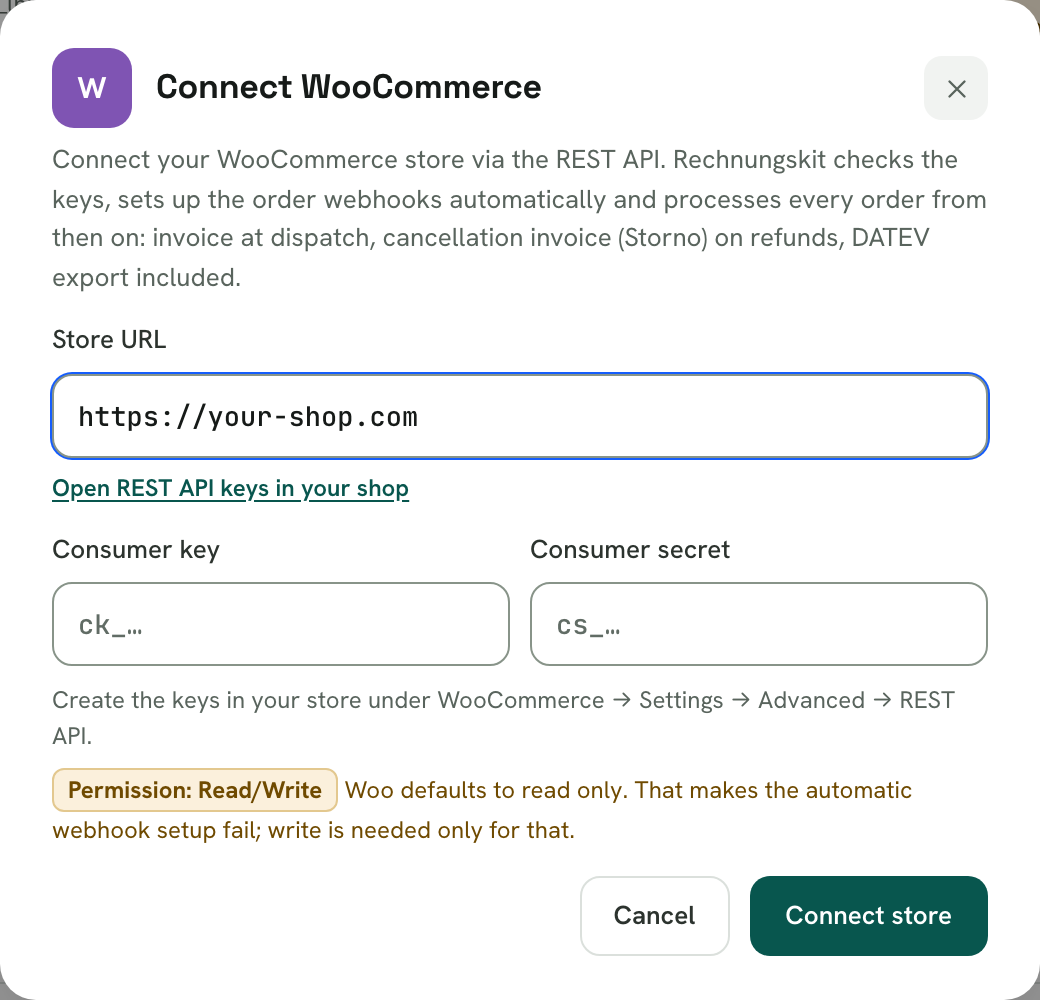
Rechnungskit checks the credentials, creates the webhooks automatically and signs them. You don't need to configure anything else in WooCommerce.
What happens automatically
- New and changed orders arrive by signed webhook; refunds and the shipping status (order "Completed") ride on the same events.
- A 4-hourly sync catches anything a webhook may have missed: all orders changed in the last 24 hours, fetched completely page by page, even with hundreds of orders a day.
- On the Orders page, "Sync now" also starts a sync of the last 7 days in the background, for example after an outage or right after setup.
- If the webhook goes quiet, Rechnungskit helps itself: the sync reactivates paused or disabled Rechnungskit webhooks in the shop through the REST API (and recreates missing ones), fetches orders every 15 minutes instead of every 4 hours in the meantime, and loads an order individually right away as soon as a payment refers to it but the order is still missing. The task "Webhook-Verbindung still" (webhook connection silent) only stays open if none of this works; then check WooCommerce under Status → Logs (source "webhooks-delivery") or reconnect.
- Products are taken over from the order lines and maintained under Products → All products.
- Refunds create the cancellation invoice (Storno) automatically. For a partial refund it lists exactly the refunded items WooCommerce reports, even when the money went back through PayPal, Stripe or Mollie. If the item details are missing, your document rule decides: proportional, as a single line, or allocated manually (see belege-archiv).
- Existing documents from an old PDF plugin stay untouched, and your number range continues without a break (set the starting number at go-live).
Prepayment with WooCommerce
Prepayment works fully: the order waits ("On hold"), you mark it as paid in the shop once the money arrives ("Processing"), and only then is the invoice created, for goods once the order is "Completed". Your shop remains the source of truth for incoming payments; Rechnungskit does not reconcile a bank account. The payment method is mapped by the exact gateway name from the shop (see zahlarten-rechnungskauf-vorkasse).
Post-purchase upsells (FunnelKit, CartFlows)
If an upsell plugin adds items to the existing order after checkout and collects a second payment for them, Rechnungskit automatically creates a supplementary invoice (Nachtragsrechnung) for exactly the new items. The first invoice stays archived unchanged (see upsell-nachtragsrechnung).
Vouchers (Germanized)
If a customer redeems a multi-purpose voucher from Germanized (created in Germanized as a Mehrzweckgutschein), Rechnungskit recognizes this on the order. A voucher is a payment, not a discount: the invoice shows the VAT on the full amount and names both parts, for example "Credit card (€54.18) and voucher (€25.00)". In the voucher register under Vouchers, the liability goes down by the redeemed amount. If a customer pays entirely with a voucher, Rechnungskit issues the invoice without an incoming payment. Regular discount coupons (percentage or fixed amount) remain discounts and reduce the invoice amount.
Rechnungskit does not recognize other voucher or store credit plugins yet. If you use such a plugin, write to us at support@rechnungskit.de before you rely on it.
Limits
- The API key needs Read/Write. With a read-only key the connection deliberately fails when creating the webhooks, instead of running silently without webhooks.
- WooCommerce has no product webhooks. The catalog is imported when you connect, then updated once a day automatically and at any time through "Sync products" on the Products page. You maintain names and categories in Rechnungskit.
- If a product was sold before it reached the catalog (source "Shop" without an item ID), the next product sync links it to the WooCommerce product by its SKU. Your category and names are kept.
- WooCommerce Subscriptions is supported; each recurring payment creates its own invoice with the correct service period.
Shipping tax
Rechnungskit applies the tax rate of the goods to shipping, even if the shop reports a flat 19 %. For mixed carts, shipping is split by the gross value of the goods; the guide Shipping costs and VAT explains the background with examples. You find the setting per shop connection under Connections → Document rules, card "Shipping tax".
Where to find it in the app
Rechnungskit is not a tax advisory or law firm. This article explains general principles and does not replace advice from a tax advisor (Steuerberater, § 5 StBerG) or a lawyer (§ 3 RDG). Rechnungskit is built for businesses based in Germany and prepares documents, tax rates and bookings automatically. How your specific case is treated remains your decision, ideally together with your tax advisor or a lawyer.