 Mollie + Rechnungskit
Mollie e‑invoicing: automatically from every payment
Mollie is popular with European online shops because it brings credit card, PayPal, Klarna, iDEAL and SEPA direct debit under one roof. What Mollie does not do is create compliant invoices for your customers, archive them in line with GoBD and hand finished bookings to your tax advisor. That is where Rechnungskit comes in.
Mollie takes the payment. The invoice is your job.
What Mollie does not do: create compliant invoices for your customers, archive them in line with GoBD and hand finished bookings to your tax advisor. That is where Rechnungskit comes in.
- Mollie processes the payment
- PDF receipt without a structured e-invoice format
- No German VAT logic per country
- No GoBD archive, no DATEV export
- Compliant e-invoice under EN 16931 (ZUGFeRD)
- Payments matched to orders automatically
- GoBD-compliant, tamper-evident archive with checksum
- DATEV export in one click
Four steps from payment to booking.
- 01ConnectConnect your Mollie account in a few minutes. No code needed.
- 02ImportRechnungskit imports every Mollie payment and matches it.
- 03ErzeugenEvery payment becomes a validated e-invoice under EN 16931.
- 04ArchiveThe invoice is archived to GoBD standards and is ready for the DATEV export.
Every format Mollie doesn't deliver.
How the Mollie integration works
Rechnungskit reads every Mollie payment directly through the API, including fees, refunds and payouts. The payment is linked automatically to the matching order from your shop (for example Shopify or WooCommerce). The result is a validated e-invoice in ZUGFeRD format: a PDF for your customer and machine-readable XML for their accounting. Customers with a Leitweg-ID (the routing ID German public bodies use), such as authorities or universities, get the same invoice as XRechnung 3.0.
Before sending, Rechnungskit checks all mandatory details under § 14 Abs. 4 UStG, the correct tax rate per country and formal validity under EN 16931. Errors land with you, not with the tax office.
Mollie payout reconciliation
Mollie pays out in batches: one payout contains many individual payments, minus fees, sometimes including refunds from earlier orders. Rechnungskit automatically breaks every payout into its parts and matches them to your invoices. Anything that cannot be matched unambiguously shows up right away in the review list, and you resolve it with one click.
The result: DATEV-ready bookings with revenue, Mollie fees and payouts kept apart and assigned for your tax advisor, as an EXTF export in SKR03 or SKR04.
Why this matters for Mollie merchants
Mollie payments come from many sources at once: credit card, Klarna, iDEAL, SEPA. Each payment method has its own fee logic and its own payout cycle. Working out by hand which payout contains which orders costs hours every month. Rechnungskit turns it into an automatic process with a complete audit trail.
Guide: connecting Mollie to Rechnungskit
Rechnungskit needs two sets of credentials from your Mollie dashboard. You create both under Developers → API access tokens → Create access token (in the German dashboard: Entwickler → API-Zugriffstokens → Zugriffstoken erstellen). Both only grant read or payment access: Rechnungskit cannot trigger payouts with them or change anything in your Mollie account.
Step 1: standard API key (for the payments)
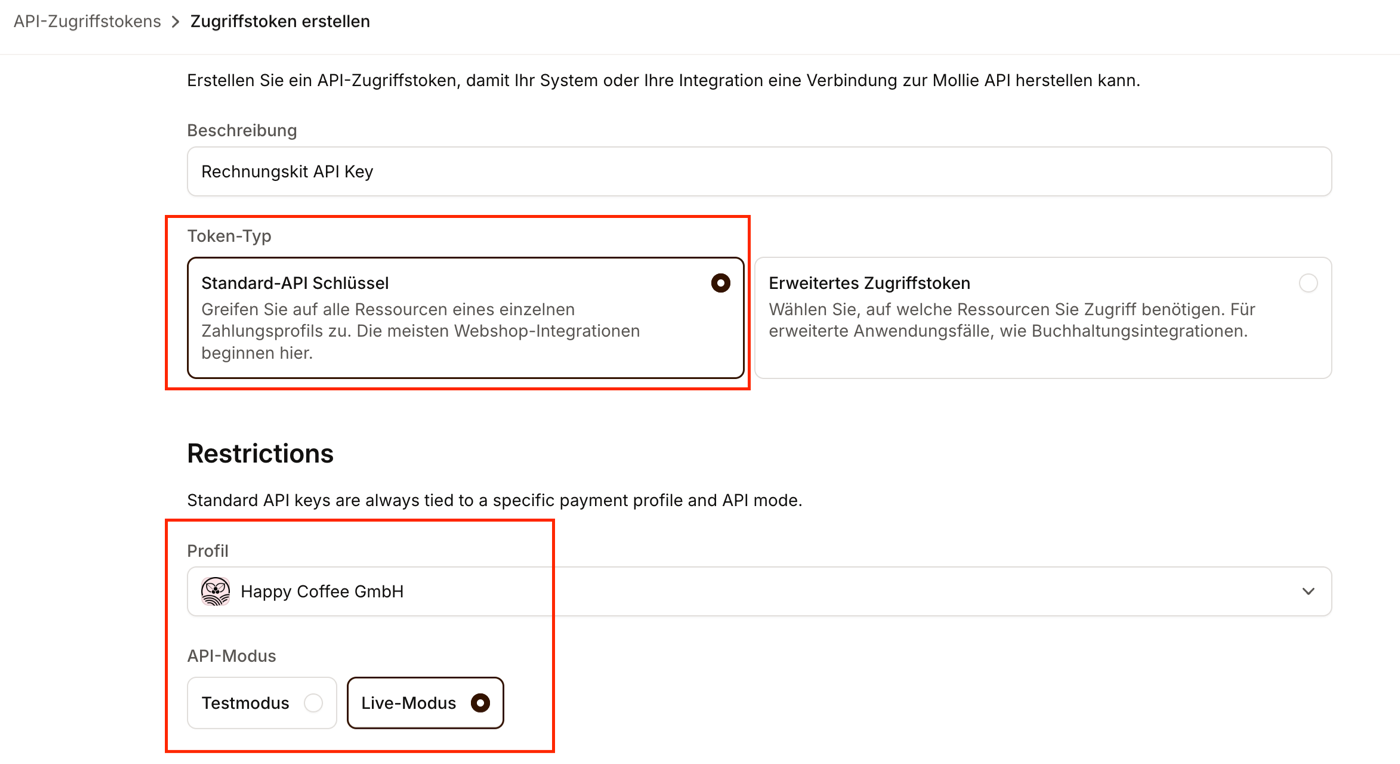
The standard API key reads your payments, refunds and chargebacks. As the token type, choose Standard API key (Standard-API Schlüssel), then your payment profile and Live mode:
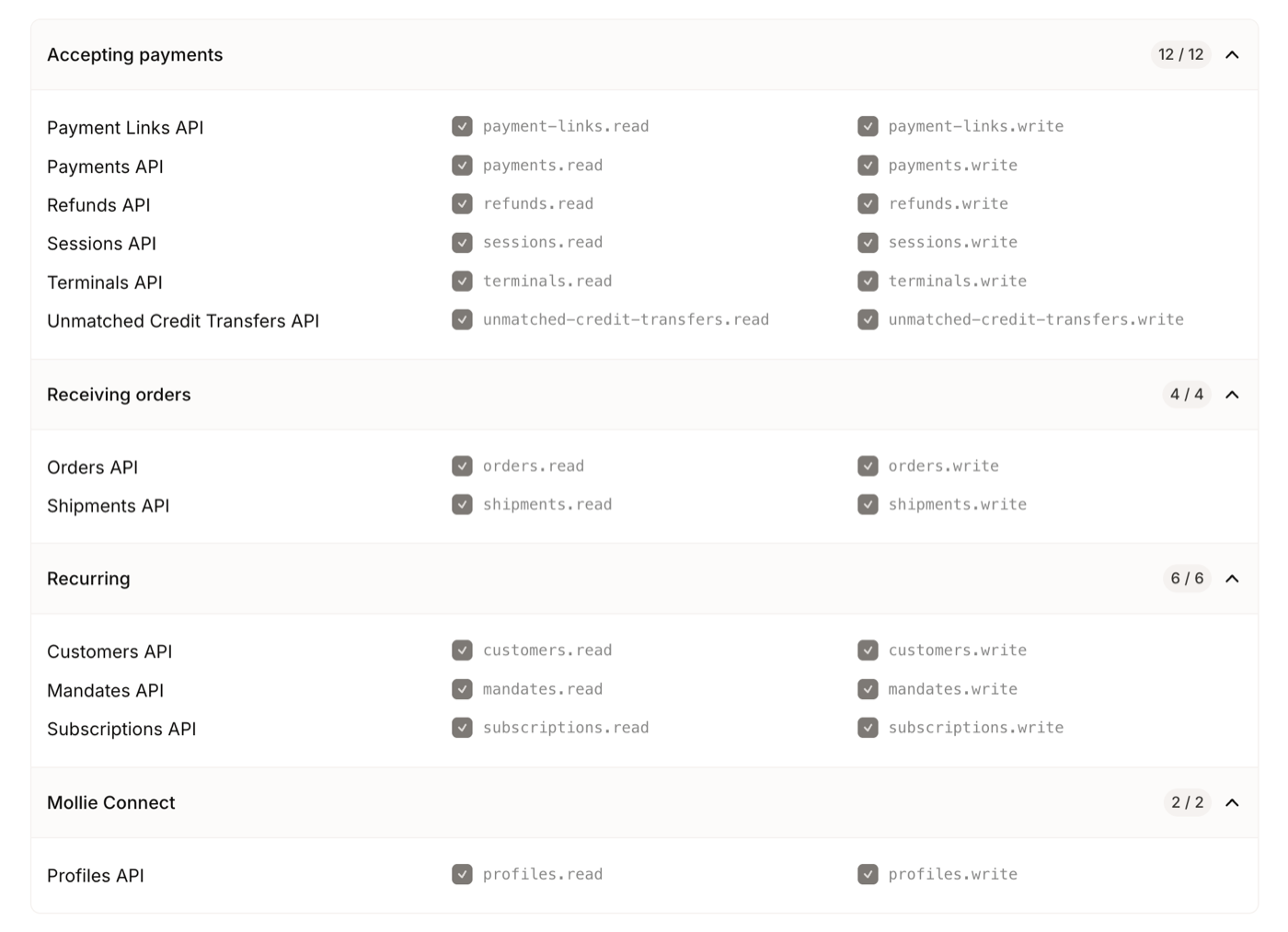
The permissions of the standard key are fixed, so you do not need to tick anything:
Copy the key (it starts with live_) and paste it into Rechnungskit under Settings → Connections → Mollie.
Step 2: organization access token (for fees and payouts)
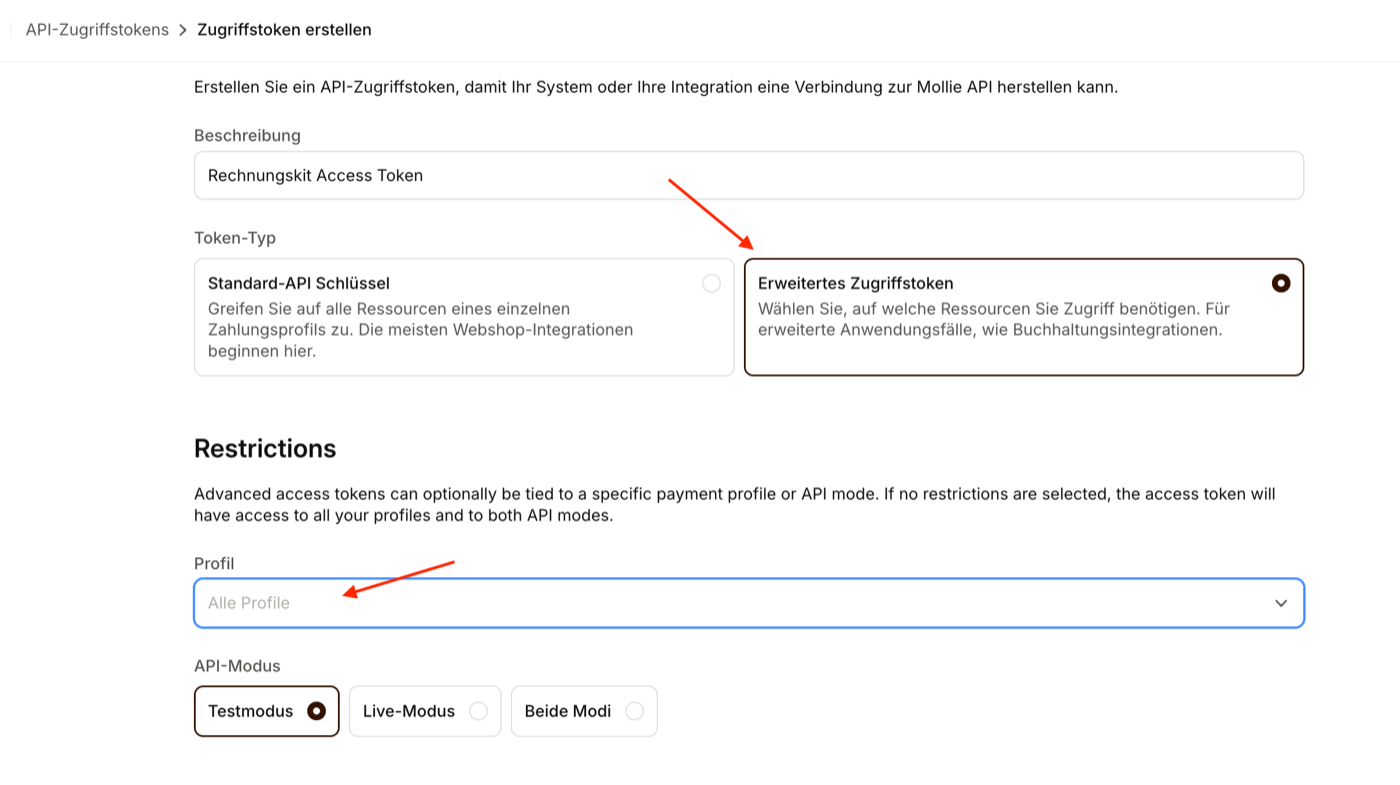
Mollie only provides payouts and the fees per payment through a second token. As the token type, choose Organization access token (Erweitertes Zugriffstoken), for profile All profiles and as API mode Live mode:
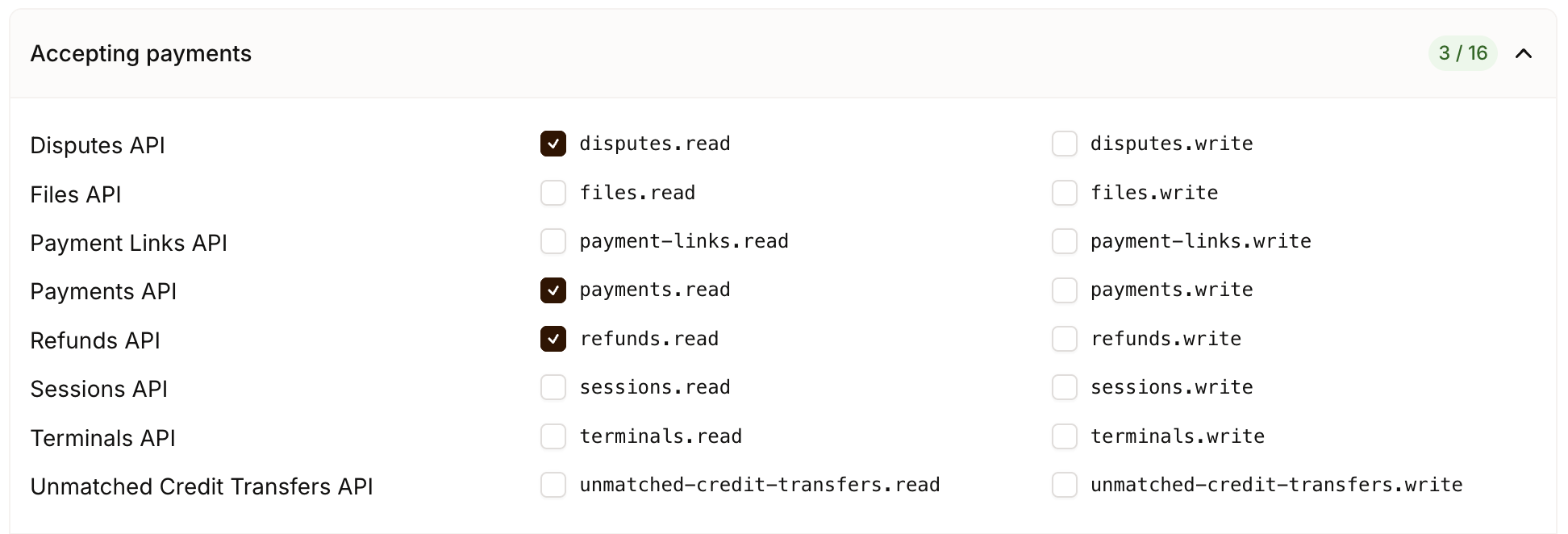
Tick exactly five permissions. Under Accepting payments, tick payments.read, refunds.read and disputes.read. Mollie handles chargebacks through the Disputes API, which is why this permission is needed:
Under Business operations, tick balances.read and settlements.read:
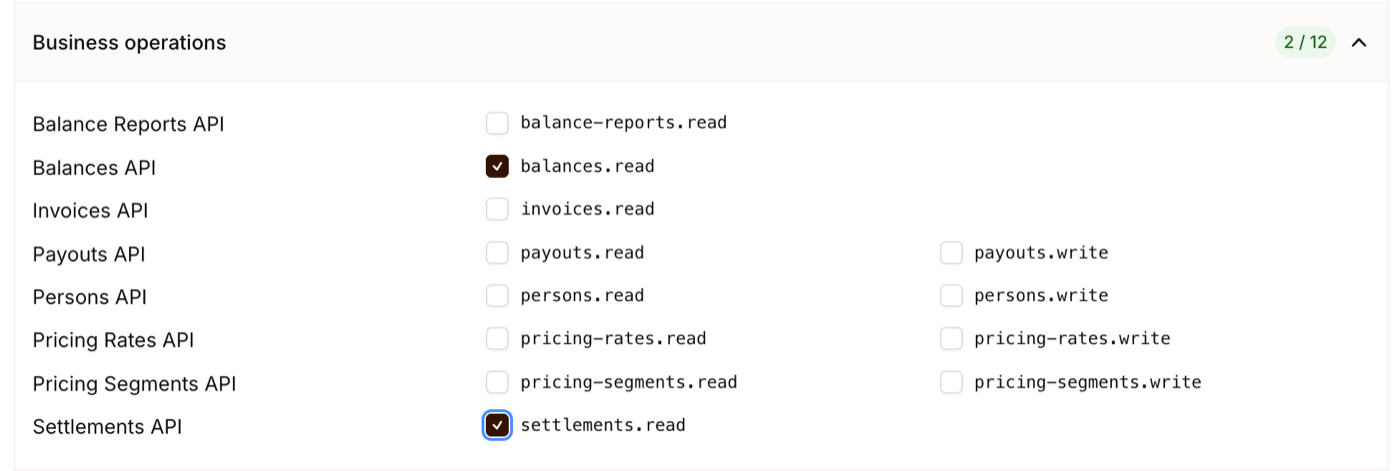
Copy the token (it starts with access_) and paste it into the payout reconciliation field of the same Mollie form in Rechnungskit. From the following night on, Rechnungskit reconciles your payouts automatically and adds the Mollie fees to every payment.
Important: Mollie shows each token only once. If you did not copy it, delete it and create a new one. Rechnungskit does not need more than the five permissions listed, and we recommend not granting any others.
Mollie and e-invoicing: FAQ
Rechnungskit is not a tax advisory or law firm. This article explains general principles and does not replace advice from a tax advisor (Steuerberater, § 5 StBerG) or a lawyer (§ 3 RDG). Rechnungskit is built for businesses based in Germany and prepares documents, tax rates and bookings automatically. How your specific case is treated remains your decision, ideally together with your tax advisor or a lawyer.
Connect Mollie, e-invoicing done.
Create an account, connect your payment provider, check everything in free test mode. Billing starts when you go live.
Try it now