Shopify invoices as e‑invoices, with DATEV export
Shopify sends order confirmations, but no invoices that meet German law. Rechnungskit automatically turns every order into an e-invoice, which becomes mandatory step by step from 2027 for business customers in Germany.
- Every order becomes an e-invoice (ZUGFeRD), with the shipping date as the date of supply (Leistungsdatum)
- Shopify Payments payouts split into sales, fees and refunds
- GoBD archive and DATEV export for your tax advisor, every month
Set up in a few minutes, nothing changes in your theme or checkout. Just looking? See the live demo
- Start Shopify
- Payment matched
- E-invoice
- GoBD archive
- Destination DATEV
Shopify sells. The invoice is your job.
Shopify gives you orders, but no German bookkeeping. Invoicing under § 14 UStG (the German VAT Act), GoBD archiving, DATEV export and the OSS return stay your job.
Shopify alone
- Order confirmation instead of an invoice under § 14 UStG
- Invoice apps usually deliver just a PDF, not an e-invoice
- Shopify Payments pays out as a lump sum
- No GoBD archive, no DATEV export
With Rechnungskit
- E-invoice under EN 16931 (ZUGFeRD) from every order
- Discounts, shipping costs and gift cards line by line
- Every payout broken down to the individual fee
- GoBD archive with checksum, DATEV export at the push of a button
Four steps from payment to booking.
Test mode first: your real data, but test invoices. They cost nothing and never reach a real DATEV export. Billing starts when you go live.
- 01
Connect
Connect your Shopify store in a few minutes. No code needed. - 02
Import
Rechnungskit imports every Shopify order and matches its payment. - 03
Generate
Every order becomes a validated e-invoice under EN 16931. - 04
Archive
The invoice is archived to GoBD standards and is ready for the DATEV export.
Step-by-step guide Connect Shopify
Every format Shopify doesn't deliver.
- ZUGFeRD 2.5
- Germany Live
- XRechnung 3.0
- Germany (public sector clients) Live
- EN 16931 XML
- EU (OSS) Live
Create Shopify e-invoices automatically
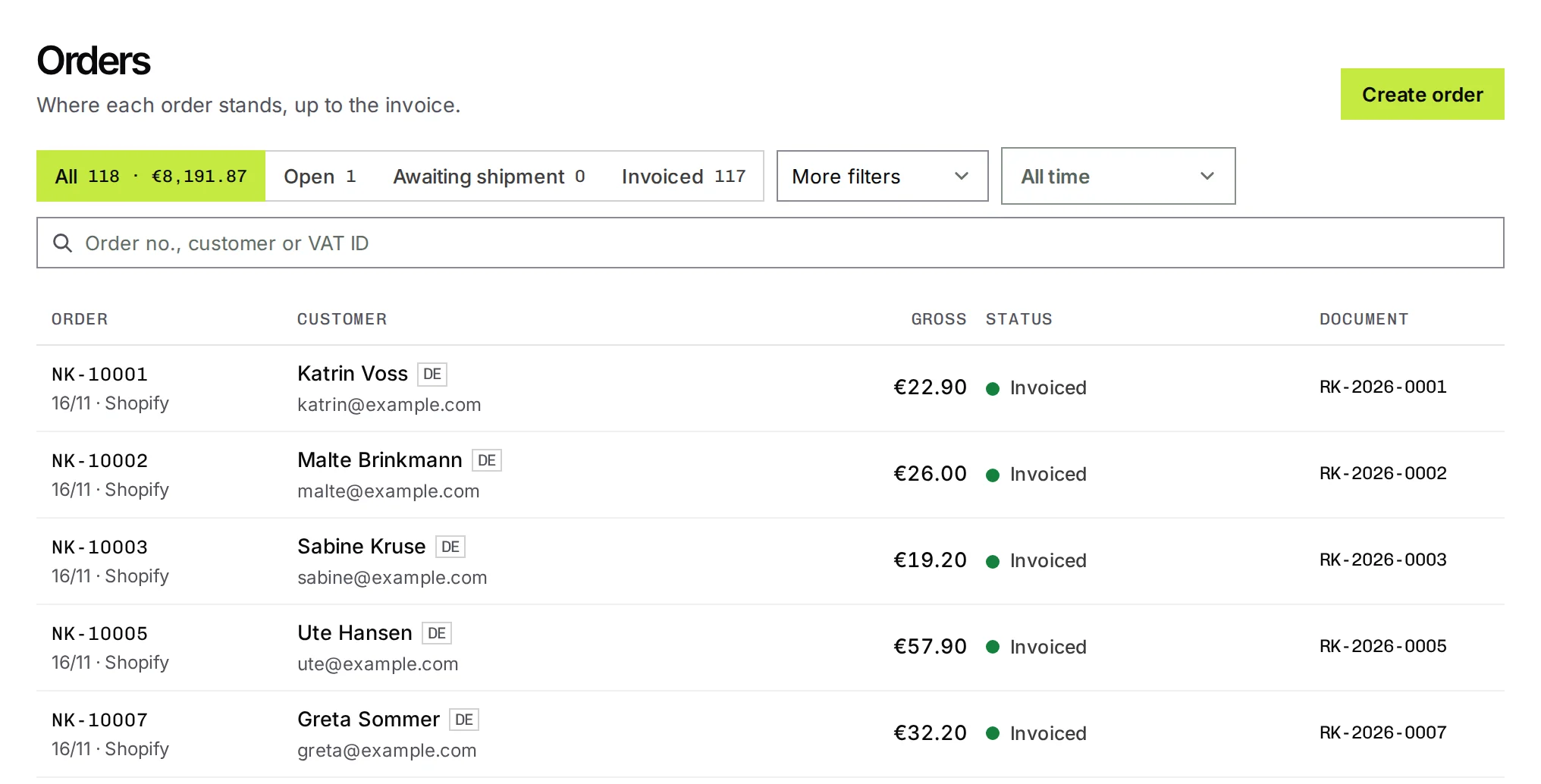
After a purchase, Shopify sends an order confirmation. That is not an invoice under § 14 UStG (the German VAT Act). So merchants who want to create invoices in Shopify usually install a template app and send a PDF. Rechnungskit removes that step: as soon as you ship, the invoice is created as a ZUGFeRD e-invoice with a sequential number, archived and included in the DATEV export. Under Orders you see every Shopify order with its status and a link to its invoice. What Shopify can do without an extra app is covered in the guide Shopify invoices.
How the Shopify integration works
Rechnungskit connects two data sources: the payment from your payment provider (Shopify Payments, Stripe, Mollie, PayPal or Unzer) and the order from Shopify. One setting matters for automatic matching: in Rechnungskit you choose Shopify as the provider's matching source, so the payment looks for its order in the right place. If your payment app also passes the Shopify order number (for PayPal as invoice_id, for Unzer as the order ID), matching runs on that. For PayPal, Rechnungskit also manages without this field (see below). Rechnungskit shows right on the connection whether the latest payments match with these settings. The order supplies what the payment alone does not know: line items, VAT rates per item, discounts, shipping costs and the shipping date.
Together, they produce a validated e-invoice in ZUGFeRD format with the correct date of supply (Leistungsdatum): shipped goods are invoiced on the shipping date, not the payment date. That sounds like a detail, but it decides whether you have a formally correct invoice or a document your tax advisor (Steuerberater) has to explain at the next tax audit. Customers with a Leitweg-ID, such as public authorities or universities, receive the same invoice as XRechnung 3.0.
- OrderCustomer buys and pays in the storeRechnungskit reads the order and payment through the Shopify API
- ShippingE-invoice in ZUGFeRD formatLine items, VAT rates, discounts and shipping costs from the orderDate of supply = shipping date
- PayoutLump sum broken downSales, fees and refunds matched individually, ready for the DATEV export
How to connect your store
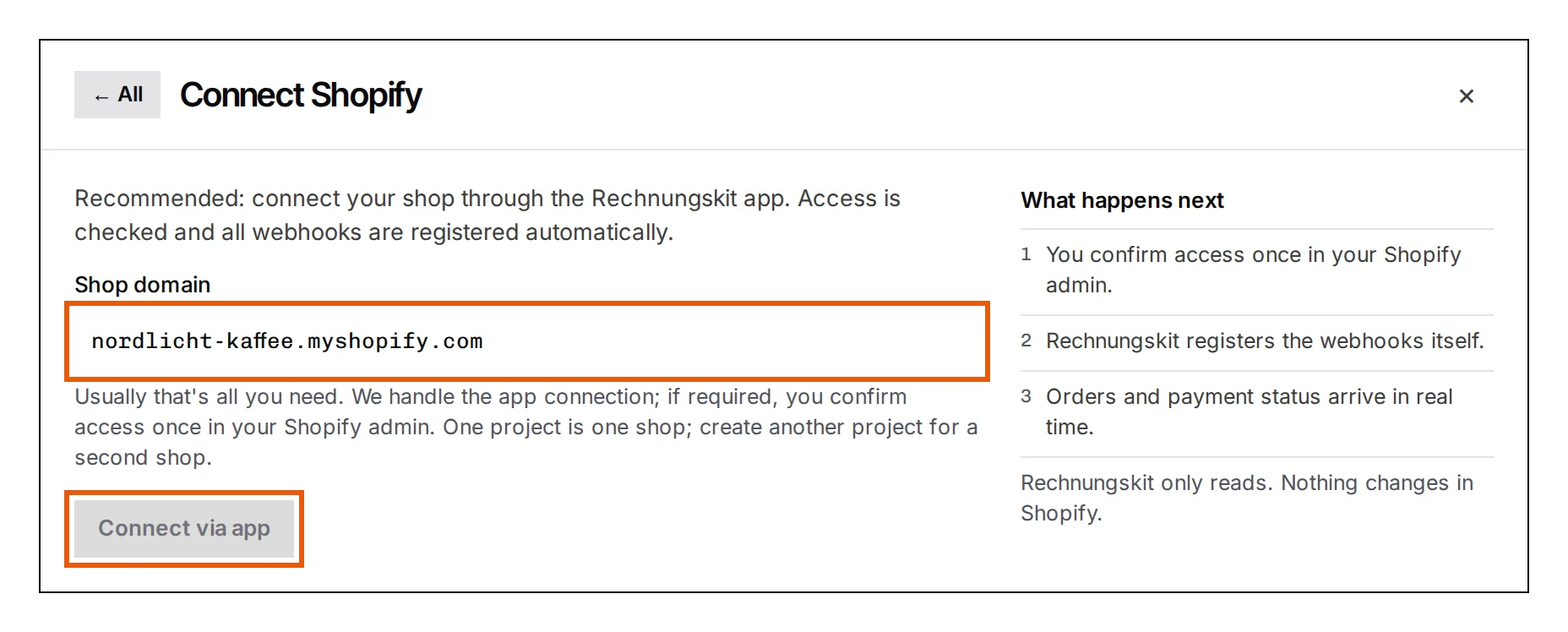
The most direct way to start is in Rechnungskit: create an account, enter your store domain under Connections, Connect and confirm the access in Shopify. Alternatively, install the app from the Shopify App Store and link it to your Rechnungskit account there. Both ways deliver the same data. The app installs nothing in your theme or checkout; it reads order, payment and product data through the Shopify API. Step-by-step setup instructions are in the Shopify help.
Every payment method, a matching route
How the invoice is created depends on how your customer pays. Rechnungskit matches online payments through Shopify Payments, PayPal or Klarna automatically. With prepayment by bank transfer (Vorkasse) there is no payment provider, so the order status in Shopify serves as the payment signal. For new connections, Rechnungskit does not invoice point-of-sale sales through Shopify POS by default, because your POS app with TSE is responsible for those.
Refunds, returns and store credit
If you refund individual items in Shopify, Rechnungskit carries exactly those line items into the cancellation invoice. The original invoice stays unchanged, as § 146 (4) AO and the GoBD require. Which correction route fits which case is explained in the article on invoice correction. If you give store credit instead of money, Rechnungskit distinguishes between a return and a goodwill gesture; details are on the page about Shopify Store Credit.
Already using an invoice app?
Shopify's own Order Printer app designs printable PDF documents. It does not deliver an e-invoice under EN 16931, a GoBD archive or a DATEV export. If a second invoice app is running alongside Rechnungskit, it is best to deactivate it so no conflicting documents are created. What Shopify can do itself and what will be missing from 2027 is in the guide Creating Shopify invoices. Direct comparisons with popular Shopify apps are at Rechnungskit or Order Printer Pro, Rechnungskit or Sufio and Rechnungskit or Pathway Solutions. When you have to send e-invoices is explained in the article on the e-invoicing mandate; the legal basis is § 14 (2) sentence 2 no. 1 UStG with the transition periods in § 27 (38) UStG.
Discounts, shipping costs and gift cards, correctly assigned
Shopify orders often include discount codes, tiered shipping costs and redeemed gift cards. Rechnungskit takes over this data line by line: discounts reduce the right line item, shipping costs are charged at the right VAT rate, including in a mixed cart, and vouchers are treated correctly for VAT. Rechnungskit treats a sold Shopify gift card as a multi-purpose voucher: it gets a purchase receipt without VAT, because for this type of voucher VAT only arises with the actual supply (§ 3 (15) UStG). When it is redeemed, it appears on the invoice as a payment.
Matching direct PayPal payments
If you use PayPal directly alongside Shopify Payments, a lot depends on a single field. For some payments, the PayPal field invoice_id contains the order number, and Rechnungskit reads the match straight from it. For the rest, it contains an internal checkout session key with no order number behind it. If you only evaluate PayPal's payment data, you find nothing for these payments.
So Rechnungskit asks the other side: the Shopify order. The PayPal transaction ID is stored there, and it connects order and payment unambiguously, even though PayPal does not know the order number. Matching runs on the transaction ID instead of an estimate from amount and time, which can easily produce an invoice for the wrong order. There is nothing to set up. The existing Shopify connection is enough. Fees and refunds keep running through the PayPal integration.
This also works retroactively: payments that were left unmatched so far are picked up the same way.
Payouts that add up
Shopify Payments pays out in bundles. Your bank statement shows one total, and behind it are dozens of sales, fees and refunds. Rechnungskit splits every payout back into its components and matches them to the individual payments, so your books add up.
Rechnungskit checks every line item, not only the final total. If something does not fit, you see a task to resolve instead of a silent rounding, because a difference usually means a transaction is missing, recorded twice or valued incorrectly. Refunds are tricky because Shopify books them under a separate transaction ID that does not match the original payment. They are therefore resolved through the order that Shopify supplies with them. If the order dates from before your Belegstart (the date Rechnungskit takes over invoicing), the line item stays quiet: the transaction belongs in your previous system and there is nothing to resolve.
 Shopify Payments€1,162.47
 PayPal€395.79
 Klarna€280.07Shopify Payments12 ordersPayPal5 ordersKlarna3 orders
The same principle applies to PayPal and Klarna. Neither pays out through Shopify Payments; both pay out from their own account. Rechnungskit fetches payments, fees and payouts directly from there as soon as you also connect PayPal and Klarna, and keeps each provider on its own transit account.
Shopify and DATEV: the monthly export for your tax advisor
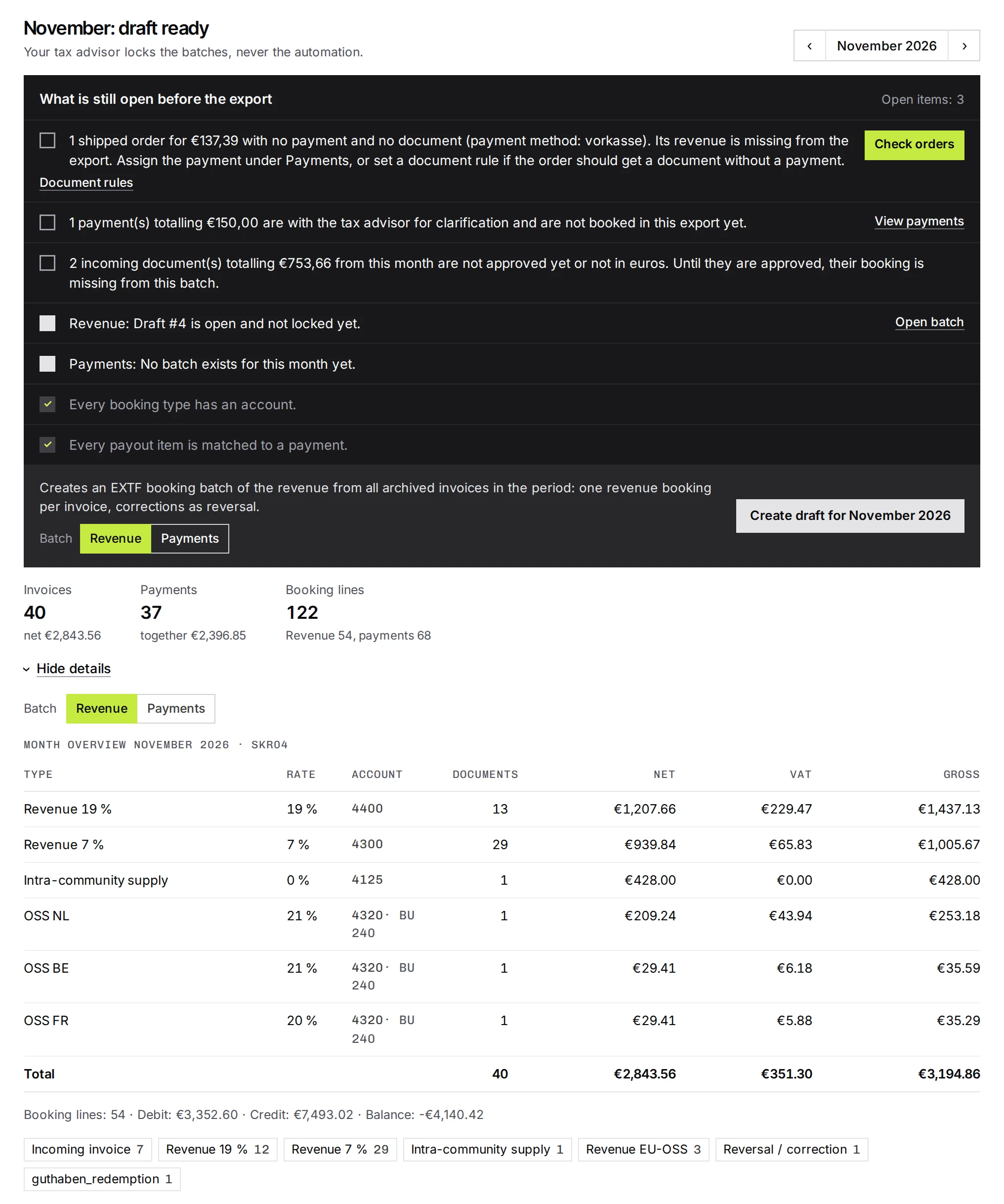
You do not need a separate Shopify DATEV connector. Every month, Rechnungskit writes invoices, credit notes, payments, fees and payouts into a DATEV export in SKR03 or SKR04, with revenue and payments in separate booking batches. If you want, the invoices go into the same package as documents, and each booking then links to its document. Before exporting, you see the monthly overview with revenue per VAT rate and account. Your tax advisor picks up the export through their own access, or you download it yourself. More on the DATEV integration page and in the help article DATEV export and your tax advisor. How Shopify Payments, Klarna, PayPal and in-store sales end up in the books is explained in the guide Shopify and DATEV.
EU sales automatically in the OSS return
If you sell through Shopify to other EU countries, Rechnungskit monitors the 10,000-euro threshold for distance sales (§ 3c (4) UStG) and groups your EU sales by country in the quarterly OSS return, with the applicable VAT rate per product category and destination country.
- OrderA private customer in Vienna buys a coffee grinderYour EU sales to private customers are already above 10,000 euros this year
- Invoice20% Austrian VATThe rate comes from the VAT matrix for Austria and the product categoryDestination country rate
- Quarter endOSS returnSales per country and VAT rate, ready to file with the BZSt
Several markets and legal entities, invoiced separately
If you use Shopify Markets (Shopify Plus) and bill different markets through different legal entities, for example the EU through your German GmbH and Switzerland through a separate Swiss company, you can control the connection per market. When you connect, Rechnungskit detects that your store has several markets and offers a market filter.
This lets you limit a connection to the markets that belong to this legal entity. Either you choose "All except these", for example to ignore the Swiss market here because another system invoices it, or "Only these" for a specific selection. Orders from excluded markets are not invoiced by this connection.
Rechnungskit works out an order's market from the delivery country, or from the billing country if there is no delivery address. That doesn't always give a clear answer: the country may not be in any active market, or several markets that your filter treats differently could apply. In that case the mode you chose decides, and you get a task with the order number to check.
If you want to bill a second market separately in Rechnungskit, connect the same store from a second account or project and filter the other way round there. Each legal entity then gets its own number range and its own documents, all with a single Shopify app.
What a Shopify store pays per month
One invoice per order; a cancellation invoice for a refund does not count. Through the Shopify App Store the prices are the same, billed on your Shopify invoice.
- 100 invoices €44.00 per month · €29.00 base fee + €15.00 usage
- 300 invoices €66.00 per month · €29.00 base fee + €37.00 usage
- 1,000 invoices €125.50 per month · €29.00 base fee + €96.50 usage
Every feature and integration included, one bank account too, cancel monthly. Free to test until you go live. An offer for businesses, all prices plus statutory VAT.
See full pricingShopify and e-invoicing: FAQ
Does Rechnungskit replace a Shopify invoice app?
Yes, and it does more: invoice apps usually only create a PDF. Rechnungskit creates a real e-invoice under EN 16931, archives it in line with GoBD and delivers the DATEV export as well.
Does my tax advisor have to get involved?
No. You can download the DATEV export yourself every month and pass it on. The tax advisor access is more convenient: you invite your tax advisor by email under Settings → Accounting → Access, and signing up is free for them. After that they pick up the booking batches and documents themselves. You can revoke the access at any time with one click.
What happens to my existing invoices?
They stay in your previous system; Rechnungskit does not import invoices issued elsewhere. When you go live, you set your document start date (Belegstart). Orders placed before it were invoiced by your old system. They never get a document in Rechnungskit and are only loaded so the payouts add up. You also choose the number range and starting number when you go live, so your numbering continues where the old one stopped.
Am I required to issue e-invoices?
Not for consumers, where a PDF is still allowed. For business customers in Germany, the e-invoice is the rule (§ 14(2) UStG). You have had to be able to receive them since 2025. For issuing them, transition periods run until the end of 2026, or until the end of 2027 if your prior-year turnover was no more than 800,000 euros (§ 27(38) UStG). Rechnungskit creates every invoice in ZUGFeRD format, which covers both cases.
How long does setup take?
To connect, you only need your store domain ending in .myshopify.com and one click to approve access in Shopify. Rechnungskit registers the webhooks itself. Then you check the imported products and their VAT category and map payment methods such as prepayment. The individual steps are in the Shopify help.
Can I test it first?
Yes. In test mode you connect your real store and Rechnungskit creates test documents from it. They never cost anything and never end up in a real DATEV export, and emails to your customers stay blocked. Billing starts with the first real document after you go live; prices are on the pricing page.
Does this work with Shopify Payments?
Yes, natively: Rechnungskit reads Shopify Payments transactions automatically, including refunds and fees, and matches them to the order. You do not need a separate payment provider for this.
Does Rechnungskit support Shopify POS?
Rechnungskit recognizes point-of-sale sales through Shopify POS and, if you want, does not invoice them, so the revenue does not show up twice in your books. Rechnungskit does not replace the till itself: the TSE (the certified security module German tills need), receipt, end-of-day closing and cash book are handled by a POS app such as OpenFiskal. Under Connections, Document rules, you set per Shopify connection whether your POS app books the till sales or Rechnungskit invoices them like online orders.
Rechnungskit is not a tax advisory or law firm. This article explains general principles and does not replace advice from a tax advisor (Steuerberater, § 5 StBerG) or a lawyer (§ 3 RDG). Rechnungskit is built for businesses based in Germany and prepares documents, tax rates and bookings automatically. How your specific case is treated remains your decision, ideally together with your tax advisor or a lawyer.
Connect your Shopify store. Rechnungskit does the rest.
Try it free Install from the Shopify App StoreSet up for free, no credit card. You only pay once real invoices go out.