Taking over from Stripe Billing: invoices first, subscriptions at the end of the period
Updated
Taking over from Stripe Billing happens in two stages. First, Rechnungskit takes over only the invoicing: Stripe Billing keeps collecting, and every billing run produces an e-invoice with your own number range, GoBD archive and DATEV export. Then the running subscriptions move to Rechnungskit through the guided takeover, each at the end of its period, with the existing payment mandate, without a gap and without any customer having to do anything. Stripe remains the payment provider; Stripe Billing is no longer needed.
 Stripe Billing
 Rechnungskit
- Load subscriptionschecks for each one whether it can move
- Map pricesnew subscription product or existing plan
- Start takeoverStripe subscription ends at period end
Rechnungskit subscriptionsWhat you gain from the move
Lower fees. Stripe Billing costs 0.7% of billing volume on the pay-as-you-go plan, and no-code Stripe Tax costs 0.5% per transaction (Stripe: Billing pricing, Stripe: Tax pricing). After the move, Rechnungskit charges through plain Stripe payments and calculates VAT itself. Both fees go away for the subscriptions you moved. You keep paying Stripe the payment fees for card or SEPA as before; Rechnungskit costs €9 a month plus a price per document (pricing).
Stripe Billing with Stripe Taxbefore RechnungskitafterOne compliance layer instead of extra tools. Every charge becomes an e-invoice (ZUGFeRD, XRechnung for public bodies) with the service period, sits in the GoBD archive for eight years and goes into the DATEV export for your tax advisor. If you keep accrual-based books, Rechnungskit defers yearly and quarterly subscriptions as deferred revenue. Rechnungskit sets the VAT rate per country, including OSS and reverse charge with a verified VAT ID.
A legally sound checkout. New customers sign up through the subscription checkout: in German or English, with the right VAT rate for the buyer's country and a cancellation and withdrawal button under § 312k BGB and § 356a BGB. Several products with a cart and QR code are sold through the shop.
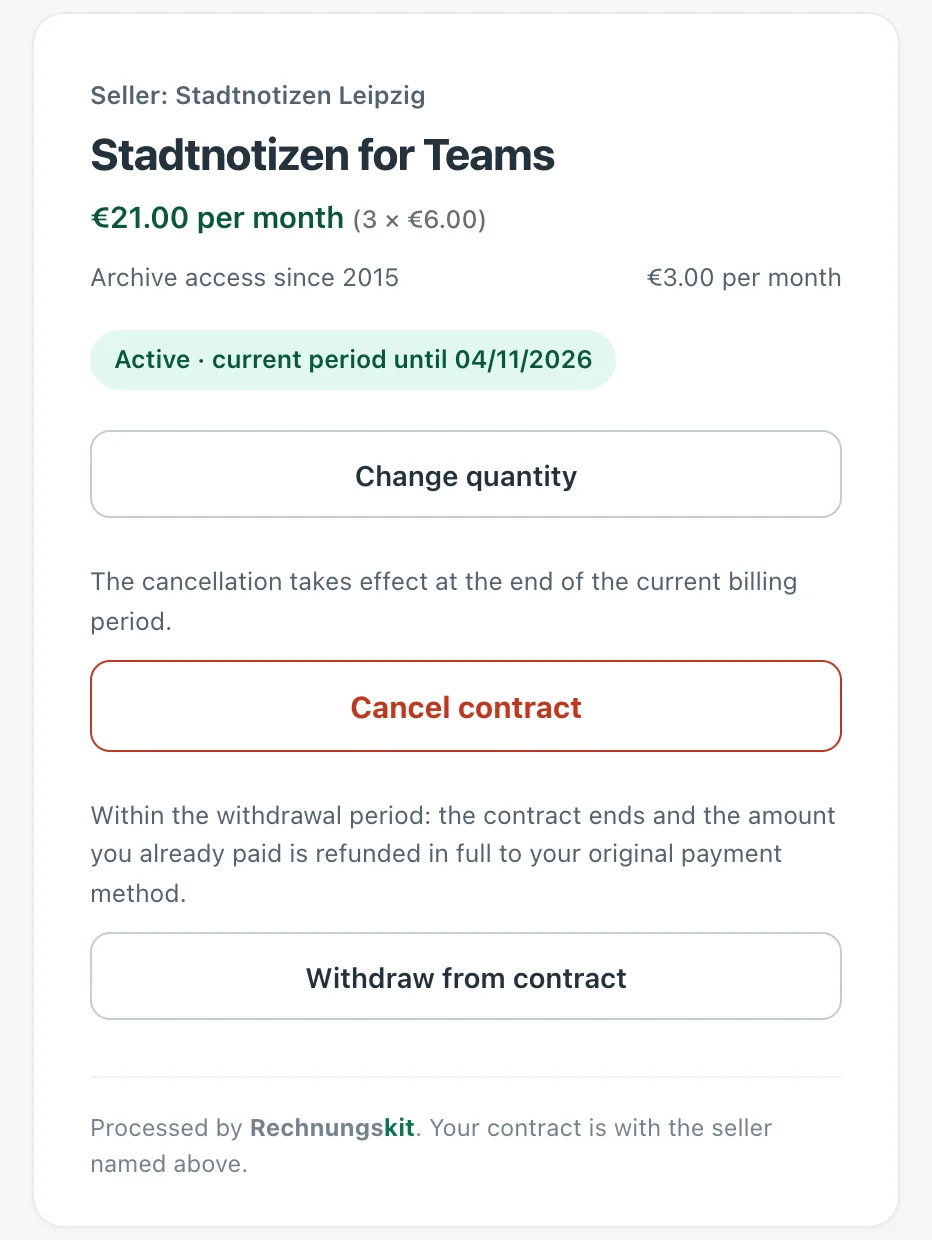
A customer account for your subscribers. Instead of the Stripe customer portal, your customers manage their subscription on konto.rechnungskit.de. They sign in with their email address and get a code; there is no password. There they see all their subscriptions, download every invoice as PDF and ZUGFeRD XML and change the quantity if the plan allows it. Cancelling and withdrawing even work without signing in, through the link in the confirmation email.
Two stages, one connection
The takeover from Stripe Billing has two stages, and each one is fully usable on its own. In the first, Rechnungskit takes over only the invoicing: Stripe Billing keeps collecting as before, and every billing run produces an e-invoice with your own number range, GoBD archive (the German rules for electronic bookkeeping) and DATEV export. In the second, the subscriptions themselves move over, each at the end of its period and with the existing payment mandate. Stripe remains the payment provider; only Stripe Billing is no longer needed afterwards.
Good to know: no customer has to sign up for their subscription again. At Stripe, the card and the SEPA Direct Debit mandate belong to the customer, not to the subscription in Stripe Billing. Rechnungskit creates the new subscription for the same Stripe customer and charges the payment method already stored there. Your customers do not re-enter a card, do not give a new mandate and do not have to confirm anything.
Both stages run through a single Stripe connection. There is nothing to export, no cut-off date on which something can break, and no customer has to sign up again. Why Stripe is not enough for German invoices is explained under Stripe invoices; this page is about the way there.
Step 1: Connect Stripe
The connection consists of a single API key:
- In the Stripe dashboard, under Developers, API keys, create a restricted key (Create restricted key). As the purpose, choose "Providing this key to a third-party application" and set the permissions: Read for Payment Intents, Charges, Payouts, Balance transactions, and Products and Prices; Write for Webhook endpoints. For Stripe subscriptions, also Read for Invoices, Customers and Tax rates. For moving the subscriptions in step 4, the key also needs Write for Subscriptions as well as for Checkout Sessions, Customers, Payment Intents and Payment Methods. The illustrated guide with the full permission table is under Connect Stripe.
- Use the live key (sk_live or rk_live), for testing too. A test key connects Stripe's empty test environment, where your real subscriptions never show up.
- Paste the key in Rechnungskit under Connections, Connect. Rechnungskit registers the webhook in your Stripe account automatically, including signature verification.
If the key lacks permissions, the connect dialog tells you which ones. The key is stored encrypted and never shown again.
Step 2: Take over invoicing
From here on, Rechnungskit creates the documents while Stripe Billing keeps running unchanged:
- Choose the sales basis. In the mapping of the Stripe connection, choose "Stripe subscriptions (Billing)" as the sales basis. For new connections without a shop this is preset. Every Stripe Billing invoice is then imported as an order with real line items, and your Stripe products land in the product catalog.
- Classify the products. Under Settings, Products, go through the synced Stripe products once: tax category and revenue recognition per product. VAT and DATEV accounts depend on them, before and after the move.
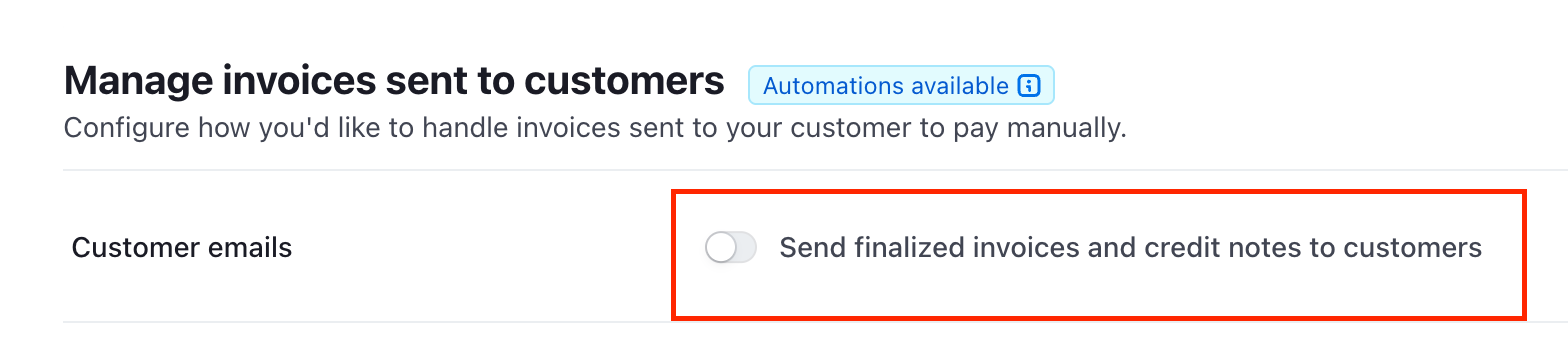
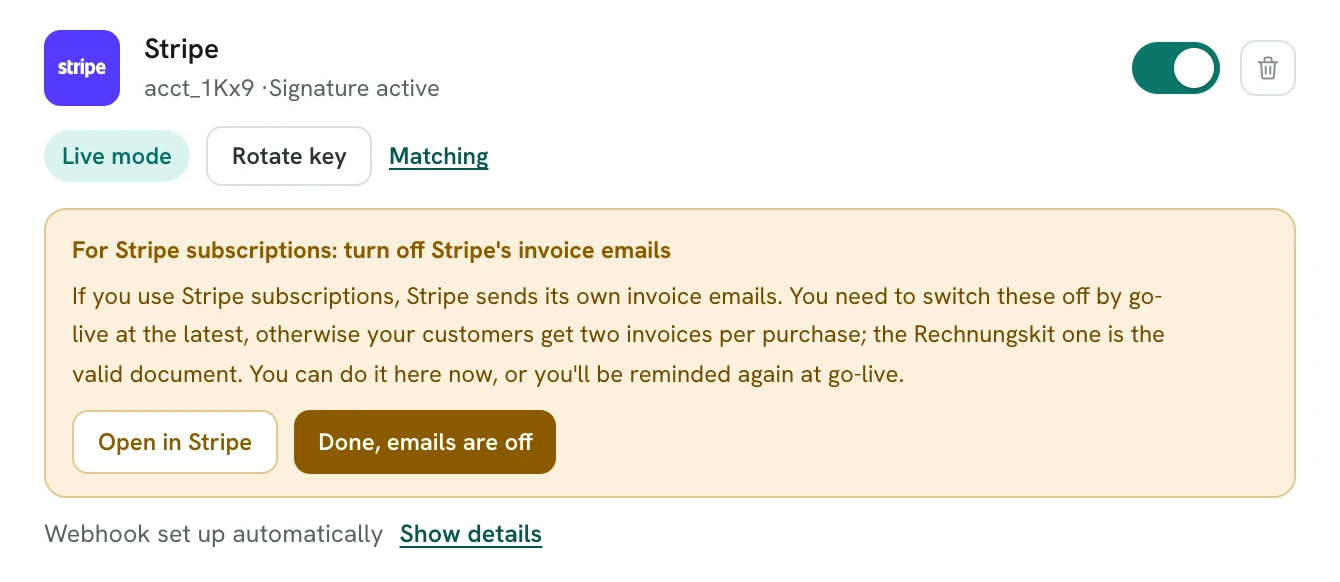
- Switch off Stripe's invoice emails. In the Stripe dashboard, under Billing, deactivate sending finalized invoices to customers. Otherwise your customers get two documents for the same purchase; the Rechnungskit invoice is the one that counts for tax purposes. Rechnungskit asks you to confirm this on the connection, and without the confirmation the subscription takeover in step 4 stays hidden.
This is how the setting looks in Stripe once sending is off:
In Rechnungskit you confirm it on the Stripe card under Connections, Connect with "Done, emails are off":
That completes the first stage. Each recurring payment becomes its own e-invoice with your number range and the service period of the billing period, refunds create the matching cancellation invoice (Storno), and payouts are split into payments, refunds and Stripe fees. If you stop here, you're fully covered; the subscriptions then stay in Stripe Billing for good.
Step 3: Choose Stripe as the subscription provider
For the move, Rechnungskit has to be able to charge through your Stripe account itself. Under Settings, Connections, choose Stripe as the provider for subscriptions. It is the same connection as in step 1; the key only needs the write permissions from the first step.
From now on you can also create new subscriptions directly in Rechnungskit, with a plan and a shareable subscription link, collected through your Stripe account by card or SEPA direct debit. You don't need this for the move, but it follows naturally: new customers no longer end up in Stripe Billing at all, and the plans created during mapping in step 4 are the same ones the subscription link uses.
Step 4: Take over running subscriptions
Under Subscriptions you find "Take over from Stripe Billing" as soon as Stripe is chosen as the subscription provider and you have confirmed that Stripe's invoice emails are off. The move has three steps:
- Load subscriptions. Rechnungskit reads all subscriptions in your Stripe account and checks for each one whether it can be taken over. Not possible: subscriptions with several line items, usage-based prices, intervals other than monthly or yearly, or no stored payment method (card and SEPA are supported). The reason is shown on the row. A quantity in the subscription (5 licenses, for example) is taken over too, and the newly created plan then gets quantity selection automatically. An active Stripe discount is not taken over; the list shows this as a warning.
- Map prices. One decision per Stripe price: create a new subscription product (prefilled with name, amount and interval from Stripe, gross or net from the tax_behavior) or choose an existing plan. You can exclude individual subscriptions from the takeover; they then keep running in Stripe Billing and stay covered through step 2.
- Start takeover. For each subscription, Rechnungskit creates the native subscription with the existing payment mandate and ends the Stripe subscription at the end of its period. Stripe still bills the current period to its end, and Rechnungskit takes over right after, without a gap and without double charges. The customer doesn't have to sign up anywhere again.
- October 14Takeover startednative subscription created, Stripe subscription ends at period end
- until October 31Stripe billsthe current period, e-invoice from stage 1
- November 1First charge by Rechnungskitwith the existing payment method
- after thatEvery periodcharge, e-invoice, archive, DATEV
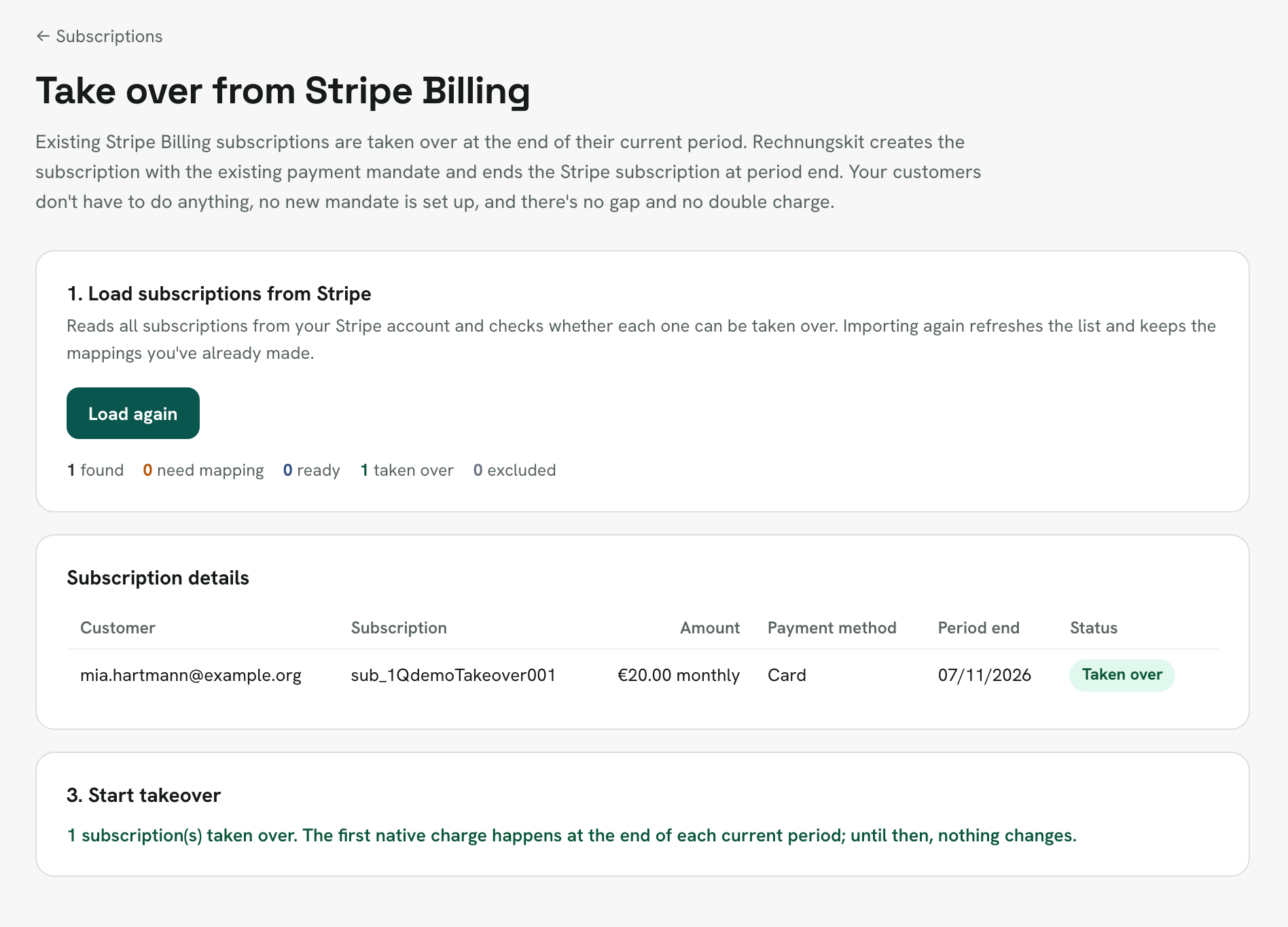
The move doesn't have to happen all at once. Mapping applies per price, you exclude individual subscriptions with one click, and the next time you load, the list shows each subscription with its state ("Taken over" or "Excluded"). So you can start with a few subscriptions, wait for the first native charge and take over the rest afterwards.
After the takeover
Two things matter afterwards. Don't reactivate a subscription you took over in Stripe, or both systems will charge. And fill in missing billing addresses: many Billing customers only have an email address stored at Stripe, but a German invoice requires the recipient's name and address.
For amounts up to €250 gross this often sorts itself out. If the buyer's country is known, Rechnungskit automatically issues a small-amount invoice under § 33 UStDV, with no address needed. Only when that is not possible does Rechnungskit hold the first billing: if the country is also missing in the Stripe customer profile (without a country, neither the tax rate nor whether a small-amount invoice is allowed can be determined), if the amount is over €250, or if the buyer is a business in another EU country (then reverse charge applies, and § 33 Satz 3 UStDV rules out the small-amount invoice, as it does for intra-Community supplies and distance sales of goods). In that case you request the address from the buyer with one click through a data request link; they add it without logging in, and the invoice is created automatically afterwards.
Everything else works like any Rechnungskit subscription: each period produces an e-invoice with a service period, archive and DATEV export, including deferred revenue if you prepare a balance sheet. Subscriptions you took over get the customer portal with the cancellation button (§ 312k BGB) and the withdrawal button (§ 356a BGB), reachable without logging in, and refunds automatically create the matching cancellation invoice.
Checklist
- Create a restricted live key in Stripe, including write permissions for Subscriptions (permission table)
- Paste the key under Connections, Connect; the webhook is registered automatically
- Check the sales basis "Stripe subscriptions (Billing)" and go through the synced products once
- Deactivate Stripe's own invoice emails in the Stripe dashboard and confirm this on the connection
- Check the first incoming Billing invoice: document, service period, VAT
- Choose Stripe as the subscription provider
- Start the takeover from Stripe Billing, with a few subscriptions first
- Check the first native charge at the end of the period, then take over the rest
- Collect missing billing addresses through a data request
FAQ
Do I have to cancel Stripe Billing before the takeover starts?
No. In the first stage everything stays at Stripe; Rechnungskit only takes over the invoicing. When the subscriptions move, Rechnungskit ends each Stripe subscription it takes over itself, at the end of the period. You don't have to cancel a Stripe Billing account; it simply isn't used anymore afterwards.
Do my customers have to do anything during the move?
No. At Stripe, cards and SEPA mandates belong to the customer account, not to the Stripe Billing product. Rechnungskit creates the new subscription with the existing mandate and charges through it from the end of the period. The customer doesn't have to sign up again or confirm anything.
When does Rechnungskit charge for the first time?
At the end of the period currently running at Stripe. Stripe still bills that period to its end, and the next charge comes from Rechnungskit. So there is neither a gap nor a double charge.
Which subscriptions can't the takeover move?
Subscriptions with several line items, with usage-based prices, with intervals other than monthly or yearly, and subscriptions without a stored card or SEPA direct debit. The list shows the reason on the row. An active Stripe discount is not taken over and appears as a warning.
Can I leave individual subscriptions in Stripe Billing?
Yes. During mapping you exclude individual subscriptions from the takeover; they keep running in Stripe Billing and get e-invoices there through stage one. Both paths run in parallel through the same connection.
Will my customers get two invoices?
Only if you leave Stripe's own invoice emails on. In the Stripe dashboard, under Billing, deactivate the option to send finalized invoices to customers. After that only the Rechnungskit invoice goes out, and that is the document that counts for tax purposes. The subscription takeover requires that you have confirmed this step.
Sources
- Stripe Docs: Billing and Invoicing
- Stripe Docs: API keys and restricted keys
- § 14 UStG (issuing invoices, e-invoicing mandate)
- § 33 UStDV (invoices for small amounts)
- § 312k BGB (cancellation button)
- § 356a BGB (withdrawal button)
This guide explains how Rechnungskit works and is not tax or legal advice. For individual cases, talk to your tax advisor.
Where to find it in the app
Recent changes
Rechnungskit is not a tax advisory or law firm. This article explains general principles and does not replace advice from a tax advisor (Steuerberater, § 5 StBerG) or a lawyer (§ 3 RDG). Rechnungskit is built for businesses based in Germany and prepares documents, tax rates and bookings automatically. How your specific case is treated remains your decision, ideally together with your tax advisor or a lawyer.