Connect Odoo Community
Updated
Odoo Community 18 or newer connects through its API, with no module in Odoo. Rechnungskit checks Odoo regularly and only reads; it writes nothing back. One rule matters: once connected, only Rechnungskit issues invoices, not Odoo. What the Odoo integration does
- CheckDid Odoo create a document itself? Then Rechnungskit holds the order
- MatchPayment to order through the Stripe reference
- InvoiceE-invoice in ZUGFeRD format, on shipment for goods
Setup
- Step 1 · OdooTurn off Automatic InvoiceWebsite → Configuration → Settings
- Step 2 · OdooCreate a user and an API keyFor this connection only
- Step 3 · RechnungskitEnter the credentialsURL, database, user, key
- Step 4 · automaticTest call, then the last 7 daysEvery 15 minutes from then on
Turn off Automatic Invoice in Odoo, under Website → Configuration → Settings. Otherwise Odoo creates an invoice itself for every online payment.
Create a dedicated user in Odoo. It needs "All Documents" in Sales and "Billing" in Accounting, because reading payments requires that right. You create the API key in the user's profile under "Account Security".
In Rechnungskit, under Connections → Connect, enter the Odoo URL, database, user and API key, and confirm that Odoo doesn't create invoices. If the user sees several companies, you then choose the one this connection should read.
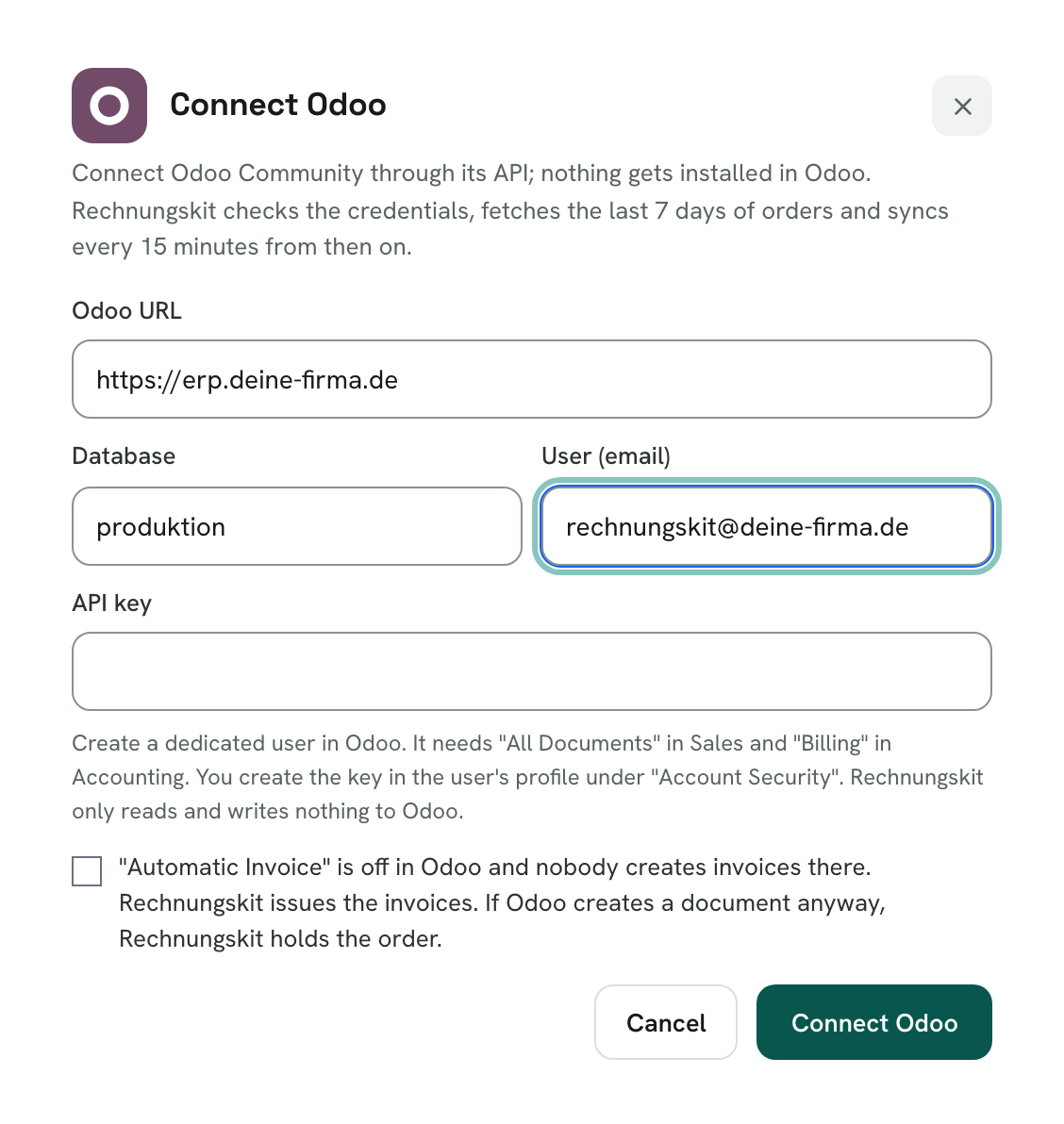
Rechnungskit checks the credentials and rights with a test call and takes over up to 50 orders from the last 7 days. It doesn't fetch older orders, and anything before your go-live date gets no document.
If you use Stripe, set the matching of your Stripe connection to Odoo. On "Stripe Billing" or "API", payments from the Odoo shop can't find their order and get no document. The connection card warns you. Rechnungskit subscriptions keep running as before.
How the data arrives
Every 15 minutes Rechnungskit asks which orders, payments, deliveries and documents have changed in Odoo. Every 4 hours a second run checks the last 24 hours. Odoo's own webhook action doesn't retry a failed delivery, so the integration doesn't rely on it.
It takes over all confirmed sales orders of the chosen company, from the web shop and the back office. Quotations and drafts stay out, and a cancelled order arrives as a cancellation.
Rechnungskit raises a task if the key is rejected or the instance can't be reached. From Odoo 18, a regular user's API key expires after 90 days at most: create a new one and connect Odoo again. Rechnungskit then catches up on missing orders from the last 24 hours by itself.
Only one place issues invoices
Two invoices for the same sale can trigger VAT twice under § 14c UStG. So Rechnungskit never takes over an invoice from Odoo and doesn't issue a second one.
Out of the box, Odoo Community can't turn off its "Create Invoice" button, so Rechnungskit can only detect such a document. If an order shows a posted document from Odoo, Rechnungskit holds it and raises a task. Check with your tax advisor what should happen to the Odoo document.
Payments and refunds
Rechnungskit finds Stripe payments through the Stripe reference that Odoo stores on the payment, whether the payment or the order arrives first. For goods, the invoice is created on shipment, which Rechnungskit reads from the delivery status of the sales stock module. Services such as licences are invoiced right away.
Refunds through Stripe come directly from Stripe and create the cancellation invoice. A credit note someone posts in Odoo never becomes a cancellation in Rechnungskit: like any other Odoo document, it shows up as a task.
Limits
- This integration is new and has so far been tested with simulated Odoo responses. The first run against a real Odoo instance is still to come, so look at your first orders in test mode before you go live.
- The integration is meant for Odoo Community. It recognises Enterprise and Odoo Online from the version string and warns you, but doesn't block. Odoo's own accounting comes with those plans, so they aren't our target.
- Odoo Community ships its own module for ZUGFeRD and XRechnung. Once connected, Rechnungskit replaces it so invoices come from one place only.
- Odoo 18 or newer is supported. Custom modules can change fields or flows, and Rechnungskit only notices when a field is missing entirely.
- The API user could write in Odoo, because reading payments requires the "Billing" accounting right. Rechnungskit only calls reading methods.
- Rechnungskit doesn't match orders paid only in Odoo, without a connected payment provider, by itself.
- Subscriptions from Odoo (through OCA modules, say) aren't intended, as they would create invoices themselves. Subscriptions run through Rechnungskit's own subscriptions.
- Rechnungskit creates products from orders. There is no separate catalogue sync with Odoo yet.
Where to find it in the app
Rechnungskit is not a tax advisory or law firm. This article explains general principles and does not replace advice from a tax advisor (Steuerberater, § 5 StBerG) or a lawyer (§ 3 RDG). Rechnungskit is built for businesses based in Germany and prepares documents, tax rates and bookings automatically. How your specific case is treated remains your decision, ideally together with your tax advisor or a lawyer.