DATEV interface: booking batches and documents, ready for your tax advisor to import
Rechnungskit creates one EXTF booking batch for revenue and one for payments each month, attaches a DATEV document link (Beleglink) to every invoice booking and adds the documents as a Belegtransfer package for DATEV Unternehmen online. Your tax advisor (Steuerberater) imports the documents first, then the batch, and has every booking with its document image.


- E-invoice archived
- Fee booked separately
- Payout reconciled

- Revenue 1200 / 4400 €119.00 Revenue 19% RE-2026-0412document
- Payments 6855 / 1460BU 506 €2.04 Stripe payout fees
- Payments 1800 / 1460 €116.96 Stripe payout
DATEV books. First the bookings have to get there.
DATEV Kanzlei-Rechnungswesen and Unternehmen online are the tools your tax advisor works with. They know nothing about your shop or about Stripe, Mollie or PayPal. Rechnungskit translates orders, payments, fees and payouts into finished DATEV bookings and delivers the documents along with them.
- DATEV knows neither your shop nor your payment provider
- Sales are typed in from payment reports
- Documents uploaded one by one and matched to bookings
- Fees and payouts split up by hand
- EXTF booking batch per month, revenue and payments separate
- Document link per invoice plus a document transfer package for Unternehmen online
- Fees, payouts and cancellations as separate bookings
- Client access: your tax advisor (Steuerberater) fetches the exports
Four steps from invoice to booking in DATEV.
- 01Set upChart of accounts SKR03 or SKR04, advisor and client number, account mappings. Your tax advisor can maintain these through their own client access.
- 02ErzeugenOne export per month, revenue and payments separate. Preview with a debit/credit check, then lock it.
- 03Hand overYour tax advisor downloads the DATEV package with booking batch, documents and README through their client access.
- 04ImportDocuments to DATEV Unternehmen online first, then the booking batch. The document images attach themselves through the document link.
What DATEV gets from Rechnungskit.
What reaches your tax advisor
Every month Rechnungskit produces two separate EXTF booking batches, in either the SKR03 or the SKR04 chart of accounts (Kontenrahmen): one for revenue, one for payments. The revenue batch comes with a Belegtransfer package that holds the invoices. This page is the technical reference. Why you want this and what it saves your tax advisor (Steuerkanzlei) is covered on DATEV export for online shops, and DATEV export with documents lists the features at a glance. The guides Stripe to DATEV and WooCommerce DATEV export explain the basics per source.
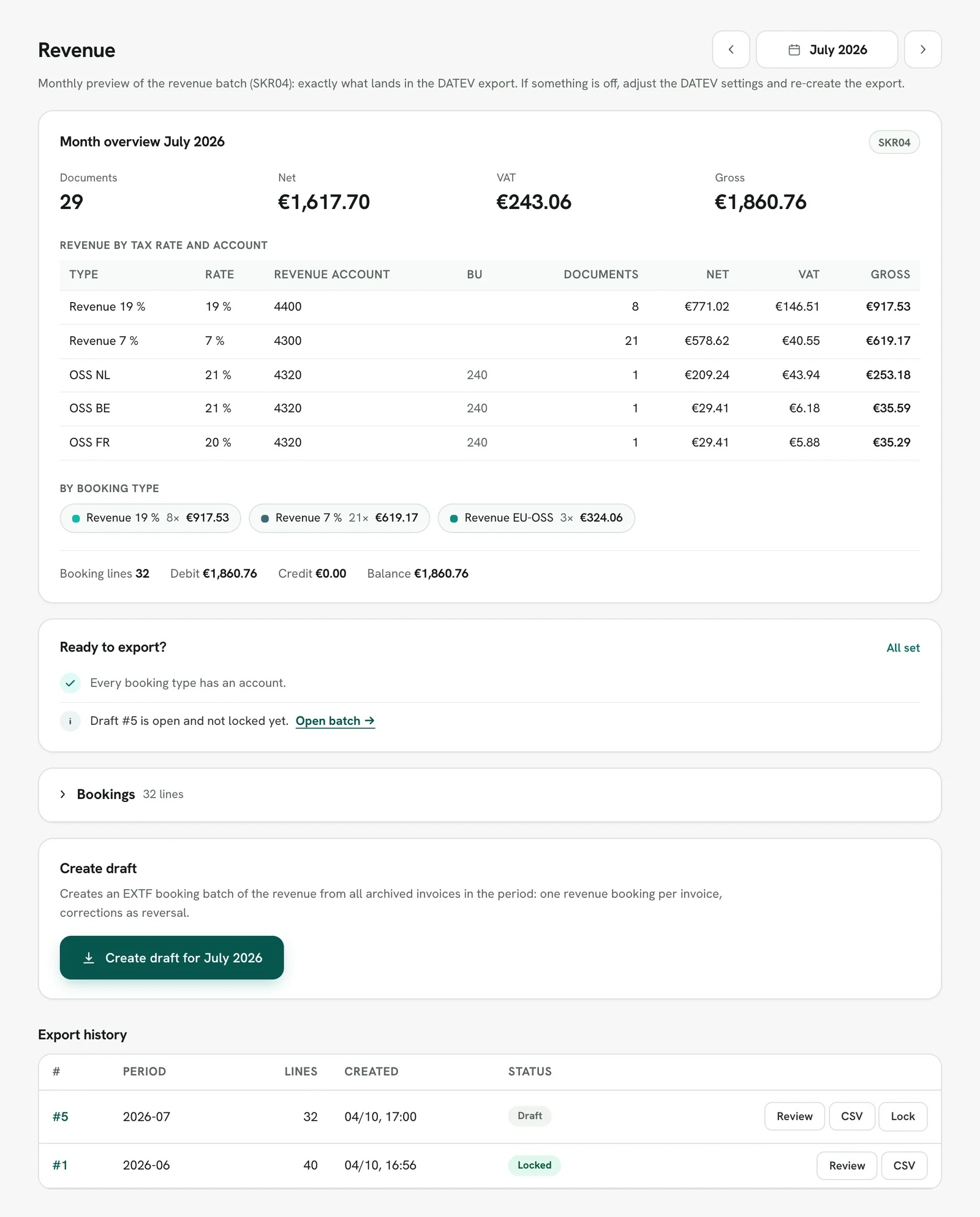
Before a batch exists, you check the month: the month overview shows what the export will contain, and "Ready to export?" lists what is still missing. Only then do you create the draft:
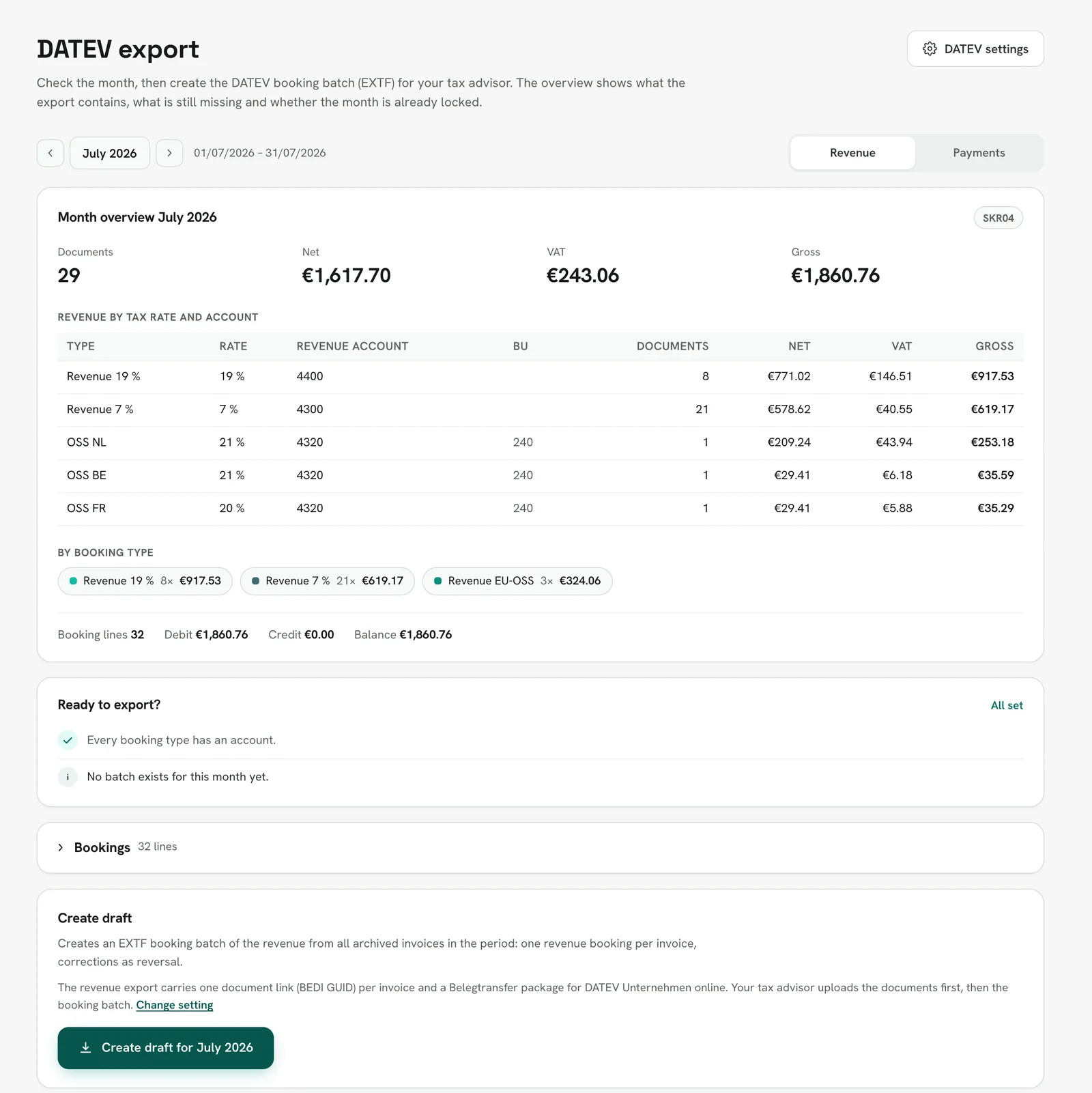
Revenue
One booking per invoice and VAT rate. The export separates domestic sales at 19% and 7%, EU sales for the OSS return, reverse charge, intra-community supplies, exports, chain transactions and small-business (Kleinunternehmer) sales. Cancellations book with a reference to the original invoice, down payments with a reclassification on the final invoice, and voucher sales go to the liability account. If you keep balance-sheet accounts, you also get deferred income (passive Rechnungsabgrenzung) for prepaid services: set up in the invoice month and released in each following month, net, monthly or by the day depending on the setting.
Payments
Incoming payments book per provider on their own clearing account (Geldtransit). Stripe, Mollie, PayPal, Unzer, GoCardless and Klarna each get one, preset to 1360 to 1365 in SKR03 and 1460 to 1465 in SKR04. Fees book per provider statement as a separate expense. For providers based elsewhere in the EU, the preset tax key is 506 for reverse charge, because you owe the VAT on their service yourself (§ 13b(1) and (5) UStG). Payouts move from the clearing account to the bank. Refunds, chargebacks and reconciliation differences have their own booking types, and nothing is netted silently.
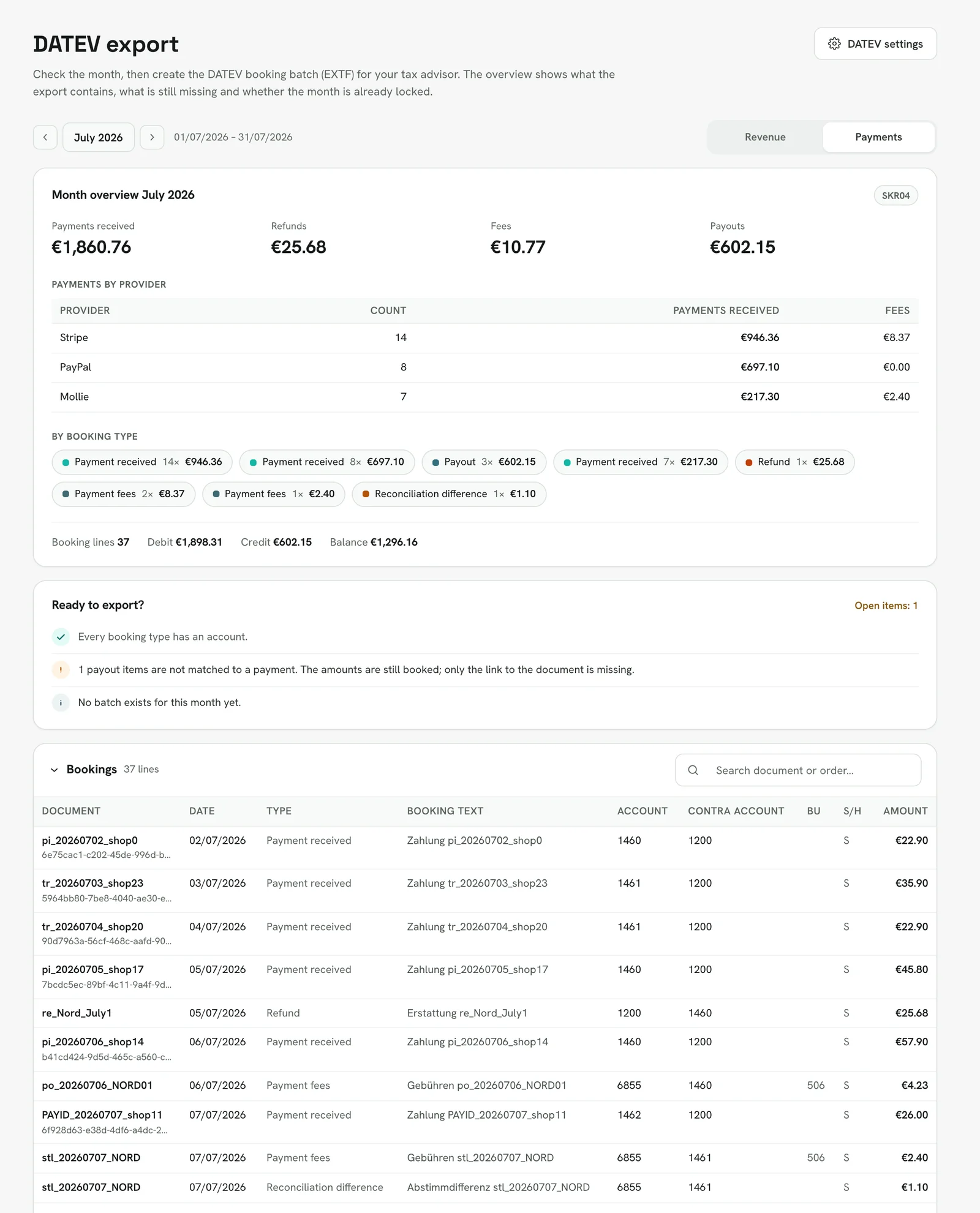
The payments month has its own overview, with payments and fees per provider. If a booking type has no account mapping, "Ready to export?" says so, and the draft can only be created once the mapping is added. Test documents from test mode never appear in an export.
An example from sale to payout
A customer buys for €119.00 and pays with Stripe. Later you refund half. This is how the bookings appear in the two batches:
For you as a merchant
You set the export up once: chart of accounts, advisor and client number (Berater- and Mandantennummer), the account mapping per booking type and, if you keep balance-sheet accounts, the account roles for revenue recognition, down payments and vouchers. All nine account roles come prefilled with the DATEV standard accounts and can be adopted in one click. After that, each month runs in four steps, separately for revenue and payments, or you leave it to your tax advisor:
- 1. Check the monthMonth overviewrevenue per tax rate and account, payments and fees per provider, debits and credits
- 2. Ready to export?Open itemsmissing accounts, unmatched payout items, the document start date and providers added during the month
- 3. Create draftEXTF batch and DATEV packagethe checks are stored with the batch; drafts can be deleted and created again
- 4. LockImmutablelock flag 1 in the file, every download checked with SHA-256
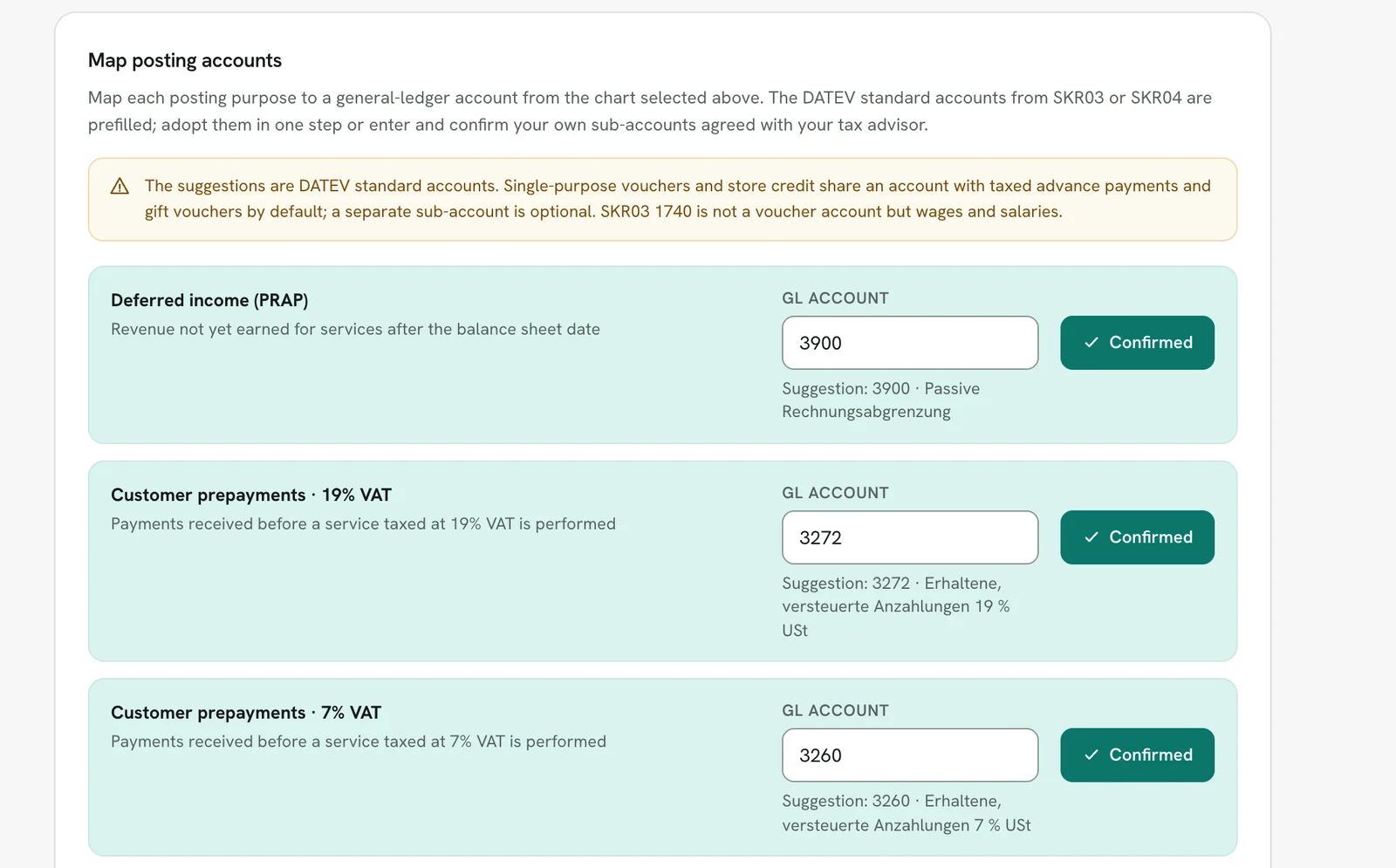
Whether the documents come along as a Belegtransfer package, whether fees and payouts are booked, and which debtor model applies, you set in the same place:
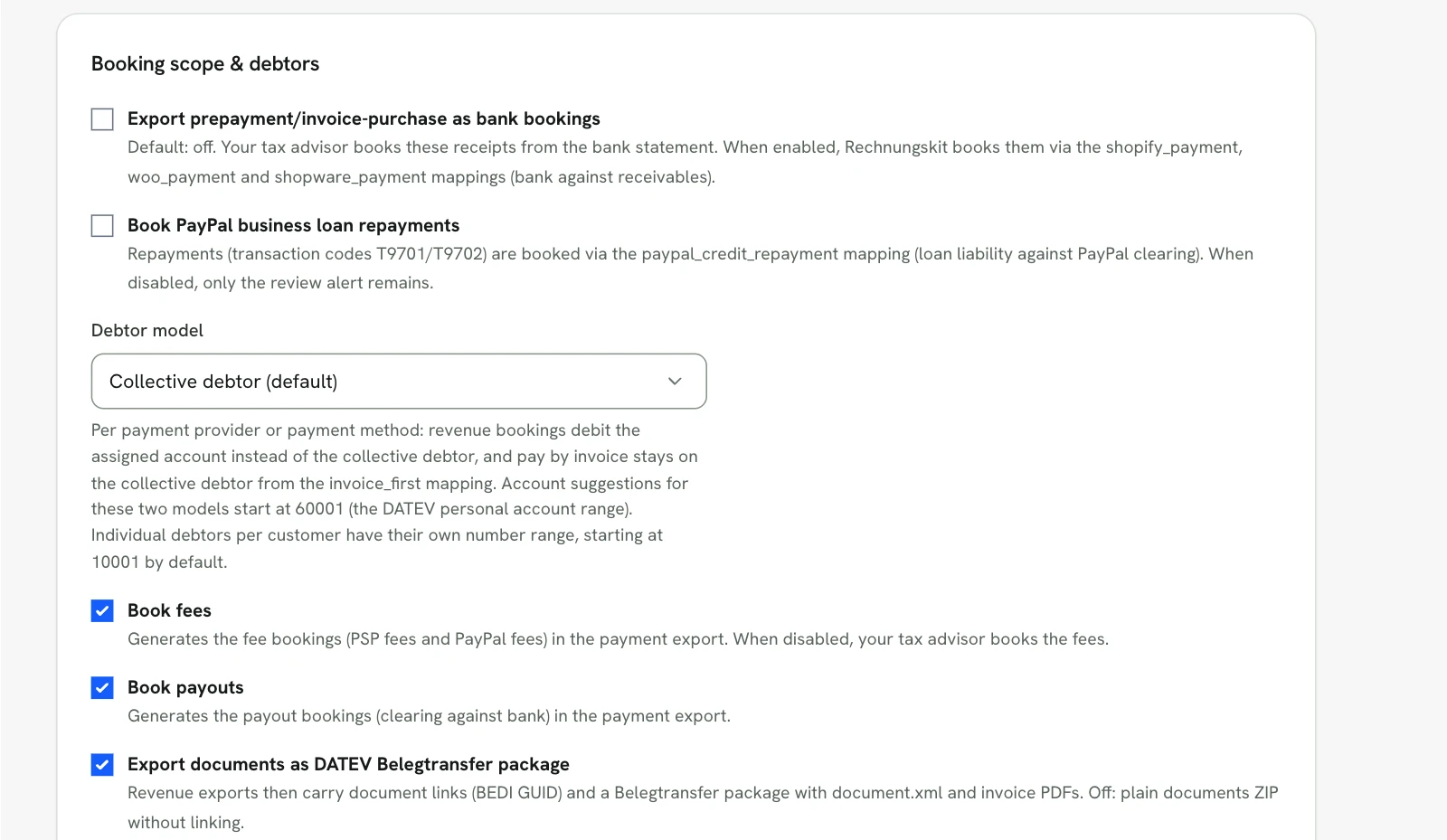
For tax advisors
Your tax advisor needs no extra software. There are two ways in, and both end with the usual import in DATEV:
In the tax firm access, the tax advisor sees every client who has granted access. A badge shows where drafts are waiting for review. If the firm wants, Rechnungskit creates the previous month's revenue and payment batches as drafts on a fixed day each month. Locking is never automatic.
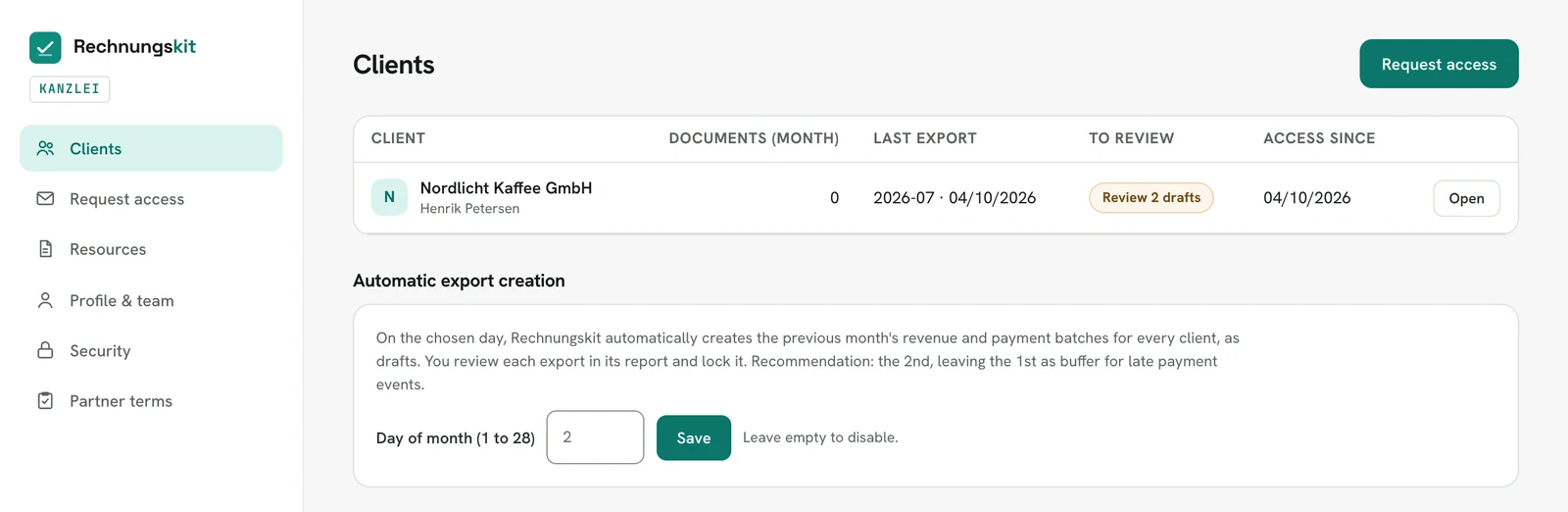
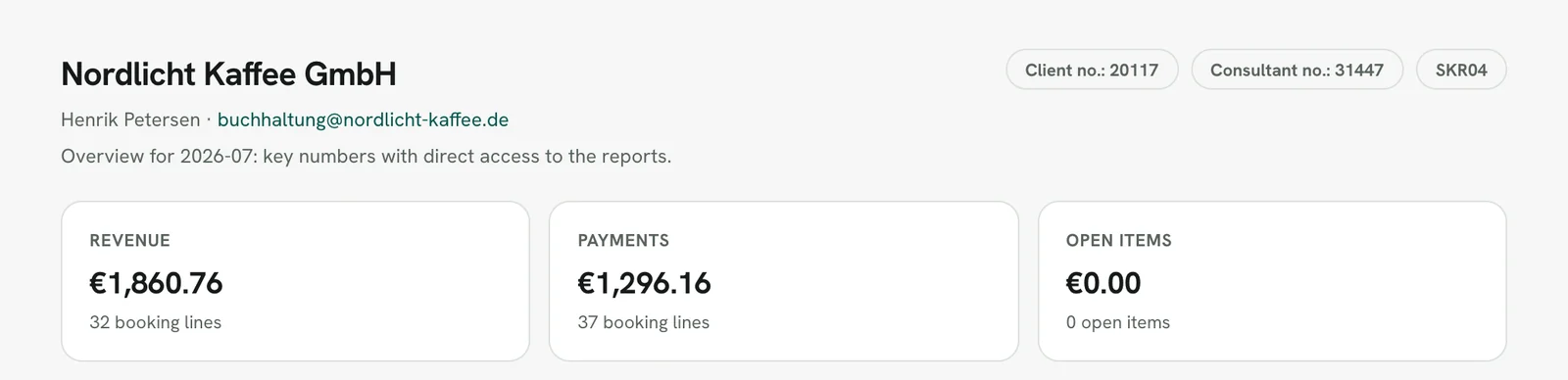
Each client has an overview with the month's key figures and the reports below it. The revenue and payments reports follow the same flow as the app: month overview, "Ready to export?", bookings, create draft, and below that the export history with Review, CSV and Lock:
How a tax firm applies for access is explained on For tax advisors.
Documents to DATEV with document link and Belegtransfer package
For every revenue export, Rechnungskit builds a DATEV package in the background. It contains:
- the EXTF booking batch (
EXTF_Buchungsstapel_<YYYY-MM>.csv), in which every invoice booking carries a document link (Beleglink) in field 20:BEDI "<GUID>". Rechnungskit assigns the GUID once per invoice and keeps it in every later export. Only archived invoices get a link; a link to a file that is not in the package is never written. - the Belegtransfer package
Belege_<client>_<YYYY-MM>.zipwith adocument.xml(DATEV format version 6.0) and one PDF per invoice. The PDF is the archived ZUGFeRD invoice, so it is the e-invoice at the same time. From 5,000 documents or 500 MB, it is split into partial packages_1.zip,_2.zip, built one after another and stored individually; an error in package 3 does not discard packages 1 and 2. The ceiling is 20,000 documents or 2 GB per export, so you split longer periods across several exports. LIESMICH_Kanzlei.txt(read-me) with the import instructions andProtokoll.txtwith the number of bookings with and without a document, the size of each partial package and a list of missing documents.
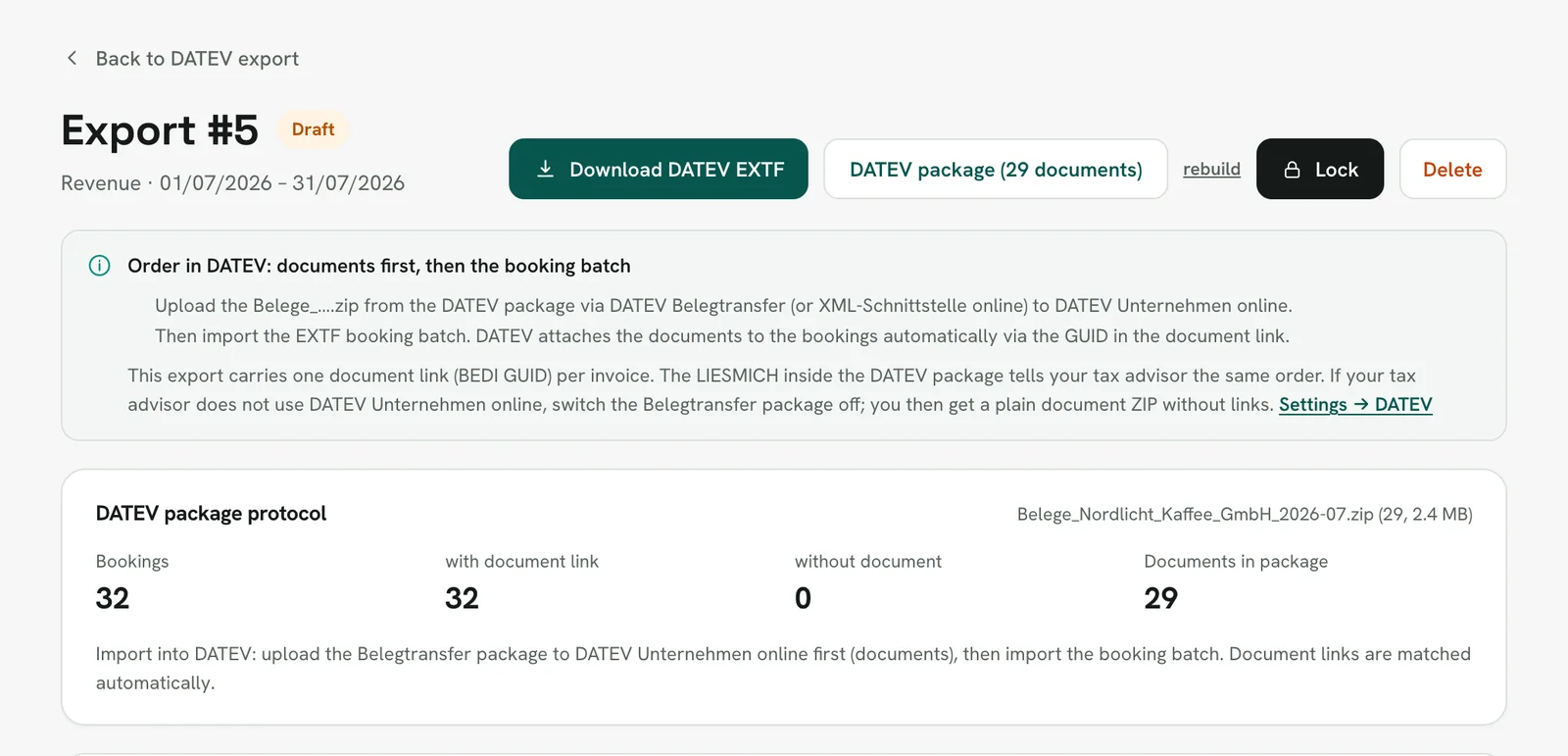
Order in DATEV: documents first, then the booking batch. The Belegtransfer package goes to Unternehmen online via DATEV Belegtransfer or the XML-Schnittstelle online. After that the tax advisor imports the batch into Kanzlei-Rechnungswesen, and DATEV attaches the document images automatically via the GUID. The other way round, the bookings stay without document images. Rechnungskit points this out on the export page, in the tax firm access and in the read-me:
Payment exports contain no document images; fee and payout bookings have no document link. If your tax advisor does not work with Unternehmen online, you turn the Belegtransfer package off in the DATEV settings and get a plain document ZIP instead, with the invoice number as file name plus index.csv, suitable for a document management system or Pennylane.
The EXTF format in detail
The file is a DATEV booking batch in EXTF format 700 (data category 21, format version 13) with the header data Kanzlei-Rechnungswesen needs for the import: advisor number, client number, start of the fiscal year, general-ledger account length (4 to 6 digits) and period. Without advisor and client number the export can still be created; it just cannot be imported directly at the tax firm.
Each booking line holds the amount, the debit/credit flag, account, contra account, tax key (BU-Schlüssel), document date, reference field 1 with the invoice number, booking text and the document link in field 20. Each account mapping can carry a cost center for the KOST1 field. Invoices in a foreign currency also carry the rate and the base amount in euros, using the same frozen rate that appears on the invoice, so DATEV and the invoice never drift apart. The bookkeeping currency is the euro.
Encoding: Windows-1252, no BOM, CRLF line endings. That is what Kanzlei-Rechnungswesen and Unternehmen online expect. The export page logs replaced characters with line and field; switching to UTF-8 is possible in the DATEV settings, for programs that cannot read Windows-1252.
Collective debtor or one number per customer
The default is the collective debtor (Sammeldebitor), one number for all customer sales. Alternatively you book per payment provider, per payment method or with an individual debtor per customer. With individual debtors, Rechnungskit assigns numbers automatically from a configurable range (preset from 10001), optionally only for business customers so the chart does not swell with many consumers. Payments then book on the same debtor as the invoice, so open items clear per customer in DATEV. Assigned numbers stay stable and can be matched to an existing DATEV setup. The matching debtor master data (name, address, VAT ID) is available as an EXTF file (data category 16) for download, in the app and in the tax firm access.
Locking and checksum
A newly created export starts as a draft with a preview and a debit/credit check. You may delete drafts and create them again. Owners, the bookkeeping role and the tax firm may lock (festschreiben) an export. After that it cannot change: the file is rewritten with lock flag 1, every download is byte-identical and checked against the stored SHA-256 checksum. Corrections are then only possible through new bookings in a later export.
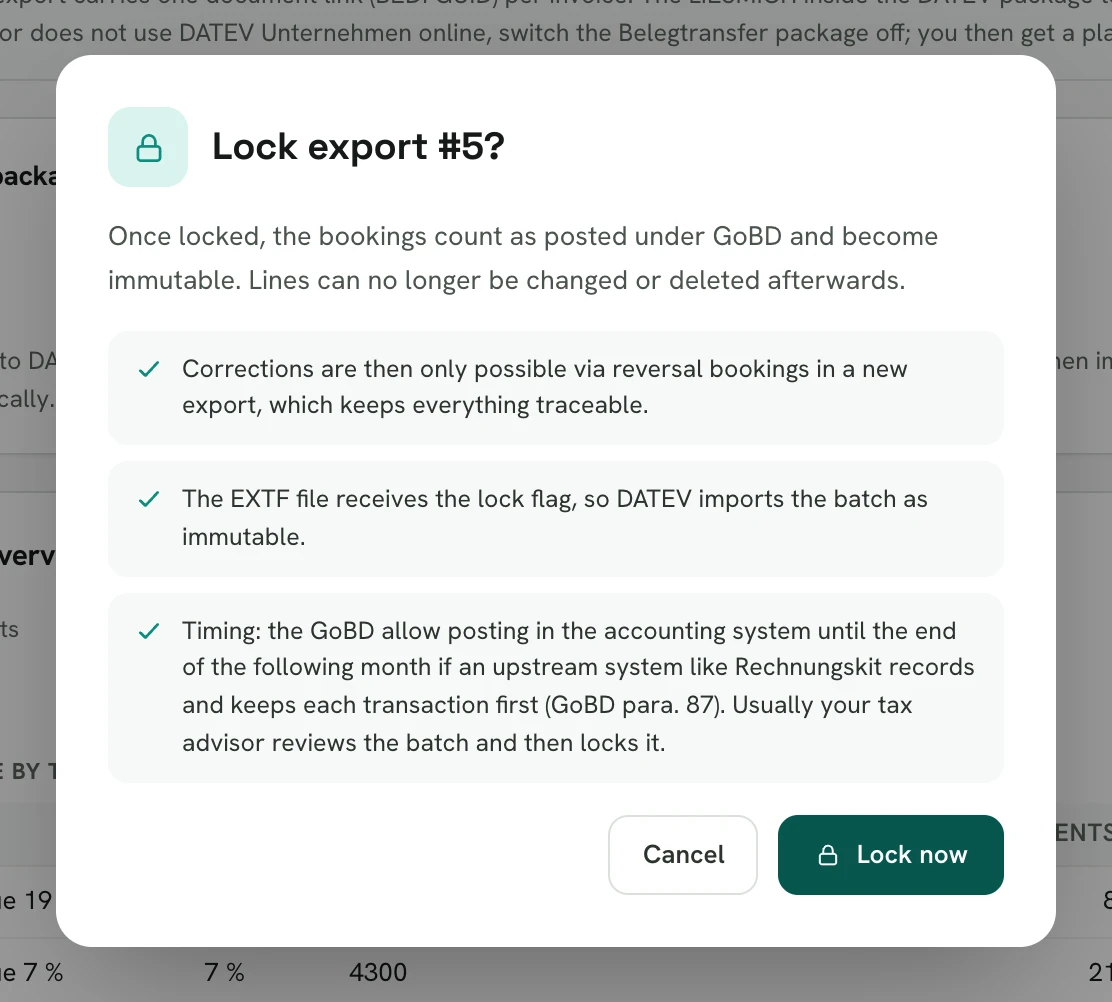
The legal basis is the ban on alterations: a booking must not be changed in a way that makes its original content impossible to determine (§ 146(4) AO, German Fiscal Code). Accounting vouchers must be retained (§ 147(1) no. 4 AO); the document link connects each invoice booking with its voucher. The GoBD (German principles for electronic bookkeeping, BMF letter of 28 November 2019) describe how this works in electronic systems in their section on immutability.
If something for the month arrives after locking, such as a late payment, there is the straggler export. It contains only bookings that are not part of any locked batch of the same type. If a linked document can no longer be rendered for a locked export, no package with a gap is created: the export page lists the missing documents with invoice number and GUID and offers a retry.
What the export does not do
There is no direct online transfer to DATEV via the XML-Schnittstelle online or the DATEV data service; your tax advisor imports files. The payments export brings no document images, and booking happens in euros only. The preset accounts are starting values for your tax advisor to review, not tax advice.
DATEV and Rechnungskit: FAQ
Rechnungskit is not a tax advisory or law firm. This article explains general principles and does not replace advice from a tax advisor (Steuerberater, § 5 StBerG) or a lawyer (§ 3 RDG). Rechnungskit is built for businesses based in Germany and prepares documents, tax rates and bookings automatically. How your specific case is treated remains your decision, ideally together with your tax advisor or a lawyer.
Hand bookings to DATEV, without retyping.
Create an account, connect your payment provider, check everything in free test mode. Billing starts when you go live.
Try it now