Subscriptions with a customer portal
With subscriptions you sell recurring services through a shareable subscription link. Rechnungskit sets up the payment mandate via Mollie or Stripe, charges monthly or yearly and issues an e-invoice with the service period for every period. Your customers cancel or withdraw in the customer portal, without logging in.
Why it matters
A subscription creates a new invoice every month or year, and each one needs the right service period, the right VAT and, for prepayments, deferral to the correct period. On top of that come duties toward consumers: the cancel button under § 312k BGB and, since June 19, 2026, the withdrawal button under § 356a BGB must be permanently available and easy to reach (§ 312k para. 2 sentence 4, § 356a para. 1 sentence 3 BGB). The safest way is one without any login. Upgrades and downgrades in the middle of a period are separate cases for VAT as well.
From plan to period invoice
A subscription starts with a product whose sale type is subscription. In it you create one or more plans, each with an interval (monthly or yearly) and a price. Every plan gets its own subscription link like checkout.rechnungskit.de/s/your-slug.
- Sign-upSubscription link, "Order with obligation to pay"Payment mandate, for example by card or SEPA direct debit. Button label under § 312j Abs. 3 BGB
- Trial, if setNo money, no invoiceOnly the mandate is stored. The first charge follows at the end of the trial
- Every periodCharge and e-invoiceWith service period, archive and DATEV export; for a yearly plan with pRAP under § 250 Abs. 2 HGB
- Mid-periodMore seats, upgrade or add-onCharged pro rata right away as a supplementary invoice (§ 31 Abs. 1 UStDV); less gives a pro-rata credit note (§ 17 Abs. 1 UStG)
- In the first 14 days"Withdraw from contract"Second click "Confirm withdrawal" (§ 356a BGB, period under § 355 Abs. 2 BGB). Rechnungskit cancels the paid invoices, you trigger the refund
- Any time"Cancel contract"Second click "Confirm cancellation" (§ 312k BGB). Depending on the plan the subscription ends at the end of the period or immediately with a pro-rata credit note
The screenshots come from the account of "Stadtnotizen Leipzig", a made-up local newspaper that sells a team subscription with reader seats. Names and addresses are invented. App, checkout and portal are shown in English; product names the merchant entered only in German, and the invoice itself, stay German.
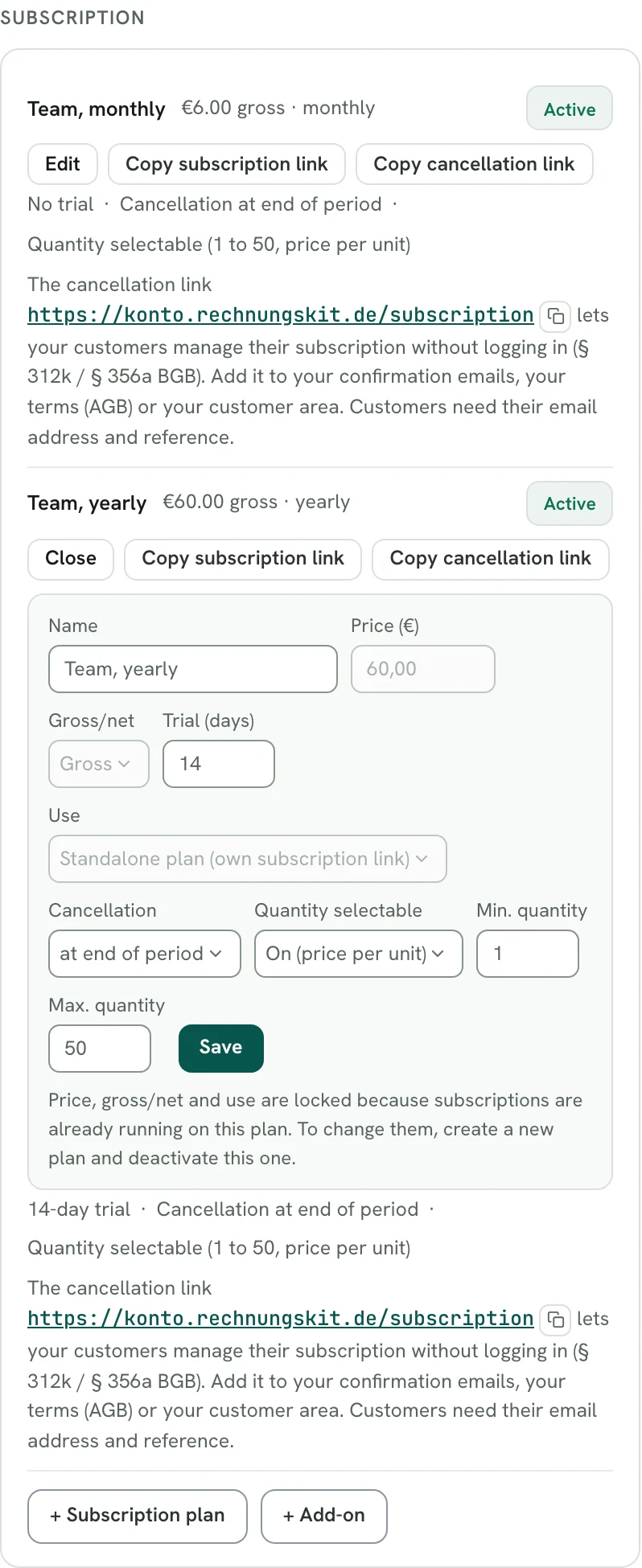
On the plan you set price, gross or net, trial and how cancellation works. With "Quantity selectable" the price applies per unit, here per reader seat, with a minimum and maximum quantity. Under "Use" a plan becomes an add-on to another subscription product.
How it works for your customer:
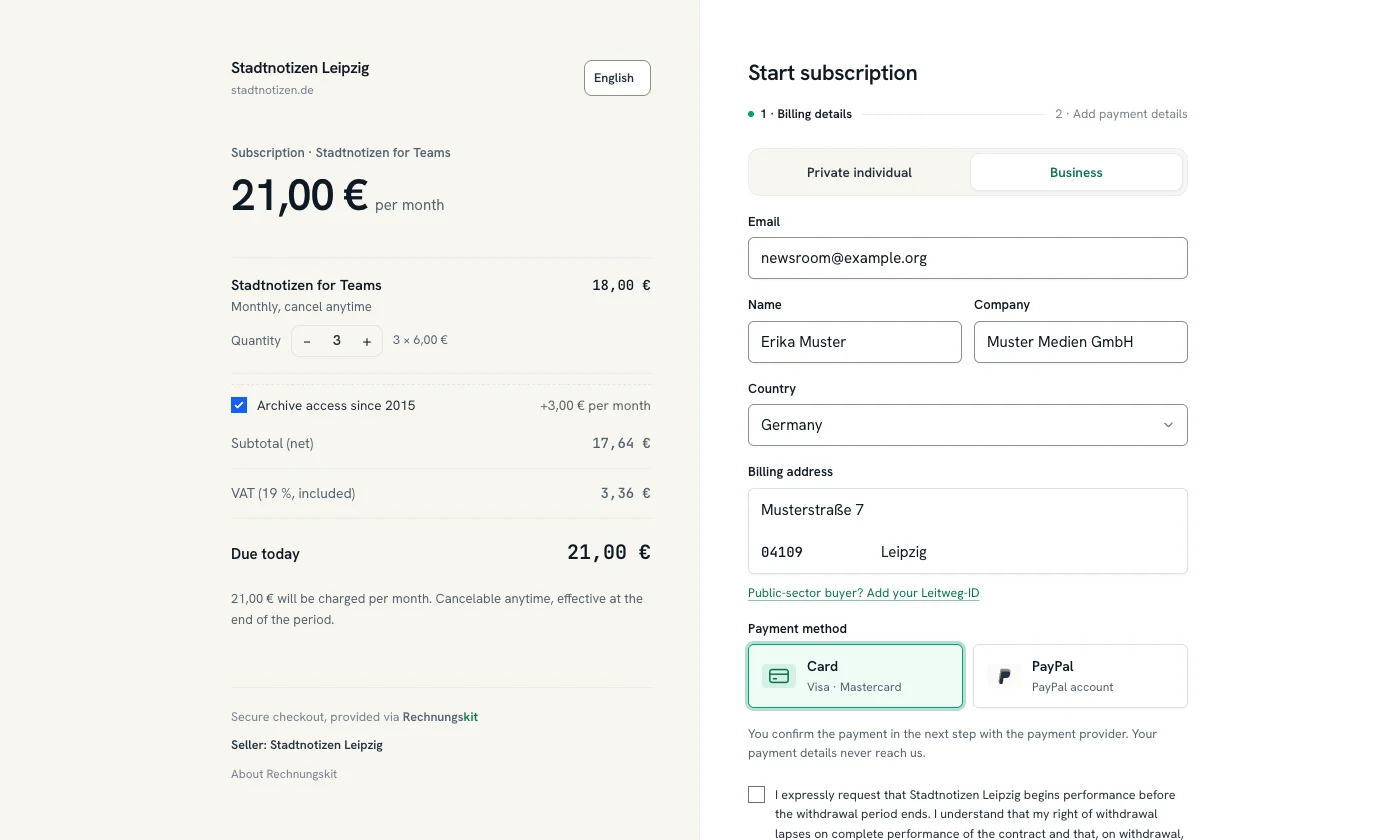
- They open the link and choose private individual or business, with a VAT ID for reverse charge if they are a business.
- They enter their billing address and choose how to pay: card or SEPA direct debit, via Mollie also PayPal or Apple Pay, depending on what is enabled in your account. For SEPA the page shows the mandate with pre-notification and the right to a refund.
- The first payment activates the subscription. Rechnungskit then triggers the recurring charges itself.
In the subscription checkout your customer picks the quantity and adds the add-on with a checkbox. The server recalculates the amount under "Due today", including VAT, on every change.
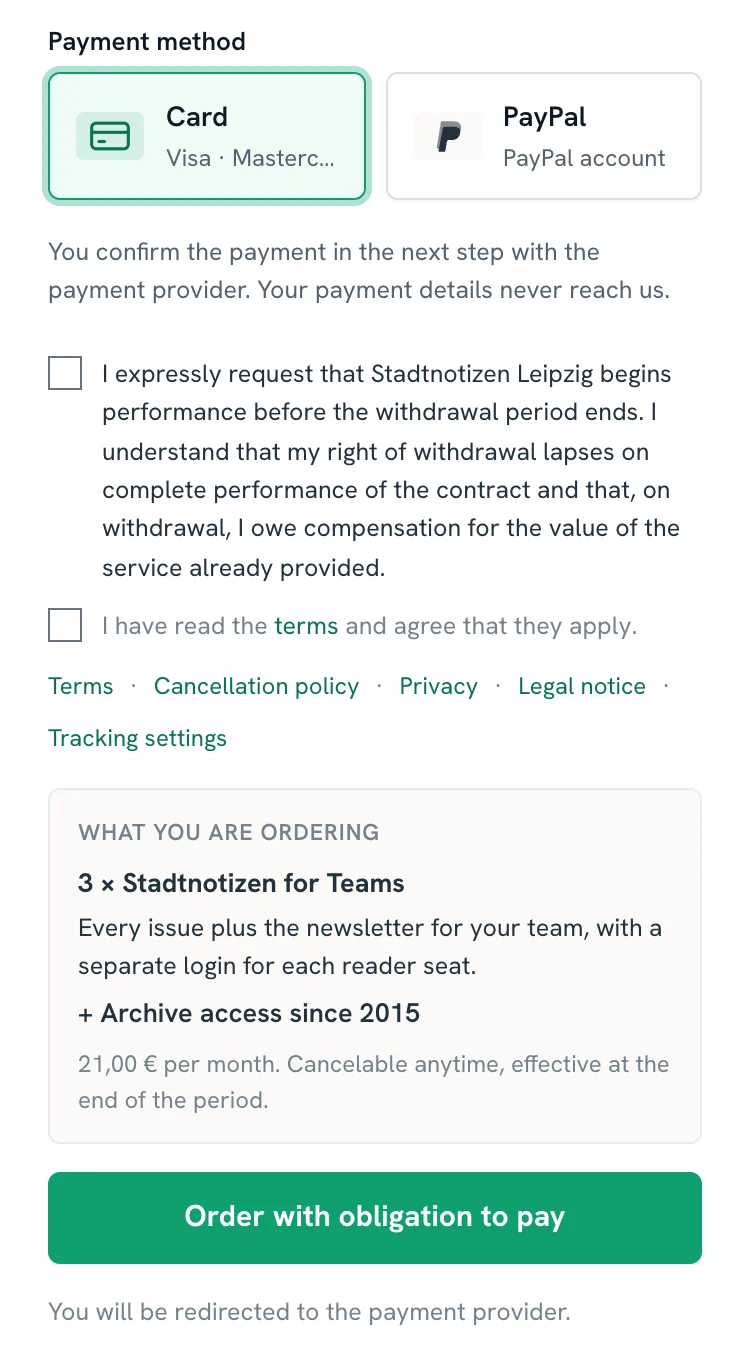
On a smartphone the consents sit one below the other. Below them come the key characteristics of the subscription and the button "Order with obligation to pay".
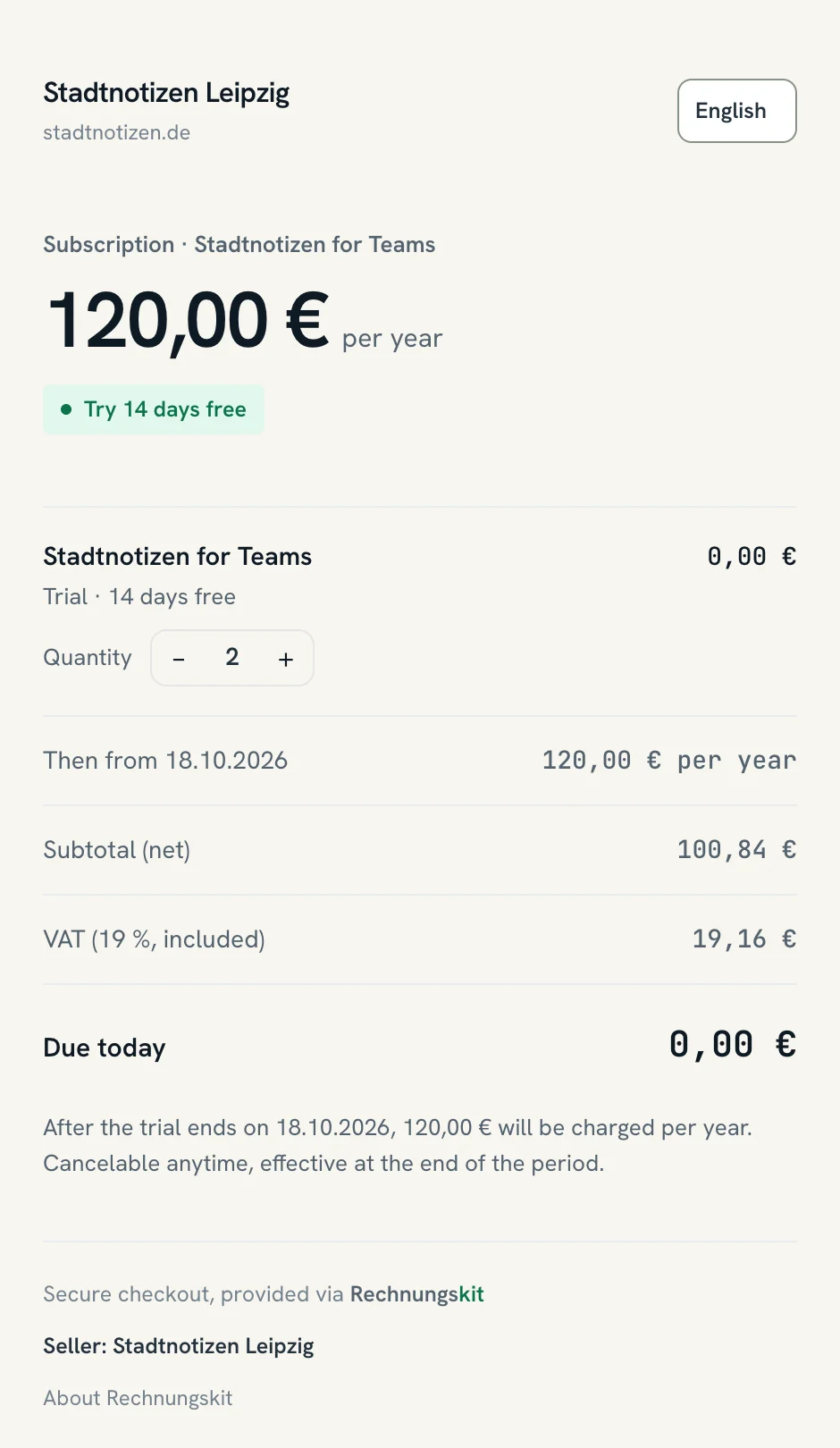
If the plan has a trial, the checkout shows "Due today 0,00 €" together with the date of the first charge.
After the first payment, "Manage subscription" on the confirmation page takes the customer straight into the customer portal in the same browser.
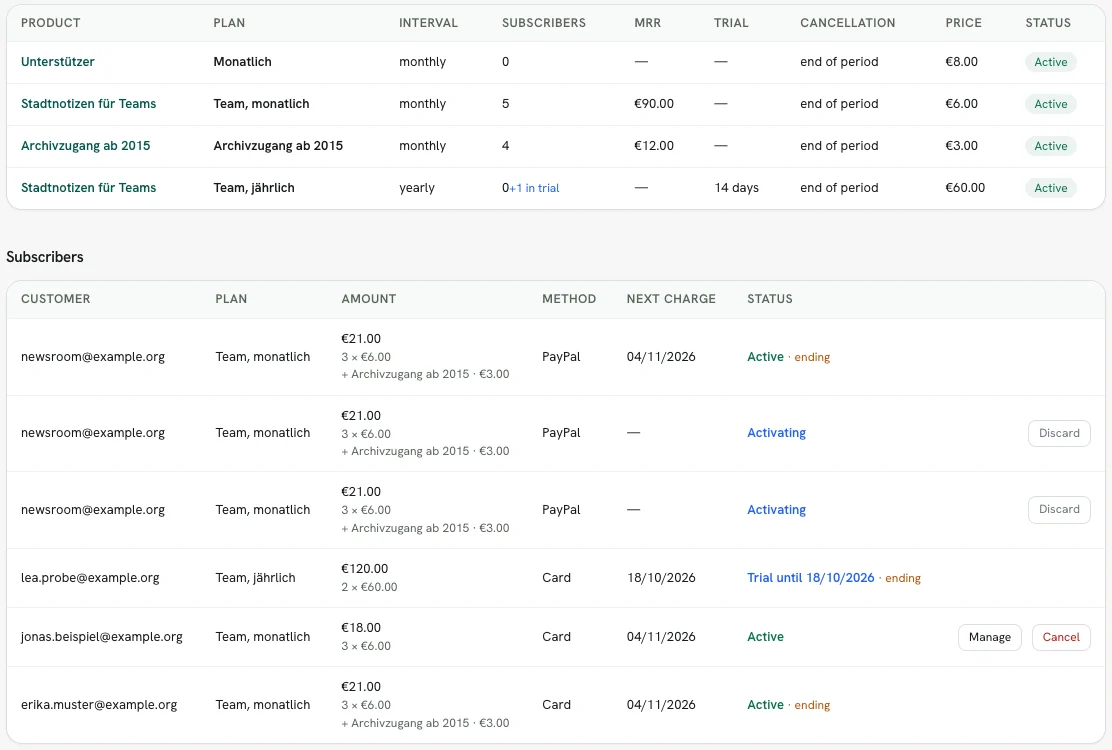
Under Subscriptions you see your plans and all subscribers with amount, quantity, add-ons, payment method and next charge.
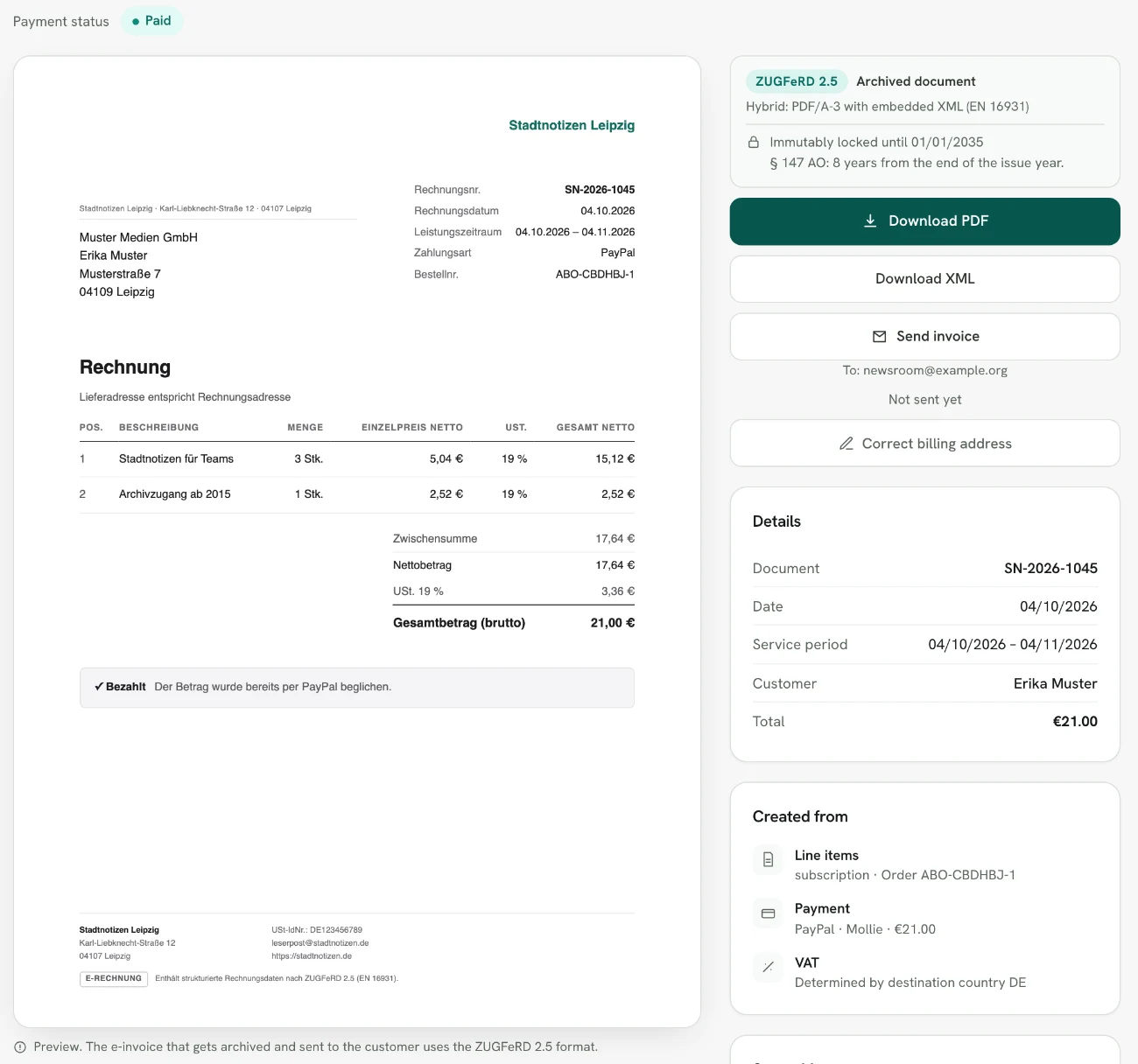
Every charge runs through the same invoice pipeline as a normal order. VAT follows the billing address, the e-invoice carries the service period, and for a prepaid yearly subscription the revenue is deferred over twelve months (§ 250 Abs. 2 HGB). A subscription for a public authority with a Leitweg-ID (the German routing ID for public buyers) creates an XRechnung on every charge.
In the example the invoice carries the service period from 04.10. to 04.11.2026 and two line items, three reader seats and the add-on, each line with its tax rate, here 19% for both.
What happens with changes mid-period?
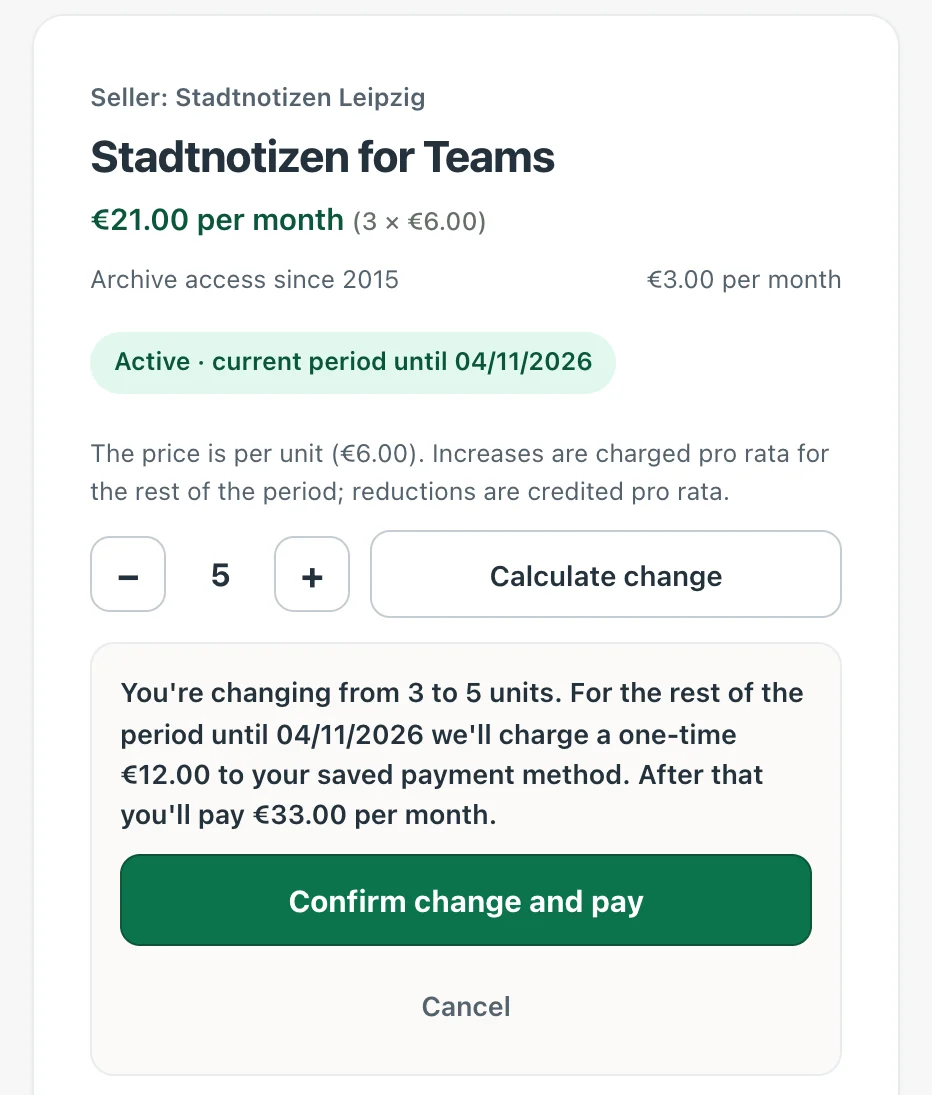
If a customer increases the quantity or moves to a bigger plan, Rechnungskit charges the rest of the period pro rata in a supplementary invoice that refers to the period invoice (§ 31 Abs. 1 UStDV). A reduction or downgrade gives a pro-rata credit note as a reduction of the price (§ 17 Abs. 1 UStG). For quantity changes Rechnungskit always uses the subscription's frozen unit price, never a new price. What this looks like in detail for seats and add-ons is shown in Subscription billing for SaaS.
Your customer changes the quantity in the customer portal. Before confirming, they see the one-time amount for the rest of the period and what they pay every month after that.
Cancel and withdraw without logging in
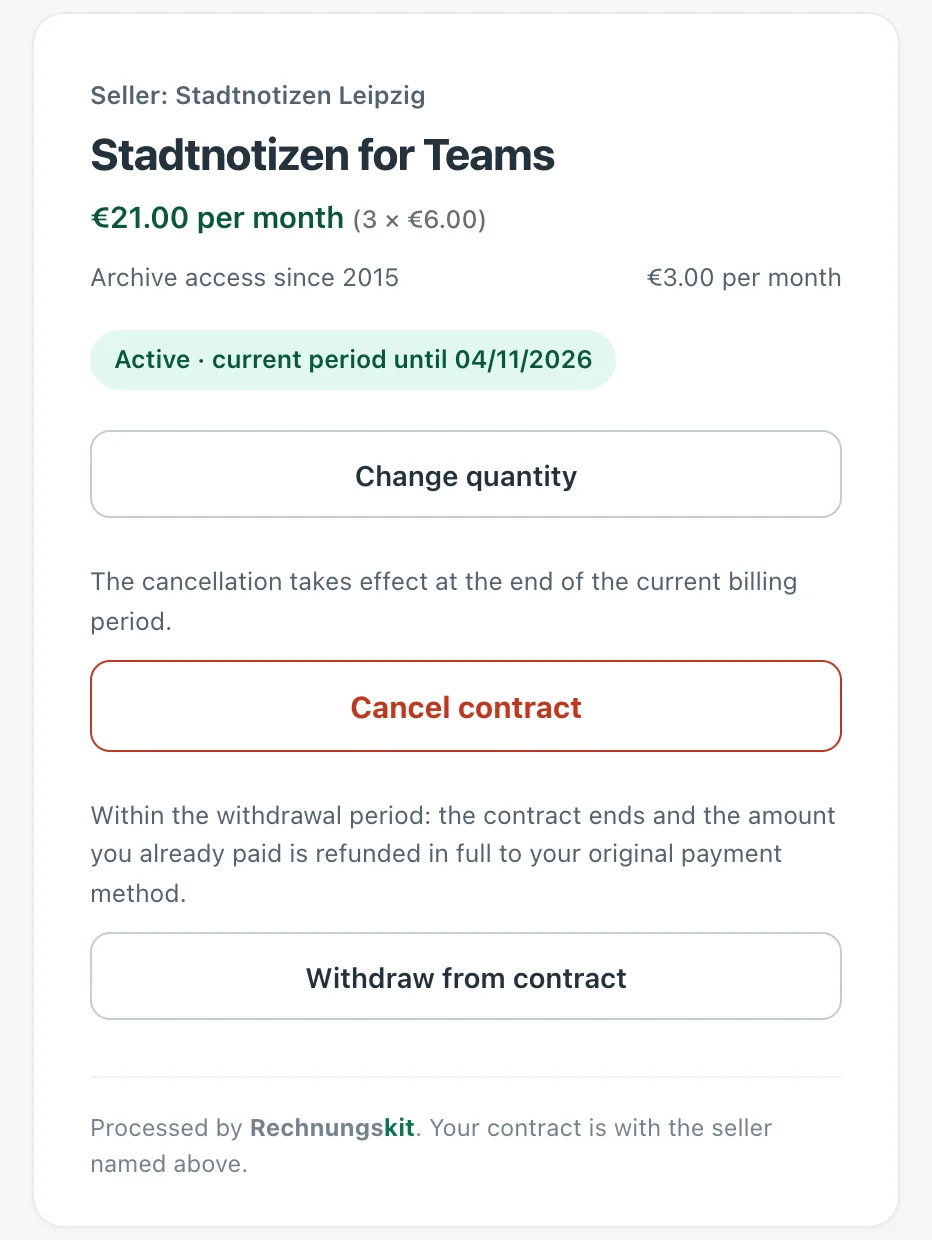
Every subscriber has their own page in the customer portal at konto.rechnungskit.de. The personal link to it is in the subscription confirmation email. The page offers "Cancel contract" (§ 312k BGB) and, in the first 14 days, "Withdraw from contract" (§ 356a BGB). Both need a second click to confirm. On withdrawal Rechnungskit cancels the paid invoices and adds a task for you to make the refund. What the law requires is explained in the articles on the cancel button and the withdrawal button.
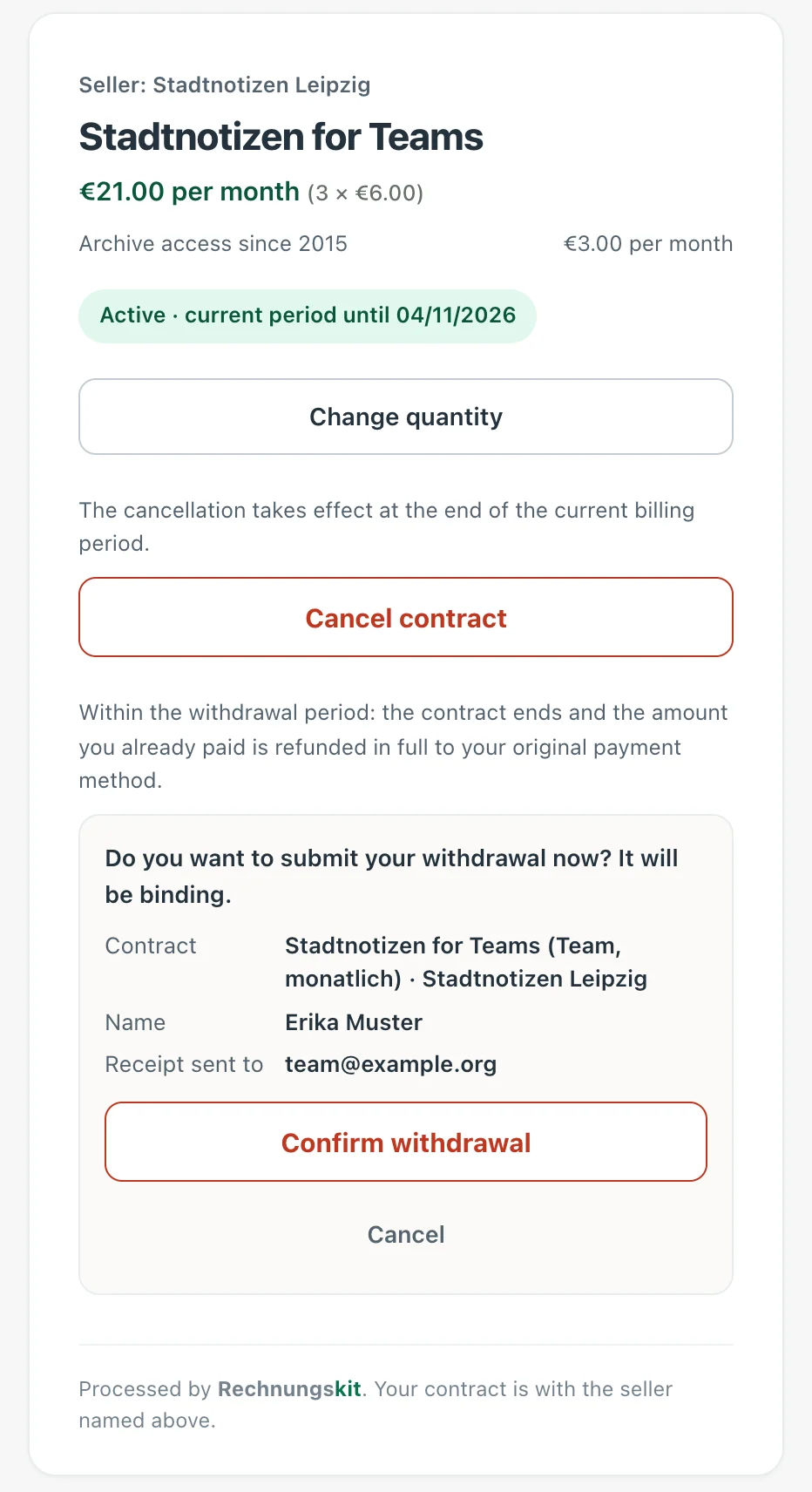
Before the withdrawal the portal shows the contract, the name and the email address for the confirmation of receipt.
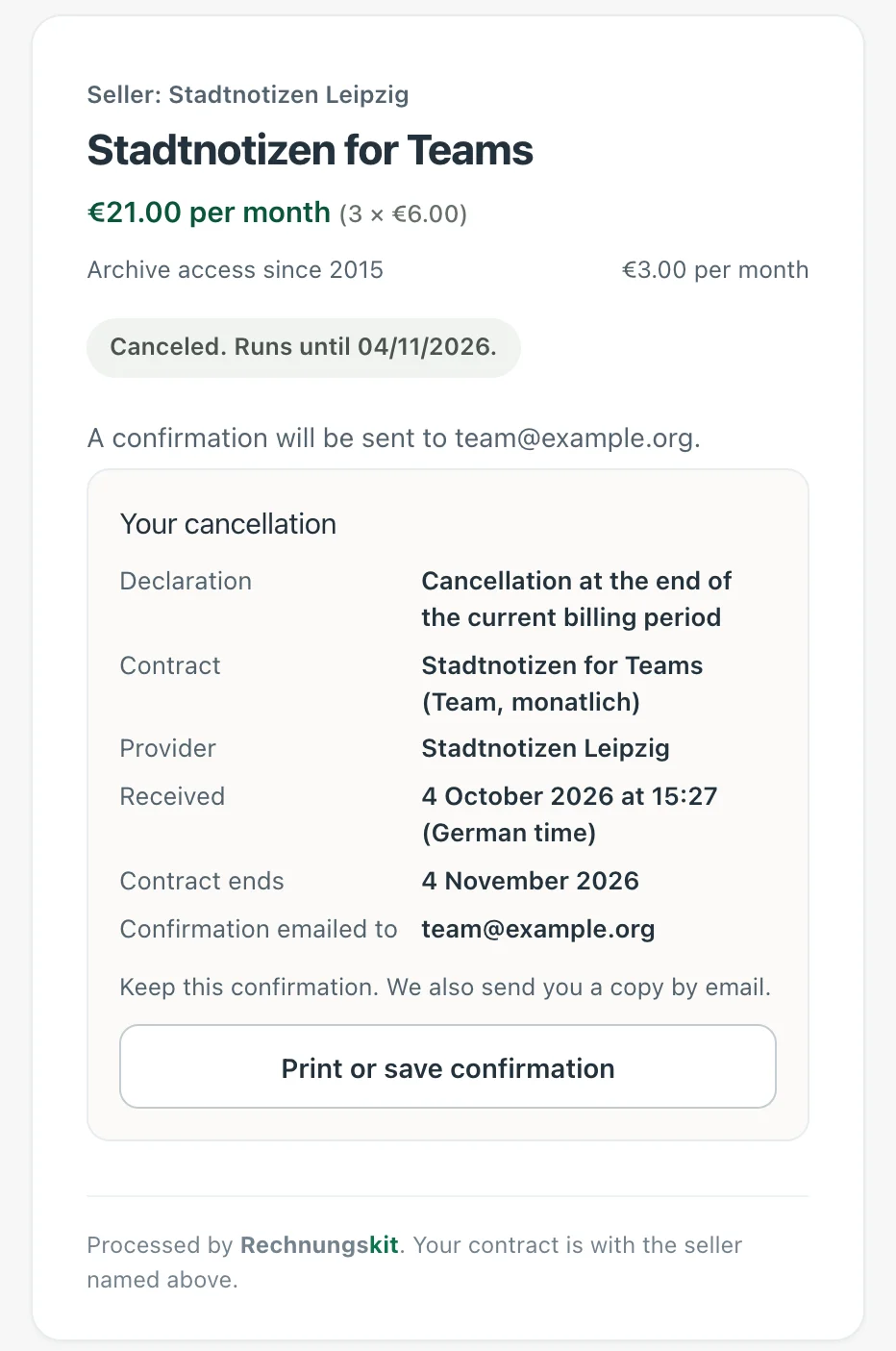
Once the cancellation is confirmed, it appears on the page with the time it was received and the contract end date. Your customer can print it or save it as a PDF.
Grant access automatically
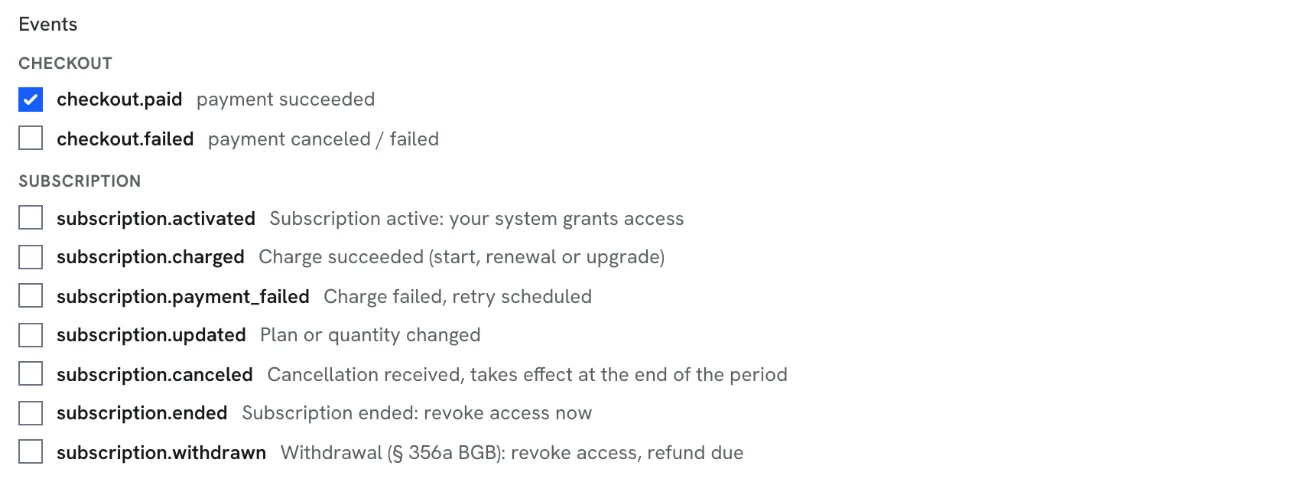
Rechnungskit reports every step of a subscription by webhook: from activation through successful and failed charges to cancellation, end and withdrawal. Every message carries the full subscription state. For courses on Memberspot and memberships on Ghost you need no webhook of your own, because the native integrations grant and revoke access. How to secure webhooks is explained in Checkout webhooks (in German).
You pick which events an endpoint receives from a checklist under Connections, API.
In detail
- Collected via Mollie or Stripe, by card or SEPA direct debit with mandate and pre-notification, via Mollie also by PayPal or Apple Pay; prices gross or net, optionally with a free trial
- Every period is a normal e-invoice with service period, archive, DATEV export and deferral to the correct period (pRAP), sent to the customer by email automatically
- Customer portal at konto.rechnungskit.de with no login required: cancel button under § 312k and withdrawal under § 356a BGB, each in two steps, plus an invoice overview with PDF and XML
- Upgrades and quantity increases are charged pro rata right away (supplementary invoice under § 31 UStDV), downgrades and reductions are credited pro rata (reduction of the price under § 17 UStG)
- Quantity selectable per plan and changeable later; add-ons run on the same invoice with the same charge
- Your business is always the contracting party, your legal texts are linked, and confirmations go out in your name
- Seven subscription webhooks from activation to withdrawal, so your system can grant and revoke access itself
- Existing Stripe Billing subscriptions can be taken over without the customer signing up again, using the existing payment mandate
Legal basis
- § 312k BGB (Kündigung von Verbraucherverträgen im elektronischen Geschäftsverkehr): Cancellation of consumer contracts online. Requires a permanently available, easy-to-reach cancel button when consumers can sign up online for a paid continuing contract.
- § 356a BGB (Widerrufsfunktion): Withdrawal function. In this version since June 19, 2026 (BGBl. 2026 I Nr. 28): for distance contracts concluded online, the consumer must be able to withdraw through a withdrawal function.
- § 355 BGB (Widerrufsrecht bei Verbraucherverträgen): Right of withdrawal for consumer contracts. The withdrawal period is 14 days.
- § 17 UStG (Änderung der Bemessungsgrundlage): Change of the taxable amount. If the price changes afterwards, for example through a pro-rata credit note on a downgrade or a lower quantity, the VAT is corrected.
- § 31 UStDV (Angaben in der Rechnung): Invoice details. An invoice can consist of several documents. The supplementary invoice that refers to the period invoice after an increase is based on this.
- § 250 HGB (Rechnungsabgrenzungsposten): Accruals and deferrals (German Commercial Code). Income received before the balance sheet date that is revenue for a specific period afterwards is deferred on the liabilities side (pRAP, deferred revenue).