 Odoo Community + Rechnungskit
Odoo Community: e‑invoicing and DATEV export without a module
Odoo Community sells, and Rechnungskit handles everything after that: the e-invoice, the GoBD archive, payment matching and the DATEV export for your tax advisor. It reads sales orders and payments through the API, with no module in Odoo. Invoices then come from one place only.
- For Odoo Community 18 or newer, no module: synced every 15 minutes
- E-invoice in ZUGFeRD format, eight years in the GoBD archive
- Monthly DATEV batch, with Stripe fees booked separately
- Hosted in Germany (Hetzner)
- GoBD archive included
- DATEV export included
- Cancel monthly
Odoo Community sells. The invoice is your job.
Odoo Community runs sales and the shop. Rechnungskit takes over from there: it issues the invoice, archives it, matches the payment and delivers the export for your tax advisor. Odoo then no longer writes invoices itself.
- Backups, archive and retention are on you when Odoo runs on your own server
- A DATEV export takes add-on modules that you maintain through every update
- Your payment provider's fees and payouts aren't in the sales order
- E-invoice to EN 16931 from every sales order, XRechnung with a Leitweg-ID
- Every invoice immutable in the GoBD archive, with no server of your own
- Stripe payment matched through the reference in Odoo
- Cancellation invoice automatically, once Stripe reports the refund
- Monthly DATEV batch with document links, fees booked separately
Four steps from payment to booking.
- 01ConnectConnect your Odoo Community store in a few minutes. No code needed.
- 02ImportRechnungskit imports every Odoo Community order and matches its payment.
- 03ErzeugenEvery order becomes a validated e-invoice under EN 16931.
- 04ArchiveThe invoice is archived to GoBD standards and is ready for the DATEV export.
Every format Odoo Community doesn't deliver.
Creating Odoo e-invoices: how an order runs through Rechnungskit
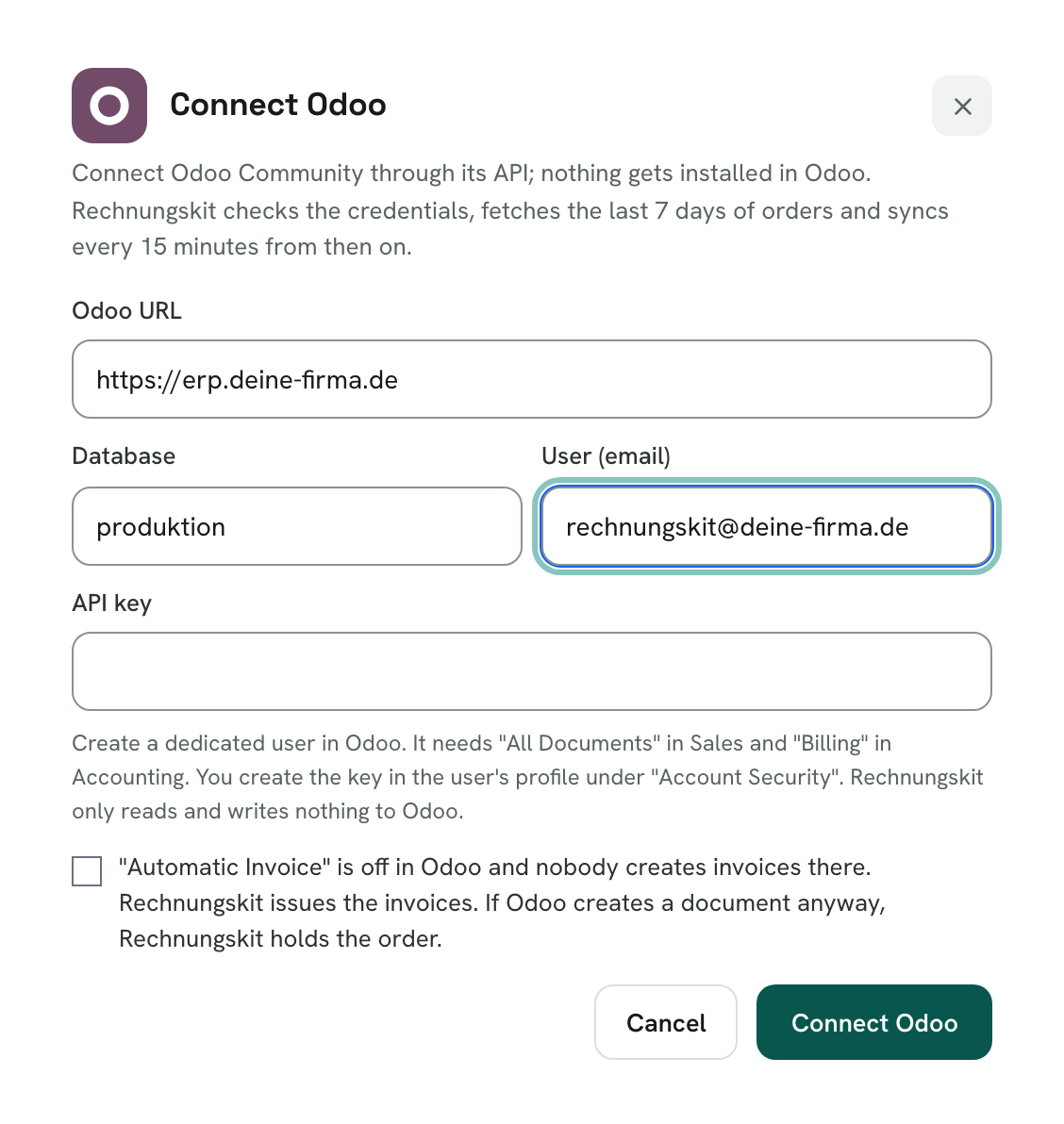
You create a dedicated user with an API key in Odoo, turn off Automatic Invoice and enter the credentials in Rechnungskit. The first sync fetches the last 7 days of orders, then it runs every 15 minutes.
The payment comes from Stripe. Rechnungskit finds it through the reference Odoo stores on the payment. Services such as licences are invoiced right away, goods on shipment.
- CheckNo document from Odoo exists
- InvoiceE-invoice in ZUGFeRD format
- CancellationOnce Stripe reports the refund
What's left to you on Odoo Community
Odoo Community ships a module for the e-invoice itself. What's left to you comes afterwards.
Odoo's documentation for Germany calls Odoo certified GoBD-compliant. It also says that responsibility for keeping complete records stays with you and that Odoo only provides the means. If Odoo runs on your own server, that includes the backups. Accounting vouchers must be kept for eight years (§ 147 (3) AO).
Odoo's own DATEV module isn't part of the Community edition. There you use modules from the Odoo Community Association and maintain them through every update. Stripe's fees and payouts aren't in any sales order either, so someone matches them by hand at the end, usually your tax advisor.
Why only one place may write invoices
Odoo can create invoices itself. Two invoices for the same sale can trigger VAT twice under § 14c UStG. So Rechnungskit never takes over an invoice from Odoo.
Out of the box, Odoo Community can't turn off its "Create Invoice" button. Rechnungskit detects a posted document from Odoo on the next sync, holds the order and tells you. The order continues by itself once Odoo no longer shows a posted document.
The DATEV export for your tax advisor
Every month two EXTF booking batches are created, one for revenue and one for payments, in SKR03 or SKR04. Your tax advisor doesn't need to install anything. See DATEV.
Who this is for
For merchants and software vendors on Odoo Community 18 or newer whose tax advisor works with DATEV and who don't want to maintain invoices in Odoo. The integration is new and has so far been tested with simulated Odoo responses. In free test mode you see on your own orders whether everything fits before a real document is created.
It isn't meant for Odoo Online, Odoo.sh or Enterprise. There, Odoo's own accounting comes with the plan, and the Standard plan has no API access.
What does this cost for your shop on Odoo Community?
Usually one document per order. A cancellation invoice for a refund counts as its own document.
- 300 documents €46.00 per month · €9.00 base fee + €37.00 usage
- 1,000 documents €105.50 per month · €9.00 base fee + €96.50 usage
- 2,000 documents €180.50 per month · €9.00 base fee + €171.50 usage
Every feature and integration included, cancel monthly. Free to test until you go live. Prices are net, plus VAT.
See full pricing →Odoo Community and e-invoicing: FAQ
Rechnungskit is not a tax advisory or law firm. This article explains general principles and does not replace advice from a tax advisor (Steuerberater, § 5 StBerG) or a lawyer (§ 3 RDG). Rechnungskit is built for businesses based in Germany and prepares documents, tax rates and bookings automatically. How your specific case is treated remains your decision, ideally together with your tax advisor or a lawyer.
Connect Odoo Community, e-invoicing done.
Create an account, connect your store, check everything in free test mode. Billing starts when you go live.
Try it now