Connect Shopware 6
Updated
Rechnungskit connects Shopware 6 through the Admin API, without a plugin in your shop. Good to know: the connection works by fetching at regular intervals (polling), not with webhooks.
- MatchPayment to order, by order number
- InvoiceE-invoice in ZUGFeRD format, for goods at shipping
- CancellationFrom the "refunded" transaction status in the shop
Rechnungskit matches the payment to the order by order number (see zahlungen-abgleich). The result is an e-invoice in ZUGFeRD format, archived unchangeable in the GoBD archive (the German bookkeeping rules) and included in the monthly DATEV export, with revenue and payments kept separate.
Setup
- Step 1 · ShopwareCreate an integrationSettings → System → Integrations, read access is enough
- Step 2 · RechnungskitEnter the credentialsUnder Connections → Connect: shop URL, access key ID (SWIA…) and secret access key
- Step 3 · automaticTest fetch, then the last 7 daysAfter that, fetching runs on its ownEvery 15 minutes
In the Shopware admin, go to Settings → System → Integrations and create a new integration. Read access is enough.
In Rechnungskit, under Connections → Connect, enter the shop URL, the access key ID (SWIA...) and the secret access key. Use the final address as the shop URL (with or without www, depending on how the shop responds), because the connection does not follow a redirect and shows a notice instead.
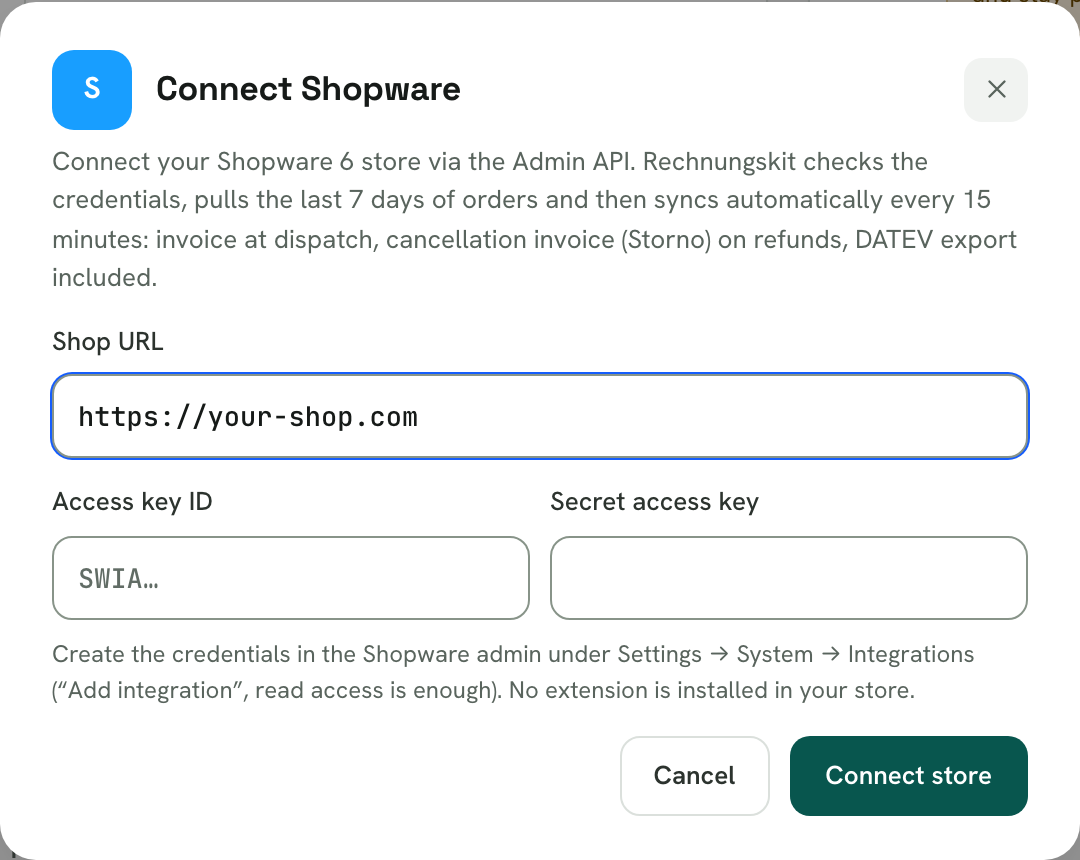
Rechnungskit checks the credentials with a test fetch. After that, syncing runs automatically.
How the data arrives
- Orders, payment status and shipping status are fetched automatically every 15 minutes. That is plenty for invoicing, since your customer gets the invoice after shipping or payment anyway.
- Real time is optional: with the Flow Builder (from Shopware Evolve, through the Commercial extension) you can add a "Call webhook" action pointing at the URL Rechnungskit provides. That triggers an immediate fetch. Rechnungskit deliberately ignores the content of this notification; all data comes from the authenticated API fetch.
- On the first connection Rechnungskit loads the last 7 days and also learns the payment methods your shop uses.
Prepayment and pay by invoice
Shopware has both built in. Payment status changes in the shop (for example "paid" for prepayment) are picked up with the next fetch and trigger the invoice. Corrections through the transaction status (refund, cancellation) are processed as well.
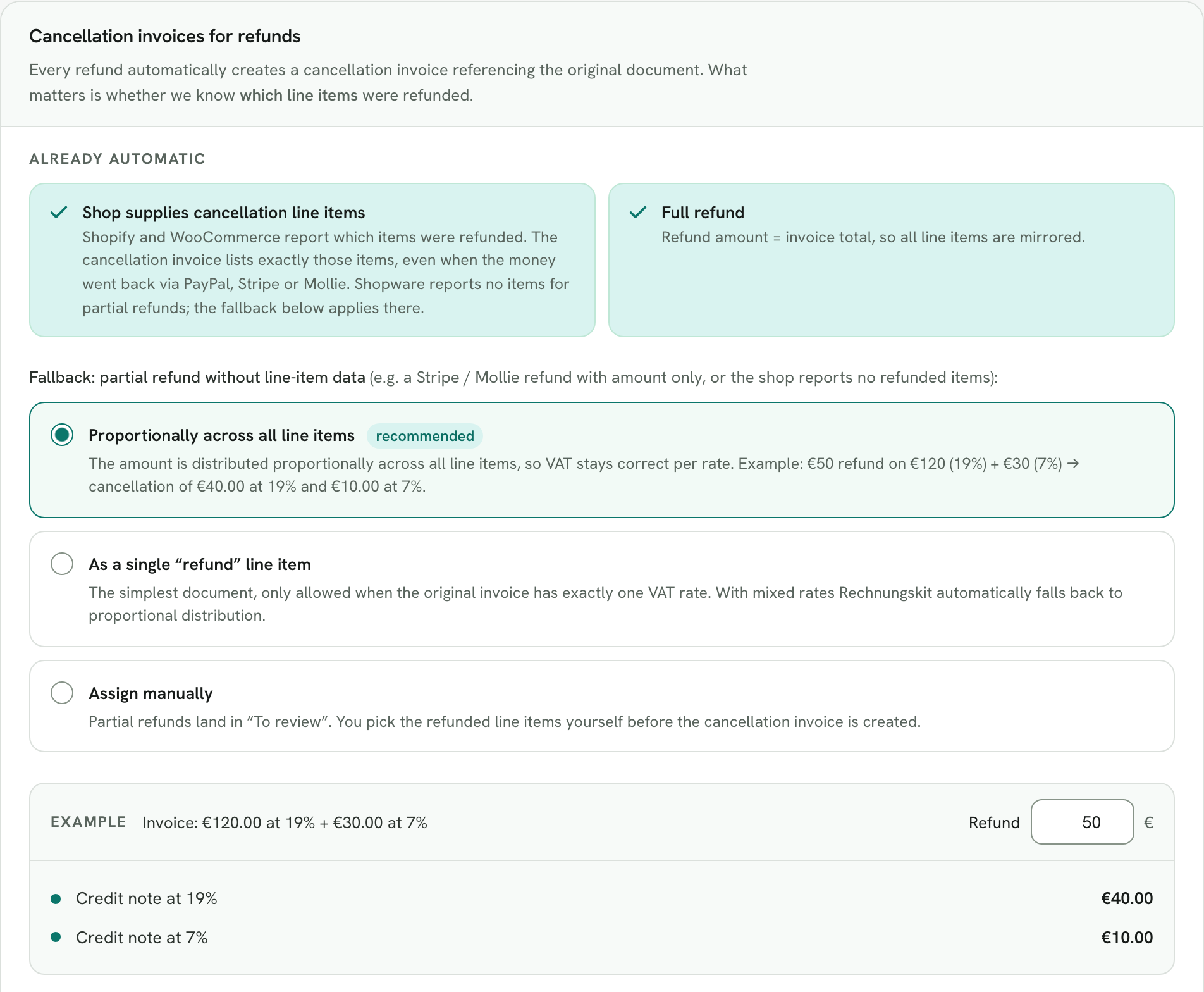
For goods, the invoice is created at shipping. If a transaction is set to "refunded" in the shop, Rechnungskit creates the cancellation invoice for the full amount. For partial refunds Shopware reports no refunded items. Your document rule then decides, under Connections → Document rules, card "Cancellation invoices for refunds": proportionally across all line items (default), as a single line item, or assigned manually (see belege-archiv).
Limits
- Core Shopware offers no configurable webhooks, hence the 15-minute polling. If you want real time, you need the Flow Builder from the paid Shopware plans.
- Don't create invoices in parallel with Shopware's own document feature, or you end up with two number ranges side by side.
- Shopware 6 is supported, Shopware 5 is not.
Shipping tax
Rechnungskit applies the tax rate of the goods to shipping, even if the shop reports a flat 19 %. For mixed carts, shipping is split by the gross value of the goods; the guide Shipping costs and VAT explains the background with examples. You find the setting per shop connection under Connections → Document rules, card "Shipping tax".
Where to find it in the app
Recent changes
Rechnungskit is not a tax advisory or law firm. This article explains general principles and does not replace advice from a tax advisor (Steuerberater, § 5 StBerG) or a lawyer (§ 3 RDG). Rechnungskit is built for businesses based in Germany and prepares documents, tax rates and bookings automatically. How your specific case is treated remains your decision, ideally together with your tax advisor or a lawyer.