Connect Mollie
Updated
You connect Mollie with its API key. For payout reconciliation there is a second, optional key that people often overlook.
 Your Mollie account
- Message as a triggerMollie does not sign webhooks. Rechnungskit reads every payment back through your API key
- Matchingto the order, which produces the e-invoice
- Nightly, with the access tokensplit payouts, add the Mollie fee to every payment
 DATEV payments batchits own Mollie clearing account, fees per payout
Setup
In the Mollie dashboard, copy the API key under Developers. Important: use the live key (live_...), even if you are only testing Rechnungskit. Rechnungskit only reads and never initiates payments. A test_ key connects Mollie's empty test environment, where your real payments never show up. For checkout and subscriptions in test mode, you add the test key separately in the "Test credentials" field below the card, see Checkout and subscriptions in test mode.
Paste it at Mollie under Connections → Connect. Rechnungskit checks the key directly against the Mollie API.
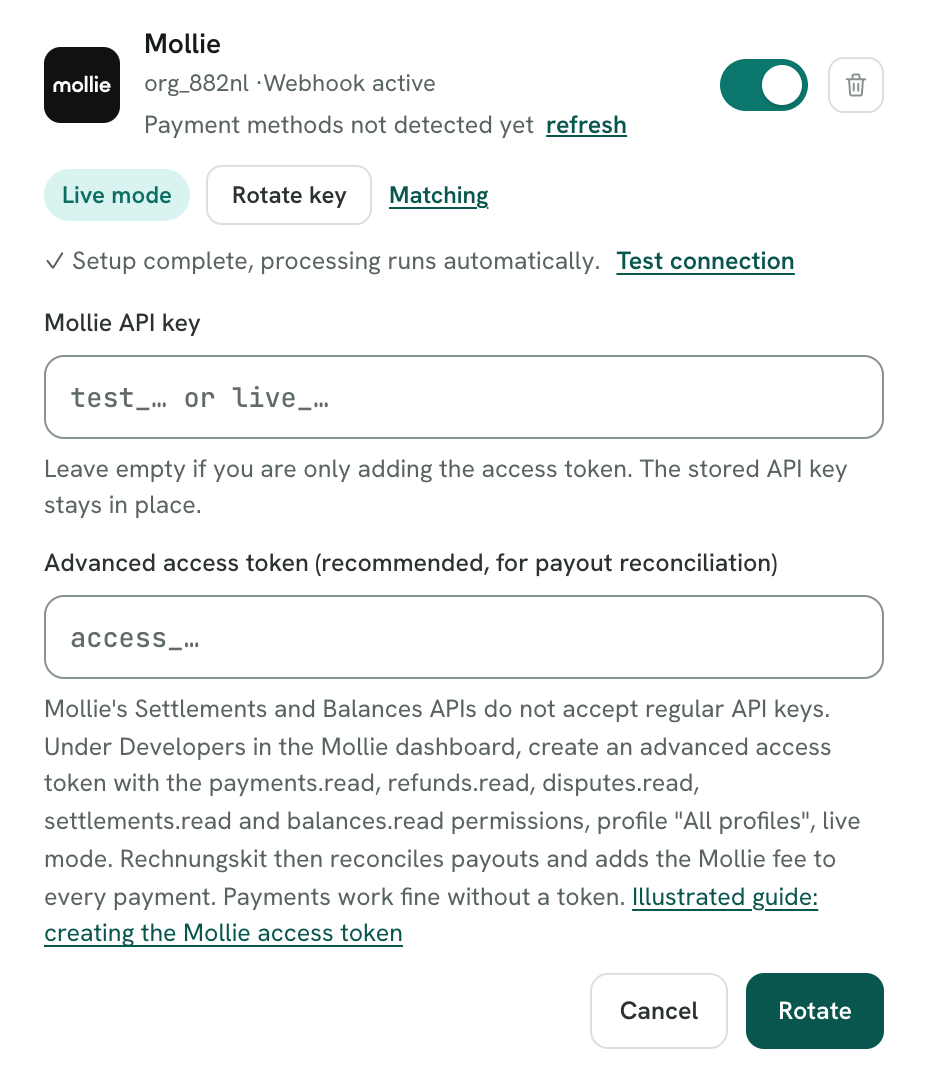
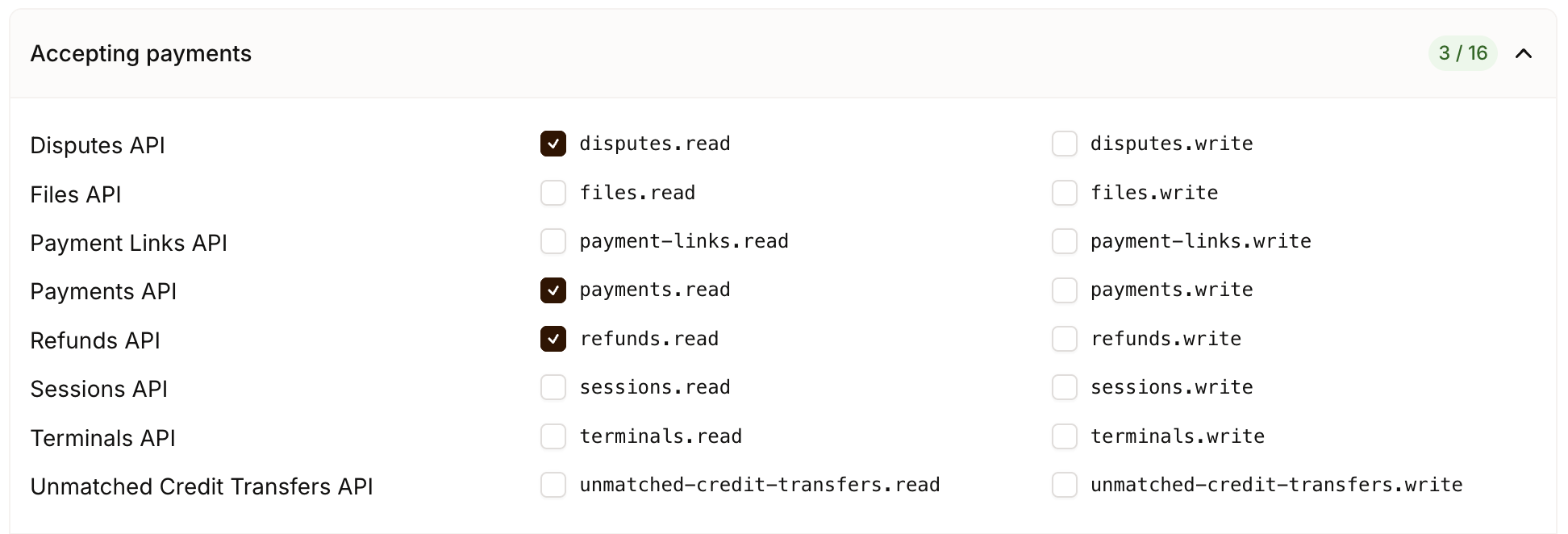
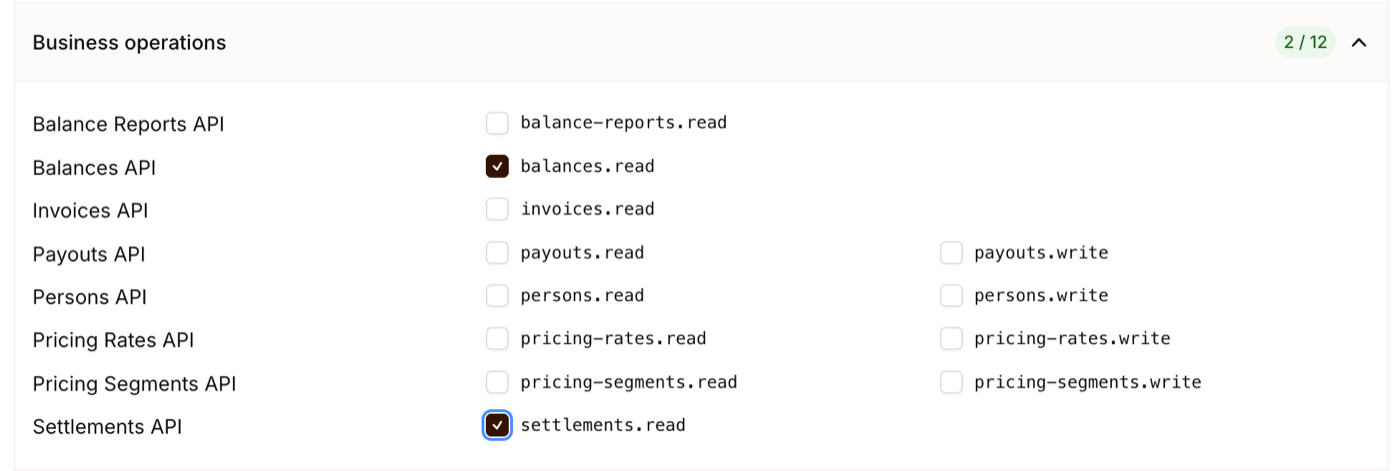
Optional but recommended: also store an organization access token (access_..., in the German Mollie dashboard "Erweitertes Zugriffstoken"). It needs exactly five read permissions: payments.read, refunds.read and disputes.read (under Accepting payments) plus settlements.read and balances.read (under Business operations). Mollie handles chargebacks through the Disputes API, which is why you need disputes.read; a chargebacks.read permission does not exist. With this token Rechnungskit reconciles the payouts every night AND adds the Mollie fee to each individual payment. When creating it, choose "Organization access token" as the token type, "All profiles" as the profile and "Live mode" as the API mode. Rechnungskit rejects a token limited to one profile with a clear message. You can add the token later without entering the API key again. Illustrated guide: https://rechnungskit.de/en/integrations/mollie#zugriffstoken. Mollie shows each token only once; if you didn't copy it, delete it and create a new one.
Webhook
Mollie webhooks are not signed. Rechnungskit gives you a webhook URL and verifies every message by reading the payment back through your API key, never from the webhook content itself. Note: you only need to enter the webhook URL in the Mollie dashboard for testing; in normal operation the connection is complete without this step.
What happens automatically
- All Mollie payment methods are processed: cards, iDEAL, Klarna, PayPal via Mollie, SEPA.
- Refunds create the cancellation invoice (Storno) automatically.
- Returned direct debits reopen the item and land in the tasks for clarification; Rechnungskit deliberately creates no automatic cancellation invoice.
Fees and payouts
Payout reconciliation runs daily through the Mollie Settlements API and splits each payout into the payments, refunds and Mollie fees it contains. In addition, Rechnungskit reads the fee of each individual payment every night through the Mollie Balances API and shows it on the payment and in the reports. This needs the organization access token with settlements.read and balances.read. Without it, payments and invoices carry on as usual; only payout reconciliation and the fee import pause, and you get a task as a reminder. A special case is PayPal via Mollie: PayPal's own fee is already part of the payment and shows up right away, without an access token. In the DATEV export a PayPal payment via Mollie books to the PayPal account (line paypal_payment, refund paypal_refund), not to the Mollie clearing account: the money lands at PayPal, and Mollie never pays it out. If the line paypal_payment is missing, it books like any Mollie payment.
The same applies if a stored token is no longer accepted later, because it was revoked in Mollie or lacks a permission: reconciliation pauses, you get a task, and the Payouts page shows a notice at the top. Important to understand: the list of payouts is then empty because nothing could be fetched, not because everything is reconciled. You fix this under Settings, Connections, not on the Payouts page: store a new organization access token there. As soon as the next reconciliation runs, the notice and the task disappear on their own.
In the DATEV payments batch, Rechnungskit books a Mollie payment by default as Mollie clearing to customer account (SKR03 1361, SKR04 1461). It books the Mollie fees collected per payout as bank charges against clearing (SKR03 4970, SKR04 6855), and the payout as bank against clearing (SKR03 1200, SKR04 1800). Both come from payout reconciliation, so without the access token these bookings are missing. Afterwards the customer account and the Mollie clearing account are at zero.
Limits
- Without an organization access token there is no payout breakdown (payments still work).
- Payments without an order reference (payment links without a reference, for example) land in the tasks for clarification.
Mollie Invoicing is something else
The Mollie dashboard has an Invoicing tab and, with it, the Sales Invoices API. That is an invoicing program for invoices you write yourself: you enter the recipient, line items and tax rate, Mollie assigns a number when you issue the invoice, sends a PDF with a payment link or collects the amount through a mandate, and tracks the status (draft, issued, overdue, paid, canceled by credit note). It is free. It does not create an invoice from a Mollie payment that already exists; that is Rechnungskit's job.
E-invoicing at Mollie runs only through the Peppol network: sender and recipient must be based in Germany, Belgium or the Netherlands, the recipient must be registered with Peppol (in Germany through the VAT ID, USt-IdNr.), and consumers are not possible. By email there is optionally a plain PDF without embedded XML, so no ZUGFeRD. XRechnung with a Leitweg-ID, DATEV export, OSS reports and validation against EN 16931 are not documented. According to Mollie, invoices are kept for five years; the legal retention period for invoices in Germany is eight years (§ 14b Abs. 1 UStG). Partial credit notes are only available in the dashboard, not through the API.
If you use both: payments on Mollie Invoicing invoices appear in Rechnungskit as payments without an order reference in the tasks, because no order exists for them. They are not invoiced automatically. If you want to write invoices to regular customers by hand, use the checkout link or a product with a fixed line item in Rechnungskit. As of September 11, 2026; sources: docs.mollie.com (Sales Invoices API guide, Invoice lifecycle), mollie.com/de/products/invoicing.
Where to find it in the app
Rechnungskit is not a tax advisory or law firm. This article explains general principles and does not replace advice from a tax advisor (Steuerberater, § 5 StBerG) or a lawyer (§ 3 RDG). Rechnungskit is built for businesses based in Germany and prepares documents, tax rates and bookings automatically. How your specific case is treated remains your decision, ideally together with your tax advisor or a lawyer.