 GoCardless + Rechnungskit
GoCardless e‑invoicing for Germany: invoices from SEPA Direct Debit, automatically
GoCardless specializes in SEPA Direct Debit, which makes it the first choice for recurring payments and subscriptions. What GoCardless does not do: create compliant invoices for your customers, archive them under GoBD and hand your tax advisor (Steuerberater) finished bookings. Rechnungskit adds exactly that part and respects how direct debit works: the invoice is only issued once the collection is confirmed.
GoCardless takes the payment. The invoice is your job.
What GoCardless does not do: create compliant invoices for your customers, archive them under GoBD and hand your tax advisor finished bookings. That is where Rechnungskit comes in.
- GoCardless processes the payment
- PDF receipt without a structured e-invoice format
- No German VAT logic per country
- No GoBD archive, no DATEV export
- Compliant e-invoice under EN 16931 (ZUGFeRD)
- Payments matched to orders automatically
- GoBD-compliant, tamper-evident archive with checksum
- DATEV export in one click
Four steps from payment to booking.
- 01ConnectConnect your GoCardless account in a few minutes. No code needed.
- 02ImportRechnungskit imports every GoCardless payment and matches it.
- 03ErzeugenEvery payment becomes a validated e-invoice under EN 16931.
- 04ArchiveThe invoice is archived to GoBD standards and is ready for the DATEV export.
Every format GoCardless doesn't deliver.
SEPA Direct Debit works differently from card payments
With a card or wallet, you know within seconds whether the payment went through. A SEPA Direct Debit works differently. It is submitted, passes through interim states for several days and only then counts as collected. Even after that, the payer can take the money back: for a SEPA Direct Debit they can demand a refund for eight weeks without giving a reason (§ 675x Abs. 2 und 4 BGB), and for an unauthorized debit for up to 13 months (§ 676b Abs. 2 BGB).
That matters for invoicing. An invoice in the GoBD archive cannot be changed (§ 146 Abs. 4 AO). If you invoice on submission, you create invoices for money that has not arrived yet, and every failed collection needs a cancellation invoice to undo it. So Rechnungskit waits for the confirmed collection and only then creates the invoice, with the actual collection date as the payment date.
How to connect GoCardless, step by step
- In the GoCardless dashboard, open Developers → Access tokens and create a new access token, for example named Rechnungskit.
- Choose Read-write access as the scope. Rechnungskit only needs write access so it can check the webhook automatically; it never initiates payments.
- Enter the token in Rechnungskit under Connections → Connect, GoCardless. Rechnungskit then walks you through step 2: a dialog shows the webhook URL and a direct link to the webhook page at GoCardless.
- Create an endpoint there: name it Rechnungskit, for example, and use the URL from the dialog. You can leave "Generate a secret for me" selected. You don't need the optional webhook client certificate, because Rechnungskit verifies every message cryptographically with the secret anyway.
- Note that you don't see the secret when you create the endpoint, only once you click the new endpoint in the list. Copy it and paste it into the dialog to activate the connection. Until then the connection stays paused on purpose: GoCardless reports payments only by webhook, so without it nothing would arrive.
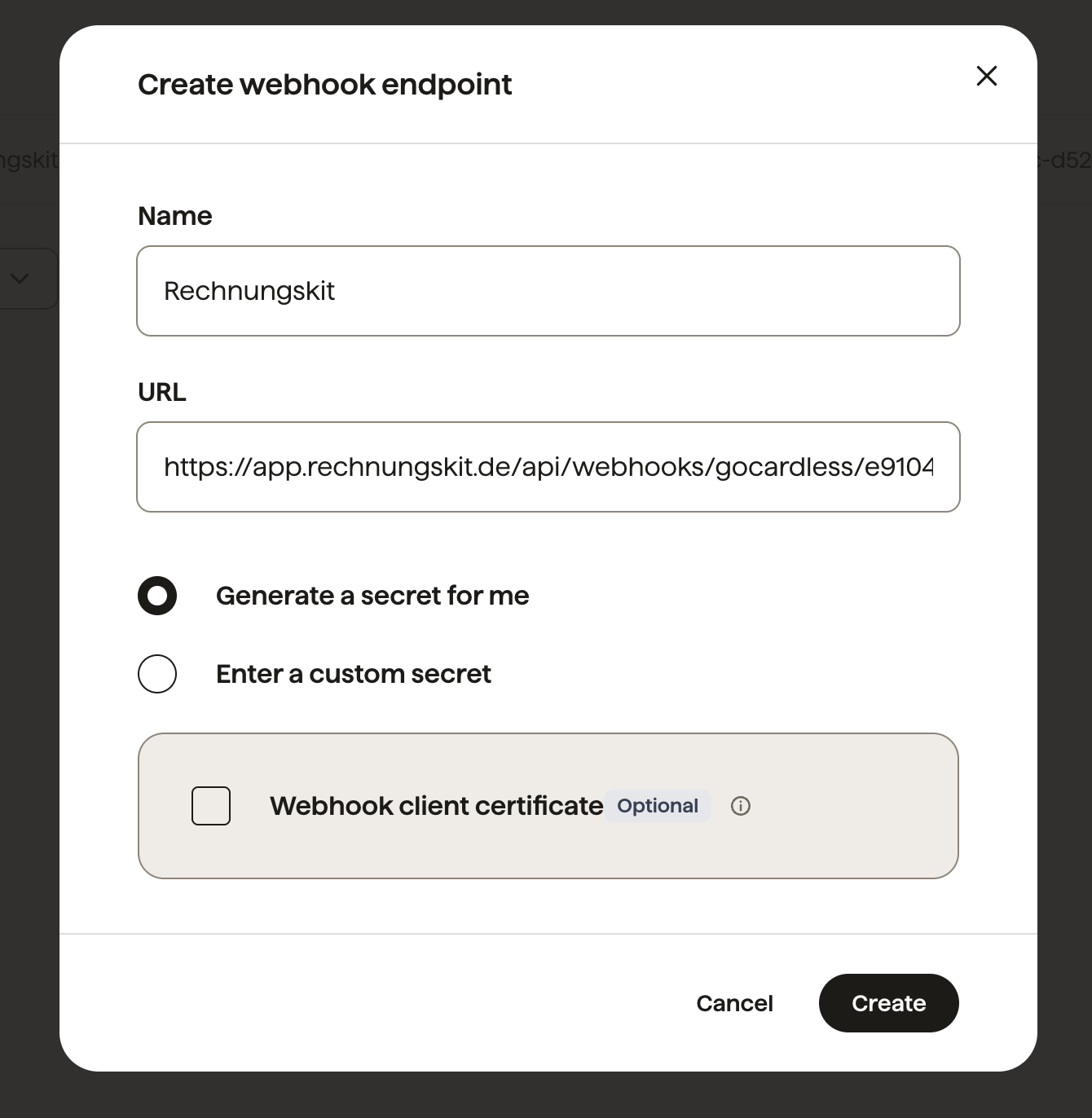
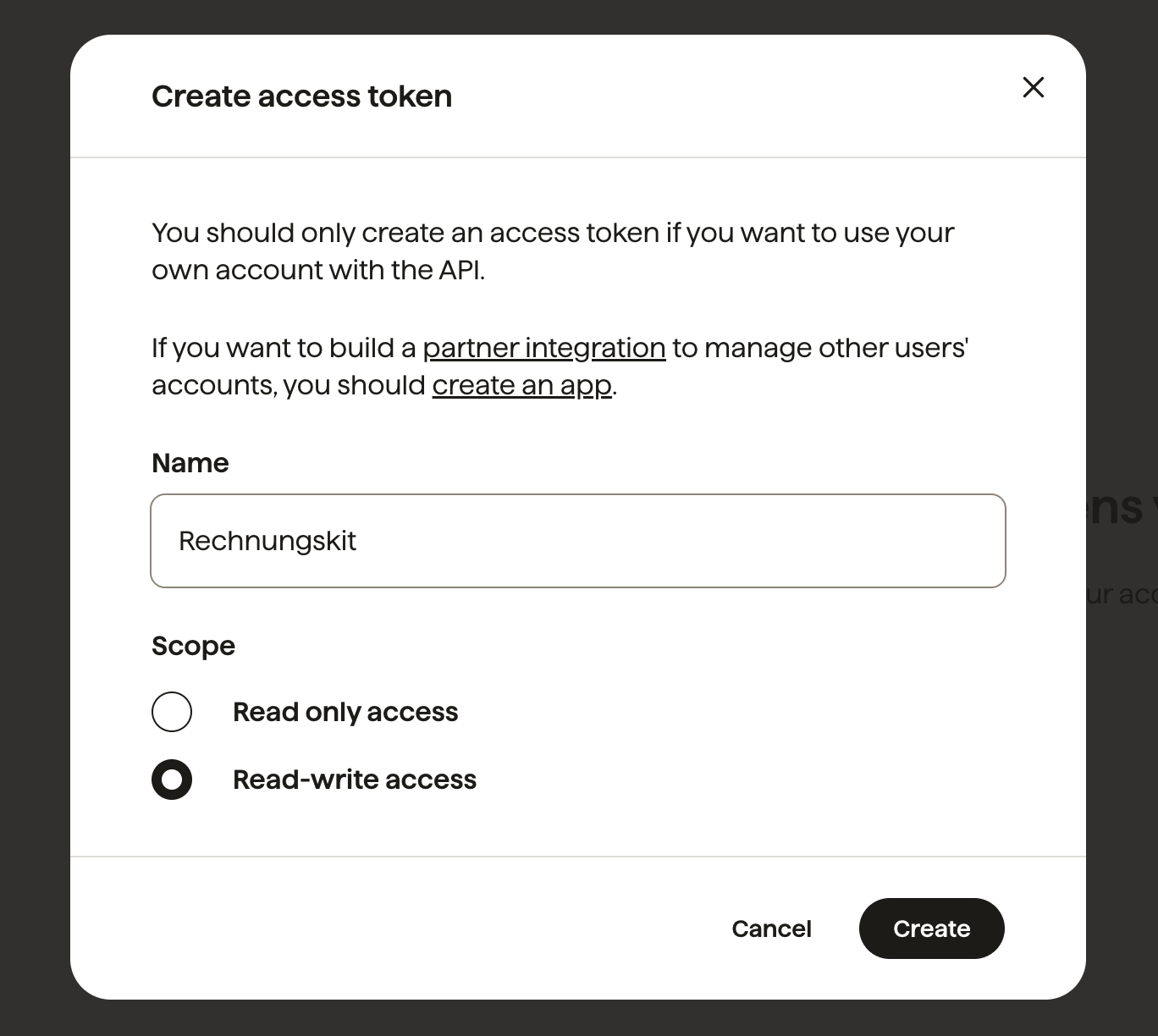
Every message from GoCardless is verified cryptographically against the webhook secret before it is processed. A token with the sandbox_ prefix switches to the GoCardless sandbox automatically.
From then on everything runs on its own: the confirmed collection is matched to the right order, a ZUGFeRD invoice with PDF and embedded XML is created, checked against the mandatory details under § 14 Abs. 4 UStG, archived in an audit-proof way and prepared for the DATEV export. Customers with a Leitweg-ID (the routing ID German public authorities use), such as government agencies or universities, get the same invoice as XRechnung 3.0.
Returned debits: an open item, not a cancellation
Returned debits are often handled wrong. A return is no reason for a cancellation invoice: the service was delivered, the invoice was correct, only the payment came back. For VAT purposes the consideration does not change automatically.
Rechnungskit reflects that: the original invoice stays, the receivable is reopened and you get a task for the case. Whether a correction is needed in the end (for example as a bad debt under § 17 Abs. 2 Nr. 1 UStG) is something you decide with your tax advisor (Steuerkanzlei). The software does not decide it on its own.
Fees and payouts in the DATEV export
GoCardless bundles collected payments into payouts and deducts its fees right away. Rechnungskit reads the payout with its individual items and separates what would otherwise be manual work for your tax advisor:
| Booking | Account (SKR04) | Meaning |
|---|---|---|
| Incoming payment | GoCardless's own transit account | the confirmed collection |
| Fees | Incidental costs of payment transactions | the fee GoCardless keeps |
| Payout | Transit account to bank | the lump sum that arrives in your account |
Every payment provider gets its own transit account. That is the only way to check per provider whether collected amounts, fees and payouts add up. All accounts can be changed in the DATEV settings to match your tax advisor's chart of accounts.
For subscriptions and recurring payments
Recurring direct debits are the main use case for GoCardless. Each collection creates its own invoice with the correct service period. If that period runs past the balance sheet date, Rechnungskit also checks the deferred revenue (passive Rechnungsabgrenzung) under § 250 Abs. 2 HGB, so the income lands in the right period.
GoCardless and e-invoicing: FAQ
Rechnungskit is not a tax advisory or law firm. This article explains general principles and does not replace advice from a tax advisor (Steuerberater, § 5 StBerG) or a lawyer (§ 3 RDG). Rechnungskit is built for businesses based in Germany and prepares documents, tax rates and bookings automatically. How your specific case is treated remains your decision, ideally together with your tax advisor or a lawyer.
Connect GoCardless, e-invoicing done.
Create an account, connect your payment provider, check everything in free test mode. Billing starts when you go live.
Try it now