Connect PayPal
Updated
You connect PayPal through your own REST app in your PayPal account. It takes a few minutes once; after that everything runs automatically.
 Your business account
- Fetch every few hoursTransaction Search, last 7 days: payments, refunds, fees
- Webhook right awayonly for payments through the Rechnungskit checkout, signed
- Matchingorder number from custom_id or invoice_id; for Shopify, the PayPal transaction ID if needed
- Withdrawalsdaily, from the transaction history of the last 30 days
 DATEV payments batchits own PayPal clearing account, fee per transaction
Before you start
You need your PayPal business account, specifically the account your shop payments go into. You sign in to the PayPal Developer Dashboard (developer.paypal.com) with the same credentials; you don't need a separate developer account. Setup takes about five minutes. After that, PayPal can take up to 9 hours to release the transaction data for the new app, so you often see the first payments the next morning.
Setup
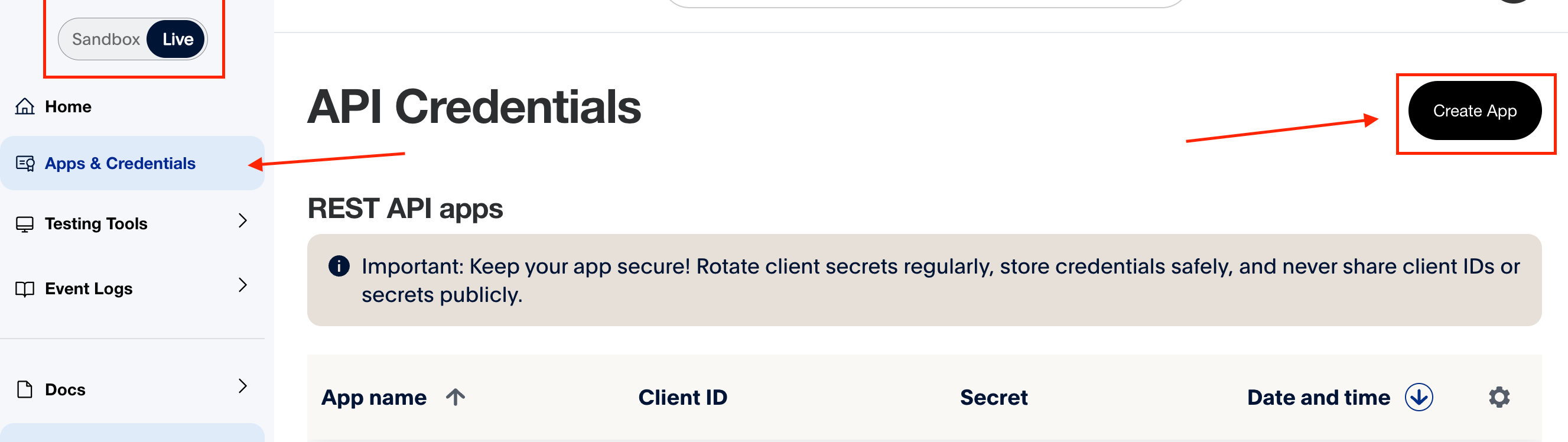
- Switch to Live at the topnot Sandbox, also for Rechnungskit's test mode
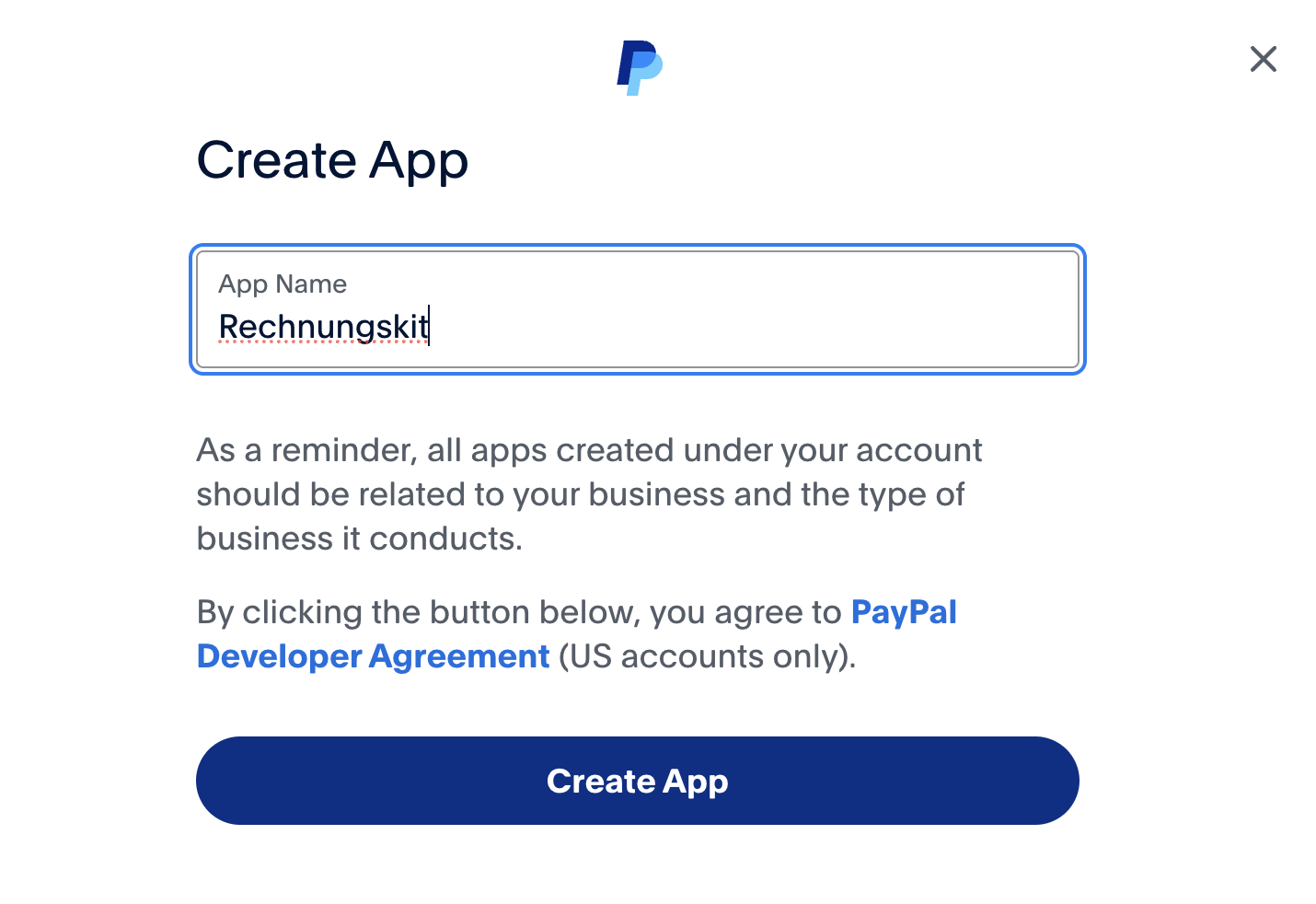
- Apps & Credentials → Create Appname it Rechnungskit, for example
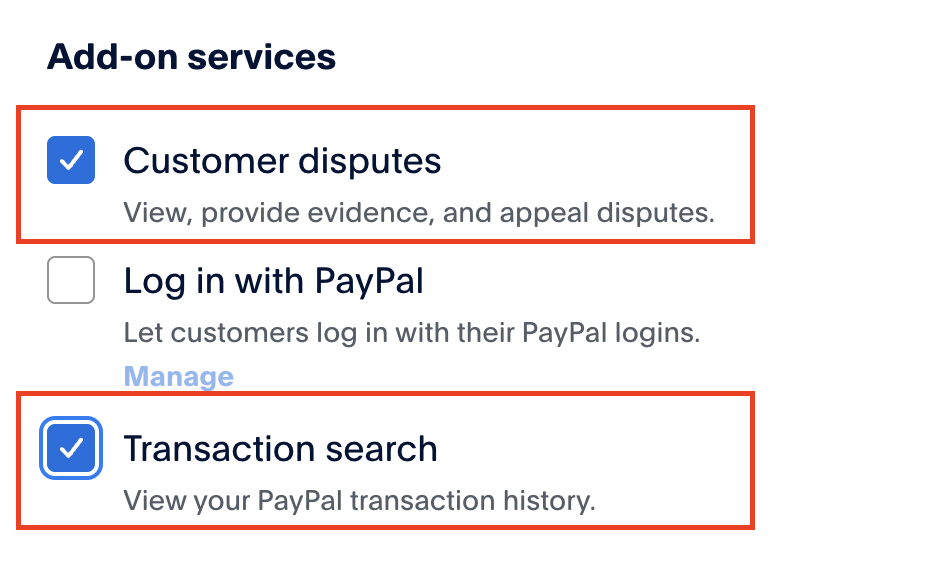
- Tick Transaction searchunder Add-on services, off by default. Customer disputes stays on
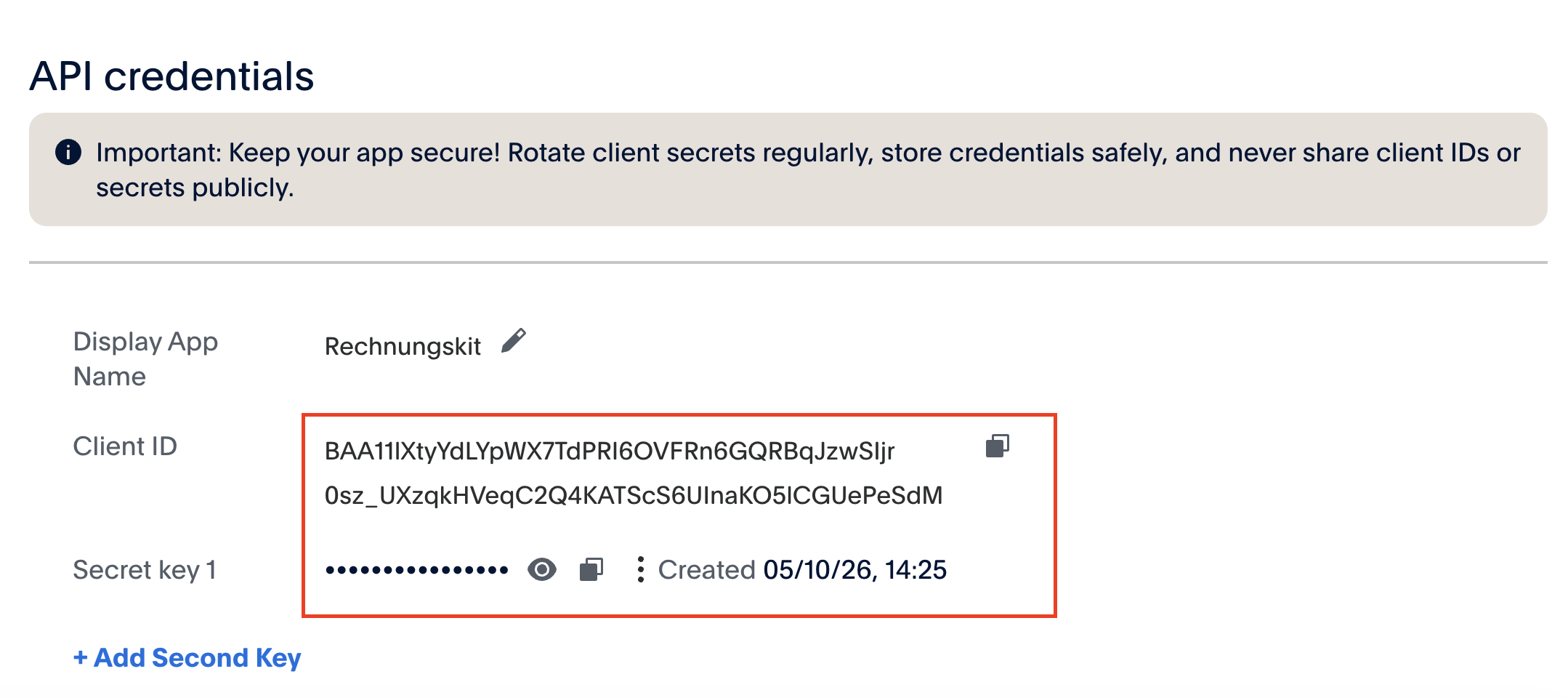
- Copy the client ID and secretPayPal only shows the secret after a click
- Connections → Connectclick "Connect" on the PayPal card
- Paste both valuesPayPal client ID and Secret Key, then connect
In the PayPal Developer Dashboard (opens the Live tab), create your own REST app under Apps & Credentials (Create App, name it Rechnungskit, for example). Important: select Live at the top, not Sandbox. Rechnungskit needs live credentials, in Rechnungskit's test mode too.
In the app, under Add-on services, TURN ON the Transaction search checkbox (it is off by default). Important: PayPal releases the data with a delay of up to 9 hours. Right after you turn it on, the fetch returns nothing yet, and "Sync now" under Payments reports "0 payments checked" even though the connection is correct. That is normal: Rechnungskit fetches automatically every few hours and catches up on the last 7 days as soon as PayPal provides the data, usually the next morning. If it still shows 0 after a day, check that the REST app really belongs to the PayPal account that receives your shop payments. Customer disputes is on by default and stays on. All other checkboxes (Checkout, SDKs, Vault, Subscriptions, Invoicing, Payouts) don't matter for Rechnungskit.
Enter the client ID and client secret at PayPal under Connections → Connect (the "Connect" button on the PayPal card). Rechnungskit detects automatically whether these are live or sandbox credentials: it tries them against Live first, then against Sandbox. The card then shows "Live mode" or "Test mode". If it says "Test mode", you picked up a sandbox app, where your real payments never show up. For checkout and subscriptions in test mode, you add the sandbox app separately in the "Test credentials" field below the card, see Checkout and subscriptions in test mode.
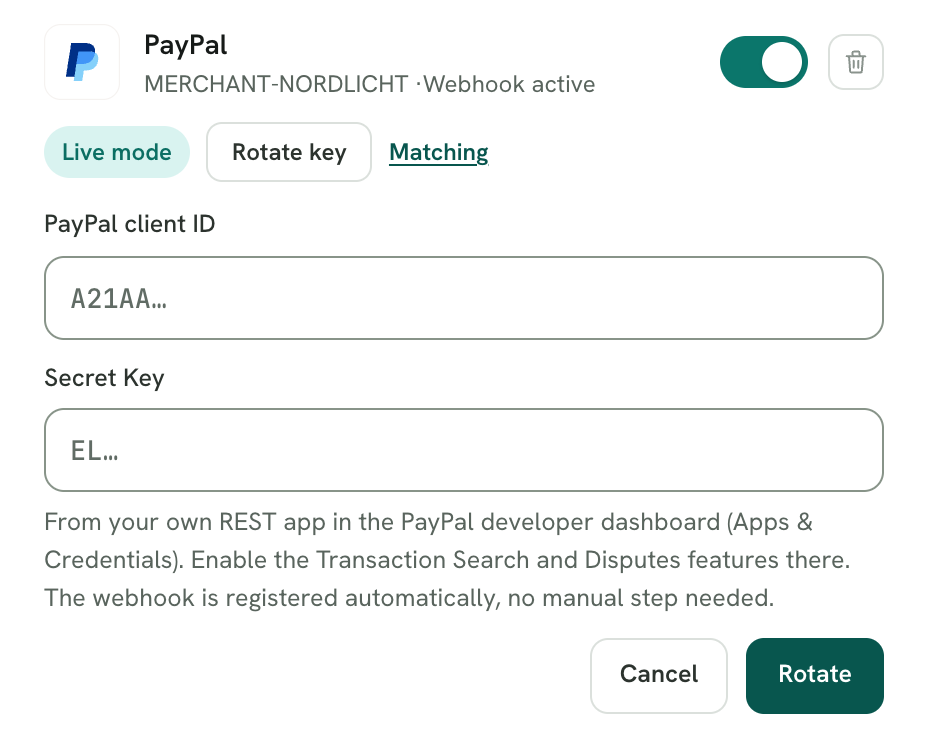
Rechnungskit registers the webhook in your app automatically, including signature verification of the messages. The Live Webhooks section in the PayPal dashboard can stay empty. If the webhook can't be created, Rechnungskit doesn't save the connection. Rechnungskit can't check at connect time whether Transaction search is on; only the first fetch shows that.
Good to know: PayPal only sends webhooks for payments that run through exactly this app. Payments from Shopify or WooCommerce run through their own PayPal connection, so no webhooks arrive for them. That is not an error. Rechnungskit fetches these payments and refunds through Transaction Search. The webhook covers payments through the Rechnungskit checkout.
When something goes wrong
- Message "PayPal credentials invalid (check client ID/secret)", usually with HTTP 401: PayPal accepted the values neither live nor in the sandbox. Copy the client ID and secret again from the live app; often a character is missing or the two values are swapped.
- The PayPal card shows "Test mode" instead of "Live mode": the credentials belong to a sandbox app. Create the app in the live area and enter the new values through "Rotate key".
- "Sync now" reports "0 payments checked": Transaction search is off, or PayPal hasn't released it yet (up to 9 hours). Check the box and wait until the next morning.
- Still no payments after a day: the app probably belongs to a different PayPal account. If your shop reports orders with PayPal while the PayPal connection hasn't delivered a single payment yet, Rechnungskit creates a task for it.
- Message "Connection failed: PayPal API not reachable": PayPal couldn't be reached or refused to create the webhook, for example because the app already has ten webhooks (PayPal allows no more per app). Try again later and delete webhooks of the app you no longer use in the PayPal dashboard.
- Note "PayPal already runs through Mollie" (or Stripe, Unzer): the direct connection captures the same payments twice. Rechnungskit detects duplicates of Mollie and Stripe payments automatically and classifies them as non-revenue; for Unzer that is technically impossible. If all PayPal payments run through the other provider, disconnect the direct PayPal connection.
What happens automatically
- Rechnungskit fetches payments and refunds every few hours through Transaction Search (last 7 days); payments through the Rechnungskit checkout also arrive instantly by signed webhook. A refund creates the cancellation invoice (Storno) automatically as soon as the original payment is matched to an order.
- If your shop reports a refund via PayPal, Rechnungskit waits for the matching refund at PayPal and creates the cancellation invoice from it. If the shop refund is further back, the fetch automatically catches up on up to 31 days. If no refund arrives at PayPal after a day, Rechnungskit creates the task "Review shop event" (see aufgabe-shop-correction). It closes on its own once the cancellation invoice exists.
- The PayPal fee is recorded per transaction and shown as a booking of its own, not netted against revenue. In the DATEV export PayPal has its own clearing account (Geldtransit; preset 1362 in SKR03, 1462 in SKR04): payments, fees and refunds book to it, payments and refunds against the invoice's customer account (Debitor; revenue and VAT come only from the revenue batch), and withdrawals to the bank account as a transfer from the clearing account to the bank. The fee books per payment on the payment date (fees against the clearing account). When PayPal returns part of the fee on a refund, that part books the other way round. You can change the account in the DATEV settings on the "Payment accounts" tab.
- Chargebacks (disputes) reopen the item and land in the tasks for clarification, including the dispute fee. Disputes you win are resolved accordingly; no automatic cancellation invoice is created.
- The order number is read from the PayPal fields (custom_id, invoice_id) and used for matching.
- With Shopify, invoice_id does not always hold the order number; sometimes it holds an internal key of the checkout session. For these payments Rechnungskit reads the PayPal transaction ID from the Shopify order and matches on that unambiguously. This needs no setting, only the connected Shopify connection (see zahlungen-abgleich).
How the DATEV export books a PayPal payment
By default the payments batch books a PayPal payment as PayPal clearing to customer account (Debitor). The fee goes to bank charges (Nebenkosten des Geldverkehrs) against clearing (SKR03 4970, SKR04 6855), the withdrawal to bank against clearing (SKR03 1200, SKR04 1800). A refund is the payment in reverse, customer account to clearing; the cancellation invoice in the revenue batch reduces revenue and VAT. After payment, fee and withdrawal, the customer account and the PayPal clearing account are both at zero, and your tax advisor can reconcile the clearing account directly against the PayPal statement.
These bookings get documents too: for a month's fees Rechnungskit creates a monthly fee list as a PDF, and a payout statement for every withdrawal. With Belegtransfer on, every fee and withdrawal booking links to it (Payout statements in the payments batch).
Withdrawals to your bank account
PayPal has no payout API like Stripe or Mollie. Instead, Rechnungskit reads the transaction history every day (Transaction Search, last 30 days) and recognizes withdrawals to your bank account as transfers.
Limits
- Rechnungskit doesn't book repayments of a PayPal business loan (transaction codes T9701/T9702) on its own, because PayPal does not document their booking codes reliably. By default they appear as a monthly task for clarification. If you turn on "Book PayPal business loan repayments" in the DATEV settings, the export books them through the mapping paypal_credit_repayment (loan liability to PayPal clearing). Agree on this with your tax advisor first.
- If PayPal runs through Mollie for you, you don't need the direct PayPal connection; the Mollie integration covers it.
- Without Transaction Search turned on in the REST app, fees and withdrawals stay incomplete.
Frequently asked questions
PayPal already runs in my Shopify store. Why do I still need my own app?
Shopify handles PayPal through its own PayPal connection, and so does WooCommerce. Rechnungskit has no access to that data. Through your own REST app, Rechnungskit reads the transactions of your business account, including the payments from your shop. You don't change anything about the PayPal setup in your shop.
What can Rechnungskit do with the app?
Rechnungskit reads transactions, fees, refunds and disputes, and creates its webhook on the app when you connect. It doesn't start payments or refunds. If you use PayPal in the Rechnungskit checkout, Rechnungskit handles your buyer's payment there through the same app.
Do I have to enter anything under Live Webhooks?
No. Rechnungskit creates the webhook itself when you connect. If a Rechnungskit address then shows up in the app's webhook list, that is this webhook. Don't delete it.
Can I try it with the sandbox first?
You can connect a sandbox app too; the card then shows "Test mode". But your real payments never appear there. So use the live app right away, even if your Rechnungskit project is still in test mode. For your shop, Rechnungskit only reads anyway.
I connected, but nothing arrives. What now?
Wait first: PayPal releases Transaction search with a delay of up to 9 hours. After that, Rechnungskit catches up on the last 7 days with the next fetch, or right away through "Sync now" under Payments. If it's still empty after a day, check the box and whether the app sits in the right PayPal account (see When something goes wrong).
Where to find it in the app
Rechnungskit is not a tax advisory or law firm. This article explains general principles and does not replace advice from a tax advisor (Steuerberater, § 5 StBerG) or a lawyer (§ 3 RDG). Rechnungskit is built for businesses based in Germany and prepares documents, tax rates and bookings automatically. How your specific case is treated remains your decision, ideally together with your tax advisor or a lawyer.