DATEV export and your tax advisor
Updated
Rechnungskit exports booking batches (Buchungsstapel) in the DATEV format EXTF, one for revenue and one for payments, each per month. Your tax advisor (Steuerkanzlei) imports the file straight into DATEV.
Check the month, then export
- Check the monthMonth overview with documents, tax rates, accounts, debit and credit
- Ready to export?Shows what is still missing. A missing account blocks the export
- Create a draftBy you, by your tax advisor, or automatically for the previous month if your tax advisor has set that up
- Upload the documentsBelegtransfer package to DATEV Unternehmen online
- Import the booking batchIn Kanzlei-Rechnungswesen. The document images attach themselves through the GUID
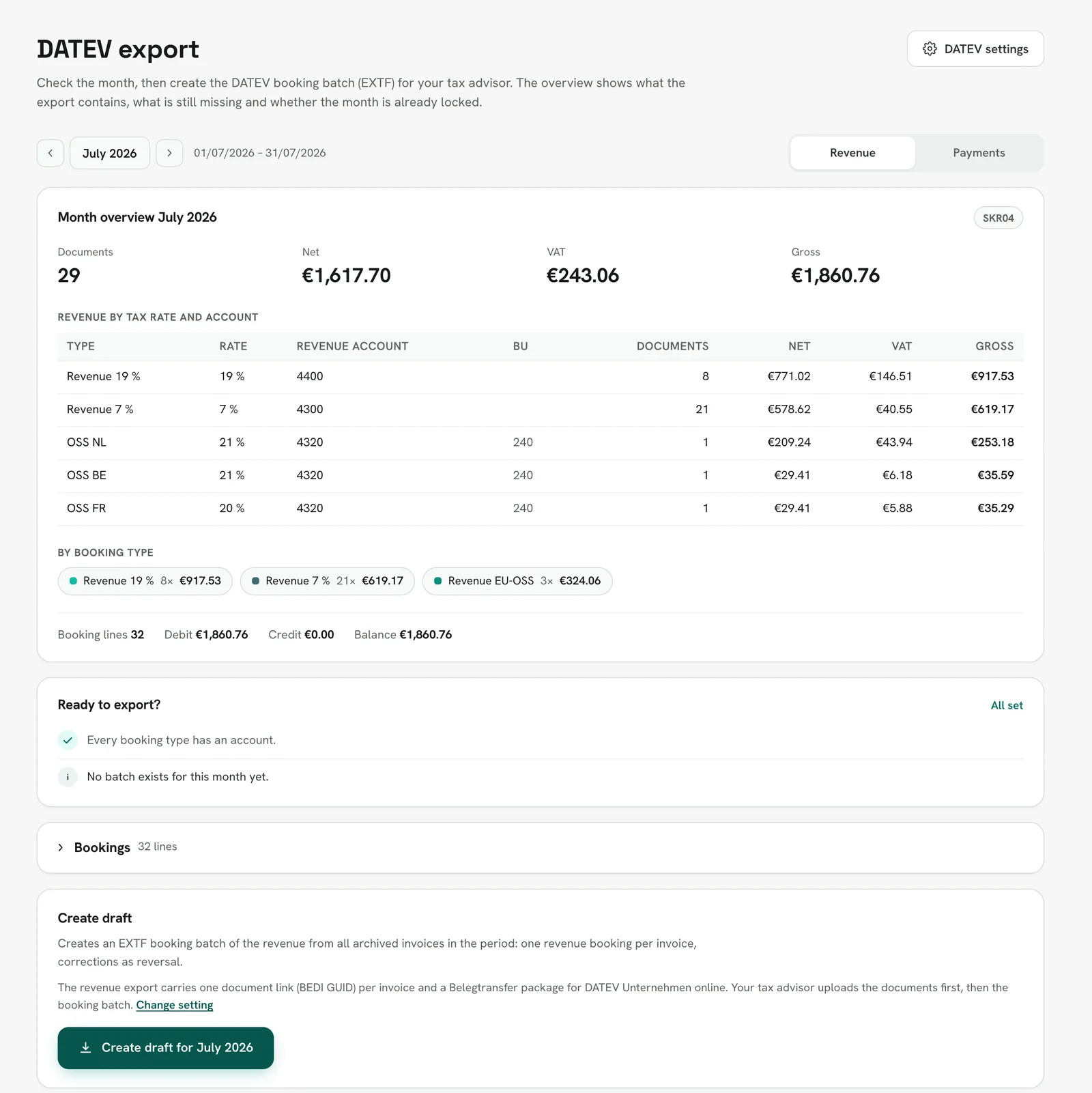
Under DATEV export you pick the month and the batch (revenue or payments) and see what the export will contain right away, without creating it first. Your tax advisor sees the same view with the same figures in the tax advisor portal under Reports → Revenue and Reports → Payments. The page reads from top to bottom:
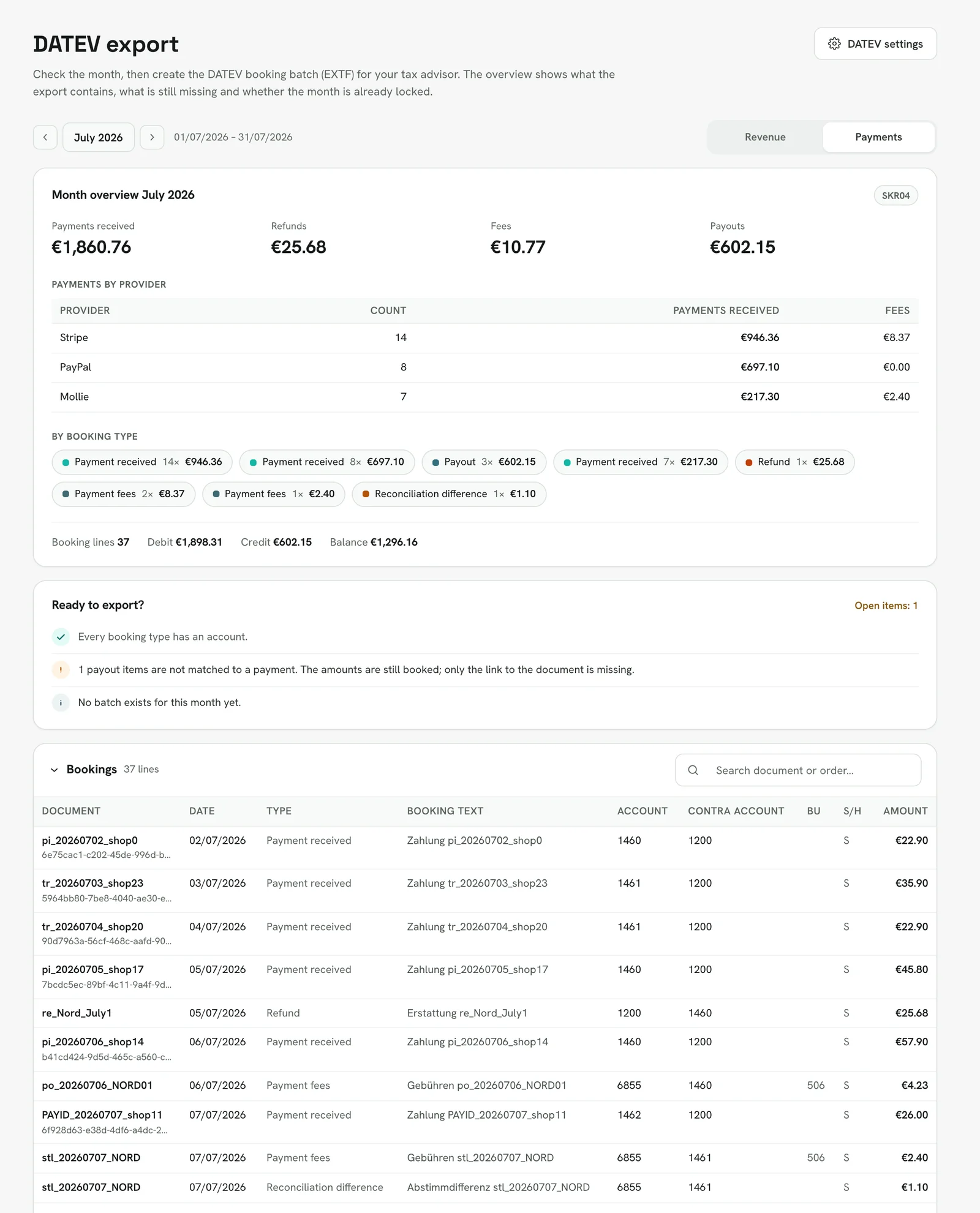
- Month overview: for revenue, the number of documents, net, VAT and gross, split by tax rate and revenue account, and OSS sales per country of destination with their BU tax key. For payments, the payments received per provider with fees, plus refunds and payouts. Below that, the booking types with debit, credit and balance.
- Ready to export?: missing account mappings (they block the export), payout items without a matched payment, payouts that are not complete yet, shipped orders without a document, a Belegstart (the date from which Rechnungskit issues your invoices) inside the month, and payment providers that were connected during the month. It also shows where the month stands: no batch yet, a draft open, or locked on a given date and how many bookings have come in since (stragglers).
- Bookings: the individual lines as they appear in the export, with account, contra account, BU key and rate, searchable and collapsible.
- Create draft: at the very bottom. The button is disabled and names the reason when the month is empty, an account is missing or the project is in test mode. If the month is already locked, "Export stragglers only" is preselected so nothing gets booked twice.
The export history sits below. Every new batch stores the checks as they were when it was created; the batch's detail page shows them together with the same overview of the stored lines. Batches created before October 4, 2026 have no stored checks.
In test mode the page shows the overview from your test documents with the note "Test data · export after going live". You can only create a batch after going live, but the overview shows you its content before that. Your tax advisor does not see projects in test mode.
Settings
Under Settings → DATEV settings you enter:
- The chart of accounts, SKR03 or SKR04 (SKR04 is common for a GmbH or UG). Setup presets both from your company name: corporations start with balance sheet accounting (Bilanz) and SKR04, everyone else with cash-basis accounting (EÜR) and SKR03. What counts is the chart your tax advisor books with. If it differs, choose it under General and click "Switch to SKR03" (or SKR04). Rechnungskit then resets, in one step, the chart in the export, the payment and revenue accounts and the standard account roles. Accounts you changed by hand stay as they are and should be checked with your tax advisor afterwards. If the accounts and the chosen chart do not match, the page shows a notice with "Reset accounts". You can only switch while there is no DATEV export yet; after that the chart is fixed for the fiscal year, and a change is something to settle with your tax advisor.
- Consultant number (Beraternummer) and client number (Mandantennummer); your tax advisor gives you both
- Fiscal year, account length, account mappings per booking type
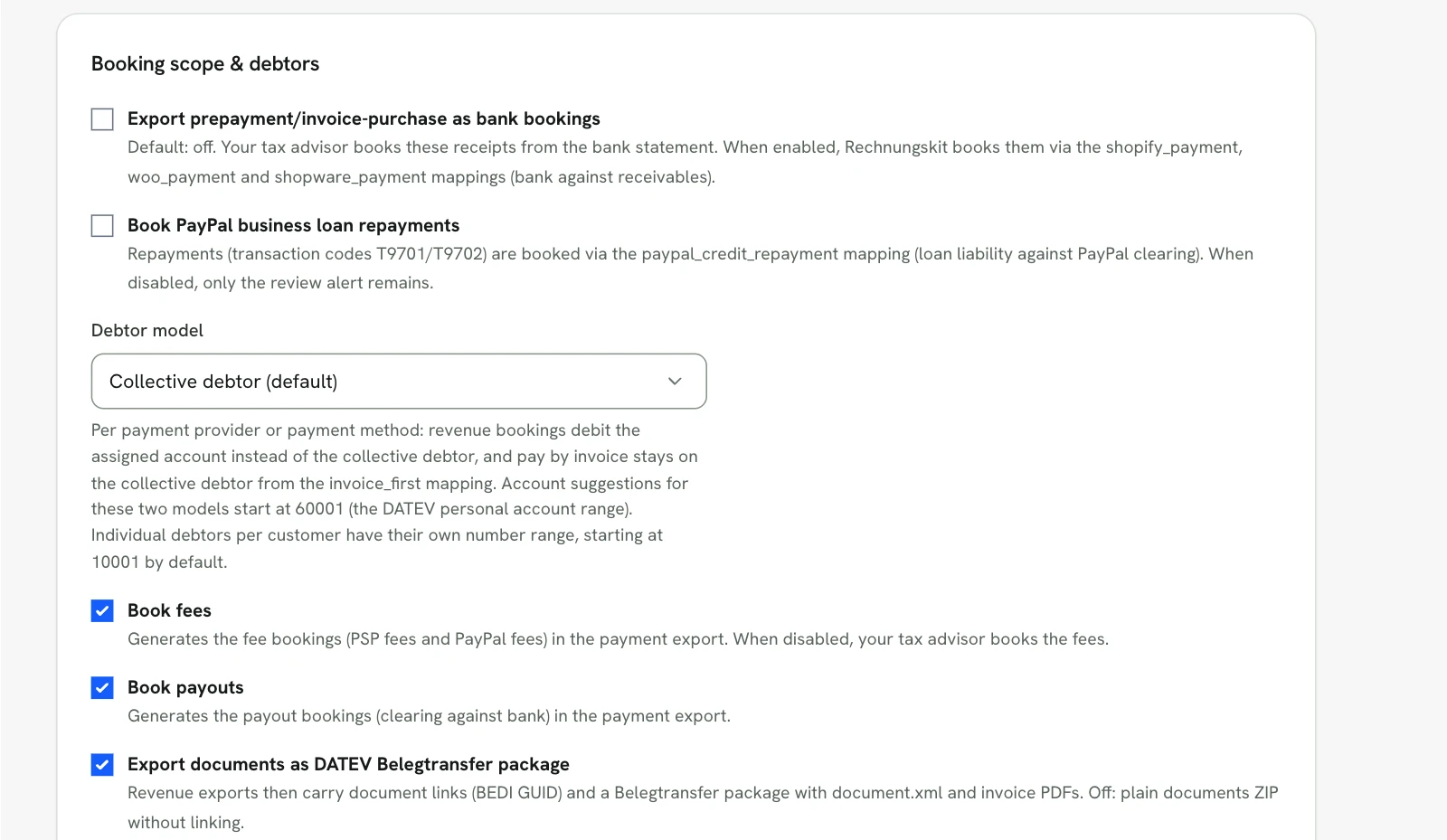
Debtors (Debitoren, customer accounts): the default is the collective debtor (Sammeldebitor), one number for all customer sales. Alternatively there is one debtor per payment provider, one per payment method, or an individual debtor per customer. The two kinds are numbered separately. For debtors per payment provider or per payment method, Rechnungskit suggests account numbers from 60001 (the DATEV personal account range), prefilled in the debtor table. With individual debtors, every customer automatically gets their own debtor number from a configurable number range (10001 by default), optionally only for business customers (B2B) so the chart of accounts does not balloon with thousands of consumers. Payments book to the same debtor as the invoice, so open items in DATEV clear per customer and dunning works there. You can adjust assigned numbers by hand (for example to match existing DATEV accounts); otherwise they stay stable for good. A master data file (Debitoren/Kreditoren) with names, addresses and VAT IDs is ready to download, both under Settings → DATEV settings and for your tax advisor in the tax advisor portal.
Preset revenue accounts: Rechnungskit books sales at 19 % to 8400 in SKR03 and 4400 in SKR04, sales at 7 % to 8300 and 4300, and OSS distance sales to 8320 and 4320. These are the revenue accounts of the DATEV standard charts 2026 (SKR03 item no. 11174, SKR04 item no. 11175). Until October 3, 2026, SKR04 was preset by mistake with 4300 for 19 %, 4310 for 7 % and 4315 for OSS. Rechnungskit switched mappings that still had exactly these old values. Mappings that you or your tax advisor had changed, and exports already created, stay as they are.
OSS distance sales (§ 18j UStG): sales to consumers in other EU countries are booked with tax key 240, and we fill in the country of destination in the DATEV field "EU-Land u. UStID (Bestimmung)" and that country's tax rate in "EU-Steuersatz". DATEV reads exactly these fields for its OSS EU report, from which the return to the Federal Central Tax Office (BZSt) is built. When goods ship from Germany, the origin fields stay empty. The revenue goes to one shared OSS revenue account; DATEV deliberately has no standard accounts per country and separates country and rate through the fields above. If you prefer one revenue account per destination country, change the account mapping oss.
Refunds: a refund books Debitor an Geldtransit (customer account to clearing account), on the clearing account of the provider that refunded. Stripe, Mollie, PayPal, Unzer, GoCardless and Klarna each have their own account mapping for this (for example paypal_refund), so a PayPal refund hits the PayPal clearing account and not Stripe's. If a provider-specific line is missing or disabled, the general mapping refund applies. Chargebacks work the same way, with mappings such as stripe_chargeback and the fallback chargeback. Revenue and VAT are reduced by the cancellation invoice (Storno) in the revenue batch; the refund itself only moves money. The section "Payments, refunds and chargebacks" further down shows how the customer account and the clearing account even out.
Booking texts: Settings → DATEV settings offers two styles. Standard writes the booking type plus the document number (for example revenue 19 % with the invoice number, a payment with the payment reference). Customer-based writes country, buyer name and order number for revenue (for example "DE Anna Muster Bestellung 434387", cancellations with the prefix "Storno - "), "Zahlung von Name / E-Mail" for payments and "Paypal Kosten Transaktion" with the PayPal transaction number for the PayPal fee. The texts themselves stay German because they end up in German books. The style applies from the next export; existing batches stay unchanged. There are no free-form texts. Stripe and Mollie fees are booked collectively per payout (not per transaction), so their booking text carries the payout reference.
Cost centers (KOST1): each account mapping can hold a cost center that goes into the DATEV field KOST1 (up to 36 characters). There is also a default cost center for derived bookings without their own mapping line (prepayments, credit balances, deferred income). DATEV only evaluates KOST on accounts set up for cost centers, typically profit and loss accounts.
Character encoding: the EXTF files (revenue and payments, also from the tax advisor portal and from automatic export creation) are written in Windows-1252, without BOM, with CRLF line endings. That is the encoding DATEV Kanzlei-Rechnungswesen and Unternehmen online expect on import; UTF-8 files show broken umlauts there. Characters that Windows-1252 does not have (an emoji in a booking text, say) are written as ?, so the export never fails because of them; the export page logs every replaced character with line and field. Under Settings → DATEV settings you can switch the encoding to UTF-8, only for programs that cannot read Windows-1252. The setting applies to new exports; a locked export keeps its file byte-identical.
Good to know: the export also works without a consultant number and client number, but your tax advisor cannot import it directly then. All account mappings are sensible starting values meant for review by your tax advisor; they are not tax advice.
Tax advisor access
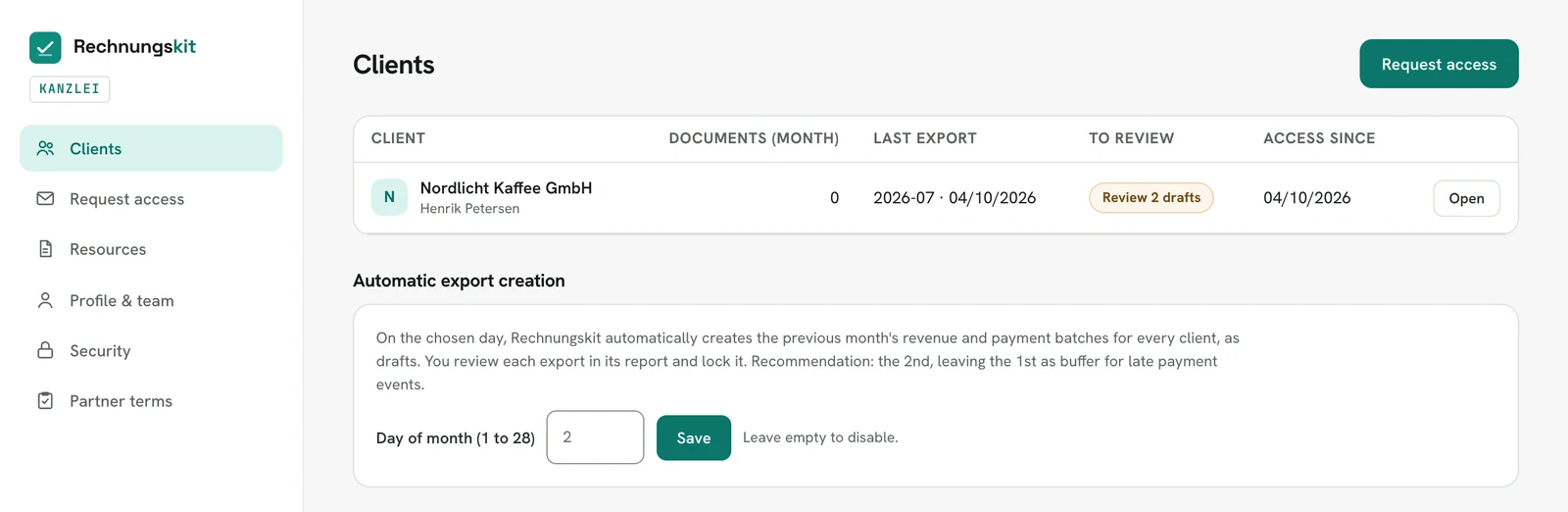
Under Settings → External access you invite your tax advisor by email. The tax advisor works in the tax advisor portal with the same functions you have in the app: they see documents and exports, maintain the DATEV settings entirely on their own (account mappings including cost centers, booking text style, document fields, debtor model, account roles including one-click adoption of the SKR standard accounts) and create, review, lock and delete exports themselves, straggler exports included, without emails going back and forth. You can revoke access at any time with one click, and every access is logged. For firms with many clients there is automatic export creation: on a day of the month they choose (1 to 28), Rechnungskit creates the previous month's revenue and payments batches as drafts for every client who granted access. The tax advisor reviews them in the report and locks them; nothing is ever locked automatically. The client list shows where drafts are still waiting for review.
Cash basis (EÜR) or balance sheet (Bilanz)
- EÜR (cash-basis accounting, the default): works right away with the defaults.
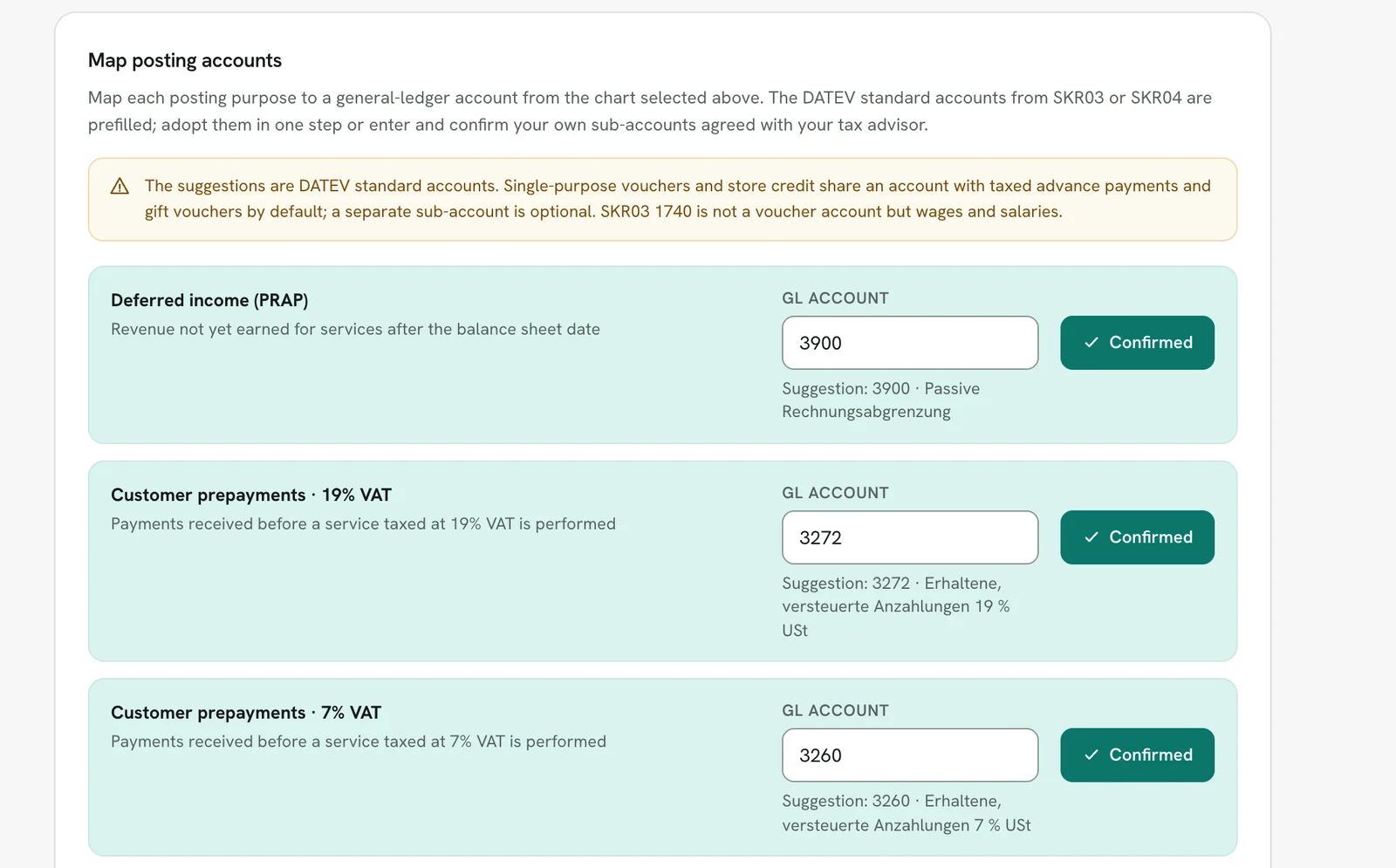
- Bilanz (balance sheet accounting): needs confirmed account mappings for revenue recognition, customer prepayments and voucher liabilities, plus a decision on the option for deferred income. Set this up together with your tax advisor; balance sheet mode cannot be switched on before that. If something is missing, the page names the open account roles right below the form when you save and links to the posting accounts; that is a missing mapping, not a permissions issue. All nine account roles are prefilled with the DATEV standard accounts from SKR03 or SKR04 (for example 0990/3900 for deferred income, 1718/3272 for taxed customer prepayments at 19 %, 1711/3260 for 7 %, 1796/3786 for gift vouchers issued). "Adopt SKR03 standard accounts" or "Adopt SKR04 standard accounts" confirms all open roles in one step, and each account stays editable afterwards, for example to a sub-account your tax advisor uses. Deferred income (passive Rechnungsabgrenzung) only exists with balance sheet accounting (§ 250 Abs. 2 HGB), with the tax option not to defer items up to €800 net (§ 5 Abs. 5 Satz 2 EStG).
- Legal form notice: if your company name points to a corporation or cooperative (GmbH, UG, AG, KGaA, SE, eG), Rechnungskit warns when you choose EÜR and in the go-live check. These legal forms count as merchants (Kaufleute), must keep books (§ 238 HGB, § 6 HGB, together with § 13 Abs. 3 GmbHG or § 3 AktG, for example) and must prepare a balance sheet; EÜR is only open to taxpayers without a bookkeeping obligation (§ 4 Abs. 3 Satz 1 EStG). Sources: § 238 HGB, § 4 EStG. The notice blocks nothing, because the decision is yours and your tax advisor's.
Documents with the export
For every revenue export, Rechnungskit builds a DATEV package in the background (under DATEV export → open the export, also in the export history and in the tax advisor portal). It is a ZIP with:
- the EXTF booking batch (CSV), in which every invoice booking carries a DATEV document link in the field Beleglink (
BEDI "<GUID>"). Rechnungskit assigns the GUID once per invoice and keeps it in every later export. Belegfeld 1 (document field 1) holds the invoice number by default, which DATEV uses to clear open items. Under Settings → DATEV settings you can switch Belegfeld 1 of the revenue bookings to the order number (for tax advisors who match open items by order number; documents without an order keep the invoice number), and Belegfeld 2 (revenue) can additionally carry the invoice number, order number or payment reference. In the payments export, Belegfeld 1 is configurable too (payment reference, invoice number or order number). One thing to watch with the debtor model: the selection (collective debtor, per payment service provider, per payment method, per customer) has to be saved; since September 2026, saving the debtor account table also saves the model currently selected. - the Belegtransfer package
Belege_<Mandant>_<YYYY-MM>.zip: adocument.xml(DATEV format version 6.0) plus one PDF per booked invoice (ZUGFeRD, so it is the e-invoice at the same time). From 5,000 documents or 500 MB, the package is split into parts (Belege_<Mandant>_<YYYY-MM>_1.zip,_2.zip, …), built one after the other in a fixed order by invoice number. Each finished part is stored right away and keeps its status, an error in part 3 does not throw away parts 1 and 2, and "Try again" resumes at the first unfinished part instead of starting over. The limit is 20,000 documents or 2 GB per export, because the outer DATEV package is a single ZIP file that is checked in one piece on download; split larger periods into several exports (one per month, for example). - a short guide for the tax advisor (LIESMICH) and a protocol (number of bookings with and without a document, missing documents).
Order in DATEV (this matters on both sides): first upload the Belegtransfer package to DATEV Unternehmen online with DATEV Belegtransfer or the XML-Schnittstelle online, then import the booking batch into Kanzlei-Rechnungswesen; DATEV then attaches the document images to the bookings automatically through the GUID. If the booking batch is imported first, DATEV cannot attach the images on import. The app points this out in three places: under DATEV export in the new export area (a note that the revenue export contains document links and a Belegtransfer package, with a link to the setting), on every export page with document links (the steps 1. upload documents, 2. import the booking batch) and in the tax advisor portal on the same export page. The LIESMICH in the DATEV package says the same. Payment, fee and payout bookings have no document link (empty). If an invoice has no PDF yet (not archived, for example), its booking stays without a document link and the protocol names it; Rechnungskit never creates a link to a file that is not in the package. A locked export's booking batch can no longer change: if a linked document cannot be rendered there, no package is built at all. The export page then shows "Document package not created: N documents missing" with invoice number and GUID per document and a "Try again" button that rebuilds the package once the documents can be rendered again.
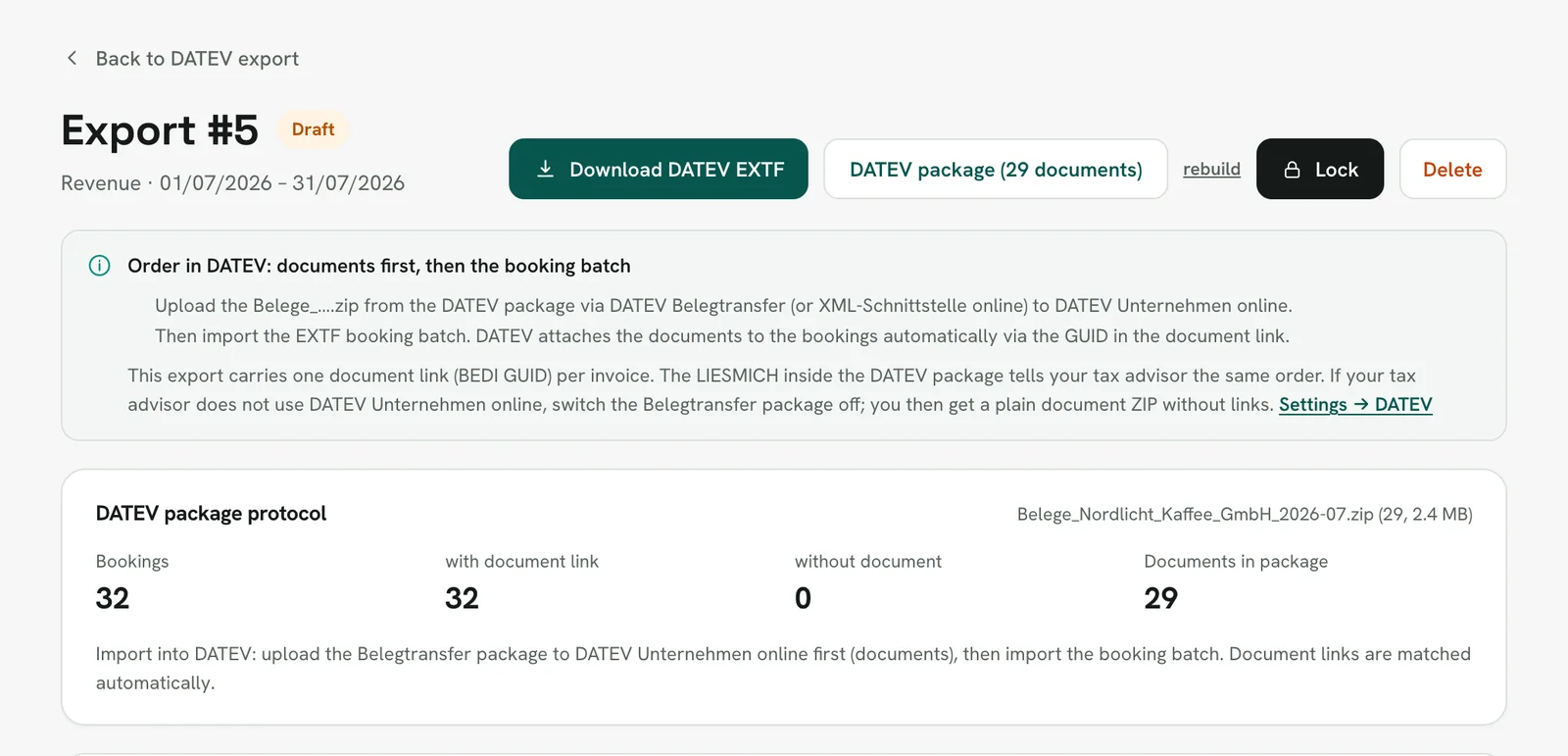
You can switch off the option "Export documents as DATEV Belegtransfer package" (Settings → DATEV settings, default: on, even without saved DATEV settings). Switching it off makes sense when your tax advisor does not use DATEV Unternehmen online or files documents in another system. You then get the plain documents ZIP instead (file name = invoice number, plus index.csv), meant for Pennylane (which matches "file name = document number") or a document management system, and the booking batch carries no document links. The links in the booking batch are set when the export is created, so the setting affects new exports; "Try again" rebuilds the document package with the setting as it is then. If you are not sure, ask your tax advisor whether they work with Unternehmen online, and otherwise leave the option on.
Locking (Festschreibung)
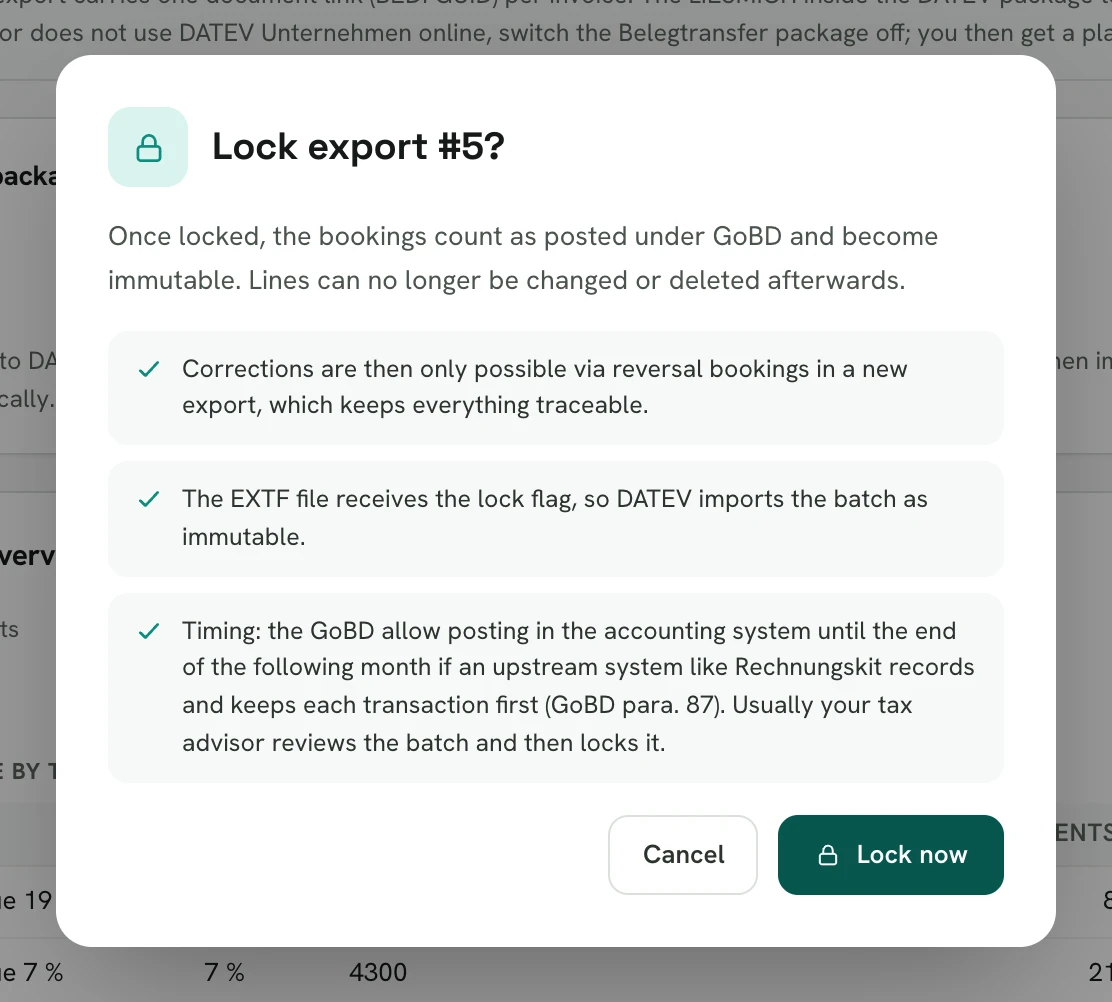
You can lock an export once it is created. After that it is immutable, and every download is byte-identical (checked with SHA-256). Owners, bookkeeping and the tax advisor role may lock. Drafts that are not locked can be deleted and created again.
When to lock is best agreed with your tax advisor; usually they review the batch and then lock it. As a time frame, the GoBD (the German tax authority's rules for electronic bookkeeping) allow posting in the accounting system until the end of the following month if an upstream system like Rechnungskit records and keeps each transaction first (GoBD para. 87). Batches must not stay open until the annual financial statements, though (GoBD para. 109).
The rule behind it is the ban on alterations: a booking must not be changed in a way that makes its original content impossible to determine (§ 146 Abs. 4 AO). Booking documents must be kept (§ 147 Abs. 1 Nr. 4 AO), and the document link ties every invoice booking to its document. How this should work in electronic systems is set out in the section on immutability of the GoBD (BMF letter of November 28, 2019).
Straggler export
The export works by period; there is no flag on individual documents. For bookings that only come in after a period was locked (late payments, for example), you get the option "Export stragglers only" when creating a batch: the new batch then contains only bookings that are in no locked batch of the same type. Drafts do not count as handed over, so deleting a draft makes its bookings exportable again. Straggler batches are marked in the export history. The option only appears once at least one locked batch of the type exists. If the amount of an already locked booking changes later, the comparison does not see it as new: it protects against double booking, not against differences.
Vouchers and credit balances
Rechnungskit books the sale of a multi-purpose voucher as a liability, not as revenue (line voucher_liability), because for a multi-purpose voucher only the redemption counts as the supply of goods or services (§ 3 Abs. 15 UStG). Movements in the credit ledger, referral rewards for example, go through the account roles. Rechnungskit does not book voucher redemptions yet: the voucher part stays open on the customer account until your tax advisor books the redemption (voucher liability an customer account). The redemptions per order are listed under Vouchers. More in Gift vouchers and credit balances (in German).
Payments, refunds and chargebacks
Payments book against the customer account. By default, a payment received books the provider's clearing account an the customer account, in SKR03 for example 1360 an 1400, in SKR04 1460 an 1200. A refund is the reverse booking, customer account an clearing account. A chargeback (Rücklastschrift) puts the clearing account on the credit side and the customer account on the debit side: the receivable is open again, and the invoice stays valid and is not canceled. If the customer pays later, the new payment clears the same customer account.
Revenue and VAT only arise in the revenue batch (customer account an revenue, cancellation invoices the other way round). When your tax advisor imports both batches, no revenue counts twice, and every customer account evens out across the two. On payments, refunds and chargebacks, the export uses the customer account that the revenue batch uses for the matching invoice: the collective debtor, the debtor per provider or payment method, or the customer's individual debtor. For a refund that is the customer account of the cancellation invoice. This applies as long as the mapping holds the standard debtor. An account your tax advisor entered there stays. If there is no matching invoice, the export books the mapping as it is.
Until October 4, 2026, payments were preset as clearing account an revenue (SKR03 8400, SKR04 4400), refunds the other way round, and chargebacks against Durchlaufende Posten (transitory items, 1590). Rechnungskit switched mappings that still had exactly these old values and added a chargeback mapping per provider (for example stripe_chargeback). If your tax advisor had changed even one payment, refund or chargeback mapping, all of them stayed as they were, and the same goes for a locked payments batch. Exports already created do not change.
Refunds in the payments export
A refund puts the payment provider's clearing account on the credit side, exactly the reverse of the payment. DATEV reads the debit/credit flag (Soll/Haben) relative to the field Konto (account). When the clearing account is the contra account, the mapping therefore needs "Soll" (debit). Until September 30, 2026, the default said "Haben" (credit); Rechnungskit corrected the unchanged standard mappings. If a refund mapping looks like a payment received, the DATEV export warns and names the mappings concerned.
Canceled and refunded payments
If a payment is refunded in full before any document was created, say because the order was canceled, there never was any revenue. Rechnungskit still books both amounts through the customer account: the payment received as the provider's clearing account an customer account, the refund as the exact reverse booking. Nothing remains on the customer account afterwards, the clearing account matches every payout, and neither revenue nor VAT arises. The booking text reads "Storniert + erstattet" (canceled + refunded) with the transaction number.
Rechnungskit deliberately does not use "Durchlaufende Posten" (transitory items) here: that account is reserved for money collected in the name and for the account of a third party (§ 10 Abs. 1 Satz 4 UStG). If the payment and the refund fall into different months, Rechnungskit does not file the case itself, because a payment before the cancellation can be a prepayment in the month it was paid. Instead it creates a task to clear up with your tax advisor. The DATEV settings explain this right next to the payment accounts as well.
Limits
- The export format is DATEV EXTF. Other accounting formats are not offered. Documents come in a Belegtransfer package (a file upload by your tax advisor); there is no direct online transfer to DATEV (DATEV XML-Schnittstelle online, DATEV-Datenservice).
- The DATEV package exists only for revenue exports. Payments exports contain no document images.
- If an account mapping is missing for a booking type, the preview shows a warning and creating the export stays blocked until the mapping is added (adopting the standard accounts in one click helps). You never get a silently incomplete batch. Automatic export creation also skips the client with a notice instead of delivering something incomplete.
- Test documents never appear in the export.
Where to find it in the app
Recent changes
Rechnungskit is not a tax advisory or law firm. This article explains general principles and does not replace advice from a tax advisor (Steuerberater, § 5 StBerG) or a lawyer (§ 3 RDG). Rechnungskit is built for businesses based in Germany and prepares documents, tax rates and bookings automatically. How your specific case is treated remains your decision, ideally together with your tax advisor or a lawyer.