What Rechnungskit does
Updated
Rechnungskit automatically creates compliant e-invoices from your sales, archives them in an audit-proof way and prepares your bookkeeping for DATEV. In short: a payment comes in, a compliant invoice goes out, and the bookings are ready.
 Shopify
 WooCommerce
 Shopware
 Checkout
 API
API Stripe
 PayPal
 Mollie
 Klarna
 Rechnungskit
- Matchpayment and order belong together
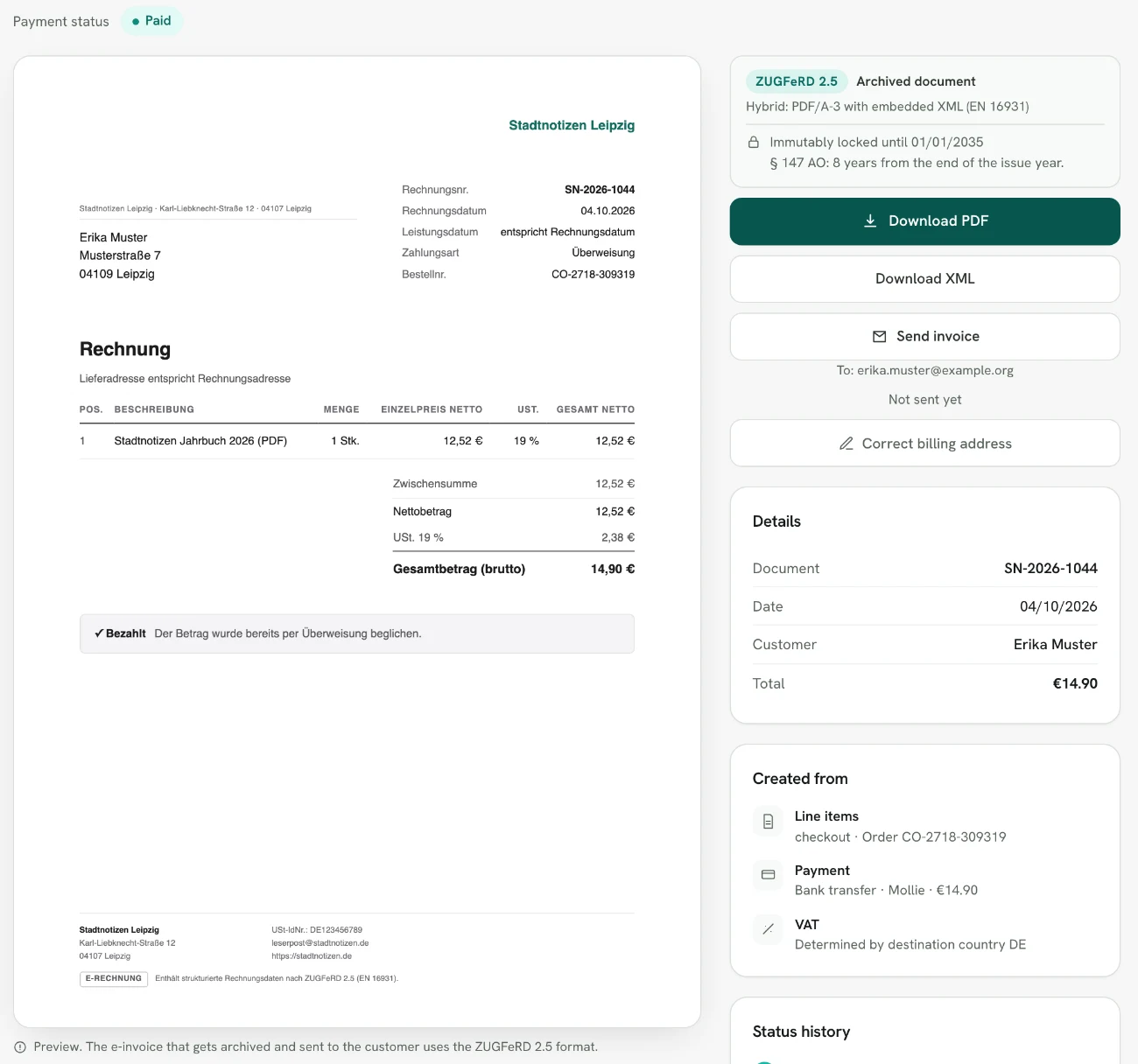
- Create e-invoiceZUGFeRD under EN 16931, validated first
- Archive8 years under the GoBD, with a checksum
- You connect your sales sources: a shop (Shopify, WooCommerce, Shopware 6) or your own application via REST API. Without a shop you sell through the Rechnungskit Checkout, and one-off jobs go in as manual orders.
- You connect your payment providers: Stripe, Mollie, PayPal, Unzer, GoCardless, Klarna or Shopify Payments.
- Rechnungskit matches every incoming payment to its order and creates a ZUGFeRD invoice from it (a PDF with embedded XML following EN 16931).
- Every invoice is validated before it is created and then archived for 8 years in line with the GoBD, the German tax authority's rules for electronic bookkeeping (retention period under § 14b UStG), with a SHA-256 checksum and immutable storage.
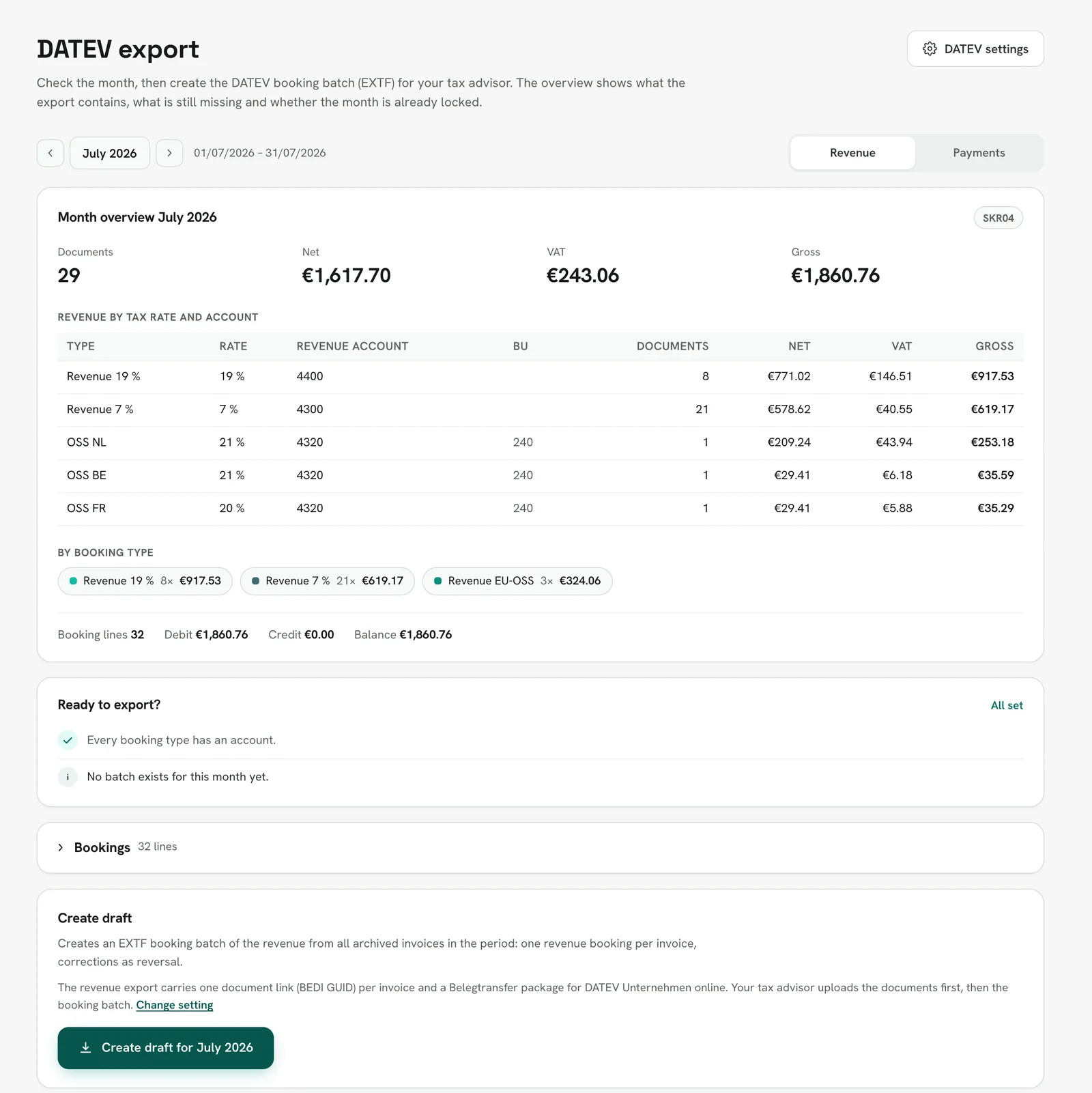
 5. For bookkeeping you export DATEV booking batches (EXTF, chart of accounts SKR03 or SKR04). For EU sales, an OSS export (One-Stop-Shop) and the Zusammenfassende Meldung (ZM, the EC sales list) are ready as well.
Which shops and payment providers Rechnungskit works with
- Shops: Shopify, WooCommerce and Shopware 6. You connect the shop under Connections → Connect, and orders arrive automatically from then on.
- Without a shop of your own: with the Rechnungskit Checkout you sell through your own link, for example from social media or a newsletter. Several products with a cart and QR code you sell through the shop. Single orders you enter as a manual order.
- Your own application or SaaS: you report orders through the REST API.
- Payment providers: Stripe, Mollie, PayPal, Unzer, GoCardless, Klarna, and Shopify Payments through the Shopify connection.
- Courses and memberships: Memberspot and Ghost grant access automatically after a purchase in the Rechnungskit Checkout.
- Accounting: the DATEV export for your tax advisor. If you keep your books in Pennylane, you read the export in there (Pennylane).
- Marketplaces such as Amazon, Kaufland, Otto or eBay have no ready-made connection yet, see Marketplaces.
If you sell through a different shop system, write to us at support@rechnungskit.de before you commit.
What Rechnungskit does differently on purpose
- Invoices are created automatically from events (payment, shipping), not by hand. There is no "write invoice" button for shop sales, but there is a manual route for one-off cases.
- Cancellation invoices (Storno) also come from events: a refund in the shop or at the payment provider creates the cancellation invoice automatically. There is deliberately no manual cancellation button.
- If a detail is missing (for example a VAT rate for a destination country), Rechnungskit holds the invoice and creates a task for you instead of issuing something wrong.
How to start
You create your account for free and connect your shop and payment providers in test mode. The setup walks you through step by step, with Kit, the assistant in the app (getting started). Once everything fits, you go live and set the document start. After that you invite your tax advisor (DATEV export and tax advisors).
- TodayCreate an accountfree, in test mode
- Test modeConnect and checkshop and payment providers, look at test documents
- Go-liveSet the document startreal invoices from here on, billing starts here
- After thatInvite your tax advisortax advisor access with DATEV export
Limits
- XRechnung (pure XML for public-sector buyers) is available per customer once a Leitweg-ID (the German public-sector routing ID) is stored. PEPPOL delivery, FatturaPA and ebInterface are not supported, and German B2C and B2B retail does not need them.
- Rechnungskit does not replace tax advice. Defaults such as the chart of accounts or account mappings are starting points that your tax advisor should review.
- Bank account reconciliation (FinTS) is not part of the product. Payment information comes from your payment providers and your shop.
This page explains what Rechnungskit does and is not tax or legal advice.
Where to find it in the app
- Dashboard Overview of documents, revenue and open tasks
- Invoices All invoices and cancellation invoices created
- Connections Connect Connect shops and payment providers
- Reports & export DATEV export Create and download the DATEV export
- Changelog Changelog: new features, integrations and improvements since you signed up (the same entries as "What's new" at rechnungskit.de/en/changelog), shown as the menu item "Changelog" at the bottom of the sidebar; a red number shows how many are unread. The list shows date, type, title and first paragraph for each entry, 10 entries per page; a click opens the full entry right in the app, with a link to the public changelog. Opening the list marks everything as read. In the English interface the entries are in English.
Rechnungskit is not a tax advisory or law firm. This article explains general principles and does not replace advice from a tax advisor (Steuerberater, § 5 StBerG) or a lawyer (§ 3 RDG). Rechnungskit is built for businesses based in Germany and prepares documents, tax rates and bookings automatically. How your specific case is treated remains your decision, ideally together with your tax advisor or a lawyer.