Selling with Rechnungskit Checkout
Updated
Rechnungskit Checkout is a hosted checkout page. It lets you sell a product you created yourself through a shareable link, with no shop at all. You can sell digital and physical products.
The link has the form checkout.rechnungskit.de/c/your-slug. You can put it anywhere: in a social media bio, a newsletter or as a button on your website. This page explains which products run through it, how a purchase works and what Rechnungskit takes care of along the way for VAT, the right of withdrawal and the invoice.
- Product and addressthe buyer chooses and enters their details
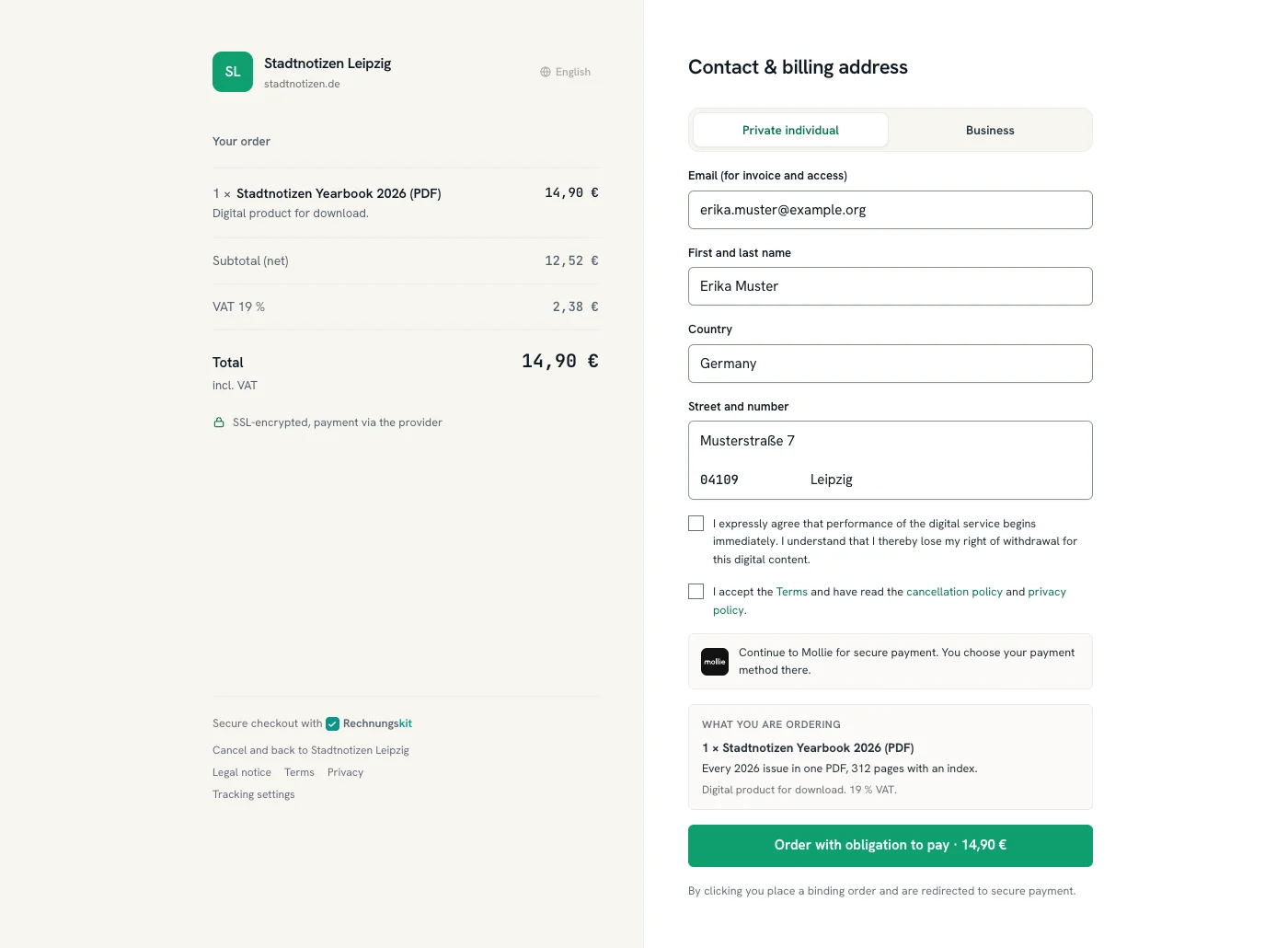
- Order page under § 312j BGBbox "What you are ordering", button "zahlungspflichtig bestellen"
- Paymentwith Mollie, Stripe, PayPal or Unzer, or by bank transfer if you offer it
Payment providers and payment methods
Payment runs through your own payment provider and its payment methods, not through Rechnungskit. The money goes straight to your account.
| Payment route | Selectable in the checkout |
|---|---|
| Mollie, Stripe, PayPal, Unzer | yes, one of them handles the checkout |
| Klarna, GoCardless | not yet (integrated as payment providers, but not for the checkout) |
| Pay by invoice, prepayment by bank transfer | yes, in addition, only for buyers in Germany |
You choose which provider handles the checkout under Connections → Connect on the checkout card. Without an active, selected provider, checkout links stay paused and cannot be activated.
Checkout in test mode
In test mode, the checkout only takes payments with test credentials. You add them under Connections on your provider's card, in the field "Test credentials (for checkout and subscriptions in test mode)": Mollie test_…, Stripe sk_test_…, a PayPal sandbox app or Unzer s-priv-…. The checkout uses them automatically in test mode, and your live connection stays next to them. You don't need a live connection for this: a provider connected with test credentials only can still be selected as the checkout provider in test mode. Without test credentials, buyers see "Test mode: payment not possible". Emails from a test purchase go only to your own address, with "[TEST]" in the subject, and your webhooks carry "test": true. Conversion events to Meta and the purchase pixel on the thank-you page stay off for test purchases. At go-live the test credentials are switched off and access from test purchases (Ghost, Memberspot) is revoked. Your checkout links then run through the live connection. If the provider is connected with test credentials only, the go-live check warns you, and after go-live the checkout shows "Payment currently unavailable" until you connect the live credentials. More under Checkout and subscriptions in test mode.
You switch on pay by invoice and prepayment under Shop page, tab Payment & shipping. The buyer then picks the payment method in the checkout. With bank transfer there is no redirect to the payment provider. Details are in the help page Pay by invoice and prepayment.
Which products run through the checkout
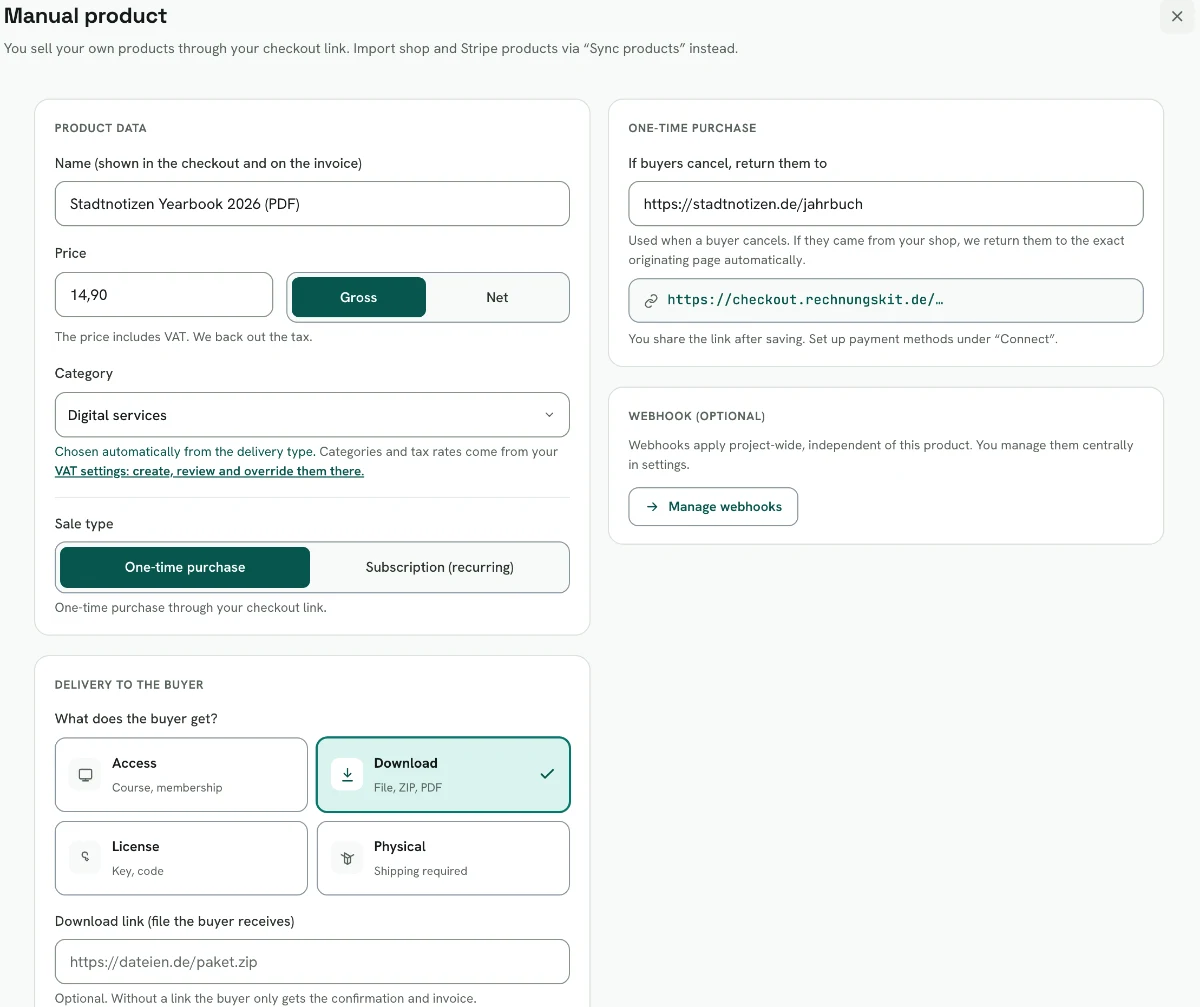
Through the checkout you sell manual products, that is, products you created yourself in your catalog. Products from a shop or from Stripe still come in through their import and connection, not through the checkout link.
When creating a product, you choose the sales type:
| Sales type | Link | Note |
|---|---|---|
| One-time purchase | checkout link /c/… | create the product once, set the price and VAT rate, activate the checkout |
| Subscription (recurring) | its own subscription link /s/… per subscription plan | no checkout link, see Subscriptions |
If you want to offer the same service once AND as a subscription, create two products.
How a purchase works
- The buyer opens the link, chooses the product and enters their address.
- They are handed over to the payment provider you chose (Mollie, Stripe, PayPal or Unzer) and pay on its hosted payment page. The money goes straight to your account, not through Rechnungskit.
- After a successful payment, Rechnungskit automatically issues the GoBD-compliant e-invoice, creates the DATEV export and files the document in the tamper-proof archive.
Order page under § 312j BGB
The order process implements § 312j BGB (German Civil Code):
| Requirement | How the checkout meets it |
|---|---|
| Abs. 2: price and mandatory information right before the order | box "What you are ordering" directly above the order button, with the product's "Key characteristics" |
| Abs. 3: clearly labeled order button | label "zahlungspflichtig bestellen" (order with obligation to pay) |
| Abs. 4: consequence of a breach | without this button, no contract with consumers would come about |
You enter the "Key characteristics" per product in the product editor (Art. 246a § 1 Abs. 1 Nr. 1 EGBGB). The box appears in the one-time checkout, in the subscription checkout and also for a cart from your shop page.
For buyers who use the checkout in English, the product editor has the field "Key characteristics in English". If it stays empty, they see the German text. If the product has an English name, English-speaking buyers also see it in the order, at the payment provider and on the confirmation page. The invoice still follows its own invoice language.
Webhooks after the purchase
You can also configure a webhook that fires on every order, for example for an automation with Zapier, Make or n8n. You manage webhooks centrally under Connections → API, section Checkout webhooks. They apply to the whole project, independent of the individual product.
| Topic | How it works |
|---|---|
| Events | event checklist on the webhook: checkout.paid and checkout.failed for one-time purchases, seven subscription.* events for subscriptions (details under Subscriptions). Can be changed any time |
| Testing | the test button sends a sample per event |
| Format | POST with a JSON body |
| Address | a public https address, no internal or private network addresses. Delivery does not follow redirects, so enter the final address |
| Time limit | if the receiver does not answer within 10 seconds, the attempt counts as failed and is retried |
| API key | the normal credential for no-code receivers, chosen by you. We send it as the header X-Api-Key and also as x-make-apikey |
| HMAC signature | optional, toggle "Also send an HMAC signature". Header X-Rechnungskit-Signature; you see the signing secret exactly once after saving |
With the API key, the built-in API key authentication of the custom webhook in Make works directly. In n8n the Header Auth of the webhook node fits, in Zapier the filter behind a Catch Raw Hook.
By default the signature is off and the API key is enough. The signature is only extra protection for anyone who checks it in the receiver. A step-by-step guide for all three tools, including the signature check, is public at Securing checkout webhooks.
VAT ID check and reverse charge
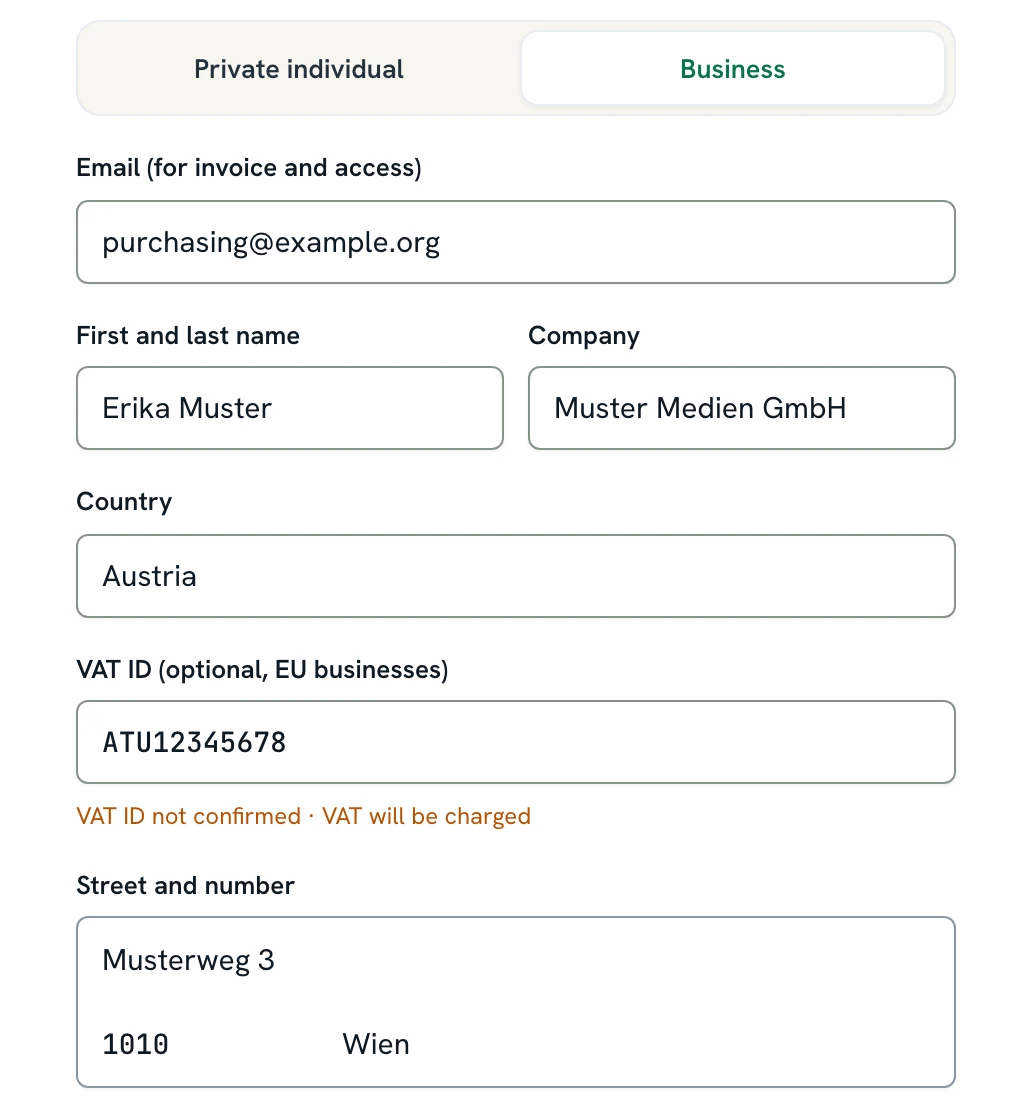
If a business from another EU country enters its VAT ID (USt-IdNr.) in the checkout, Rechnungskit checks it directly with the Federal Central Tax Office (BZSt). This is a qualified eVatR confirmation, which includes matching the company name and address. The check never blocks the purchase; the buyer can always pay.
Business customers with a confirmed VAT ID
Rechnungskit applies reverse charge only if the BZSt confirms the VAT ID. The invoice is then issued without VAT (0 %) with the corresponding note:
| Supply | Legal basis |
|---|---|
| Digital service | reverse charge mechanism (§ 3a Abs. 2, § 14a Abs. 1 UStG) |
| Goods | tax-free intra-community supply (§ 4 Nr. 1 Buchst. b, § 6a UStG) |
If it is not confirmed or the BZSt is unreachable at the moment, Rechnungskit charges VAT as usual.
The check result is archived tamper-proof as a record and matches the check that the invoice pipeline runs again after the payment. The requirement is that you have entered your own German VAT ID in the settings. It is the requester ID at the BZSt. If it is missing, VAT is charged as usual without a check.
Leitweg-ID for public-sector buyers
Business customers with country Germany also see the link "Public-sector buyer? Add your Leitweg-ID" below the billing address. It opens an optional field "Leitweg-ID" (routing ID). If a public-sector customer fills it in, their invoice is automatically created as XRechnung 3.0 instead of ZUGFeRD (see Documents, formats and the GoBD archive). All other buyers simply leave the field empty.
Private customers from the EU
Important: reverse charge applies only to business customers with a confirmed VAT ID. If a private person from another EU country buys (without a VAT ID), reverse charge is never applied. A private EU customer therefore always pays VAT, never 0 % reverse charge.
| What the buyer purchases | Classification |
|---|---|
| Physical goods | intra-community distance sale (§ 3c UStG) |
| Digital product | electronically supplied service (§ 3a Abs. 5 UStG) |
Both share the same EU-wide threshold of €10,000 (§ 3a Abs. 5 Satz 3, § 3c Abs. 4 UStG). Below the threshold (and without opting out) the German tax rate applies. Above the threshold or with OSS registration, the tax rate of the country of destination applies. You control whether the threshold is exceeded through your OSS profile in the settings (registered or opted out).
Sources: § 3a UStG, § 3c UStG, § 4 UStG, § 6a UStG, § 14a UStG
Country selection when you pay tax in the destination country
If you pay tax in the country of destination (registered for OSS or opted out of the threshold), the checkout offers only EU countries for which the VAT matrix knows a rate for the product. If the cell for a country is missing, the country does not appear in the country selection and an order to it is rejected. This applies to one-time purchases and the subscription checkout alike.
Under Settings → VAT rates, such cells say "not selectable in the checkout". Once you add the rate, the country can be selected again right away. Below the threshold nothing is hidden, because the German rate applies there.
Use cases and delivery
Through the webhook you deliver automatically after payment. Typical cases:
| Case | What happens after payment |
|---|---|
| License or key | the webhook generates the license key and emails it to the buyer |
| Download link | a time-limited link to a file, PDF or template |
| Access to a course or a membership | the buyer is unlocked in your course platform |
| Physical product (a book is a good example) | with a delivery address in the checkout; the shipping service is notified |
Whatever the case, the revenue account, tax rate and date of supply are right for DATEV per product type automatically. For physical products the buyer can choose the quantity; digital products are always sold once.
For Memberspot and Ghost you don't need a webhook of your own. The native integrations under Connections → Integrations unlock course access and membership tiers automatically after payment (see Memberspot and Ghost).
Delivery type on the product
On the product, under "Delivery to the buyer", you choose how it is delivered, also later on: Access, Download, License or Physical.
This has to fit the revenue recognition. "Physical" therefore becomes physical goods and vice versa. Rechnungskit aligns the other field and tells you what it changed. The checkout only charges shipping for "Physical", and only then does the note "Digital product for download" disappear.
Ad attribution and consent
For ad campaigns, the checkout captures click IDs (fbclid, gclid, msclkid, ttclid) and UTM parameters from the link, but only with the buyer's consent. It freezes them on the purchase:
- In the webhook: they are in the payload, field attribution.
- On your thank-you page: if a return URL is set on the product, the checkout appends them to the redirect, together with rk_order, rk_amount_cents and rk_currency.
The checkout asks for consent with a slim bar at the bottom edge. It only appears when tracking is active in the project (Meta Ads, Google tag or TikTok pixel) and a privacy policy URL is set. Without a yes, the field attribution stays empty and nothing goes to ad platforms. The buyer's email is never in the URL.
Do I need a cookie banner in the checkout? Not one of your own: Rechnungskit shows the bar automatically. Without tracking there is none, and the checkout stays cookie-free. Details are in the help page Consent and cookie banner in the checkout.
The native Meta Ads integration under Connections → Integrations reports purchases directly to your ad account (see Meta Ads). You enter the Google tag and TikTok pixel there with their IDs.
Right of withdrawal for digital products
When consumers buy a digital product (access, download, license), the checkout shows a checkbox. With it, the buyer agrees that the service starts immediately and confirms that their right of withdrawal expires as a result. The consent is stored with the order.
| Supply | When the right of withdrawal expires |
|---|---|
| Digital content | when performance of the contract begins, provided consent and confirmation exist and the buyer has received a contract confirmation that records both (§ 356 Abs. 6 Nr. 2, § 312f Abs. 3 BGB) |
| Services | only once the service has been provided in full (§ 356 Abs. 5 Nr. 2 BGB) |
You decide per product whether the checkbox appears: under Products in the product editor, toggle "Ask for consent to lose the right of withdrawal" (default: on). If you switch it off, the checkbox disappears for this product. Your customers then keep their 14-day right of withdrawal (§ 355 Abs. 2 BGB) and can withdraw from the purchase within that time, even after using the service.
If there are several digital products in the cart, the checkbox appears as soon as one of them requires it. Business customers and purely physical carts do not see the checkbox.
Sources: § 356 BGB, § 312f BGB, § 355 BGB
Order number, invoice and confirmation page
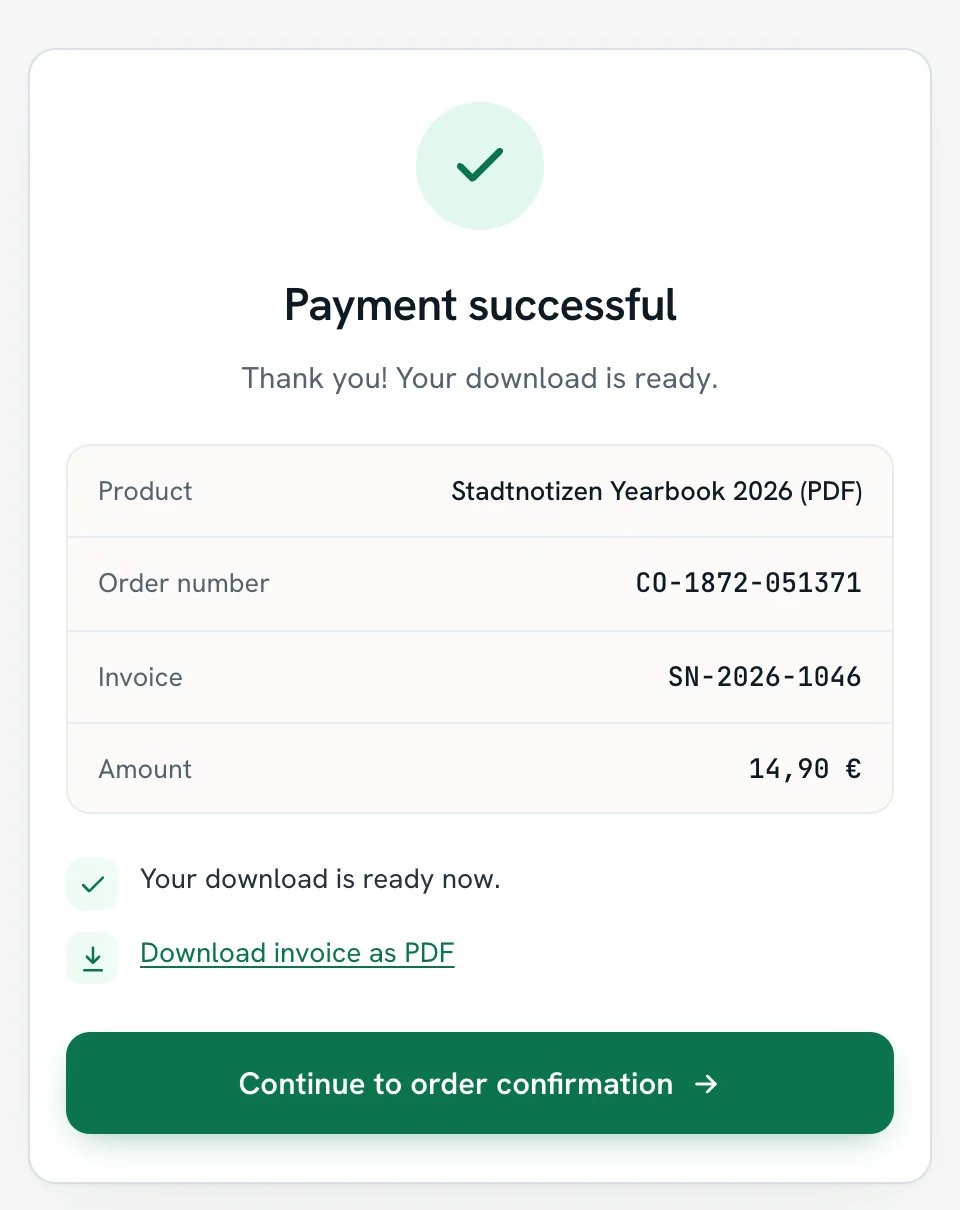
Every checkout order gets a short order number in the format CO-1234-567890. On the confirmation page after payment, the buyer can download their invoice as a PDF as soon as it has been created.
The note "invoice by email" only appears if invoice delivery by email is switched on in the settings. Without it, the download on the confirmation page is the way to the invoice.
Physical and digital goods
Digital services are invoiced immediately after payment. For physical goods, the invoice is only created when you mark the order as shipped with "Mark as shipped", so the date of supply is correct. Accordingly, the PDF on the confirmation page is ready right away for digital services and after shipping for physical goods.
Several products in one order
For several products in one order, you add the parameter items to the checkout link, a list of product ID and quantity: /c/
- Quantities: physical products have a quantity control, digital ones stay at 1. If the buyer presses minus at quantity 1 (for digital lines, "Remove"), the line drops out. One always stays.
- Allowed products: only one-time products of the same project with an active checkout, because subscription products keep running through their own subscription link. The checkout silently ignores unknown or deactivated products in the link.
- Webhook: all lines are in the payload field items (product ID, name, quantity, gross unit price). productId and product still name the first line.
Shipping in a cart link
With such a link, every physical product brings its own flat shipping rate, and the rates are added up.
If the cart mixes 7 % and 19 %, we split the shipping by the ratio of the gross values of the goods. That follows the standard the German Federal Fiscal Court (BFH) sets for splitting a total price across goods with different tax rates: the gross individual selling prices (BFH, judgment of January 22, 2025, XI R 22/22). Example: with €30 of goods at 7 % and €70 at 19 %, €5 of shipping splits into €1.50 and €3.50. This way the overview, the payment page and the invoice show the same amounts to the cent.
Shop page
If you want to offer several products on one page, set up a shop page in the menu under Products → Shop page. It gets its own link of the form checkout.rechnungskit.de/shop/your-slug. There is one shop per project.
Buyers choose quantities there, see the goods value and shipping, and go to the normal checkout with "Checkout". Everything ends up in one order and on one invoice. Prices appear as you created them (gross prices with "incl. VAT", net prices with "plus VAT"). The shop shows no tax amount, because that depends on the address and is only calculated in the checkout.
The three tabs
| Tab | What you set there |
|---|---|
| Page | title, introduction, accent color, layout (tiles or list), which products appear in which order, an image per product (JPG, PNG or WebP; we shrink it automatically) |
| Payment & shipping | flat shipping rate per order, optionally free shipping from a certain goods value, plus pay by invoice and prepayment |
| Share | copy the link or download the QR code as an SVG for flyers and trade fair stands. SVG stays sharp at any print size |
Without a product selection, the shop shows all one-time products with an active checkout. Subscription products never appear in the shop; they keep running through their subscription link.
Shipping and payment in the shop
Shipping follows its own rule in the shop: one flat rate per order instead of the shipping costs of the individual products, optionally free shipping from a certain goods value. It is only charged when something physical is in the cart.
Payment runs through the same payment provider as your checkout links, plus bank transfer if you want (pay by invoice, prepayment). If neither a provider nor bank transfer is set up, the shop accepts no orders.
Publishing, logo and cookies
- Publishing: the shop only becomes visible once you publish it. Before that its link answers with "not found". If you take the shop offline, anyone opening the link sees a note with a link to your website.
- Logo: the logo at the top of the shop and the checkout comes from your invoice template (/settings/template). You change it there for all three places.
- Cookies: the cart lives only in the link. Without active tracking, the shop sets no cookies and shows no bar. With tracking, the same consent bar as in the checkout appears.
Quantities and descriptions
Whether buyers may choose a quantity is set per product with "Allow multiple units", optionally with a maximum quantity. Without a setting: physical products yes, digital ones no.
Longer texts about the product, such as scope, level or format, go into the product under "Shop description". On the shop page they appear behind "Learn more".
Where to find it in the app
Rechnungskit is not a tax advisory or law firm. This article explains general principles and does not replace advice from a tax advisor (Steuerberater, § 5 StBerG) or a lawyer (§ 3 RDG). Rechnungskit is built for businesses based in Germany and prepares documents, tax rates and bookings automatically. How your specific case is treated remains your decision, ideally together with your tax advisor or a lawyer.