Odoo and DATEV: getting bookings and e-invoices to your tax advisor
Three ways from Odoo to DATEV: the DATEV export from Odoo's general ledger, the OCA module datev_export for Odoo Community, and Rechnungskit with no module. Plus SKR03/SKR04, GoBD, ZUGFeRD and XRechnung e-invoices, and why invoices may only come from one place.

On this page 6
Is there a DATEV interface for Odoo?
Yes. There are three ways, and which one fits depends on where the bookkeeping happens.
Odoo's own DATEV export. With one of the German localization packages installed, you export the journal items from the general ledger through the Actions menu: "Datev DATA (zip)" for the tax advisor and "Datev ATCH (zip)" for the receipts in DATEV's document transfer (Odoo documentation, Germany localization). This assumes you keep your books in Odoo.
The OCA module for Odoo Community. The Odoo Community Association maintains the module datev_export under the AGPL-3 license, for Odoo versions 13 to 19. It provides the base configuration that other DATEV modules build on.
Rechnungskit, with no module. Rechnungskit reads sales orders and payments from Odoo Community 18 or newer through the API. From these it creates the e-invoice, the GoBD archive and the monthly DATEV export, with revenue and payments in separate batches. Nothing gets installed in Odoo, and Rechnungskit writes nothing back.
Which routes to DATEV exist in general, and how other tools implement them, is explained in the guide DATEV interface for online retailers.
Is Odoo enough for accounting in Germany?
Odoo supports the SKR03 and SKR04 charts of accounts. You can only switch the chart of accounts while nothing has been booked yet. Odoo calls itself GoBD certified, but its own documentation points out that the taxpayer remains responsible for record retention (Odoo documentation).
In practice your tax advisor usually decides. If they work in DATEV, you need a clean way to get your data there, even if you could book in Odoo.
Once a month: what changes for your online business.
Deadlines, law and tax, market news and what is new in Rechnungskit. Free, for shops, SaaS and digital products. Learn more
The three ways to your tax advisor compared
| DATEV export from Odoo | OCA module datev_export | Rechnungskit | |
|---|---|---|---|
| Where is the bookkeeping done? | in Odoo | in Odoo | in DATEV, at the tax advisor's office |
| Install in Odoo | localization package | module | nothing |
| E-invoice | from Odoo | from Odoo | from Rechnungskit, ZUGFeRD |
| Payment matching | in Odoo | in Odoo | automatic, e.g. with Stripe |
| Fits if | you book in Odoo yourself | you use Odoo Community and book in Odoo | Odoo sells and your tax advisor books |
E-invoices with Odoo: ZUGFeRD and XRechnung
Odoo Community ships its own module for e-invoices in ZUGFeRD and XRechnung format. If you connect Odoo to Rechnungskit, Rechnungskit takes over the invoices. One rule applies: invoices come from one place only. Two invoices for the same sale can make the VAT due twice under Section 14c UStG. So you turn off "Automatic Invoice" in Odoo before you connect.
If an order still shows a posted document from Odoo, Rechnungskit won't issue a second invoice. It holds the order and raises a task.
How it works with Rechnungskit
- Turn off "Automatic Invoice" in Odoo (Website → Configuration → Settings).
- Create a separate user with an API key in Odoo, with the rights "All Documents" in Sales and "Billing" in Accounting.
- Enter the Odoo URL, database, user and key in Rechnungskit.
- Rechnungskit checks the connection with a test request and imports the orders from the last 7 days.
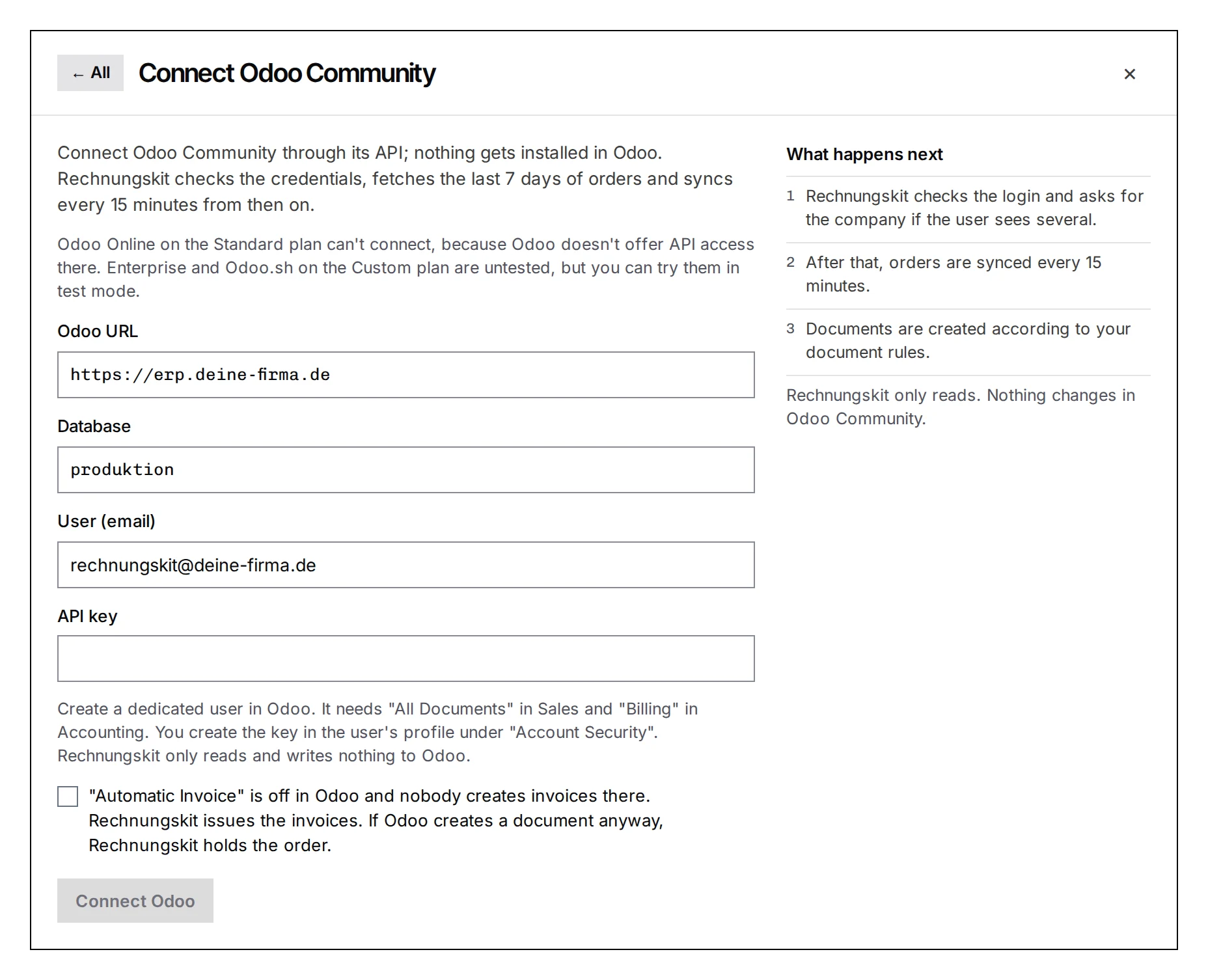
After that, Rechnungskit asks Odoo every 15 minutes for new and changed orders, payments and deliveries, and every 4 hours a second run checks the last 24 hours. It picks up every confirmed sales order, from the webshop and from the back office. For goods the invoice is created on shipment; services such as licenses are invoiced right away. Rechnungskit finds Stripe payments through the Stripe reference on the payment, and refunds through Stripe create the cancellation invoice. The help page Connect Odoo Community has every step, and Odoo and Rechnungskit gives an overview.
What to know before you start
- The integration is built for Odoo Community 18 or newer. Odoo 17 and older can't be connected.
- Odoo Online only works on the Custom plan, because that is the only plan with API access. With Enterprise and Odoo.sh, Rechnungskit warns you when you connect, since Odoo's own accounting comes with those plans.
- Your Odoo instance has to be reachable publicly over HTTPS.
- Rechnungskit reads one company per connection.
- From Odoo 18 on, a regular user's API key expires after 90 days at most. You then create a new one and reconnect, and Rechnungskit fetches any missing orders by itself.
FAQ
Is there a DATEV interface for Odoo Community?
Do I even need DATEV with Odoo?
Can Odoo create e-invoices in ZUGFeRD or XRechnung format?
Does Rechnungskit work with Odoo Online?
What happens if Odoo has already created an invoice?
Sources
Rechnungskit is not a tax advisory or law firm. This article explains general principles and does not replace advice from a tax advisor (Steuerberater, § 5 StBerG) or a lawyer (§ 3 RDG). Rechnungskit is built for businesses based in Germany and prepares documents, tax rates and bookings automatically. How your specific case is treated remains your decision, ideally together with your tax advisor or a lawyer.