Yes, Rechnungskit handles incoming invoices too
Expenses is included in every account at no extra cost and has been out of beta since 11 Nov 2026: document inbox, reading, checks, approval, payment run and DATEV export.
No credit card. You only pay once real invoices go out.
- Supplier invoice
- Read and checked
- Approval
- Payment run
- DATEV
On this page 14
What you get.
Yes, Rechnungskit handles incoming invoices too. Under Expenses, your suppliers' invoices come in through a document inbox of your own, by upload or through the API. Rechnungskit reads them, checks the mandatory details under § 14 UStG, and someone on your team approves them. Payment runs, bank reconciliation and the DATEV export follow. Expenses is included in every account at no extra cost, and it has not been a beta since 11 Nov 2026.
- Document inbox an address of its own for each project; every PDF, XML, PNG or JPEG attachment becomes an incoming document, up to 15 MB and up to 10 attachments per email
- Upload PDF, XRechnung or ZUGFeRD as XML, PNG and JPG, several files at once, on a phone with "Take photo"
- API POST /v1/purchase-documents with an API key and an Idempotency-Key
- E-invoices XRechnung, ZUGFeRD and Factur-X, values from the XML, validated against EN 16931 with a rule ID for each finding
- PDF, photo or scan read by AI in a data centre in the EU, only the document is sent, uncertain values are marked yellow
- Mandatory details checked under § 14(4) UStG with the legal reference for each one, the shorter list for small-amount invoices, plus a duplicate check
- IBAN protection a document never changes a supplier's stored bank details; if it names a different IBAN, it stays out of every payment run until you decide
- Approval by a person allowed to approve, and above a gross amount you set, by a second person (four-eyes rule)
- Approving together clean documents in one go; per business partner automatically if you want, with a maximum amount
- Payment method detected already paid by card, PayPal or Klarna, or collected by direct debit; such documents stay out of payment runs
- Payment run a SEPA file for your online banking, with early-payment discounts; with a connected bank, sent straight from Rechnungskit
- Bank reconciliation through the connected bank or a statement as camt.053 or CSV
- GoBD archive the original unaltered and encrypted, with a SHA-256 checksum
- DATEV export creditor to expense, payment to bank, tax case per business partner, including reverse charge under § 13b UStG
Why it matters.
Supplier invoices arrive as PDFs by email, as photos of till receipts and more and more as e-invoices in XML, which every business in Germany has had to be able to receive since 2025. Typing them up, filing them in folders and paying them one by one takes time. If an invoice is missing a mandatory detail, your input VAT deduction is at risk, and that often only comes up when your tax advisor asks. Then, at the end of the month, someone digs the documents out of an inbox.
What Expenses does for you
Under Expenses, Rechnungskit handles the other side of your invoicing: it collects your suppliers' invoices, reads them, checks them against the mandatory details and puts them in front of you for approval. You pay approved documents through a payment run, Rechnungskit matches the debits against your bank account, and everything goes into the DATEV export for your tax advisor.
Expenses left beta on 11 Nov 2026 and is switched on in every account. It costs nothing extra: incoming documents are not counted as billable documents, however many you approve.
Rechnungskit is built for online retailers and SaaS companies, from the first shop up to businesses with several million in revenue and tens of thousands of orders a month.
From arrival to booking
- Readfrom the XML of an e-invoice, otherwise by AI as a suggestion
- Check mandatory detailslist under § 14(4) UStG, duplicate check
- Approveby one person, above an amount by a second
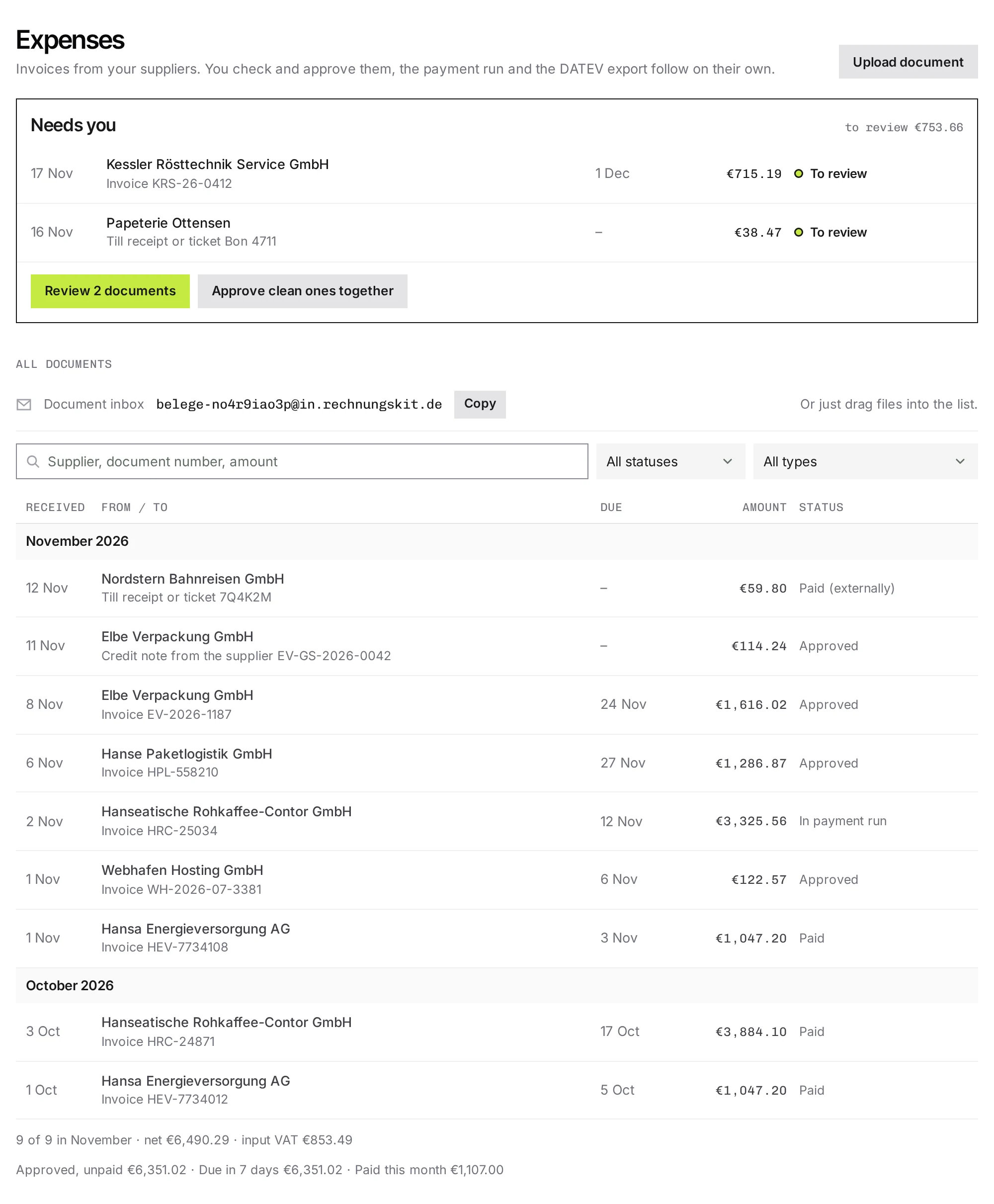
At the top of Expenses, the "Needs you" card lists the documents waiting for you. Below it, smaller, are all documents by month, with your document inbox address, search and filters.
How invoices come in
Incoming invoices arrive digitally, without extra software. Every project has its own document inbox with an address like belege-…@in.rechnungskit.de. Forward invoices to it or give the address to your suppliers as your billing address. Each attachment becomes an incoming document of its own. You can also upload documents, several at once, and on a phone as a photo. From your own system they come in through the API.
Since 1 Jan 2025, every business in Germany has had to be able to receive e-invoices (section 14.1(5) UStAE). An email inbox is enough for that. The document inbox accepts XRechnung, ZUGFeRD and Factur-X, and the original is then kept unaltered in the archive.
Reading and checking the mandatory details
For an e-invoice, the values come from the XML, and Rechnungskit validates the file against EN 16931. A PDF without XML, a photo or a scan is read by an AI in a data centre in the EU. Only the document is sent. The result is a suggestion, and values read with doubt are marked yellow. You change any value with one click.
Rechnungskit then checks the mandatory details from § 14(4) UStG, each with its legal reference, and whether the document has come in before. You can only deduct input VAT from an invoice that has these details (§ 15(1) sentence 1 no. 1 UStG). If something is missing, Rechnungskit warns you, and "Request correction" emails the supplier with the missing details. For a small-amount invoice up to €250 gross, it checks the shorter list from § 33 UStDV.
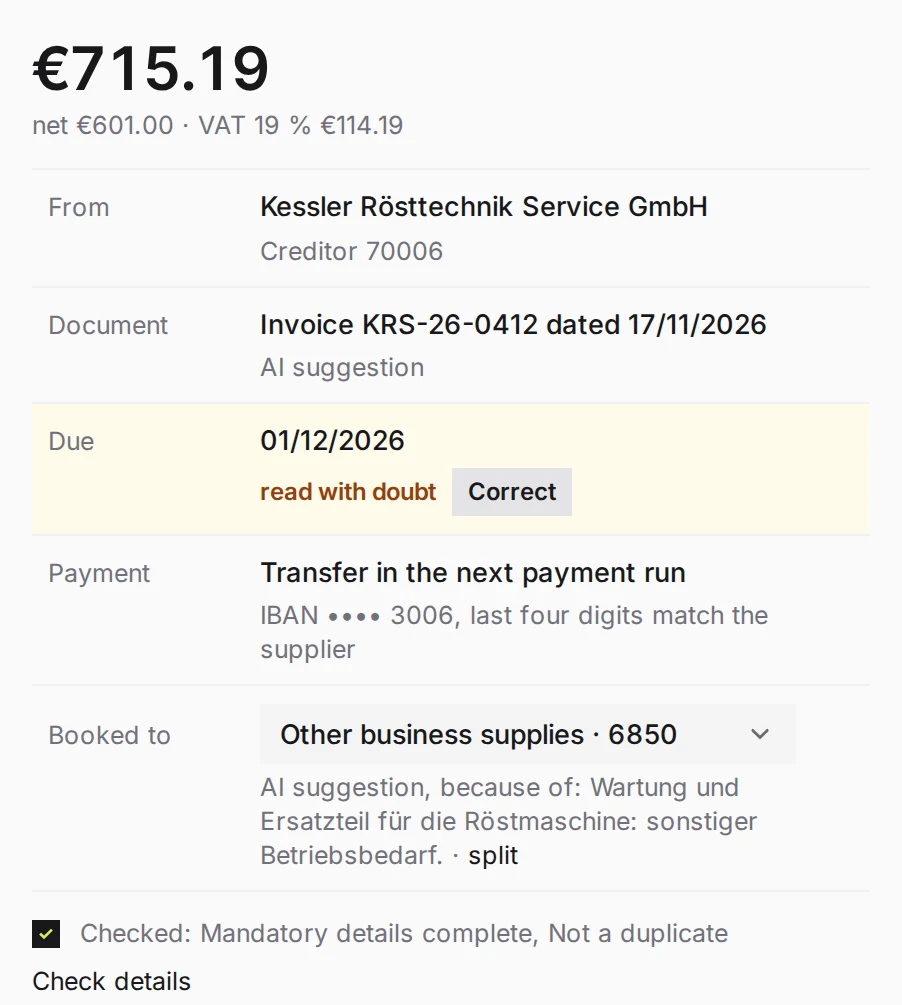
Rechnungskit also recognises how a document is paid. If it says "paid by Klarna" or "collected by direct debit", you are asked before the document goes into a payment run. If a document names a different IBAN from the stored one, Rechnungskit warns you and leaves the supplier's bank details as they are, because a swapped account number on an invoice is a known fraud route.
Approving
The Admin and Internal accounting roles can approve. Above a gross amount you set, the person who uploaded a document can't approve it. Clean documents, where everything was read with confidence and no check flags anything, you approve together. For business partners whose documents you always approve the same way, such as a subscription, a rule with a maximum amount can take over if you want.
If someone else knows better whether an invoice is right, ask them with "Request approval": one person per part of the invoice, through a link, no account needed. Approving stays with you. How it works is shown under invoice approval.
Paying and reconciling
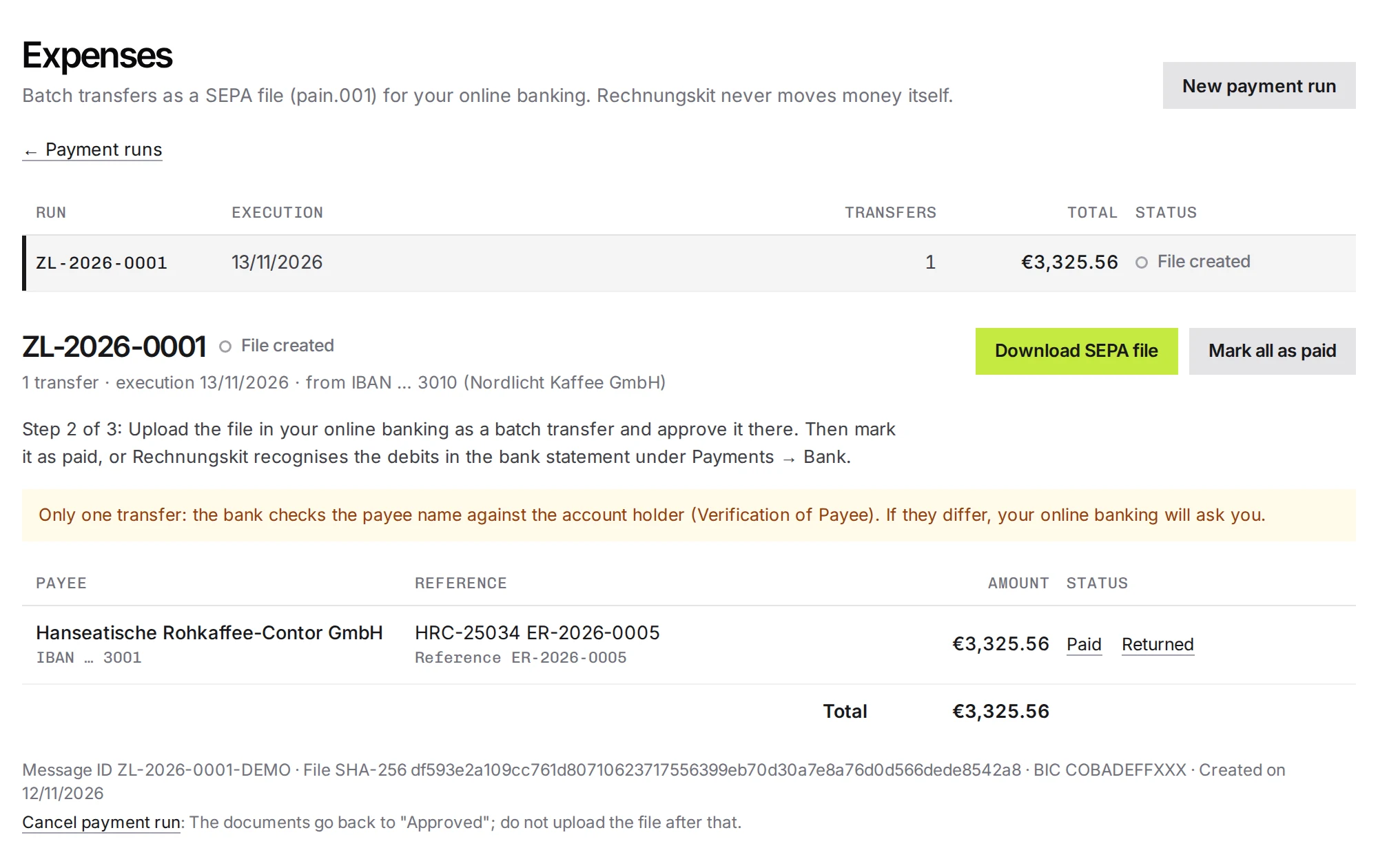
Rechnungskit builds a payment run from approved documents. You upload the SEPA file to your online banking as a batch transfer and approve it there. If your bank is connected, you send the payment run straight from Rechnungskit. Early-payment discounts shown on the document can be deducted in the payment run.
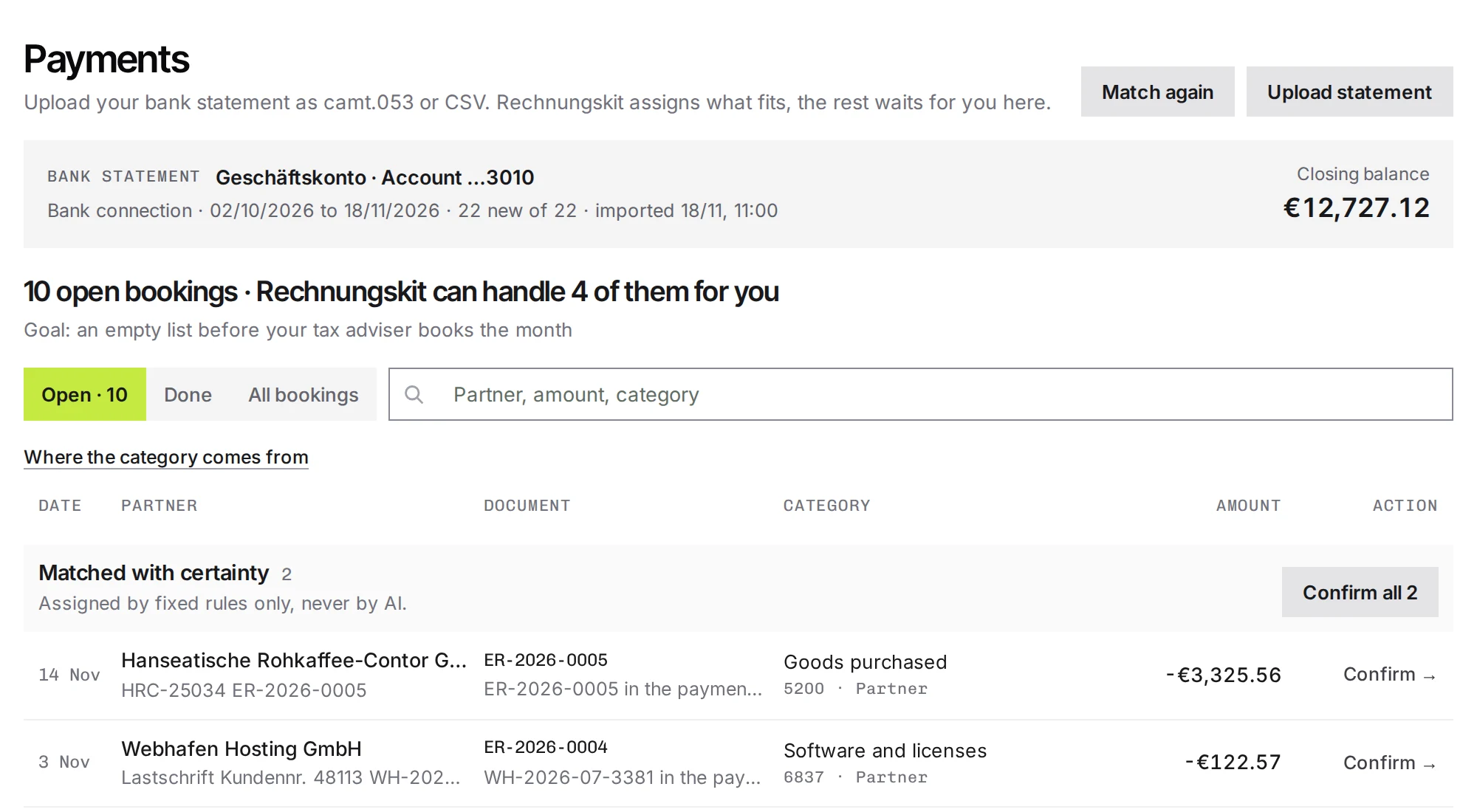
Under Payments → Bank, transactions come in through the connected bank or a statement as camt.053 or CSV. Rechnungskit matches debits to documents by fixed rules, for example by the reference from the payment run or the invoice number in the payment reference. The document then counts as paid from the booking date.
Self-billing and commission statements
You settle commissions to affiliates, purchases of used goods or work by creators yourself by self-billing, instead of waiting for an invoice. That is allowed if it was agreed in advance (§ 14(2) sentence 5 UStG). Rechnungskit issues the self-billing invoice as an e-invoice, sends it to the recipient and files it as an incoming document in the same list. For private individuals there is the commission statement. Self-billing invoices and commission statements count as billable documents when you issue them.
Archive and DATEV export
Every original is kept unaltered and encrypted in the GoBD archive, with a SHA-256 checksum. The eight-year retention period runs to the end of the year (§ 14b(1) UStG, § 147(3) AO). Rejected documents are not deleted, they stay archived with the reason.
The DATEV export books approved documents: creditor to expense, the payment to bank. How they are booked depends on the business partner's tax case, such as Germany with VAT or a supplier abroad with reverse charge. If your tax advisor has access to your account, they see the documents with the original and the booking and can ask a question about each one.
Limits
- Only documents in euros are booked. The export check shows documents in other currencies as open, and you pay them outside Rechnungskit.
- Reading by AI is a suggestion. Approval comes from a person or from a rule you switch on per business partner.
- Rechnungskit does not fetch documents from suppliers or their customer portals and does not receive through Peppol. The connections to shops and payment providers don't deliver incoming invoices, not even their own fee invoices.
- For goods from countries outside the EU, the export does not book import VAT automatically. Your tax advisor takes care of that.
- Payment runs only contain transfers in euros, no direct debits and no instant transfers.
Setup and all the details
Every step, the document types, the tax case per business partner and what to do when an approval is blocked are covered in the guide Expenses (in German). Payment runs and bank reconciliation are in payment runs and SEPA (in German), self-billing in self-billing and commissions (in German).
Legal basis.
- § 14 UStG (issuing invoices) Paragraph 4 lists the mandatory details of an invoice, which Rechnungskit checks on every incoming document. Paragraph 2 sentence 5 allows self-billing if it was agreed in advance.
- § 15 UStG (input VAT deduction) You can only deduct input VAT from an invoice that meets §§ 14 and 14a UStG (para. 1 sentence 1 no. 1).
- BMF letter of 15 Oct 2025 on e-invoicing Section 14.1(5) UStAE: since 1 Jan 2025, businesses in Germany must be able to receive e-invoices. An email inbox is enough (para. 4).
- § 33 UStDV (small-amount invoices) Up to €250 gross, fewer details are required. Rechnungskit adjusts its checklist to match.
- § 14b UStG (keeping invoices) Invoices must be kept for eight years, including the ones you receive.
Frequently asked questions
Can Rechnungskit handle incoming invoices?
Yes. Under Expenses, Rechnungskit collects your suppliers' invoices, reads them, checks the mandatory details and puts them in front of you for approval. You pay approved documents through a payment run, and they go into the DATEV export for your tax advisor.
Is Expenses still in beta?
No. Expenses left beta on 11 Nov 2026 and is switched on in every account, no request to support needed. Older texts that mention a beta date from before then.
What does it cost?
Nothing extra. Expenses is included in every account, and incoming documents are not counted as billable documents: they are covered by the base fee, however many you approve. Only self-billing invoices and commission statements that you issue yourself are counted. In test mode you can try Expenses for free with up to 10 test expenses. Prices are on the pricing page.
What kind of company is it for?
Rechnungskit is built for online retailers and SaaS companies, from the first sale up to businesses with several million in revenue and tens of thousands of orders a month. The price tiers go beyond 20,000 invoices a month. Expenses has no volume tiers, and with checkers who need no account, the four-eyes rule and approving documents together, several people can work on the same documents.
Do I have to be able to receive e-invoices from suppliers?
Yes. Since 1 Jan 2025, every business in Germany has to be able to receive e-invoices (section 14.1(5) UStAE). No particular channel is required, an email inbox is enough. Give your suppliers the address of your document inbox. Rechnungskit reads XRechnung and ZUGFeRD and keeps the original unaltered.
Does Rechnungskit pay my suppliers automatically?
No. Rechnungskit builds a payment run from approved documents. You upload the SEPA file to your online banking, or with a connected bank you send it straight from Rechnungskit. Either way, you approve the transfer at your bank.
What about invoices that are already paid?
If the document says something like "paid by PayPal" or "collected by direct debit", Rechnungskit shows this and asks you. Until you answer, the document stays out of every payment run, so nothing gets paid twice.
- Integrations DATEV
- Guides E-invoicing in Germany: the mandate explained for foundersGoBD explained: principles, retention and what they mean for your invoices
- Help Ausgaben - Eingangsbelege prüfen und freigeben (in German)Ausgaben - Gutschriften und Provisionsabrechnungen (in German)Ausgaben - Zahlläufe per SEPA-Datei und Bankabgleich (in German)
- Recently changed Expenses is now available in every account Expenses (beta): incoming documents, self-billing and payment runs
- Pricing What Rechnungskit costs per month. Every feature is included in every account.
Rechnungskit is not a tax advisory or law firm. This article explains general principles and does not replace advice from a tax advisor (Steuerberater, § 5 StBerG) or a lawyer (§ 3 RDG). Rechnungskit is built for businesses based in Germany and prepares documents, tax rates and bookings automatically. How your specific case is treated remains your decision, ideally together with your tax advisor or a lawyer.
Connect your shop. Rechnungskit does the rest.
Set up for free Or view the live demo firstSet up for free, no credit card. You only pay once real invoices go out.