OSS return in Germany: deadlines, filing in the BZSt portal, nil returns and corrections
The OSS return is the VAT return of the EU One-Stop Shop. Once a quarter you report your sales to consumers in other EU countries, broken down by country and VAT rate. Filing and payment are due by the last day of the following month: 30 April, 31 July, 31 October and 31 January (§ 18j(4) UStG). From Germany you file electronically in the online portal of the Federal Central Tax Office (BZSt), not in Mein ELSTER and not in the regular advance VAT return. While you are registered, you also file for quarters without such sales (a nil return). Mistakes are corrected in a later return for up to three years.
The OSS return is the quarterly VAT return of the One-Stop Shop. Instead of registering in every EU country where you sell to consumers, you report those sales once a quarter to the German Federal Central Tax Office (BZSt). This guide covers the process from deadline to correction. When you have to join OSS and how registration works is in the guide to the OSS scheme.
What goes into the OSS return
The return covers your sales to consumers where the place of supply is in another EU country. For an online store, those are mostly intra-Community distance sales of goods (§ 3c UStG). For SaaS, downloads and online courses, they are electronically supplied services (§ 3a(5) UStG). For each country and rate you report the total net amount and the VAT on it. Goods and electronic services go into the same quarterly return (§ 16(1d) UStG).
Everything else stays in the advance VAT return at your local tax office. The advance return rules do not apply to OSS sales (§ 18j(4) sentence 4 UStG), so you report them once, here.
Four fixed deadlines a year
The OSS tax period is the calendar quarter (§ 16(1d) UStG). You file within one month after the quarter ends, and the VAT is due on the last day of that month (§ 18j(4) sentences 1 and 3 UStG). That gives these dates:
- 30 AprilReturn for January to MarchQ1
- 31 JulyReturn for April to JuneQ2
- 31 OctoberReturn for July to SeptemberQ3
- 31 JanuaryReturn for October to DecemberQ4, in the following year
The dates are fixed. Plan for the return and the payment to arrive by the deadline at the latest, and don't count on a weekend moving it. A permanent extension for the advance VAT return does not change the OSS deadline.
Filing in the BZSt online portal, not in Mein ELSTER
The BZSt is the competent authority (§ 18j(1) sentence 2 UStG), and the return has to be filed electronically, in the BZSt online portal (BOP). You log in with a certificate, and the ELSTER certificate you use for the advance return works there too (BZSt, electronic filing). So if you searched for "OSS return ELSTER", you have the right login, just for a different portal.
After logging in, open the form for the OSS VAT return. You can type in the amounts per country and rate, or upload them as a file with the import function. With several countries, the file saves typing and typos.
- Check the figuressales per country and rate for the quarter
- Lockso the return and the books show the same numbers
- File in the BZSt portalfill in the form or import a file
- Payto the Bundeskasse, with payment reference and period
- Keepreturn, confirmation and records for ten years
Paying the Bundeskasse
You transfer the VAT from the return yourself, since OSS has no direct debit. The money has to reach the Bundeskasse by the deadline, so a transfer on the last day may not be enough. The payment reference must contain your Kassenzeichen (the reference number the BZSt assigns to you) and the period. The BZSt sends you the Kassenzeichen and bank details through your portal mailbox after your first return (BZSt).
You make one payment to the Bundeskasse, even if the return covers ten countries.
Nil return
If you had no OSS sales in a quarter, you still file a return, with zero (Art. 59(4) VAT Implementing Regulation, BZSt). This applies as long as you are registered for the scheme, with the same deadlines. To leave the scheme, you withdraw with effect from the start of a quarter (§ 18j(1) UStG). The BZSt generally asks for the deregistration in the portal 15 days before the quarter starts.
Correcting an OSS return
You cannot edit a return once it is filed. You correct mistakes in a later return and state which quarter and which country you are correcting. That is possible for three years after the last day of the original deadline (§ 18j(4) sentence 5 UStG). The form has a separate section for it. If a correction leaves a credit for a country, the BZSt first offsets it against the VAT for that country, and the country itself refunds the rest. Once you have left OSS, you correct directly in the country concerned (BZSt).
Common reasons are a refund after the quarter was already filed, a wrong rate for a product group, or missing sales from a previous system.
Example from a coffee shop
The demo shop Nordlicht Kaffee is registered for OSS. In the fourth quarter it sold to consumers in four EU countries. This is the overview before filing:
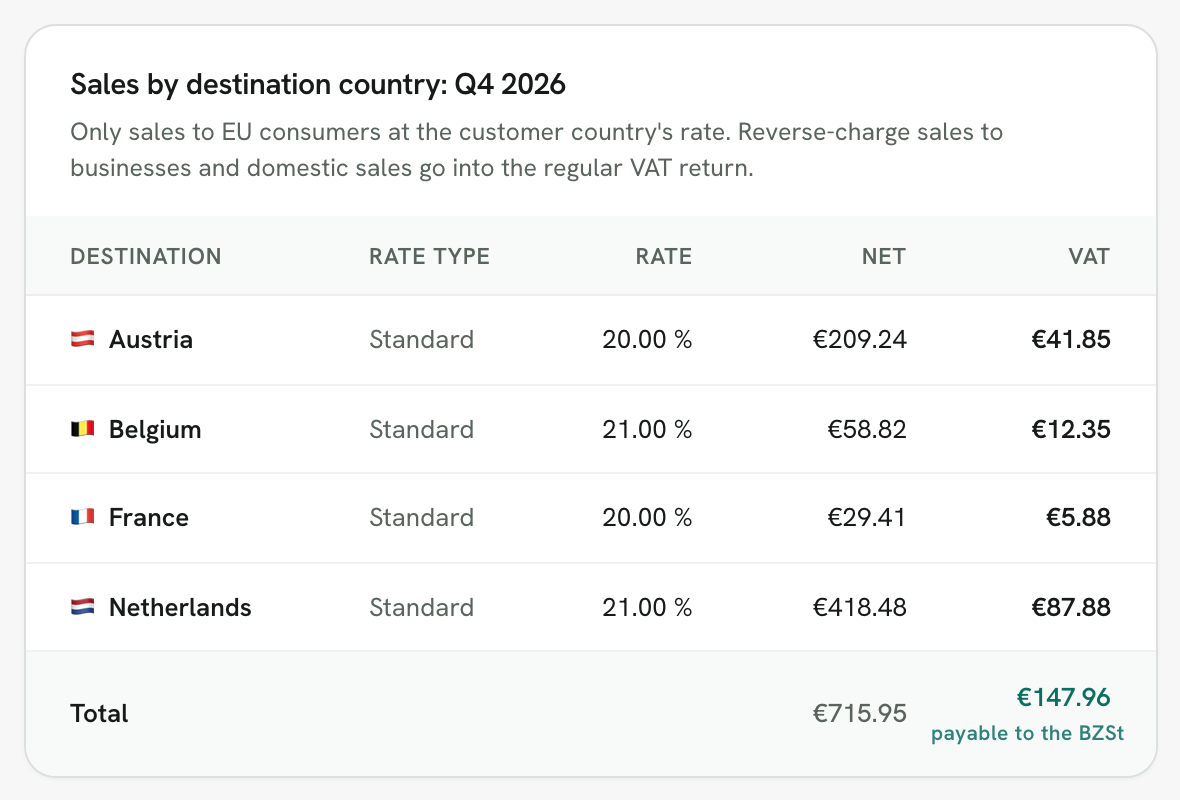
The return gets four lines, one per country and rate. If the shop sold at two rates in one country, say coffee at the reduced rate and a grinder at the standard rate, that country would get two lines. The shop pays 147.96 euros in one transfer. You can check the rates per country and product in the EU TEDB database. If you invoice in a foreign currency, the return uses the European Central Bank rate of the last day of the quarter (§ 16(6) sentence 4 UStG).
OSS return with Rechnungskit
Rechnungskit picks the VAT rate when it creates each invoice (above the threshold, the rate of the customer's country) and records whether the sale belongs in OSS. Under OSS export, the return that is due next opens with its deadline, the amount and a card with four steps: lock, upload the file to the BZSt portal, pay, mark as filed.
- Locking freezes the figures and the return, so they match your books afterwards.
- For the BZSt portal you get a CSV in the BZSt format to upload with the import function, instead of typing each line.
- Corrections to earlier quarters sit below the table and go into the same file.
- If you are registered and had no such sales, Rechnungskit still shows the quarter as due, for the nil return.
- If you switch systems mid-quarter, you add the missing sales per country and rate, so the return is complete.
Rechnungskit also tracks the €10,000 threshold, so you know in time when you have to join. More on the feature is under OSS export, and the step-by-step help is under VAT profile and OSS. How the sales reach your DATEV books is shown in the DATEV export.
FAQ
- [1] § 18j UStG: special scheme (para. 1 registration, para. 4 return and corrections, para. 6 exclusion)
- [2] § 16 UStG: OSS tax period (para. 1d) and currency conversion (para. 6)
- [3] § 22 UStG: record-keeping
- [4] Implementing Regulation (EU) No 282/2011, Art. 59(4) (nil return) and Art. 60a (reminder)
- [5] BZSt: One-Stop Shop, EU scheme (deadlines, payment, nil return, corrections; in German)
- [6] BZSt: electronic filing in the One-Stop Shop (in German)
Rechnungskit is not a tax advisory or law firm. This article explains general principles and does not replace advice from a tax advisor (Steuerberater, § 5 StBerG) or a lawyer (§ 3 RDG). Rechnungskit is built for businesses based in Germany and prepares documents, tax rates and bookings automatically. How your specific case is treated remains your decision, ideally together with your tax advisor or a lawyer.
Every invoice automatically as a valid e-invoice.
Connect your payment provider and we take care of format, validation and archive. Start for free in test mode.
Try it now