Connect your bank account: fetch transactions, match them, pay directly
Rechnungskit fetches the transactions from your bank account, matches them with invoices and incoming documents and sends payment runs straight from the app. Through YAXI, with Qonto and your PayPal account connected directly.
No credit card. You only pay once real invoices go out.
- Bank account
- Transactions fetched
- Matched
- DATEV
On this page 10
What you get.
Rechnungskit connects your bank account through our technology partner YAXI, a provider of banking interfaces based in Nuremberg. Qonto and your PayPal account are connected directly. Rechnungskit fetches booked transactions at a click or automatically and matches them with your invoices and expenses, and you send payment runs straight from Rechnungskit. Your online banking credentials go straight to the bank; Rechnungskit never receives or stores them.
- Banks through YAXI most Sparkassen and Volksbanken, DKB, ING, Revolut, N26, Wise and Kontist
- Connected directly Qonto with your company's API key, your PayPal account with a PayPal app of your own
- Credentials go straight from your browser to the bank connection; Rechnungskit never receives or stores them
- Fetch bookings from start of the month, the last 30 or 90 days or a date, at most 90 days back
- Fetching by hand at most once every 60 minutes per bank connection, automatically on Mondays and Thursdays around 6:15 pm and on the last day of the month
- Matching an incoming payment with the invoice or order number and the exact amount marks the invoice as paid; a different amount brings a partial payment suggestion
- Transfer directly a payment run sent from Rechnungskit, as one bulk transfer with a single approval if your bank accepts them
- Paid only once the debit shows up on your account with the right amount and payee IBAN
- No connection enter the account by IBAN and upload statements as camt.053 or CSV
- Cost one bank account included in the base fee, each further one €9.00 a month
Why it matters.
Without a bank connection, you download statements, look up the invoice for every incoming payment and the document for every debit, and type supplier invoices into your online banking one by one. You only know which invoice is paid and which document is still open once someone has done the matching.
How the bank connection works
Under Settings → Connections → Bank accounts, choose "+ Add account" and search for your bank by name, sort code (BLZ) or IBAN. You decide from which day Rechnungskit fetches bookings: the start of the month, the last 30 or 90 days, or a date of your choice, at most 90 days back. You sign in at the bank itself, usually with your online banking credentials and a TAN or an approval in your bank's app. Then you switch on the accounts Rechnungskit should read.
Your credentials go straight from your browser to the bank connection. Rechnungskit never receives or stores them. Your bank wants the access confirmed again after 180 days at the latest, and Rechnungskit reminds you from day 170.
Technology partner YAXI
The connection to your bank runs through YAXI, a provider of banking interfaces based in Nuremberg. According to YAXI, it works with isolated hardware environments and stores neither credentials nor banking data. Test mode uses YAXI too: there you connect YAXI's demo banks with sample data.
Which banks you can connect
Through YAXI you can connect most Sparkassen and Volksbanken, direct banks such as DKB and ING, and neobanks such as Revolut, N26, Wise and Kontist. Several banks work as well. Each gets its own card with its balance and "Fetch now", and the transactions end up in one shared list.
If your bank is not on the list, add the account with "Enter the IBAN directly" and upload the transactions as a statement in camt.053 format or as CSV.
Qonto and PayPal: connected directly
Rechnungskit connects two kinds of account without YAXI, through their own interfaces:
- Qonto: You connect Qonto with an API key for your company, which you create in the Qonto web app. Rechnungskit reads accounts, balances and booked transactions and matches them like those of any other bank. You cannot send transfers through Qonto yet, because Qonto does not offer the interface that providers like Rechnungskit would need for that. You upload the SEPA file from the payment run to Qonto instead.
- PayPal account: A PayPal account you use by hand to receive and send money connects like a bank, through a PayPal app of your own. Rechnungskit reads the euro balance and the transactions, and the PayPal fee comes in as a booking of its own. Your shop's PayPal account, on the other hand, connects as a payment provider.
More banks may join through this direct route in the future.
Matching with invoices and expenses
Every fetch goes straight into matching. An incoming payment marks an open invoice as paid if the payment reference names the invoice or order number and the amount is exactly the open amount. For a different amount, Rechnungskit suggests a partial payment. Rechnungskit matches debits to the right incoming documents and shows each suggestion with its reasons; you confirm it with "Accept". Amounts that a payment provider such as Stripe or PayPal collects are left alone.
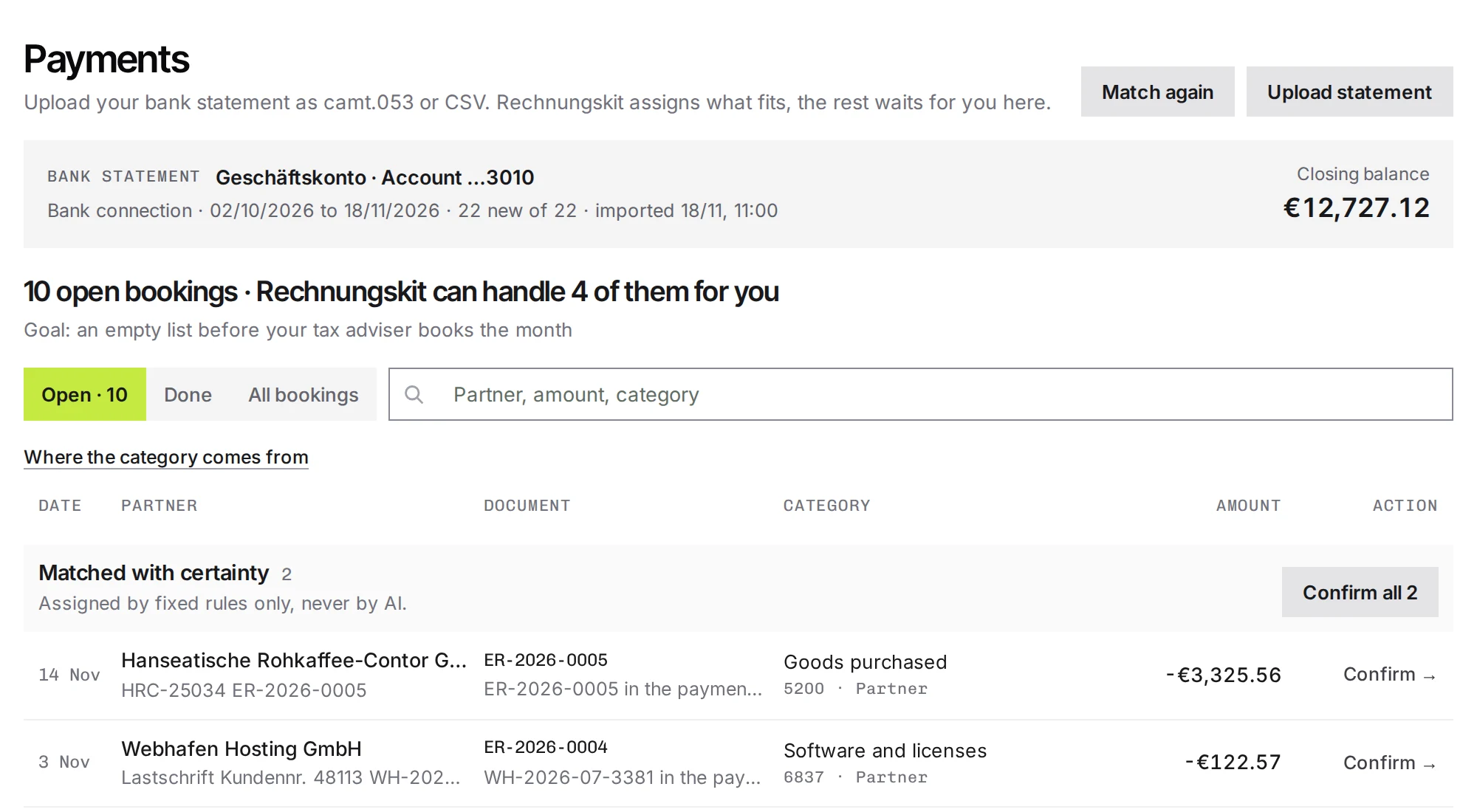
You can fetch new transactions any time with "Fetch now", at most once every 60 minutes per bank connection. If you switch on "Fetch automatically", Rechnungskit fetches them on Mondays and Thursdays around 6:15 pm and on the last day of the month, so the month closes with every booking in it.
Transfer directly from the payment run
You pay approved incoming documents through a payment run. If the account's bank is connected through YAXI, a "Transfer directly" button sits next to "Create SEPA file". You sign in to your bank once. If it accepts bulk transfers, Rechnungskit sends all transfers in the payment run as one, and you approve them once. Otherwise you approve each one, with a TAN or in your banking app.
A document only counts as paid once the debit shows up on your account at the next fetch and the amount and payee IBAN match the transfer. If the connection drops while sending, Rechnungskit asks the bank again within ten minutes at most, with exactly the same transfer; according to YAXI, the bank does not receive such a retry as a second order. Above your four-eyes limit, a second person has to send the transfer.
Cost and test mode
One bank account is included in the base fee, and each further one costs €9.00 a month. The base fee also covers e-invoices, expenses, the DATEV export and matching with your payment providers. In test mode you try fetching, matching and transfers with YAXI's demo banks, without real money. All the details are in the help article Connect a bank (in German).
Frequently asked questions
Does Rechnungskit store my online banking credentials?
No. Your credentials go from your browser straight to the bank connection; Rechnungskit never receives or stores them. According to YAXI, it handles the connection in isolated hardware environments and stores neither credentials nor banking data.
Which banks can I connect?
Through YAXI, most Sparkassen and Volksbanken, direct banks such as DKB and ING, and neobanks such as Revolut, N26, Wise and Kontist. If your bank is not on the list, you enter the account by IBAN and upload the transactions as camt.053 or CSV. Qonto and your PayPal account connect directly, without YAXI.
Can Rechnungskit send money without my approval?
No. Rechnungskit sends the transfers to your bank, and you approve them there, with a TAN or in your bank's app. If your bank accepts bulk transfers, one approval covers the whole payment run.
How often does Rechnungskit fetch new transactions?
By hand with "Fetch now", at most once every 60 minutes per bank connection. Automatically on Mondays and Thursdays around 6:15 pm and on the last day of the month, if you have switched on "Fetch automatically" for that bank connection.
What does the bank connection cost?
One bank account is included in the base fee. Each further connected account costs €9.00 a month, prorated in the first month from the day you connect it.
Can I try the bank connection?
Yes. In test mode you connect YAXI's demo banks with sample data. You connect real bank accounts once you go live.
- Integrations DATEV
- Help Ausgaben - Zahlläufe per SEPA-Datei und Bankabgleich (in German)
- Recently changed Prepayment with a proforma invoice: a clearer flow, the PDF on the order, matching with your bank account Bank transactions: fetched automatically on Monday and Thursday evenings Connecting a bank: you choose how far back Rechnungskit fetches
- Pricing What Rechnungskit costs per month. Every feature is included in every account.
Rechnungskit is not a tax advisory or law firm. This article explains general principles and does not replace advice from a tax advisor (Steuerberater, § 5 StBerG) or a lawyer (§ 3 RDG). Rechnungskit is built for businesses based in Germany and prepares documents, tax rates and bookings automatically. How your specific case is treated remains your decision, ideally together with your tax advisor or a lawyer.
Connect your shop. Rechnungskit does the rest.
Set up for free Or view the live demo firstSet up for free, no credit card. You only pay once real invoices go out.