PayPal in DATEV: setup, bookings and documents for your tax advisor
PayPal reaches DATEV in two ways. DATEV itself offers a payment data service for PayPal: the PayPal account is set up in the accounting program much like a bank account, transactions arrive daily and are matched to open items. Alternatively, invoicing software delivers payments, fees and withdrawals as a finished booking batch. Bookings run through a separate PayPal account: the payment against the debtor, the fee as bank charges, the withdrawal as a transfer to the bank. PayPal fees are mostly treated as an exempt payment service.
For many stores PayPal is the second most important payment method after cards, and often the messiest one for the books. The money stays in the PayPal account until it is withdrawn, and the same account handles purchases, refunds and payments that have nothing to do with the store. This guide shows how PayPal gets into DATEV and how it is booked.
Ways into DATEV
Setting up the payment data service for PayPal
DATEV offers its own connection, the payment data service for PayPal. According to DATEV, the PayPal account is set up in the accounting program much like a bank account. Transactions are available daily in the DATEV cloud and are matched to open items like electronic bank transactions, including by order number (DATEV, DATEV shop, both in German). DATEV now groups such connections under its payment provider data service (in German), which also covers Klarna, Mollie, Shopify and Stripe.
In practice:
- In DATEV's accounting program, usually at your tax advisor's office, the service is set up and the PayPal account created.
- You grant access in your PayPal business account.
- From then on, PayPal transactions keep arriving in DATEV and are matched to open invoices.
The service covers the payment side. It does not write the invoices. Those have to be booked as open items beforehand, or the payment finds nothing to match. Matching also only works if PayPal knows the order number. With Shopify, some payments carry an internal checkout session key instead.
Booking PayPal: payment, fee, withdrawal, refund
The books keep a separate account for PayPal, either as a clearing account or as a balance account kept like a bank account. Four transactions come up again and again:
| Transaction | Entry | SKR03 | SKR04 |
|---|---|---|---|
| Customer payment | PayPal account to debtor | 1362 to 1400 | 1462 to 1200 |
| Fee for the payment | bank charges to PayPal account | 4970 to 1362 | 6855 to 1462 |
| Withdrawal to the bank | bank to PayPal account | 1200 to 1362 | 1800 to 1462 |
| Refund to the customer | debtor to PayPal account | 1400 to 1362 | 1200 to 1462 |
The account numbers are examples from the Geldtransit range of the DATEV standard charts. Your tax advisor may use others. The refund does not reduce revenue by itself; the matching cancellation invoice does that.
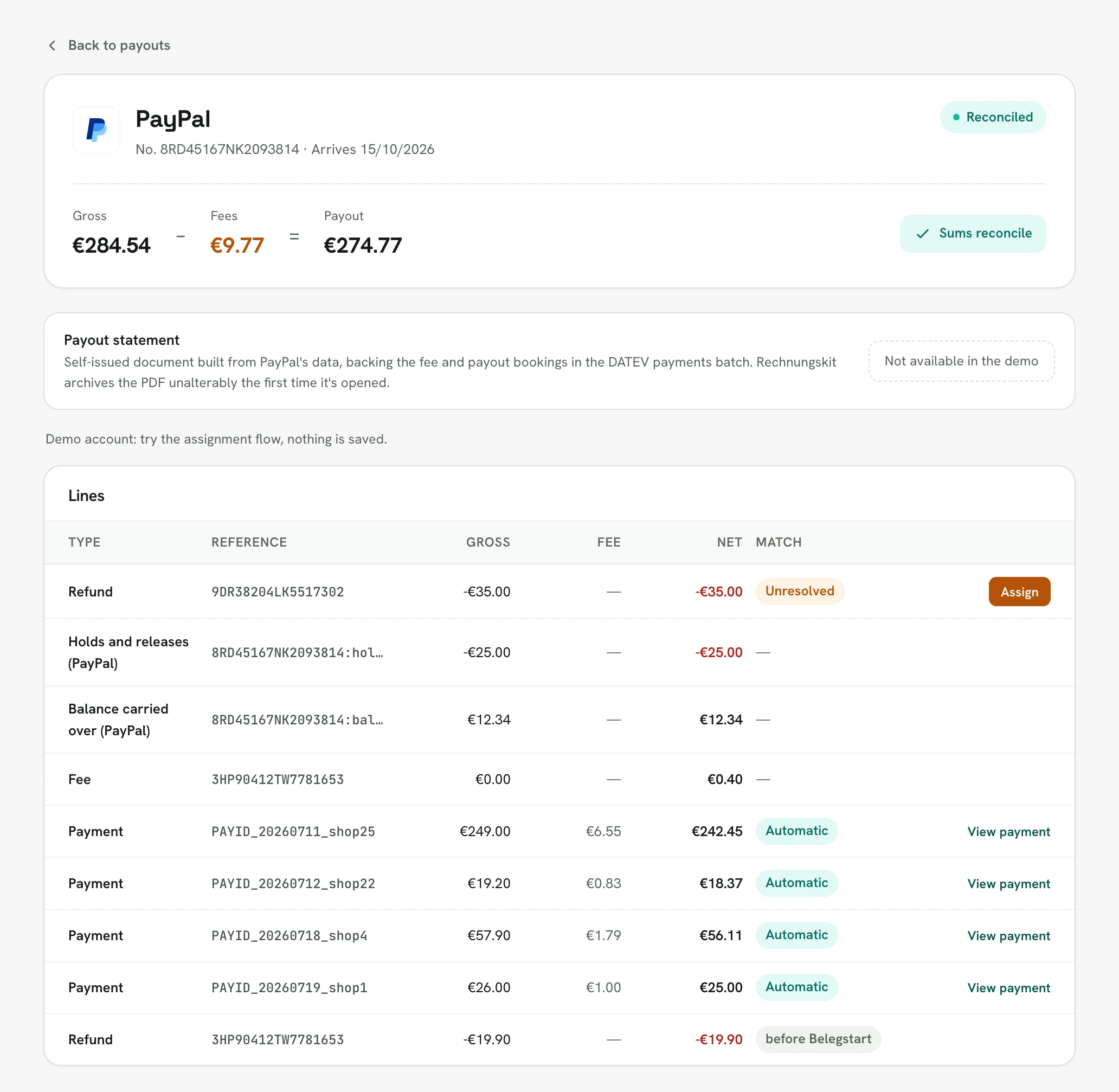
A withdrawal covers everything that moved the balance since the last withdrawal: sales with their fees, refunds, holds and releases, and amounts that were already in the account before. That is why the total rarely matches a week of sales.
PayPal fees and VAT
PayPal fees are mostly treated as an exempt payment service under § 4 no. 8(d) UStG. Then no tax under § 13b UStG applies either, and the fee account gets no reverse-charge tax key. That sets PayPal apart from Stripe or Mollie, whose fees from other EU countries are billed under the reverse charge. Your tax advisor confirms the treatment.
Movements without an order
A PayPal account often handles more than the store: you pay a supplier from your PayPal balance, receive a refund for your own purchase, or get money from another PayPal account. These movements have no store invoice. To keep the balance right, they are booked against a suspense account that your tax advisor reconciles at month end, asking you for the missing documents. Without a document, the booking is incomplete (GoBD, para. 61 ff.).
Month-end balance
If your tax advisor keeps PayPal like a bank account, the PayPal account in the books must show the same balance at month end as PayPal does. If it differs, usually a movement without an order, a fee correction, a hold or a refund is missing. Foreign currency amounts and currency conversions need their own review.
PayPal and DATEV with Rechnungskit
Rechnungskit connects to your account through its own PayPal app, fetches payments, refunds, fees and withdrawals and matches each payment to its invoice. With Shopify, it reads the PayPal transaction ID from the order when PayPal carries a session key instead of the order number.
- In the DATEV payments batch, PayPal books to its own account (preset SKR03 1362, SKR04 1462), with the fee per payment on the payment date and without a tax key.
- Each withdrawal is split into its lines, including balance carried over and holds.
- With the switch for movements without an order, the export also books purchases, third-party receipts and PayPal's own fees against a suspense account.
- The tax advisor area has a month-end balance reconciliation and a PayPal statement as CSV or PDF.
- Each withdrawal gets a payout document and the fees a summary, both as PDFs with document links in the DATEV package.
More on the connection is under PayPal integration, on the export under DATEV export. How other providers are booked is shown in the guide Geldtransit clearing account.
FAQ
- [1] DATEV: processing payment data from PayPal and Amazon (in German)
- [2] DATEV shop: payment data service for PayPal (item 20494; in German)
- [3] DATEV: payment provider data service (in German)
- [4] § 4 no. 8 UStG: exemptions for money and payment services
- [5] § 13b UStG: recipient of the service as the person liable for tax
- [6] BMF letter of 28 Nov 2019: GoBD (para. 61 ff., document function; in German)
Rechnungskit is not a tax advisory or law firm. This article explains general principles and does not replace advice from a tax advisor (Steuerberater, § 5 StBerG) or a lawyer (§ 3 RDG). Rechnungskit is built for businesses based in Germany and prepares documents, tax rates and bookings automatically. How your specific case is treated remains your decision, ideally together with your tax advisor or a lawyer.
Every invoice automatically as a valid e-invoice.
Connect your payment provider and we take care of format, validation and archive. Start for free in test mode.
Try it now