E-invoices and DATEV: how e-invoices reach your tax advisor
E-invoices reach DATEV in two ways. Incoming invoices from suppliers can come in through the DATEV E-Invoicing Platform (E-Rechnungsplattform) and are filed in DATEV Unternehmen online (Belege online). Outgoing invoices from your shop or payment provider go to your tax advisor as a posting batch in DATEV format (EXTF), ideally with document links so every booking shows its e-invoice. For an e-invoice you must keep at least the XML part, unchanged, for eight years.
Incoming and outgoing are two routes
People searching for "DATEV e-invoice" usually mean one of two questions. How do my suppliers' e-invoices get into DATEV? And how do my own invoices to customers get there? The answers differ because the invoices travel in opposite directions.
Incoming e-invoices are records of expenses and input VAT. They come from outside: you receive them, check them and file them. Outgoing e-invoices are produced by your own system, in online retail usually automatically from order and payment. For those, your tax advisor needs the matching booking as well as the invoice: revenue, VAT, payment, fee and payout.
Since 1 January 2025, every business in Germany has to be able to receive e-invoices. Transition periods apply to sending (§ 27(38) UStG, German). The page on the e-invoicing mandate explains what applies when.
Incoming e-invoices in DATEV
For receiving, DATEV offers the DATEV E-Invoicing Platform (German). Suppliers send invoices via Peppol, the TRAFFIQX network or email. The e-invoice inbox lists them together and can pass them on to DATEV Unternehmen online automatically. The inbox itself does not archive. For further processing and GoBD-compliant filing, DATEV recommends the Belege online module in DATEV Unternehmen online.
Incoming invoices also work without the platform: you upload e-invoices that arrive by email to Belege online. What matters is that you upload the original file, meaning the XRechnung as XML or the ZUGFeRD invoice as a PDF with the embedded XML. A printout or a PDF generated afterwards without the XML is no longer the e-invoice.
You still have to check incoming invoices yourself. Validation shows format and rule errors, but it does not replace checking that the invoice is complete and correct, for example whether the VAT rate is right (BMF letter of 15 Oct 2025, para. 35a, German).
Outgoing e-invoices from your shop and payment provider
Your own invoices are a different matter. A shop or SaaS business issues hundreds of invoices a month, not one. Uploading each of them to Belege online and having them booked there one by one would mean a lot of manual work. The usual route is a posting batch in DATEV format, often called EXTF after the identifier in its first line (DATEV format, German). Your tax advisor imports it into DATEV and has all revenue bookings for a month in one go.
A batch without documents falls short, though. Every booking needs a document (GoBD para. 61 ff., German), and your tax advisor wants to see it on the booking. That is what the document link (Beleglink) is for. The invoices go to DATEV Unternehmen online as a document package, and each booking line in the batch points to its invoice through a document link. The order is fixed: upload the documents first, then import the batch. Only then does every link find its document image.
 Shopify
 WooCommerce
 Stripe
 PayPal
- Issue the e-invoiceZUGFeRD or XRechnung under EN 16931
- ArchiveXML unchanged, eight years
- Export the monthposting batch with document links and document package
 2. Posting batchimport EXTF, every booking shows its invoice
Two things often get mixed up. First, the payout from your payment provider is not revenue. It is money moving between two of your own accounts. Revenue and VAT arise with the invoice, and the provider's fees are an expense. The Stripe DATEV export guide shows how this works for Stripe, and the WooCommerce DATEV export guide covers WooCommerce. Second, a CSV report from your shop or payment provider is not a posting batch yet. It contains the payments, but accounts, tax keys and the link to the document are missing.
Each line in a posting batch has fixed fields (DATEV format, German). For a revenue booking, the ones that matter most are the amount, the debit/credit flag, account and contra account, document date, document field 1 with the invoice number, the booking text and, in field 20, the document link.
What your tax advisor needs
Before you set anything up, ask your tax advisor how they work. Their answers decide what you deliver:
- Chart of accounts: SKR03 or SKR04, and which revenue accounts apply to your sales, for example domestic sales, EU consumers under the OSS scheme, and reverse charge.
- Advisor number and client number: both go in the header of the posting batch and assign it to the right client.
- Documents: does your tax advisor work with DATEV Unternehmen online and want to see the invoices on the bookings? Then a document package with document links. Otherwise a ZIP of the invoices is often enough, matched to the booking through the invoice number in the document field.
- Payments: do they want your payment providers' payments, fees and payouts booked as well as revenue? Then you need a second batch.
- Rhythm: monthly for the advance VAT return or less often, and who locks the month (Festschreibung).
A clean month has one simple property in the end: every revenue booking points to exactly one invoice, and every invoice is booked exactly once. A cancellation invoice gets its own booking, and the original stays as it is.
Archiving: the XML is the original
Invoices have to be kept for eight years, incoming and outgoing (§ 14b(1) UStG, German; for accounting records § 147(1) no. 4 and (3) AO, German). For an e-invoice, at least the structured part must be kept so that it stays intact in its original form (BMF letter of 15 Oct 2025, para. 60, German). That is the XML record. For a ZUGFeRD invoice, this means the original file with the embedded XML, not a printout of it.
The GoBD as amended on 14 Jul 2025 (German) go a step further. For outgoing invoices from an invoicing program you need not keep an image copy, as long as a copy with identical content can be produced at any time (para. 76). For received e-invoices the structured part is enough, as long as the image part holds no additional tax-relevant information such as booking notes (para. 131).
The document package in DATEV is a practical copy for bookkeeping. It is not automatically your archive. The retention obligation lies with you as the business owner. Whether you meet it in DATEV, in your invoicing software or in both is best agreed with your tax advisor. The GoBD guide covers what else a compliant archive has to do.
E-invoices and DATEV with Rechnungskit
Rechnungskit covers the outgoing side. Orders and payments from your shop or payment provider automatically become a ZUGFeRD invoice, or an XRechnung for customers with a Leitweg-ID. The XML under EN 16931 is archived in immutable storage with a SHA-256 checksum that is verified on every retrieval.
For DATEV, Rechnungskit produces two posting batches per month in EXTF format, one for revenue and one for payments, for SKR03 or SKR04. If your tax advisor works with DATEV Unternehmen online, each revenue export comes with a DATEV package: the batch with one document link per invoice booking, and a document transfer package with document.xml and the ZUGFeRD invoice as a PDF. Your tax advisor uploads the document package and then imports the batch. The export page in Rechnungskit shows this order too.
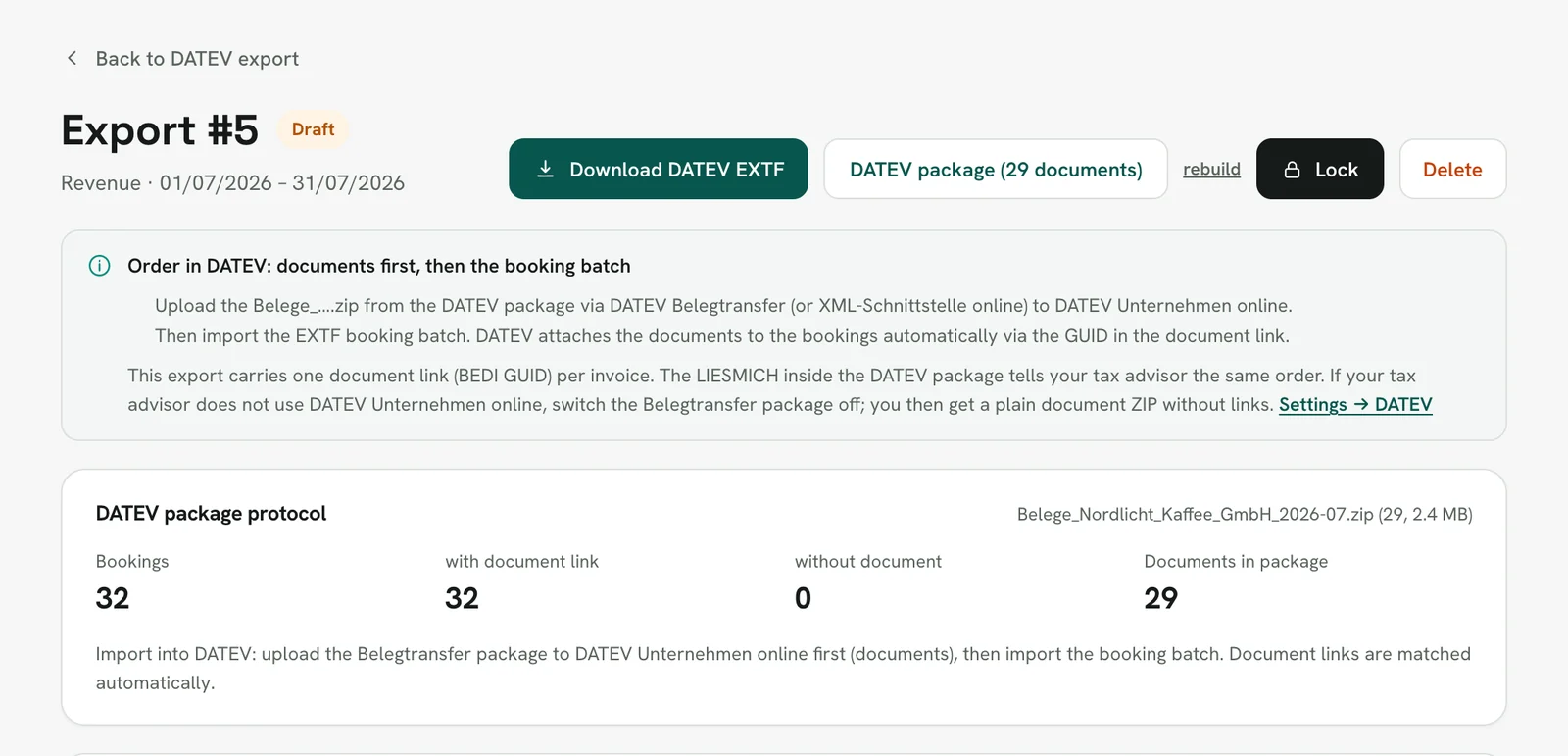
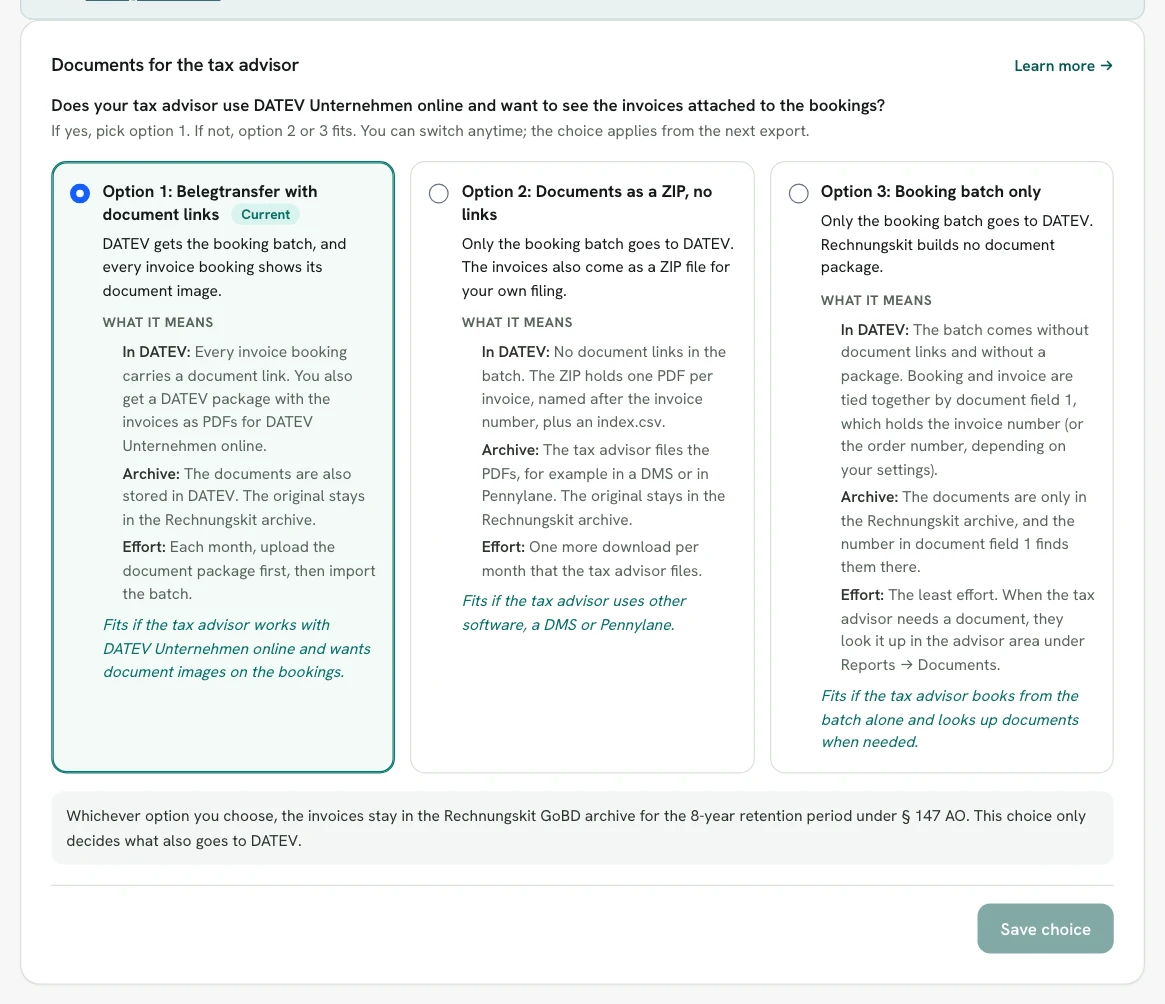
If your tax advisor does not use DATEV Unternehmen online, you get the documents as a ZIP without document links, or the batch alone. You pick one of the three options in the DATEV settings.
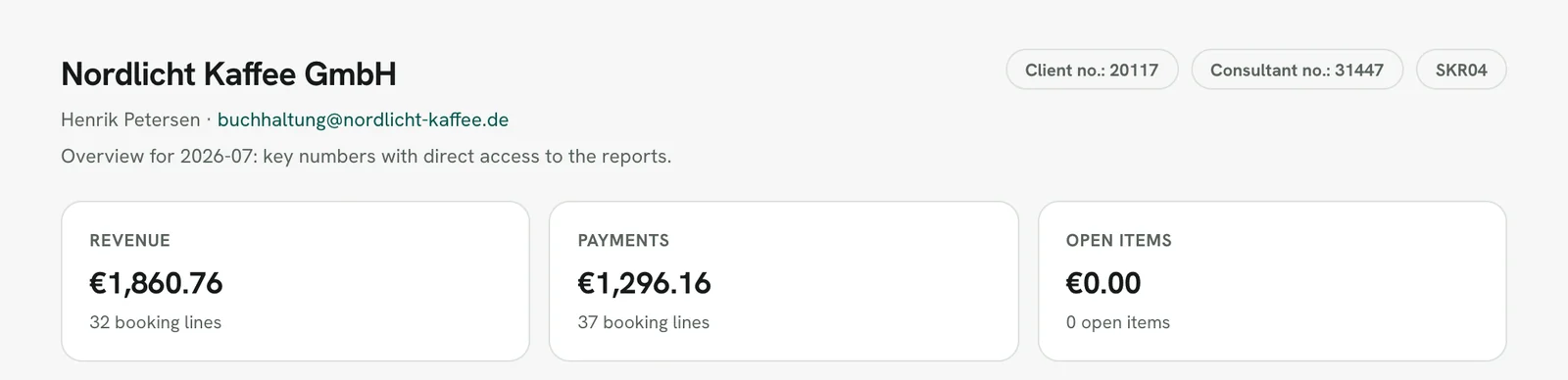
You invite your tax advisor under Settings → External access. The advisor access is free for them. There they check accounts, download exports and lock them. If they want, Rechnungskit creates the previous month's batches as drafts on a fixed day each month. Nothing is ever locked automatically.
Two limits, so you can plan: documents reach DATEV by file upload, and there is no direct online transfer to DATEV. And Rechnungskit does not process your suppliers' invoices; your incoming route stays in charge of those. The DATEV export feature page, the DATEV integration and DATEV export for online shops show the export in detail.
FAQ
- [1] § 14 UStG, German VAT Act (German)
- [2] § 14b UStG, retention of invoices (German)
- [3] § 147 AO, retention of records (German)
- [4] BMF letter of 15 Oct 2025 on mandatory e-invoicing, para. 60 (German)
- [5] BMF letter of 14 Jul 2025, second amendment of the GoBD (German)
- [6] DATEV: E-Invoicing Platform (German)
- [7] DATEV Developer: DATEV format (EXTF, German)
Rechnungskit is not a tax advisory or law firm. This article explains general principles and does not replace advice from a tax advisor (Steuerberater, § 5 StBerG) or a lawyer (§ 3 RDG). Rechnungskit is built for businesses based in Germany and prepares documents, tax rates and bookings automatically. How your specific case is treated remains your decision, ideally together with your tax advisor or a lawyer.
Every invoice automatically as a valid e-invoice.
Connect your payment provider and we take care of format, validation and archive. Start for free in test mode.
Try it now