Shopify and DATEV: interface, export and bookkeeping for Shopify stores in Germany
Shopify has no built-in DATEV export. For the books, your tax advisor needs four things from the store: the invoices as source documents, revenue by VAT rate and country, payments per payment provider, and payouts including fees. There are three ways to get them: prepare Shopify reports by hand, use an export app that creates booking batches, or use a tool that creates invoice, booking and document together. Shopify Payments is booked through a clearing account (Geldtransit): the payment goes in at its full amount, the fee and the payout go out, and the account ends at zero.
If you sell with Shopify, the figures sit in the Shopify admin and your tax advisor needs them in DATEV. In between are more than orders: invoices, revenue per VAT rate, payments through several providers, fees, bundled payouts, refunds and often sales to other EU countries. This guide shows what goes where and the ways to get it into DATEV.
What your tax advisor needs from Shopify
For one month of Shopify, your tax advisor needs four things:
- The invoices as source documents: every booking needs a document, and you have to keep the documents (§ 147(1) AO). For orders from businesses, an invoice with the required details is mandatory (§ 14(2) and (4) UStG).
- Revenue separated by VAT rate and country, with 19 %, 7 %, tax-exempt EU supplies and OSS sales on their own accounts.
- Payments per provider, so every invoice counts as paid and open items are correct.
- Payouts and fees, so the amount on the bank statement is explained.
Shopify provides the orders and the payout reports. What is missing is the translation into booking entries with accounts and tax keys, in DATEV format, with the document attached to each booking.
Three ways to a DATEV export
By hand works for a few orders. Every extra payment provider, refund and EU country makes the spreadsheet bigger, and mistakes only show up when you reconcile with the bank.
Export apps take care of the bookings but leave open where the invoices come from. The same goes for DATEV's own payment provider data service for Shopify (in German): it brings the payment data into the accounting program and matches it to invoice bookings, which have to exist already. For those you need a second app or Shopify's invoice feature, and from 2027 or 2028 invoices to businesses in Germany have to be e-invoices (see creating Shopify invoices). How two well-known export apps compare is on the pages for Pathway Solutions and AccountOne.
Invoice and booking together means the invoice your customer receives is the document behind the booking, so the invoicing app and the booking batch cannot drift apart.
Booking Shopify Payments through a clearing account
Shopify Payments does not pay out each order on its own. Payments collect, Shopify deducts its fees and transfers the rest to your bank in one sum. Your bank statement then shows one amount that covers many orders, fees and refunds.
In the books, a clearing account (Geldtransit) represents this stop in between. It takes in each payment at its full amount and passes the fee to expenses and the payout to the bank. When everything is booked, it ends at zero.
 Shopify Payments
- Payment arrives+€119.00, against the customer receivable
- Shopify keeps the fee−€2.00 to bank charges
- Shopify pays out−€117.00 to the bank
- Balance€0.00
 DATEVthree bookings, the clearing account ends at zero
In the DATEV standard charts the account is called Geldtransit, 1360 in SKR03 and 1460 in SKR04. Most tax advisors book fees to bank charges (Nebenkosten des Geldverkehrs, SKR03 4970, SKR04 6855). Your tax advisor decides which accounts and tax keys apply.
The invoices Shopify sends you for the plan and apps are a different matter: purchase invoices for your costs, which go to your tax advisor like other supplier invoices. If a business in another EU country provides the service, you usually owe the VAT on it yourself under the reverse charge (§ 13b(1) and (5) UStG). The issuer and the applicable note are on the invoice.
Klarna, PayPal and other providers next to Shopify Payments
Many stores offer PayPal or Klarna next to Shopify Payments. When a payment method runs through your own account with the provider, that provider also pays out on its own schedule. For the books, that means one clearing account per provider, each with payments, fees and payouts.
Matching is harder than booking. A PayPal or Klarna payment has to find the right Shopify order, or the invoice stays open and the clearing account does not balance. Shopify does not always pass the order number to the provider. Some PayPal payments carry a checkout session key instead, and with Klarna as a payment app in the checkout it is always the session. Matching on amount and time is unreliable then, because two customers can pay the same amount. The reference Shopify stores on the order is reliable: the PayPal transaction ID, or the session that Klarna also knows.
If your store offers Klarna through Shopify Payments, the payment is part of the Shopify Payments payout and stays on the Shopify Payments clearing account. Both variants are compared in Shopify Payments and Klarna.
Refunds and cancellations
A refund means two bookings: correcting the revenue and paying the money back through the provider. An invoice already issued is not changed. A cancellation invoice or credit note offsets it (see invoice correction). The refund books to the same clearing account as the payment and reduces the next payout.
With Shopify Payments, a refund appears in the payout under its own transaction ID, which does not match the original payment. It can be matched through the order that Shopify includes with every entry.
In-store sales with Shopify POS
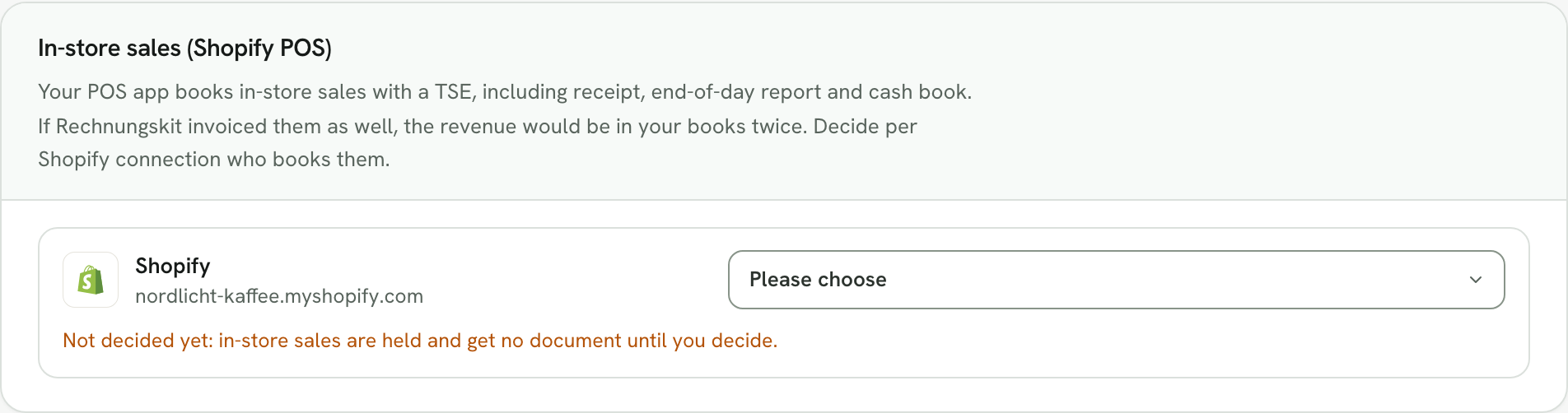
If you also sell in a shop with Shopify POS, the till has its own rules in Germany: records must be protected by a certified technical security device (TSE), and the customer gets a receipt (§ 146a(1) and (2) AO). Your POS app handles that, along with the end-of-day report and the cash book, and it books the till revenue.
For the books, an in-store sale must not show up a second time as online revenue with an invoice. At the same time, Shopify Payments pays out card payments from the shop and from the online store in the same payout. Agree with your tax advisor how the in-store share in it is offset against the bookings of your POS app.
EU sales and OSS
If you sell to consumers in other EU countries and are above the €10,000 threshold, the invoice carries the VAT rate of the customer's country. In DATEV these sales go to their own revenue accounts, and you report them once a quarter in the OSS return to the BZSt instead of the advance VAT return (§ 18j UStG). Deadlines and filing are covered in the guide to the OSS return, the threshold in the guide to the OSS scheme.
Shopify and DATEV with Rechnungskit
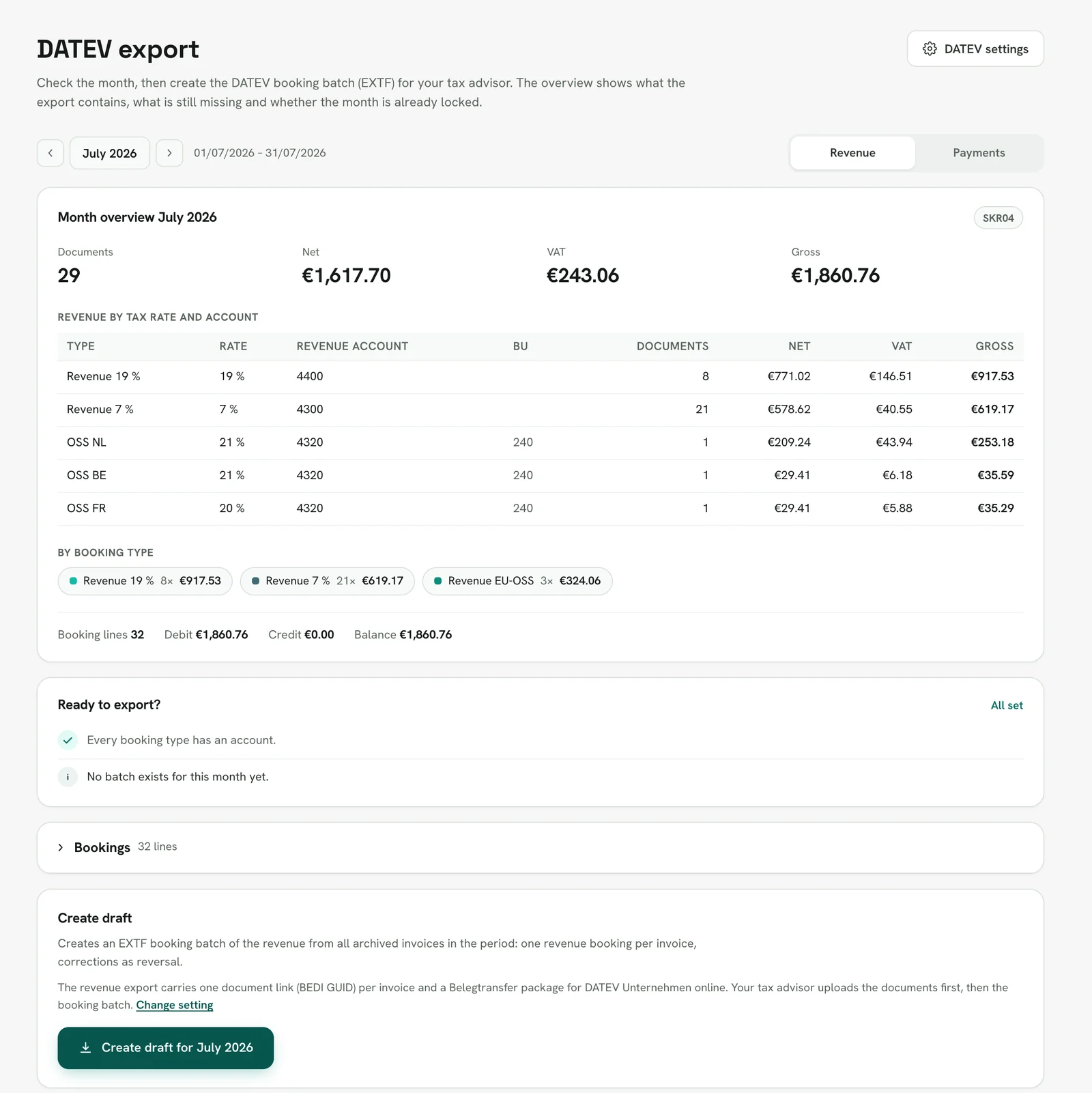
Rechnungskit connects to your store as an app and creates the invoice for every order, as a ZUGFeRD e-invoice. At month end it turns them into two DATEV booking batches in SKR03 or SKR04: one for revenue, one for payments, fees and payouts.
In detail:
- Rechnungskit picks up Shopify Payments through the store connection, with payments, fees and payouts. You connect PayPal and Klarna as well, and each provider gets its own clearing account.
- PayPal and Klarna payments are matched through the reference on the Shopify order, not on amount and time.
- Each payout is split into its lines and checked. If something does not add up, you get a task instead of a silent rounding.
- Refunds in the store create the cancellation invoice and the refund booking.
- For new connections, Rechnungskit does not invoice in-store sales from Shopify POS. Their payments stay visible for payout reconciliation but do not count as revenue.
- If you like, the invoices go into the DATEV package as documents, and each booking links to its document.
Your tax advisor can collect the exports through their own access and set the accounts themselves. More on the connection is under Shopify integration, on the export under DATEV export, and the step-by-step help for tax advisors under DATEV and your tax advisor.
FAQ
Rechnungskit is not a tax advisory or law firm. This article explains general principles and does not replace advice from a tax advisor (Steuerberater, § 5 StBerG) or a lawyer (§ 3 RDG). Rechnungskit is built for businesses based in Germany and prepares documents, tax rates and bookings automatically. How your specific case is treated remains your decision, ideally together with your tax advisor or a lawyer.
Every invoice automatically as a valid e-invoice.
Connect your payment provider and we take care of format, validation and archive. Start for free in test mode.
Try it now