Getting documents into DATEV Unternehmen online: upload, Belegtransfer and data services
Documents reach DATEV Unternehmen online in four ways: by hand with DATEV Upload online in the browser, Upload Mail or the Upload mobil app; automatically with the Windows program DATEV Belegtransfer, which watches folders and uploads packages through the XML interface; through the Rechnungsdatenservice, which transfers invoice data with the document image from other software; and through the Buchungsdatenservice, which delivers bookings as well. If the document images should sit on finished bookings, you upload the documents first and import the booking batch with the document links afterwards.
Every booking needs a document (GoBD, para. 61 ff.). If your tax advisor works with DATEV, the documents usually end up in DATEV Unternehmen online, in the Belege online area. Several routes lead there, and they differ in what comes along: just the image, the invoice data too, or the finished booking.
Four ways into Unternehmen online
Upload in the browser, by email or app
For single documents, DATEV offers three routes (DATEV):
- DATEV Upload online takes documents by drag and drop in the browser, and you assign them to areas such as purchase invoices or cash.
- With DATEV Upload Mail you forward invoices from your mailbox to Unternehmen online.
- Paper receipts you photograph with the DATEV Upload mobil app.
That works for purchase invoices, receipts and anything that does not come from your own software. For hundreds of sales invoices from an online store, it is too much manual work.
DATEV Belegtransfer and the XML interface
DATEV Belegtransfer is a Windows program. It transfers documents and structured invoice data automatically from selected folders or from other programs to Unternehmen online (DATEV). It is not released for macOS (DATEV Community). On a Mac you are left with Upload online, or your tax advisor imports the packages on their computer.
For software that delivers many documents at once, there is the XML interface online. The software packs the documents into a ZIP file: one PDF per document and an index file named document.xml that describes where each document belongs and which ID it carries. Belegtransfer uploads this package. Through the ID, each document can later be matched to a booking.
Setting it up comes down to installing Belegtransfer, signing in with your DATEV access, choosing the client and defining which folders the program watches or which package it uploads. The exact steps are in DATEV's help and depend on the version.
Rechnungsdatenservice and Buchungsdatenservice
The DATEV data services transfer data and documents directly from other software into the DATEV cloud, with no file and no program on your computer (DATEV). Two of them matter for invoices:
- The Rechnungsdatenservice 1.0 transfers invoice data and document images to Unternehmen online (DATEV shop). The bookings are then made at your tax advisor's office.
- The Buchungsdatenservice transfers bookings, master data and document images into DATEV's accounting programs (DATEV shop). The supplying software does the booking itself, and your tax advisor takes over the finished bookings.
Your tax advisor activates both in DATEV Arbeitsplatz, and both have a monthly fee listed in the DATEV shop. The supplying software has to support the service. The DATEV marketplace shows which products do.
Document images on bookings: document link and order
When software delivers finished bookings as a booking batch (EXTF format) and the documents as a package, a document link connects the two. Each booking carries the ID of its document. When the batch is imported into DATEV Kanzlei-Rechnungswesen, DATEV looks for the document with that ID in Unternehmen online and attaches the image to the booking.
For that, the document has to be there already. The order is always the same:
- Download the packagebooking batch with document links and the month's document package
- Upload the documentsdocument package with Belegtransfer to Unternehmen online
- Import the batchbooking batch into Kanzlei-Rechnungswesen
- Checkeach booking shows its document image
Which way fits?
For purchase invoices from suppliers, Upload online, Upload Mail or the app is usually enough. For the sales invoices of an online store or SaaS, it depends on who does the booking:
- If your tax advisor books from the documents, the documents with invoice data are enough, through the Rechnungsdatenservice or a package with Belegtransfer.
- If the bookings come finished from your software, your tax advisor needs the booking batch and the matching documents. That works with the Buchungsdatenservice or with a booking batch plus a document package with document links.
- If your tax advisor does not use DATEV Unternehmen online, a booking batch with the invoice number in the document field is enough. The documents stay in your archive, and your tax advisor finds them by number.
Whichever route you take, the duty to keep the documents stays with you as the business (§ 147(1) and (3) AO).
Documents from Rechnungskit
Rechnungskit creates the invoices itself and books them into a DATEV booking batch (EXTF) in SKR03 or SKR04. For the documents, you and your tax advisor pick one of three options:
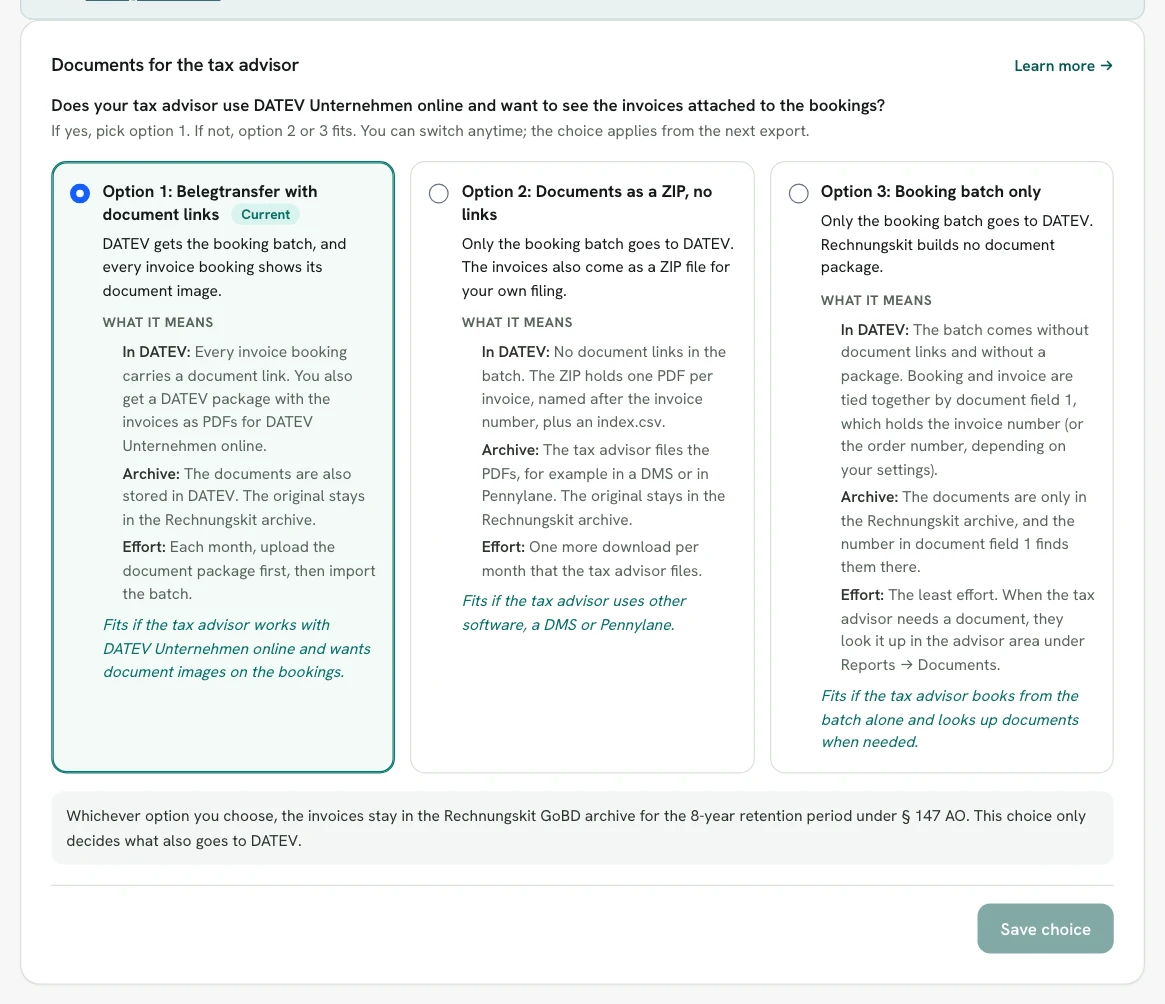
- With Belegtransfer and document links, every invoice booking carries a document link, and each month gets a DATEV package with the booking batch and a document package (document.xml and one PDF per invoice). The PDF is the ZUGFeRD invoice, so it is also the e-invoice. Fees and payouts in the payments batch get a document too.
- As a ZIP without document links, your tax advisor gets one PDF per invoice, named after the invoice number, for example for other accounting software.
- With the booking batch only, the documents stay in the Rechnungskit GoBD archive, where your tax advisor looks them up.
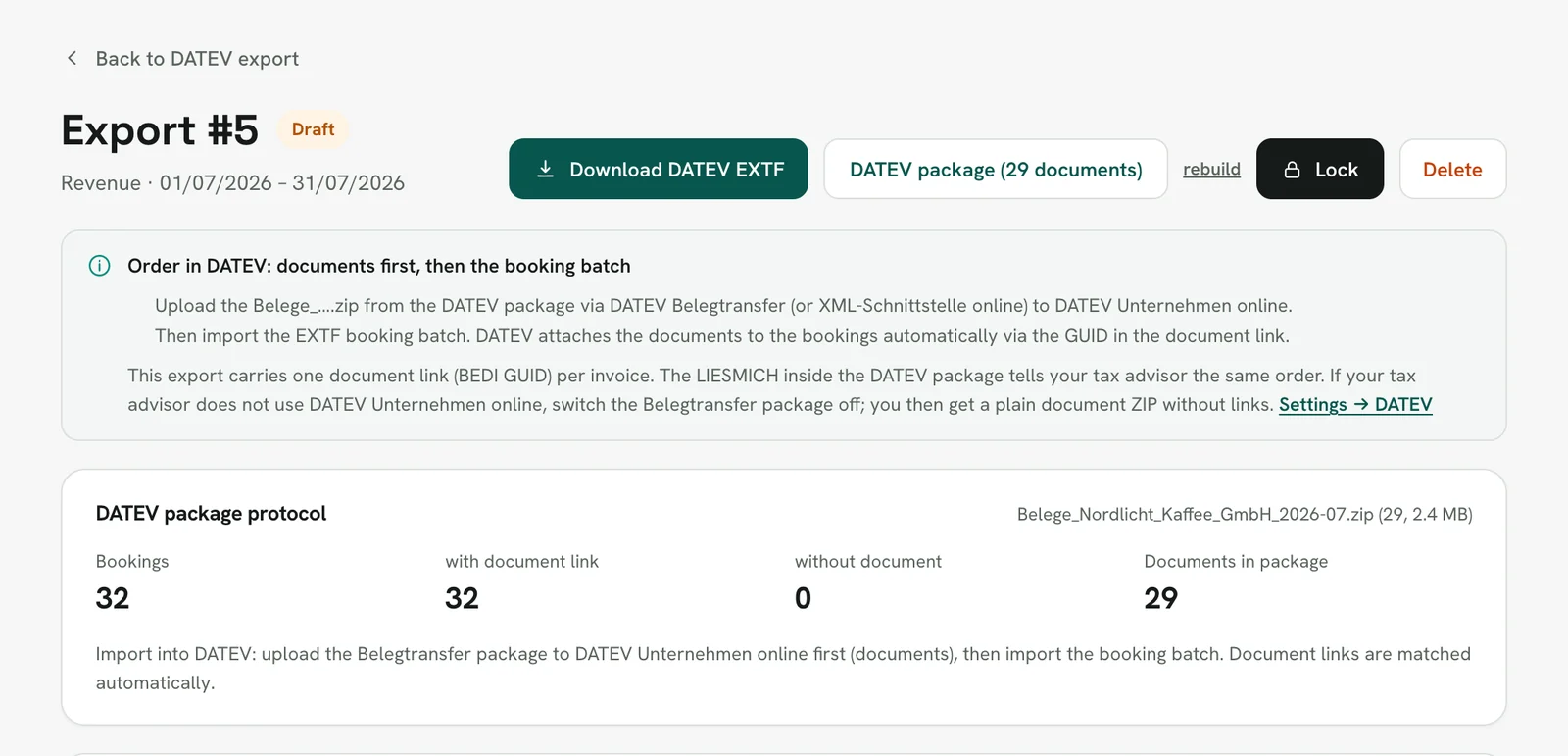
The protocol in the package counts the bookings with and without a document, and the export page reminds you of the order. Your tax advisor uploads the document package with Belegtransfer. Rechnungskit does not offer a direct transfer through a DATEV data service. More on this under DATEV export and in the help article DATEV and your tax advisor. How Shopify payments get into the same export is shown in Shopify and DATEV.
FAQ
- [1] DATEV: DATEV Unternehmen online (Upload online, Upload Mail, Upload mobil, Belegtransfer, data services; in German)
- [2] DATEV shop: Rechnungsdatenservice 1.0 (item 92222; in German)
- [3] DATEV shop: Buchungsdatenservice (item 91000; in German)
- [4] DATEV Community: announcement of DATEV Belegtransfer 3.66 (macOS not released; in German)
- [5] § 147 AO: retention of records
- [6] BMF letter of 28 Nov 2019: GoBD (para. 61 ff., document function; in German)
Rechnungskit is not a tax advisory or law firm. This article explains general principles and does not replace advice from a tax advisor (Steuerberater, § 5 StBerG) or a lawyer (§ 3 RDG). Rechnungskit is built for businesses based in Germany and prepares documents, tax rates and bookings automatically. How your specific case is treated remains your decision, ideally together with your tax advisor or a lawyer.
Every invoice automatically as a valid e-invoice.
Connect your payment provider and we take care of format, validation and archive. Start for free in test mode.
Try it now