Clearing account (Geldtransit): booking PayPal, Stripe, Klarna, Mollie and Shopify Payments in DATEV
A clearing account (Geldtransit) holds money that is in transit: payment providers such as PayPal, Stripe, Klarna or Shopify Payments take your customer's payment, deduct their fee and transfer the rest later in one sum. You book the payment at its full amount to the clearing account, the fee as an expense and the payout to the bank. After that the account is at zero. In the DATEV standard charts it is called Geldtransit, 1360 in SKR03 and 1460 in SKR04. One clearing account per provider is common, because that is the only way to see at month end who still owes you money.
When a customer pays by PayPal, card or Klarna, the money does not land in your bank account right away. The payment provider takes it, deducts its fee and transfers a lump sum days later. Your bank statement then shows an amount that matches no single invoice. That is what the clearing account (Geldtransit) is for.
What a clearing account is
The clearing account holds money that is in transit. Each customer payment books to it at the full amount, regardless of what arrives later. The provider's fee goes out again as an expense, and so does the payout to the bank. Once all three are booked, the account is at zero.
 PayPal
 Stripe
 Klarna
- Payment+€119.00
- Fee−€2.50 to expenses
- Payout−€116.50 to the bank
- Balance€0.00
In the DATEV standard charts the account is called Geldtransit, 1360 in SKR03 and 1460 in SKR04. Further providers take the following numbers, such as 1361 and 1362. Your tax advisor decides which number goes to which provider.
Entries in SKR03 and SKR04
Five transactions cover almost everything. The accounts are the usual standard accounts; your tax advisor may use others.
| Transaction | Entry | SKR03 | SKR04 |
|---|---|---|---|
| Payment arrives | clearing account to debtor | 1360 to 1400 | 1460 to 1200 |
| Provider keeps fee | bank charges to clearing account | 4970 to 1360 | 6855 to 1460 |
| Payout to the bank | bank to clearing account | 1200 to 1360 | 1800 to 1460 |
| Refund to the customer | debtor to clearing account | 1400 to 1360 | 1200 to 1460 |
| Chargeback | debtor to clearing account | 1400 to 1360 | 1200 to 1460 |
The invoice itself books like any other: debtor to revenue. A refund adds the cancellation invoice that corrects the revenue. A chargeback revives the receivable; as long as the customer keeps the goods, no cancellation invoice is created.
VAT on the fees per provider
The fee is a service the payment provider supplies to you. How VAT applies to it depends on where the provider is based and whether its service is exempt:
With the reverse charge you owe the VAT on the fee yourself (§ 13b(1) and (5) UStG) and, with full input VAT deduction, deduct it again in the same month. In DATEV a tax key on the fee account handles this, usually 506. For an exempt service, such as payment services under § 4 no. 8(d) UStG, you owe no tax under § 13b. Small businesses also owe the § 13b tax but cannot deduct it (§ 19(1) UStG). For Stripe in detail, see booking Stripe fees.
The providers one by one
All providers follow the same principle. They differ in how they bill:
- Stripe deducts the fee per payment and pays out at fixed intervals. More under Stripe DATEV export.
- Shopify Payments pays out online and in-store sales in one payout, details under Shopify and DATEV.
- PayPal keeps the money in your PayPal account until it is withdrawn. Purchases and payments without an order often run through PayPal too, so some tax advisors keep PayPal like a bank account, with its balance at month end. More under PayPal in DATEV.
- Klarna bills fees per payout, including later fee corrections.
- Mollie bills fees collectively per payout, not per transaction.
- Unzer issues separate invoices for its fees. Your tax advisor books the credit on the bank account from the bank statement.
- GoCardless collects SEPA direct debits, with the fees deducted from the payout.
How the data gets into DATEV
To book, your tax advisor needs the individual items of each payout: which payments, fees and refunds it contains. There are three ways:
- Statements by hand: your tax advisor downloads the providers' reports and books from them. That works for a few transactions.
- DATEV's payment provider data service: DATEV transfers payment data from PayPal, Amazon, Amazon Pay, eBay, Klarna, Mollie, Shopify and Stripe into its accounting program, matches it to invoice bookings and provides it as booking proposals (DATEV, in German). The invoice bookings have to exist already.
- A booking batch from the invoicing software: if the software knows invoice and payment, it delivers revenue, payments, fees and payouts already booked, usually as a DATEV booking batch.
There is no customer invoice for fees and payouts. Every booking still needs a document (GoBD, para. 61 ff.), such as the provider's statement or a self-made document from its data.
Month-end close: is the account at zero?
At month end, the clearing account shows what is still in transit. A balance equal to a payout that arrives next month is correct. Anything beyond that usually means a booking is missing. Typical causes are a fee correction, a refund without a booking, a chargeback or a payment without a matching order.
Payment providers with Rechnungskit
Rechnungskit fetches payments, fees and payouts directly from the connected providers, matches each payment to its invoice and splits each payout into its items. In the DATEV export, each provider gets its own clearing account:
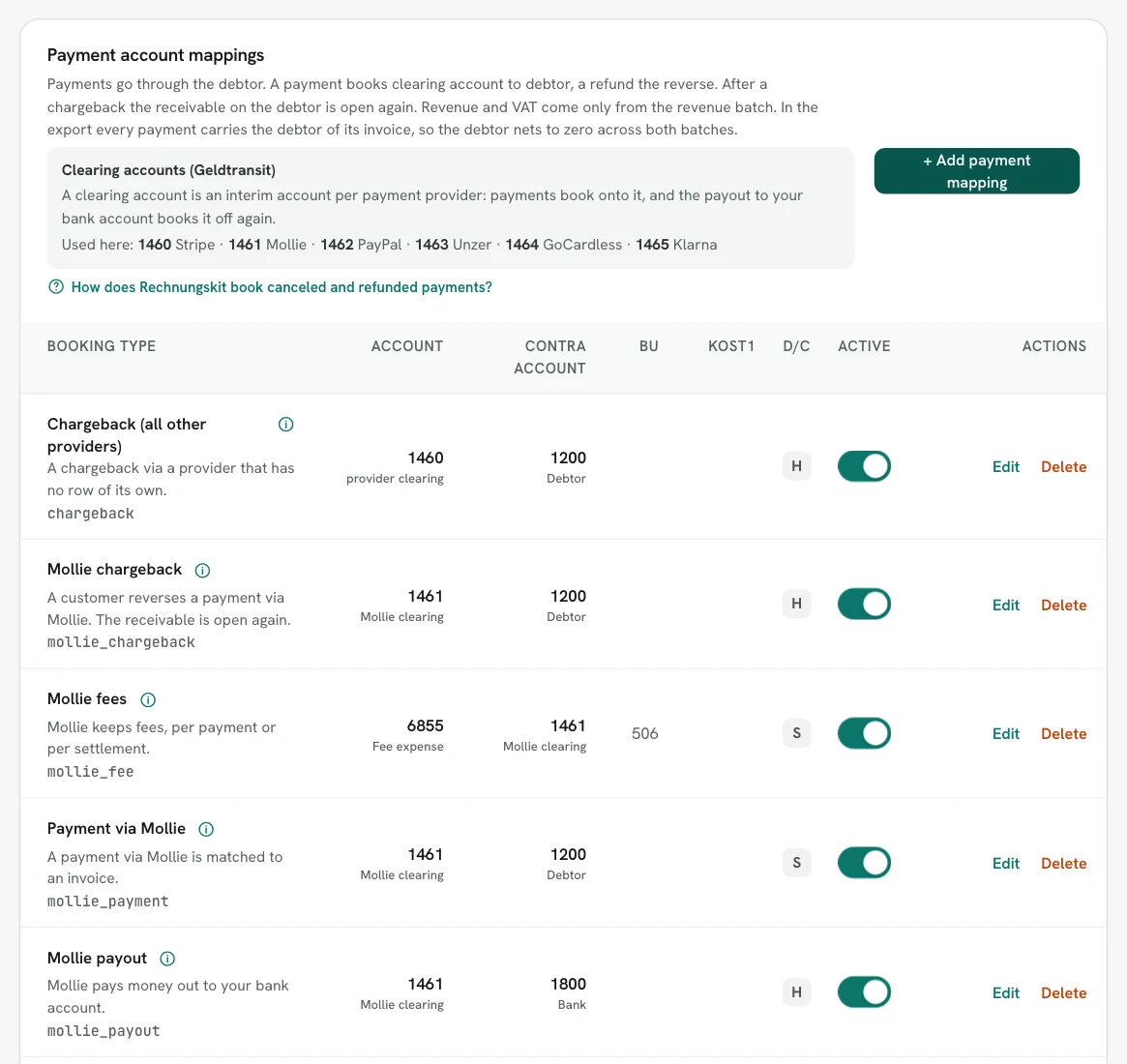
- Payments, fees, payouts, refunds and chargebacks go into a separate payments batch, apart from revenue.
- The tax keys on the fees are preset per provider, and your tax advisor can change them.
- For each payout, Rechnungskit creates a payout document as a PDF, and the fee and payout bookings link to it.
- For PayPal and Stripe there is a month-end balance reconciliation and a statement in the tax advisor area.
- If a payout is off by a cent, you get a task instead of a silent rounding.
The accounts and all mappings are explained in the help article DATEV and your tax advisor. The provider connections are under PayPal, Stripe, Klarna, Mollie and Unzer, and the export under DATEV export.
FAQ
- [1] § 13b UStG: recipient of the service as the person liable for tax
- [2] § 4 no. 8 UStG: exemptions for transactions in money and payment services
- [3] § 19 UStG: small businesses
- [4] BMF letter of 28 Nov 2019: GoBD (para. 61 ff., document function; in German)
- [5] DATEV: payment provider data service (in German)
Rechnungskit is not a tax advisory or law firm. This article explains general principles and does not replace advice from a tax advisor (Steuerberater, § 5 StBerG) or a lawyer (§ 3 RDG). Rechnungskit is built for businesses based in Germany and prepares documents, tax rates and bookings automatically. How your specific case is treated remains your decision, ideally together with your tax advisor or a lawyer.
Every invoice automatically as a valid e-invoice.
Connect your payment provider and we take care of format, validation and archive. Start for free in test mode.
Try it now