MCP server for Claude and ChatGPT
Ask Claude about revenue, customers, subscriptions and expenses. The Rechnungskit MCP server answers with the figures from your account, as text and as a chart in the chat.
No credit card. You only pay once real invoices go out.
- Question in Claude
- Figures from Rechnungskit
- Chart in the chat
- App
On this page 8
What you get.
The Rechnungskit MCP server connects Claude to your Rechnungskit account. You can then ask something like "How much revenue did I make in October, by product?" and get the figures from Rechnungskit, with the period, the change from the previous month and a chart. Claude does no arithmetic of its own and never sees your customers' names or addresses. The connector is included in every account.
- Figures on revenue, customers, subscriptions, payments, open invoices and expenses, plus the status of an invoice by number and your open tasks
- Revenue split by VAT rate, country, sales channel, consumers or businesses, product or month on request, compared with the previous period and the previous year
- Claude takes the values Rechnungskit returns and calculates nothing itself; the figures match the overview in the app
- Rechnungskit charts right in the chat, in Claude on the web, in the desktop app and in the mobile app; other apps get the same figures as text
- Totals only no names, email addresses or postal addresses of your customers
- Sign-in with OAuth in the browser, no API key; one connection covers one account and one project
- Every access is logged, and "Revoke access" under Settings → Connections → AI assistants (MCP) ends it at once
- Tested with Claude, including the free plan; it also works technically with ChatGPT, Gemini and other assistants that support MCP over HTTP with OAuth
Why it matters.
The figures of your business live in invoices, payments and supplier documents. To find out which product brought in the most revenue last quarter, how many new customers you gained or where the money went last month, you click through reports or build a spreadsheet. AI assistants such as Claude answer questions like these well, as long as they get reliable figures. Uploading a CSV to the chat is tedious, hands over customer data and leaves the assistant to add up the numbers itself.
Ask a question, get your figures
Once Rechnungskit is connected in Claude, you ask the way you would ask a person:
- "How much revenue have I made so far in November, and from how many customers?"
- "Which products brought in the most revenue in October?"
- "How many new customers did I get in Q3, and how many bought again?"
- "What did I spend the most on in October?"
- "What is my MRR, and how many subscriptions were cancelled?"
- "Which invoices are overdue?"
Claude calls the matching report in Rechnungskit and uses the values that come back. It always names the period, and if the period is still running, such as the current month, Claude says so. Every answer comes with a link to the matching page in the app.
Claude shows revenue, customers, payments, open invoices, subscriptions and expenses as a Rechnungskit chart right in the chat. Hover over a bar or tap it to see the exact amount. Here is the answer to "revenue in October by product", with the figures of the demo shop "Nordlicht Kaffee". The labels are in English, while product names and the notes from Rechnungskit stay in German:
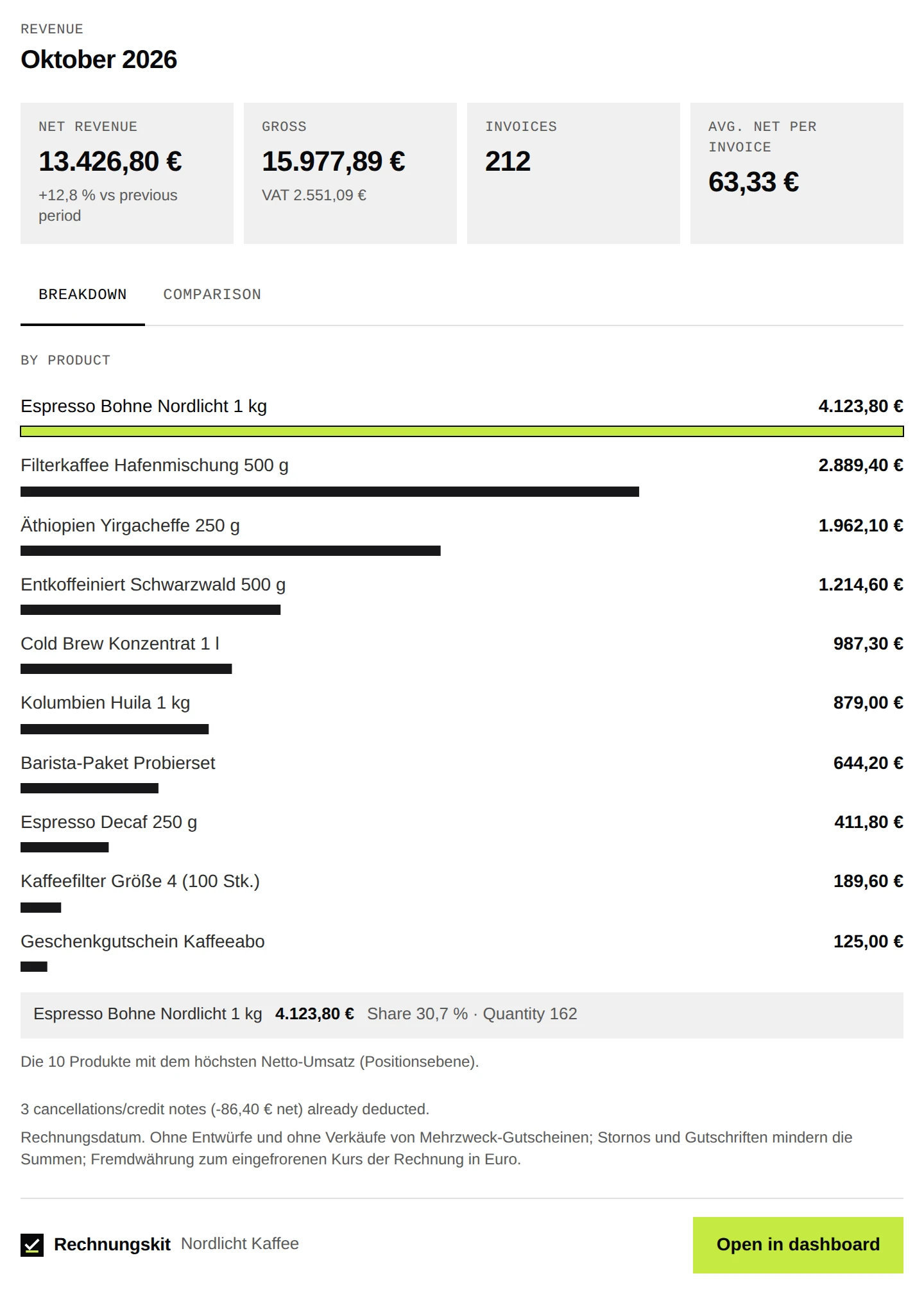
The first time a chart appears, Claude asks whether it may show the view. You allow it once or always. Apps without this view give you the same figures as text.
What Claude can analyse
| Question | What Claude gets from Rechnungskit |
|---|---|
| Revenue | Net, gross, VAT and number of invoices by invoice date, as in the overview. On request split by VAT rate, country, sales channel, consumers or businesses, product or month, compared with the previous period and the previous year |
| Customers | Number of customers, new and returning customers, revenue per customer. A customer is the buyer's email address on the invoice |
| Subscriptions | Active subscribers, MRR, ARR, cancellations and churn rate of subscriptions sold through the Rechnungskit checkout |
| Payments | Incoming payments, refunds, chargebacks and fees per payment provider |
| Open invoices | Open and overdue amounts from invoice payments, grouped by age |
| Expenses | Incoming documents by document date, split by expense type, month or supplier, compared with the previous period and the previous year, plus the open and due supplier invoices |
| One invoice | Status by invoice number: date, amount, payment status, amount open, due date |
| Open tasks | The open items as in the app, with a count and a link |
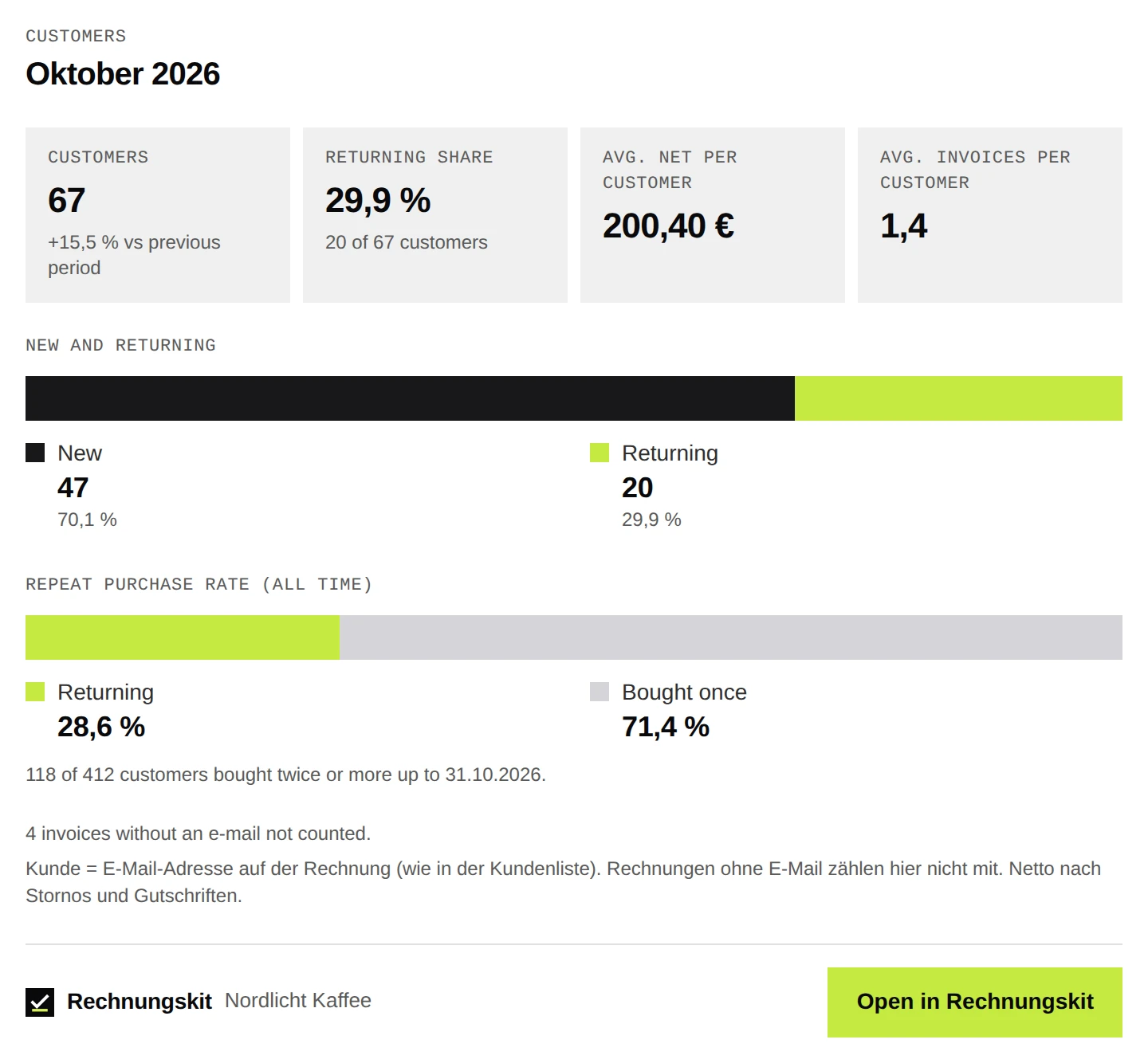
For customers, the chart shows new and returning customers and the repeat purchase rate without a single customer name:
Claude cannot work out your profit. Revenue and expenses are separate reports, and Claude does not subtract one from the other. Amazon documents and expenses in foreign currencies are left out of the totals, and Claude tells you how many documents are missing. Subscriptions from Shopify or Stripe Billing do not count towards the subscription figures, although their invoices are part of your revenue.
Connected in four steps
The connector works in Claude on the web, in the desktop app and in the mobile app, on the free plan as well.
- In Claude, open Customize, then Connectors, and choose "Add custom connector".
- Enter "Rechnungskit" as the name and
https://app.rechnungskit.de/mcpas the URL. Under Authentication, choose "Sign in when needed", even if Claude suggests "No sign-in". You do not need an API key. - Ask a question about your figures. A "Connect" button appears in the chat: sign in to Rechnungskit, pick the account and project, and click "Allow".
- Claude picks up where it left off and answers the question.
Claude answers questions about Rechnungskit, pricing and the setup steps before you sign in. If you have no account yet, create one in the sign-in window and let Claude help you set it up. The full guide, including ChatGPT, Gemini and other assistants, is at Mit KI auswerten und einrichten (in German).
What Claude may do and what stays with you
With your permission, Claude may:
- analyse revenue, customers, payments, open invoices, subscriptions and expenses
- read your setup status and company details
- fill in company details, with the same checks as in the settings
- create links you use to connect your shop and payment providers yourself
- invite your tax advisor
- create test invoices in test mode
- give you the document inbox address to send supplier invoices to
Going live, real invoices and cancellations, payments, passwords, API keys and your bank details stay with you. Only admins and internal bookkeeping can change anything through Claude. Every role sees the figures it can also see in the app.
Data protection and control
Rechnungskit passes on only what Claude asks for with your permission, and only as totals. Your customers' names, email addresses and postal addresses stay in Rechnungskit, as do login credentials. What Claude reads goes to Anthropic, the company behind Claude, and is processed under your Claude account and its terms.
Under Settings → Connections → AI assistants (MCP) you see every connected assistant with the date it was connected and when it was last used. "Revoke access" ends its access at once. Every connection, every disconnection and every change the assistant makes is recorded in your account's log.
Nothing in Rechnungskit requires the connector. Kit, the assistant in the app, answers the same questions about your figures without Claude.
Frequently asked questions
What is an MCP server?
MCP (Model Context Protocol) is an open standard that lets AI assistants use other software. The Rechnungskit MCP server gives Claude tools such as "get revenue" or "analyse customers". Claude calls them when your question fits and gets the answer from Rechnungskit.
Does the connector cost extra?
No, it is included in every Rechnungskit account. For Claude you need an Anthropic account, and custom connectors work on the free plan too.
Does Claude see my customers' data?
No. Rechnungskit passes on totals only, never names, email addresses or postal addresses. For expenses, Claude names your five largest suppliers by company name, without IBAN, address or VAT ID.
Does it work with ChatGPT?
Technically, yes. Rechnungskit accepts any assistant that can add a custom MCP server over HTTP with OAuth sign-in. In ChatGPT that takes the Plus plan or higher. So far only Claude has been tested. The steps for each assistant are in the app under Settings → Connections → AI assistants (MCP).
Can Claude issue or cancel invoices?
No. Real invoices, cancellations, going live, payments and your bank details stay with you in the app. With your permission, Claude may fill in your company details, invite your tax advisor and create test invoices in test mode.
Do I need a Rechnungskit account first?
Not for questions about Rechnungskit, pricing or the setup steps: Claude answers those through the connector without a sign-in. For your own figures you sign in. If you have no account yet, you create one in the sign-in window.
- Help Kit, the AI assistantMit KI auswerten und einrichten (Claude-Connector, MCP) (in German)
- Pricing What Rechnungskit costs per month. Every feature is included in every account.
Rechnungskit is not a tax advisory or law firm. This article explains general principles and does not replace advice from a tax advisor (Steuerberater, § 5 StBerG) or a lawyer (§ 3 RDG). Rechnungskit is built for businesses based in Germany and prepares documents, tax rates and bookings automatically. How your specific case is treated remains your decision, ideally together with your tax advisor or a lawyer.
Connect your shop. Rechnungskit does the rest.
Set up for free Or view the live demo firstSet up for free, no credit card. You only pay once real invoices go out.