Taking over credit from your own shop
Updated
This guide is only for shops that are connected to Rechnungskit through the API and manage referral or customer credit themselves. The overview of vouchers and credit for every shop is in Gift vouchers and credit.
Some shops manage credit themselves, such as a reward for every successful referral that the customer redeems on their next purchase or has paid out. Your shop then keeps managing the credit. Your shop reports every movement to Rechnungskit, or Rechnungskit reads the history itself. Rechnungskit reconciles the balances and, from a cut-over date, takes over the bookings for your tax advisor.
Do you need this?
Only if your own shop (connected through the API) manages the credit itself.
- Gift vouchers and credit from Shopify come in automatically through the Shopify connection.
- Multi-purpose vouchers from Germanized come in through the WooCommerce connection.
- You don't set anything up here for those.
Rechnungskit does not yet recognize other credit or referral plugins for WooCommerce or Shopware. If you use such a plugin, write to us at support@rechnungskit.de before you put it into use.
How it works
- Your shop reports every credit movement: earning, redemption, reversal, payout and expiry. Each movement carries a unique ID, and Rechnungskit stores it exactly once.
- On top of that come the balances per customer. Rechnungskit compares them with the history. If a customer differs, you see it under Vouchers.
- Until the cut-over date this is a dry run. From the cut-over date, Rechnungskit takes the history into the credit ledger and books it in the DATEV export.
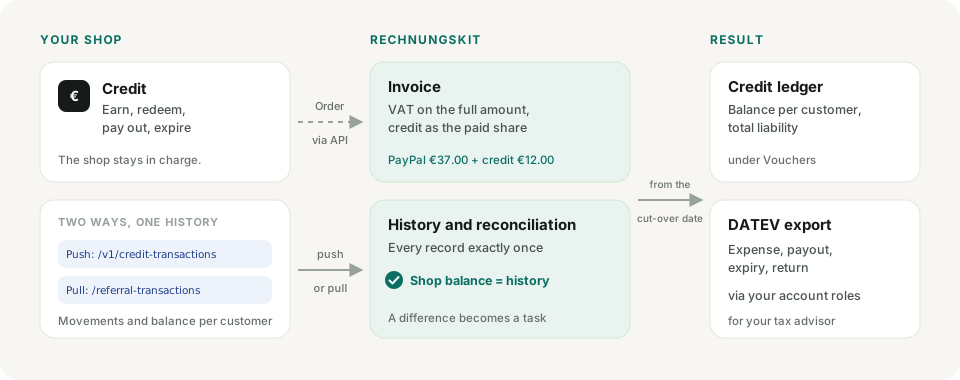
- Reportpush or pullevery movement with a unique ID
- Dry runrecord the historyno cut-over date, no booking
- Reconcileshop balance equals historydifferences per customer under Vouchers
- Cut-overopening balance, then bookingsfirst of a month, then the DATEV export
Push or pull
There are two ways to report. Both end up in the same history and can also be combined.
| Push through the API | Pull (Rechnungskit reads the history) | |
|---|---|---|
| Who delivers | your shop sends every movement | Rechnungskit reads every hour |
| Endpoints | POST /v1/credit-transactions, daily PUT /v1/credit-balances |
two read-only endpoints of your shop |
| Setup | nothing, the section appears with the first call | address and token under Vouchers |
| Lost message | only the comparison with the balances shows it | Rechnungskit catches up in the next run |
Push is the recommended way. Pull is worth it if your shop cannot send messages reliably.
Push through the API (recommended)
Your shop sends every movement to POST /v1/credit-transactions and once a day the balances to PUT /v1/credit-balances, with the API key from Connections → API. Structure and examples are in the API reference (in German).
You don't need to set anything up in Rechnungskit for this. With the first call, the section "Credit from your own shop" appears under Vouchers with the note "Via API (push)".
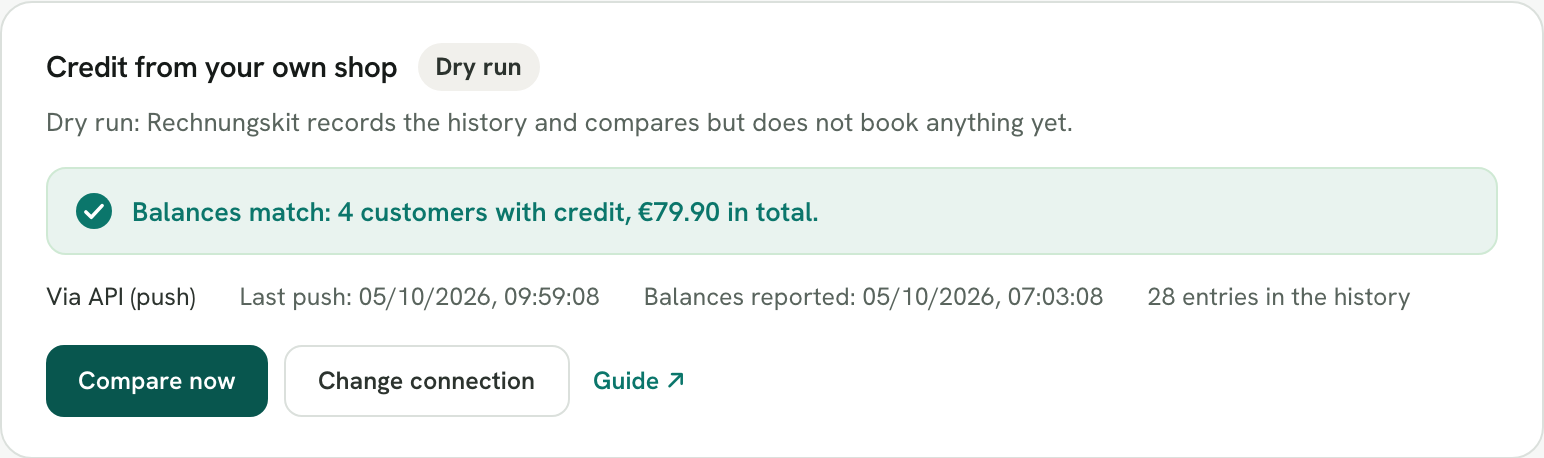
The balances matter: if a message gets lost, only the comparison with the balances reveals the gap. So send them at least once a day.
Letting Rechnungskit read the history (pull)
Here your shop provides two read-only endpoints, and Rechnungskit fetches the history itself every hour. Rechnungskit remembers how far it has read and catches up on missed movements in the next run. What your shop's endpoints must return is in the API guide.
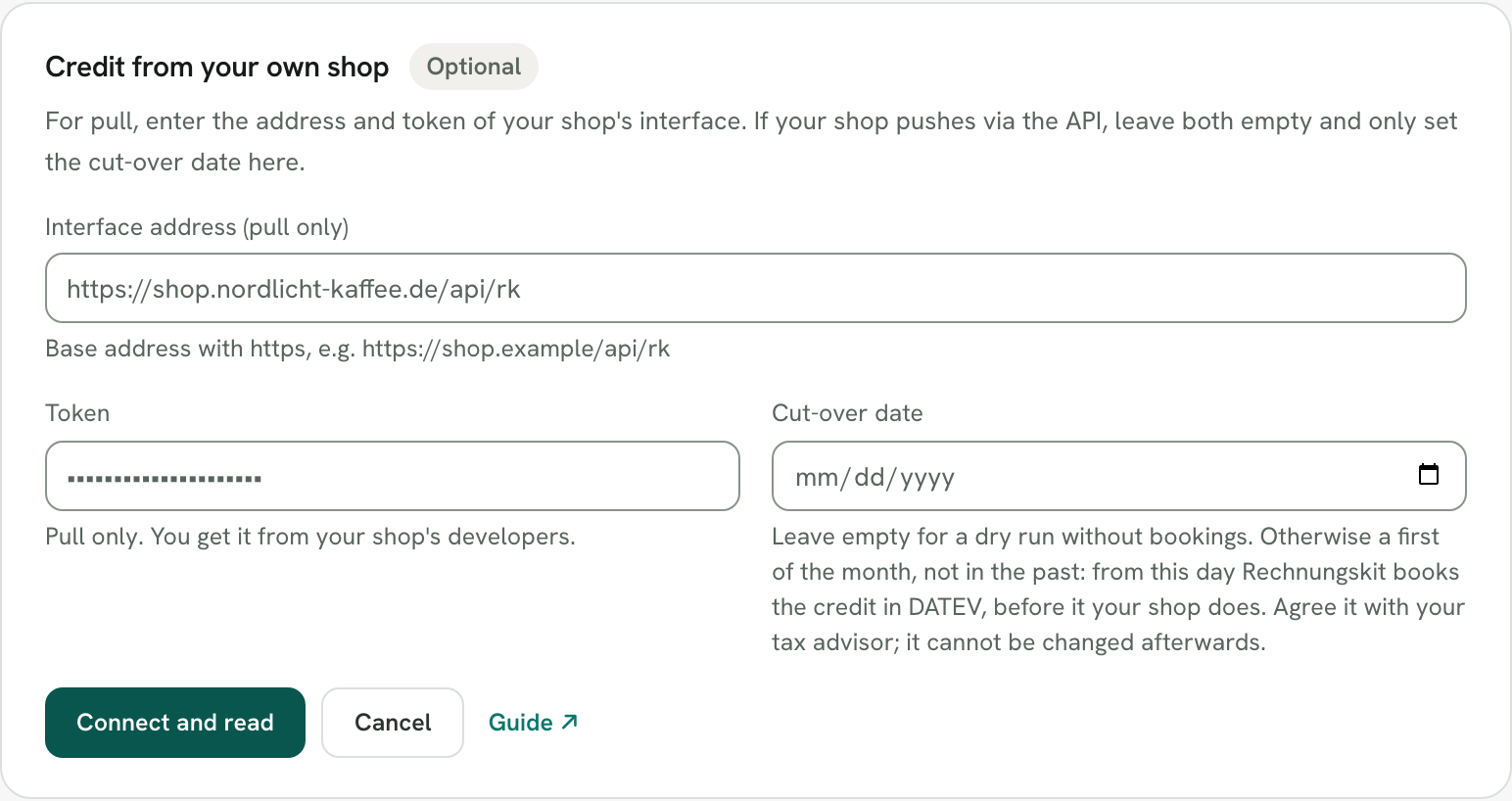
- Open Vouchers and click "Set up" in the section "Credit from your own shop".
- Enter the address of the interface, for example
https://shop.example/api/rk, and the token. - Leave the cut-over date empty. That way you start with a dry run.
- Click "Connect and read". Rechnungskit reads the history right away and shows the result.
Dry run and reconciliation
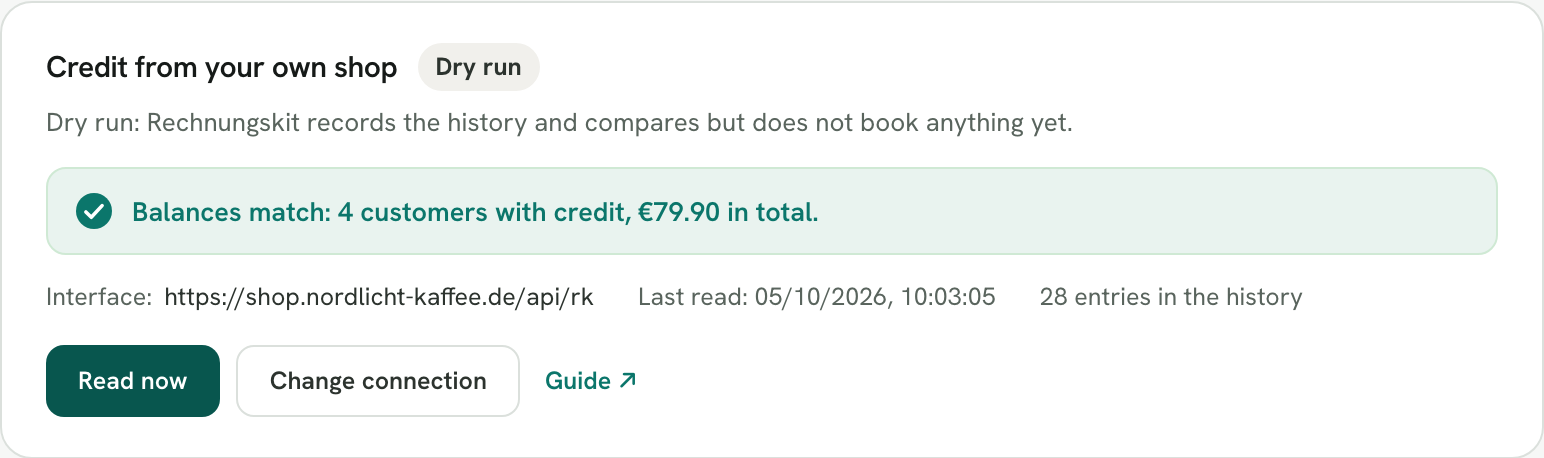
Without a cut-over date, Rechnungskit only records the history and books nothing. If the reconciliation matches, you see the number of customers with credit and the total. This total should match what your shop shows as open credit.
When a customer differs
Rechnungskit lists them with both amounts: the balance in the shop and the sum of the history.
- With pull, the shop only returns records from the last minute on the next read. A short difference right after a booking is normal there.
- If it stays, a movement is usually missing, or the customer has a different email address in the shop than on their credit.
The cut-over date
The cut-over date (Stichtag) is the day from which Rechnungskit books the credit. Until then your shop books it.
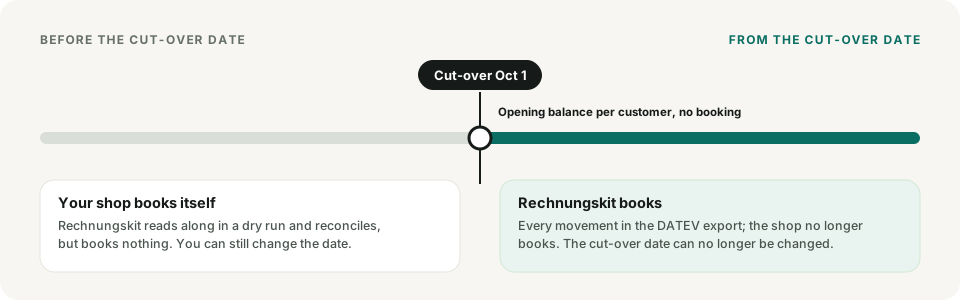
Three rules
So that nothing is booked twice or not at all:
- The cut-over date is always the first of a month, such as October 1.
- When you set it, it must not lie in the past. Until then your shop has booked itself; otherwise Rechnungskit would book twice.
- Once it has been reached, it can no longer be changed.
Agreeing on the date
Your shop stops booking the credit itself on the same day. So agree on the date with your shop's developers and with your tax advisor, ideally at the turn of a month or quarter.
On the cut-over date, Rechnungskit creates an opening balance per customer from the history so far, without a booking.
Which date counts
Whether a record lies before or after the cut-over date is decided by the booking date your shop sends (hc_booking_date). If it is missing, the German date of the record counts. A record at 12:30 a.m. on October 1 therefore belongs to October, even though it is still September 30 in UTC.
What Rechnungskit books from the cut-over date
The accounts come from three account roles under Settings → DATEV settings: "Open referral rewards", "Referral reward expense" and "Income from expired credit". Confirm them there before the cut-over date. If a role that a month needs is not confirmed, Rechnungskit holds the DATEV export for that month and names the missing role.
| Event in the shop | Booking | Suggested SKR04 | Suggested SKR03 |
|---|---|---|---|
| Customer earns credit | Expense to liability | 6770 to 3500 | 4760 to 1700 |
| Earning or goodwill credit reversed | Liability to expense | 3500 to 6770 | 1700 to 4760 |
| Credit paid out | Liability to bank | 3500 to 1800 | 1700 to 1200 |
| Credit expired | Liability to income | 3500 to 4932 | 1700 to 2736 |
| Refund onto credit | Customer account (Debitor) to liability | 1200 to 3500 | 1400 to 1700 |
| Credit redeemed on a purchase | Liability to customer account | 3500 to 1200 | 1700 to 1400 |
The account numbers are the suggestions for a new account. Your tax advisor can change them under Settings → DATEV settings. For expired credit, Rechnungskit suggests the account "Erträge aus der Herabsetzung von Verbindlichkeiten" (income from the reduction of liabilities, SKR04 4932, SKR03 2736).
What is not booked
- Credit that was created before the cut-over date and only released after it is not booked again by Rechnungskit: your shop booked it when it was created.
- Anything the credit ledger cannot cover, such as a payout without a matching balance, becomes a task, never a negative balance.
From the cut-over date, the reconciliation compares the balance in the shop with the credit ledger. If it differs, a task appears.
Credit on the invoice
When a customer redeems credit on a purchase, your shop sends the amount with the order (field creditRedemptions). Credit is a payment, not a discount:
- The invoice shows the VAT on the full amount and names both shares, such as "PayPal (€37.00) and referral credit (€12.00)".
- Your payment provider only collects the rest.
- If a customer pays entirely with credit, Rechnungskit issues the invoice without a payment received.
The invoice books the revenue. From the cut-over date, the redemption itself settles the liability against the customer account, as in the table above. Rechnungskit only takes the redemption from the credit ledger for orders from the cut-over date onward. Your shop booked earlier redemptions itself.
Where to find it in the app
Rechnungskit is not a tax advisory or law firm. This article explains general principles and does not replace advice from a tax advisor (Steuerberater, § 5 StBerG) or a lawyer (§ 3 RDG). Rechnungskit is built for businesses based in Germany and prepares documents, tax rates and bookings automatically. How your specific case is treated remains your decision, ideally together with your tax advisor or a lawyer.