Topics: Using features
File your VAT advance return yourself
Rechnungskit works out your VAT advance return (Umsatzsteuer-Voranmeldung) from your invoices and documents. You check it, approve it and upload the file to Mein ELSTER, or your tax advisor files it.
Updated
On this page 7
Under Accounting → VAT (/ustva), Rechnungskit works out your VAT advance return (Umsatzsteuer-Voranmeldung) from your invoices, incoming documents and your own entries. You check the figures, approve them and upload the file to Mein ELSTER yourself. Rechnungskit sends nothing to the tax office and moves no money.
This is not tax or legal advice. Rechnungskit calculates by fixed rules and shows the documents behind every figure. Whether that is right for your case is your call. If in doubt, ask a tax advisor or your tax office.
What Rechnungskit cannot do
- no direct transmission to ELSTER: you upload the file yourself
- no annual VAT return, no EÜR (cash-basis profit statement), no income or trade tax
- no construction services under § 13b, no margin scheme, no VAT group, no split of input VAT
- incoming documents in a foreign currency block the period until they are in euros
/ustva lists these limits per period as a blocked point.
First: who files?
Each return may reach the tax office only once. So the first time you open /ustva, it asks who files:
- I file myself: you set up the return (tax number, period) and file it yourself from then on.
- My tax adviser files: Rechnungskit shows the figures for reference only, without deadlines, approval or reminders. Your tax firm keeps getting the DATEV export as before.
Both options sit side by side as cards. Click one, then confirm with the button below: "Continue to setup" if you file yourself, "Save" if your tax adviser does. The button stays grey until you pick a card.
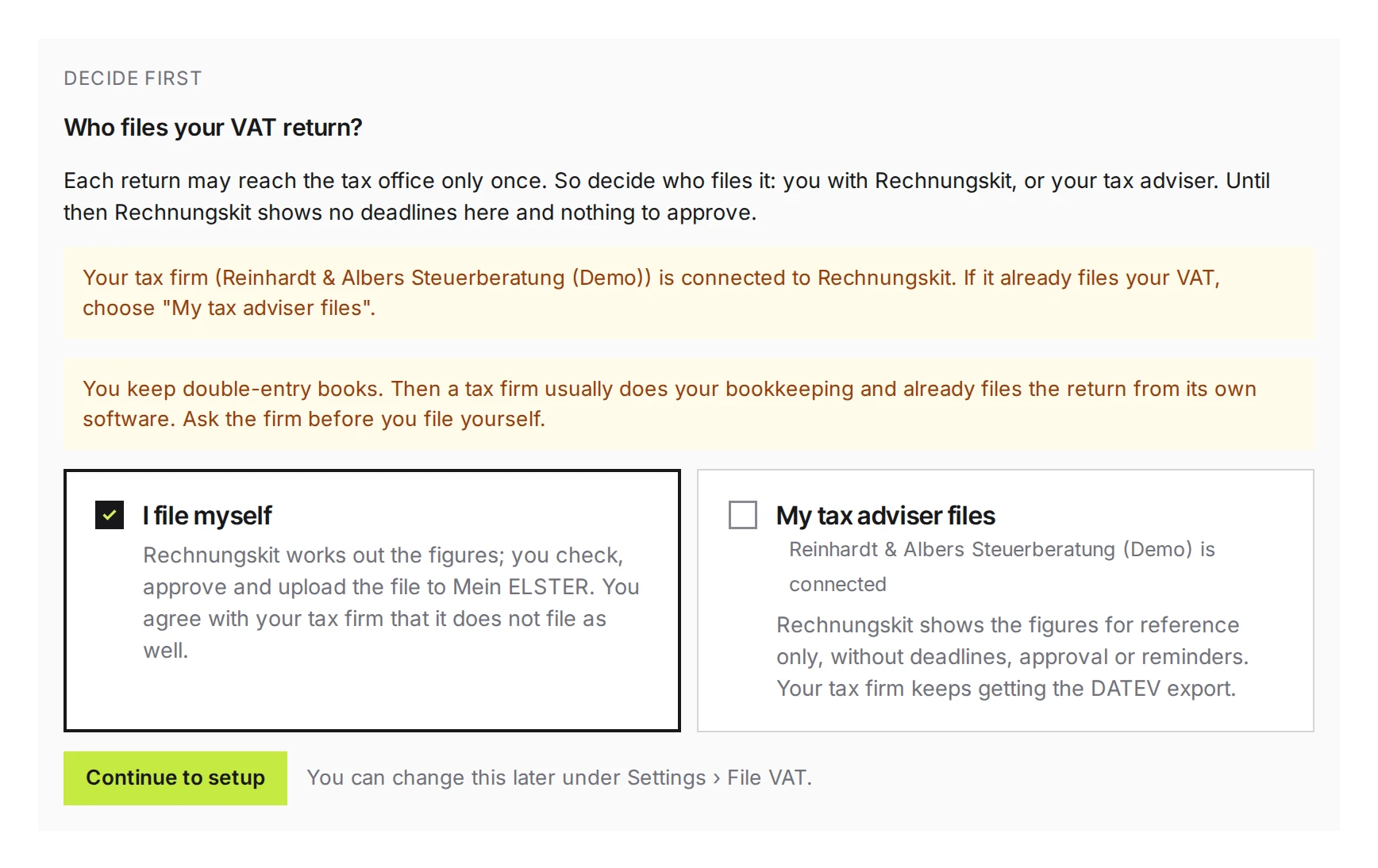
Until you decide, the page shows no deadlines and nothing to approve. If a tax firm is connected to your account and you file yourself, Rechnungskit asks before every approval whether the firm is not filing this period too. So agree with the firm beforehand from which month on you file yourself. If you keep double-entry books, you usually have a tax firm that already files the return from its own software.
You can change this at any time under Settings → File VAT (/settings/tax-filing).
Only owners and the Accounting role can decide. Setup users, the tax firm and members with read-only access see a note about who decides instead of the two options.
Setting it up
Setup has three steps:
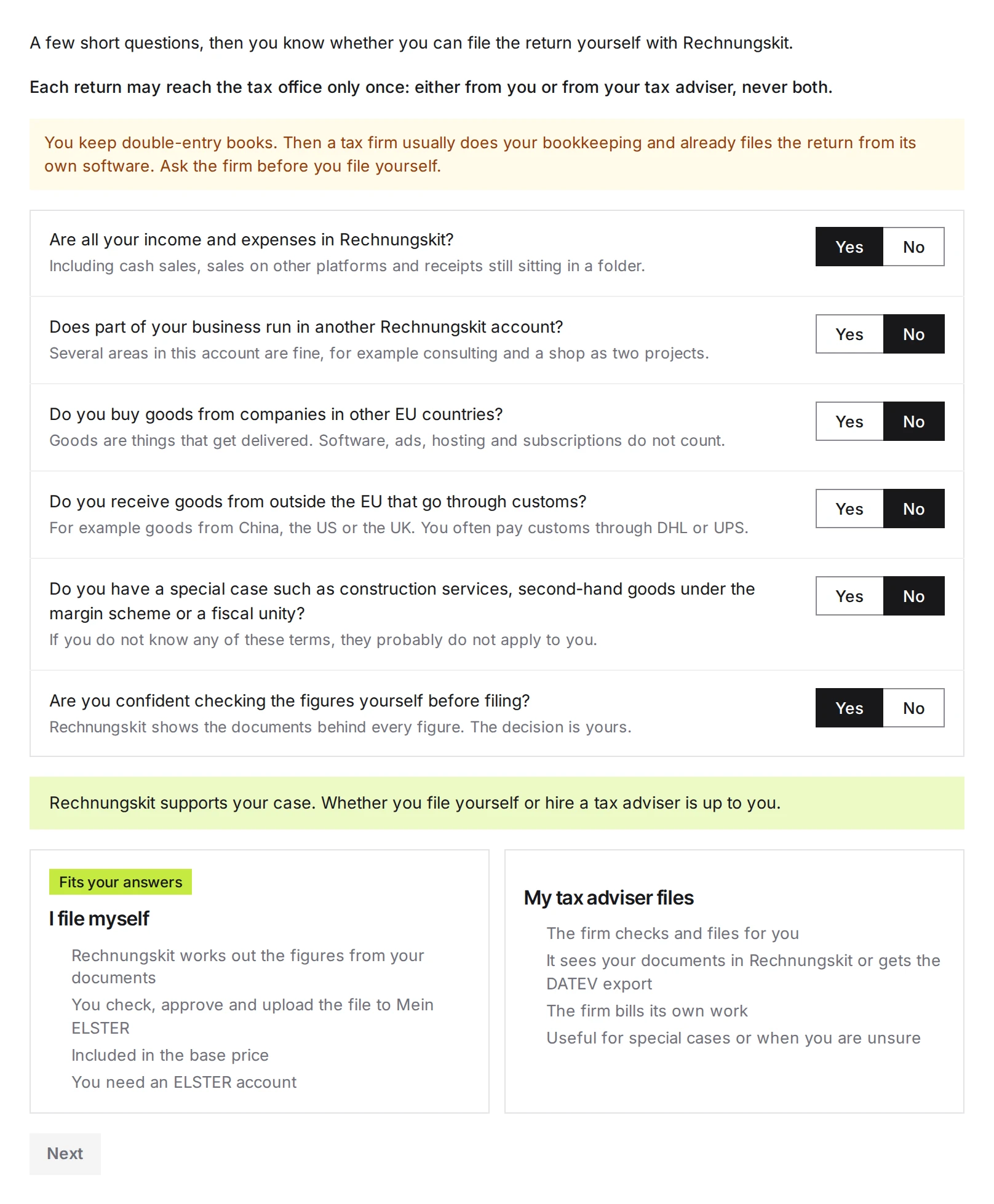
- Who files? A few yes/no questions show whether Rechnungskit supports your case. Only real special cases (construction services under § 13b, the margin scheme, a VAT group) rule out filing yourself. If part of your business runs in another Rechnungskit account, you pick the month from which everything runs in this account; you file the periods before that the way you did so far.
- Tax number: as it appears on the letters from your tax office. Rechnungskit shows it in the 13-digit ELSTER format.
- Period: monthly, quarterly or not at all, plus an approved permanent extension (Dauerfristverlängerung) and the special advance payment (Sondervorauszahlung). Your tax office's letter tells you which applies (§ 18(2) UStG, §§ 46 to 48 UStDV).
Whether you pay VAT on invoiced or on received amounts (Soll- or Ist-Versteuerung) and whether you are a small business (Kleinunternehmer) stay where they were, under Settings → VAT.
To save, you agree to the provisions of the terms on the VAT advance return (§ 3, § 5(3), § 6 and § 7). They put in writing what this page says: Rechnungskit calculates and delivers the file; you check, file and pay yourself.
One period in four steps
At the top of /ustva you see the amount, the deadline and four steps: Check, Approve, Upload to ELSTER, Pay.
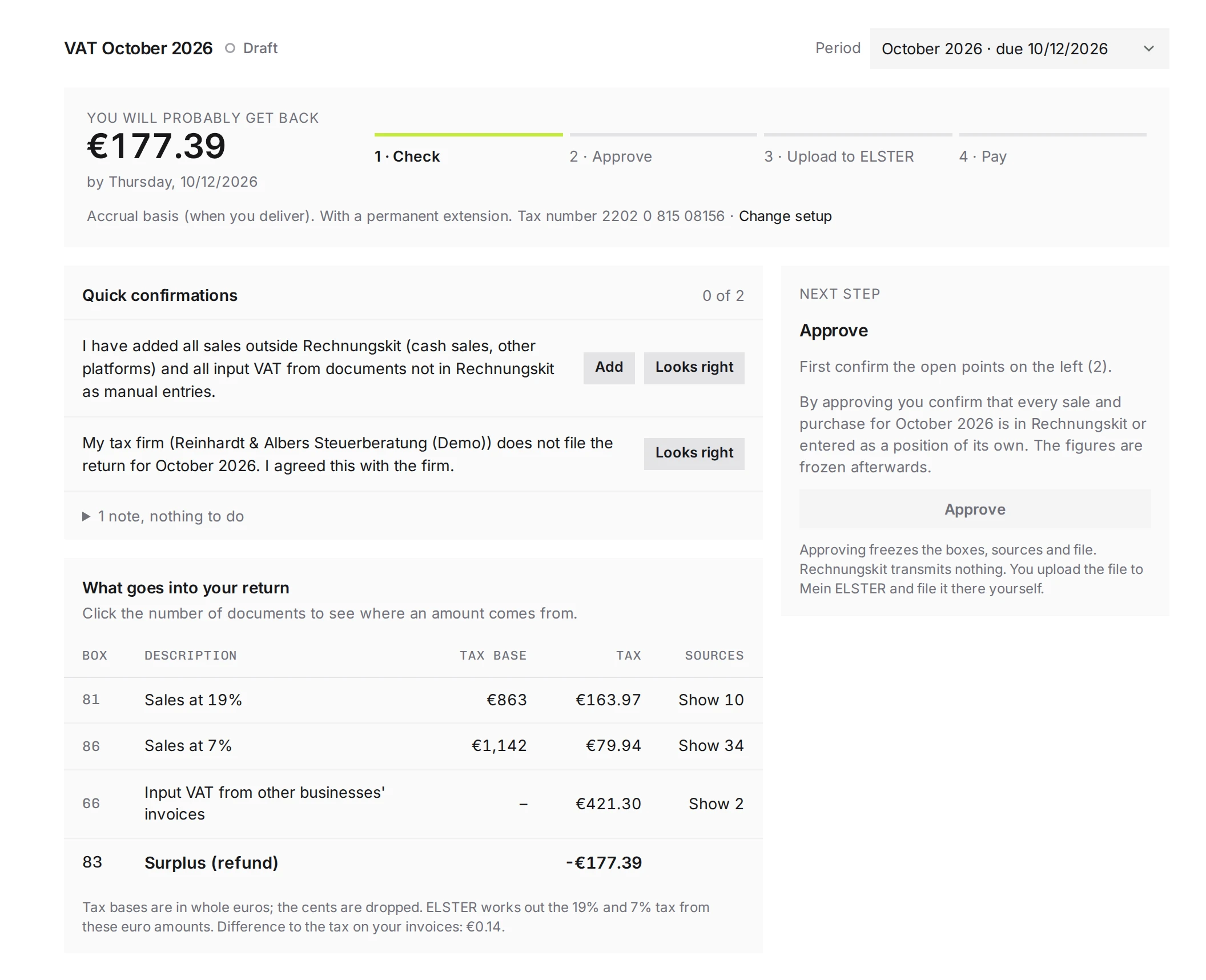
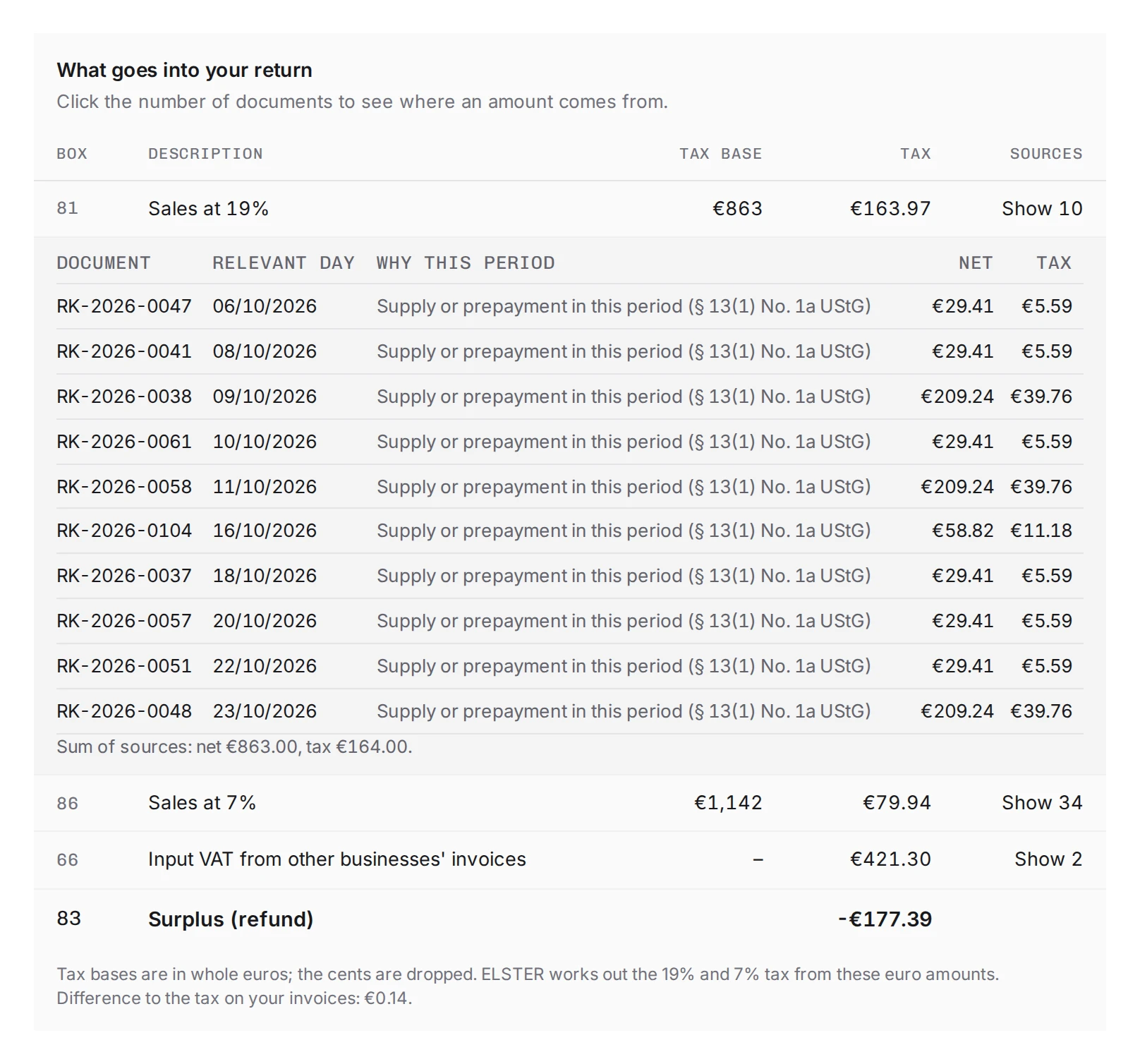
- Check: under "Quick confirmations" you confirm each point with Looks right, for example that there are no sales outside Rechnungskit. Points that block filing appear in red above, with a link to sort them out. Under "What goes into your return", the number of documents opens the sources of each box.
- Approve: by approving, you confirm that all sales and purchases of the period are recorded. The boxes, sources and file are frozen after that.
- Upload to Mein ELSTER: download the file and upload it in Mein ELSTER on the VAT advance return form via "Daten übernehmen" (import data). If that fails, type in the boxes by hand. Then record the filing in Rechnungskit, ideally with the transmission log (Übermittlungsprotokoll).
- Pay: Rechnungskit shows the amount, the deadline and the payment reference to copy. The VAT payable is due on the same day as the return (§ 18(1) UStG).
The return is due on the 10th of the following month, or one month later with a permanent extension (§ 46 UStDV). If that day falls on a weekend or public holiday, the next working day applies (§ 108(3) AO). A week before, the task "File the VAT advance return" appears.
What goes into the boxes
- Your invoices by tax rate (boxes 81, 86), tax-exempt supplies to the EU (box 41), exports (box 43) and services to businesses in the EU (box 21). Sales under OSS belong in the OSS return and stay out (§ 18j UStG).
- Input VAT from approved incoming documents (box 66), in the period in which both the supply and the invoice exist (§ 15(1) UStG).
- Services from abroad without German VAT, such as Google advertising from Ireland: you owe the tax yourself and deduct it as input VAT (boxes 46/47 or 84/85 and box 67, § 13b UStG).
- Goods from the EU: you classify the document on
/ustvaas "Goods from the EU". Rechnungskit then fills boxes 89/93 and the same input VAT in box 61 (§ 1a UStG). - Imports from outside the EU: the supplier's invoice contains no input VAT. You enter the import VAT from the customs notice as an entry of your own in box 62 (§ 15(1) sentence 1 no. 2 UStG).
- Your own entries for cash sales, sales on other platforms or input VAT from documents that are not in Rechnungskit. An entry cannot be changed, only cancelled.
Tax bases are in whole euros; the form works out the 19% and 7% tax from them.
Corrections
If a document of the period changes after you filed, /ustva shows the boxes affected and the task "Correct the VAT advance return" appears. You file a correction as soon as you notice the error (§ 153 AO). Rechnungskit creates it as a new version; you approve it and upload it as usual.
Where to find it in the app
Rechnungskit is not a tax advisory or law firm. This article explains general principles and does not replace advice from a tax advisor (Steuerberater, § 5 StBerG) or a lawyer (§ 3 RDG). Rechnungskit is built for businesses based in Germany and prepares documents, tax rates and bookings automatically. How your specific case is treated remains your decision, ideally together with your tax advisor or a lawyer.