Consent and cookie banner in the checkout
Updated
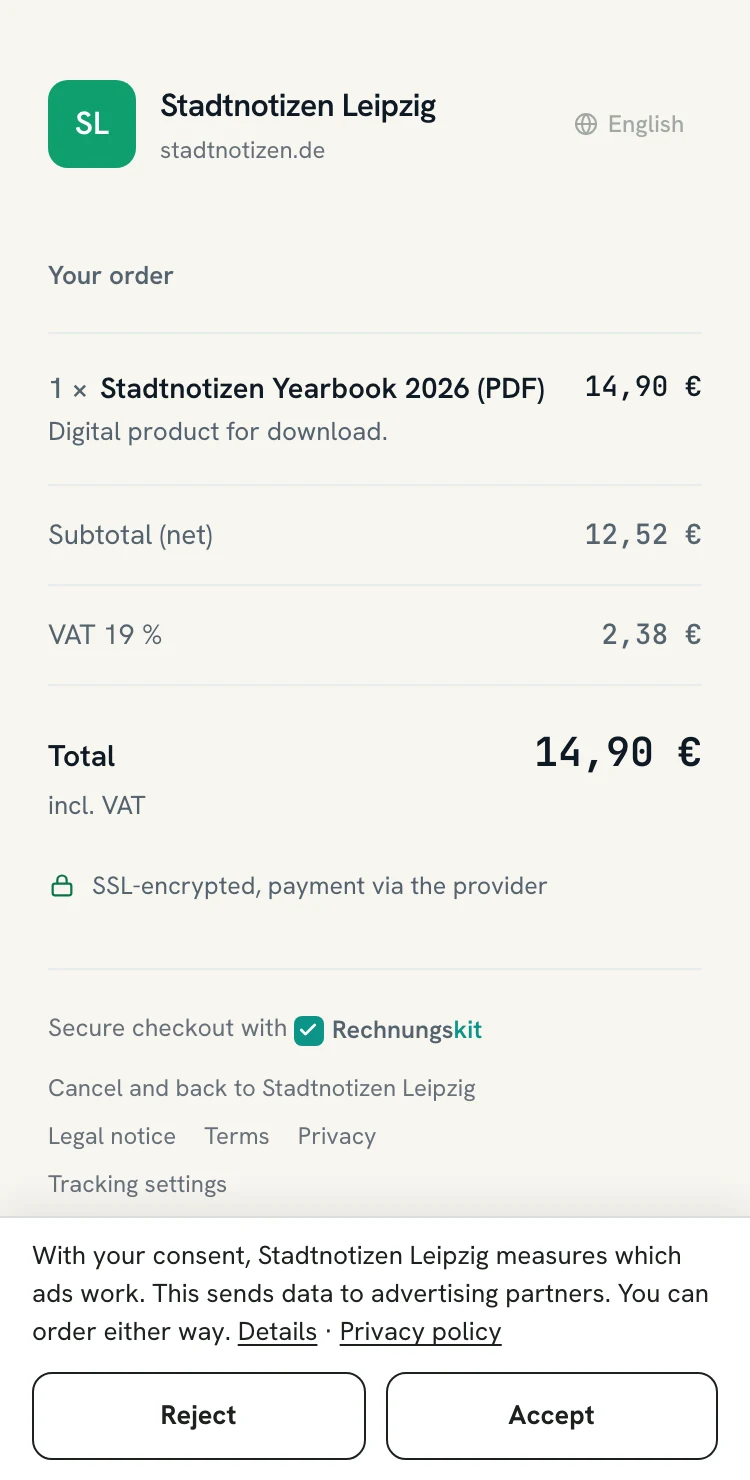
Do I need a cookie banner in the checkout? No, not one of your own: Rechnungskit automatically shows a slim consent bar in the checkout as soon as tracking is active in your project, meaning Meta Ads, the Google tag or the TikTok pixel. Without tracking there is no bar, and the checkout sets no tracking cookies.
The bar appears in the product checkout, the subscription checkout, on the shop page and on the thank-you pages. This page explains why consent is needed, what happens with and without a yes, and what you still have to do yourself.
- Buyerarrives with a click ID or UTMfbclid, gclid, ttclid, utm_…
- Checkoutbar at the bottom edgeAccept and Reject the same size
- Decisioncookie on the checkout domainonly yes or no, 180 days
- Purchasemeasured only with a yesanyone can buy, with or without a yes
Why consent is needed
The European Data Protection Board already treats collecting a click ID from a tracking link (fbclid, gclid, ttclid) as access to the user's device (EDPB Guidelines 2/2023, version 2.0, para. 50 f.). For that, § 25 Abs. 1 TDDDG (the German telecommunications and digital services data protection act) requires consent, even if no tracking cookie is set.
Server-side tracking through the Meta Conversions API changes nothing about this. Rechnungskit therefore asks before any measurement.
What the bar looks like
A slim bar at the bottom edge, not a pop-up. It consists of one sentence, a link to your privacy policy, two equally sized buttons Accept and Reject, and a Details section.
The form and the pay button stay visible and usable, on phones too. The bar exists in all six checkout languages. Anyone who clicks nothing has not consented. Every buyer can always buy, with or without a yes.
Under Details, the bar names every active provider with its purpose:
| Provider | Purpose |
|---|---|
| Meta | measuring ad results and building audiences for Meta ads |
| conversion measurement and statistics for Google Ads and Analytics | |
| TikTok | measuring ad results for TikTok ads |
What happens with and without a yes
With a yes
Rechnungskit stores click IDs and UTM parameters on the order or the subscription, together with the record of consent: decision, providers, version of the bar and time (Art. 7 Abs. 1 GDPR). The Meta integration then reports the purchase, the webhook field attribution is filled in, and the return URL to your thank-you page carries the ad parameters.
The checkout loads browser pixels (Meta pixel, Google tag, TikTok pixel) only after the click on Accept. From then on the providers set their own cookies. The purchase event on the thank-you page runs in a separate frame without buyer data and without a document link in the address. For prepayment and pay by invoice (the page with bank details), no pixels run.
Without a yes
Rechnungskit stores neither click IDs nor UTM parameters, sends nothing to Meta, loads no pixel and leaves the webhook field attribution empty. The return URL to your thank-you page then only gets the rk_ parameters, no ad parameters.
Rechnungskit checks the stored consent at the moment of sending to decide whether it may send. Orders from before the switch in October 2026 have no record and count as a no.
Remembering and withdrawing the decision
A cookie on the checkout domain remembers the decision, separately per project, for 180 days. It contains no identifier, only yes or no, the version of the bar and the providers. It is strictly necessary for the service (§ 25 Abs. 2 Nr. 2 TDDDG).
The bar asks again when:
- a new provider is added or the bar changes,
- a buyer deletes the cookies of the checkout domain (then it reappears on the next visit).
Buyers can change or withdraw their decision at any time through the link "Tracking settings" at the bottom of the checkout and on the thank-you page. After a withdrawal the page reloads so no pixel keeps running.
What you have to do
- Enter your privacy policy URL: Settings, company details. Without it, tracking pauses completely: no bar appears, and nothing is stored or sent. The integration card then warns you.
- Name the providers in your privacy policy: every active one. You find suggested wording in the guide Server-side tracking for Meta on rechnungskit.de (not legal advice).
- Check joint controllership with Meta: check whether you are a joint controller with Meta (Art. 26 GDPR, CJEU C-40/17 Fashion ID). This is a pointer, not legal advice.
Status on the integrations page
On the integrations page, every tracking card shows:
- the status "consent in the checkout active",
- a preview of the bar,
- the check of the privacy policy URL,
- the consent rate of the last 30 days, counted from orders, without personal data.
Expect some buyers to reject. Meta, Google and TikTok do not see those purchases. Rechnungskit does not replace legal advice.
Your own website
The bar does not cover your own website. If a pixel runs there, you need your own banner there.
Where to find it in the app
Rechnungskit is not a tax advisory or law firm. This article explains general principles and does not replace advice from a tax advisor (Steuerberater, § 5 StBerG) or a lawyer (§ 3 RDG). Rechnungskit is built for businesses based in Germany and prepares documents, tax rates and bookings automatically. How your specific case is treated remains your decision, ideally together with your tax advisor or a lawyer.