 Stripe Billing + Rechnungskit
Stripe Billing e‑invoicing for Germany: every subscription charge becomes a valid invoice
Rechnungskit connects to your Stripe account and adds to Stripe Billing in one of two ways. Path A, keep Stripe Billing. Rechnungskit reads every subscription charge with its line items, tax rates and service period and turns it into an e-invoice under EN 16931 with your own number range, archived under GoBD and booked in the DATEV export, with deferred revenue for annual plans. Subscriptions, mandates and payments stay with Stripe. Path B, take over the subscriptions. Rechnungskit runs the subscriptions itself, Stripe keeps collecting through the existing mandate, and each subscription switches at the end of its period without your customer signing up again. Both paths use the same connection, and path B builds on path A.
Stripe Billing takes the payment. The invoice is your job.
Stripe Billing manages subscriptions and collects the money, but it does not issue e-invoices in the German format or archive under GoBD, and it knows nothing about DATEV or deferred revenue under the German Commercial Code (HGB). Rechnungskit adds that part. Whether Stripe Billing stays or the subscriptions move to Rechnungskit is your call.
- Stripe Billing processes the payment
- PDF receipt without a structured e-invoice format
- No German VAT logic per country
- No GoBD archive, no DATEV export
- Compliant e-invoice under EN 16931 (ZUGFeRD)
- Payments matched to orders automatically
- GoBD-compliant, tamper-evident archive with checksum
- DATEV export in one click
Four steps from payment to booking.
- 01ConnectConnect your Stripe Billing account in a few minutes. No code needed.
- 02ImportRechnungskit imports every Stripe Billing payment and matches it.
- 03ErzeugenEvery payment becomes a validated e-invoice under EN 16931.
- 04ArchiveThe invoice is archived to GoBD standards and is ready for the DATEV export.
Every format Stripe Billing doesn't deliver.
Two paths, one connection
Rechnungskit can work with Stripe Billing in two ways. Both start with the same Stripe connection, and you can begin with path A and switch to path B later.
| Path A: keep Stripe Billing | Path B: move subscriptions to Rechnungskit | |
|---|---|---|
| Who runs the subscriptions | Stripe Billing, as before | Rechnungskit |
| Who collects the money | Stripe Billing | Your Stripe account, triggered by Rechnungskit each period |
| What Rechnungskit does | Reads every subscription charge and turns it into the e-invoice | Runs the subscriptions, creates the e-invoice each period and gives your customers the cancellation portal |
| What you need to do | Connect Stripe, turn off Stripe's invoice emails | Also pick Stripe as subscription provider and move the subscriptions in the wizard |
| What changes for customers | Nothing | Nothing, the payment mandate stays and nobody signs up again |
| Fits if | you want to keep using Stripe Billing, for example for usage-based prices or discounts | you want subscription management and invoicing in one system and no longer need Stripe Billing |
| Guide | This page | Switching from Stripe Billing |
Path B builds on path A. First Rechnungskit takes over invoicing, then the subscriptions switch at the end of their period. You can also mix the two: some subscriptions stay in Stripe Billing while the rest move, all through the same connection.
Path A: keep Stripe Billing, invoices from Rechnungskit
Stripe Billing is good at managing subscriptions and collecting money. What it lacks is the German invoicing side: an e-invoice under EN 16931, a GoBD-compliant archive and a DATEV export for your tax advisor (Steuerkanzlei).
On path A, Stripe stays in charge of subscriptions and payments, and Rechnungskit handles the invoicing behind them. There is no cut-over date and nothing to export. Stripe Billing issues an invoice for every subscription period with line items, tax rates and billing period; Rechnungskit reads that data and creates the invoice that counts for tax purposes:
- Your own number range. Every charge gets an invoice number from your sequential range, independent of Stripe's own numbering.
- Line items and tax rates. The Stripe line items come over with their tax rate, and the VAT is checked against your tax matrix per country and product category.
- Service period. The billing period appears on the invoice and as structured data in the e-invoice (ZUGFeRD BG-14); prorated line items after an upgrade or downgrade come over as separate line items.
- Cancellation invoice from the refund. A refund in Stripe automatically creates the matching cancellation invoice (Storno), to the cent for partial refunds too.
- Fees and payouts. Every payout is split into payments, refunds and Stripe fees; the DATEV export books them through the transit account (Geldtransitkonto), with fees as a separate expense.
- Missing address. Many Stripe customers only have an email address on file. Up to 250 euros gross and with Germany as the place of supply, Rechnungskit then automatically creates a small-amount invoice (Kleinbetragsrechnung) without an address (§ 33 UStDV). If that does not apply, Rechnungskit holds the invoice and you request the address from the buyer with a data request link. They add it without logging in.
Your Stripe products end up in the product catalog. Go through them once under Settings, Products (tax category, revenue recognition) so that VAT and DATEV accounts are right.
How to connect Stripe Billing
The connection is the same as for regular Stripe payments: a restricted API key from your Stripe Dashboard.
- Create the key. In the Stripe Dashboard under Developers, API keys, create a restricted key (Create restricted key). On top of read access for payments, payouts and products, it needs read access to invoices, customers and tax rates for subscriptions. The full permissions table with screenshots is on the Stripe page.
- Use the live key. Even for testing. A test key connects Stripe's empty test environment, where your real subscriptions never show up.
- Paste the key. In Rechnungskit under Connections, Connect. Rechnungskit registers the webhook in your Stripe account automatically, including signature verification.
- Check the sales source. The connection mapping shows "Stripe subscriptions (Billing)"; for new connections without a shop it is preselected. From now on every Stripe Billing invoice is taken over automatically as an order with real line items.
If the key is missing permissions, the connect dialog tells you which ones. The key is stored encrypted and never shown again.
Turn off Stripe's invoice emails
Stripe automatically creates its own invoice for every subscription payment. You cannot turn that off, but you can turn off sending it to your customers, and you need to: the Rechnungskit invoice is the one that counts for tax purposes. If Stripe keeps sending, your customers get two documents for the same purchase.
In the Stripe Dashboard under Billing, turn off the customer emails: switch off "Send finalized invoices and credit notes to customers", and under customer emails also turn off the receipt for successful payments. Payment collection and webhooks are not affected.
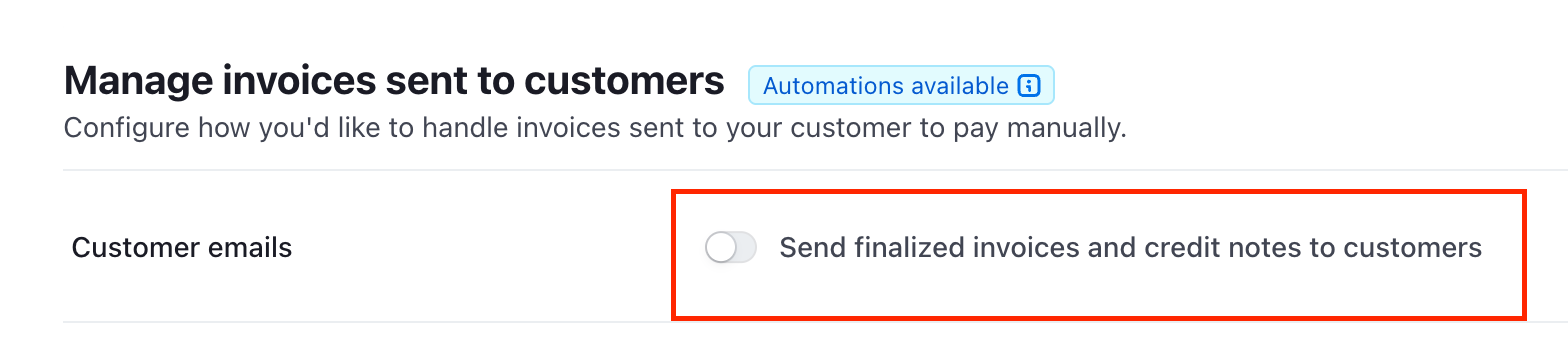
After you connect, Rechnungskit reminds you of this step right on the Stripe connection, with a direct link to the right place in the Stripe Dashboard, and again at go-live.
The same setting applies to one-off invoices you create by hand in Stripe. Rechnungskit reads those through this connection as well. How to create them in Stripe and what they cost is in the Stripe Invoicing guide.
Deferred revenue for annual plans in the DATEV export
If the service period runs past the invoice month, as with an annual plan, the DATEV export books the deferred revenue (pRAP under § 250 Abs. 2 HGB) automatically: the deferral in the invoice month and the release in each following month, monthly or to the day, across year end too. This requires that you prepare a balance sheet and that the pRAP account is set in the DATEV settings (SKR03 0990 or SKR04 3900, preset as the default). Under cash-basis accounting (EÜR), revenue counts when the money arrives (§ 11 Abs. 1 EStG), so there is no deferral and the period appears on the invoice for information only. Background: deferred revenue for subscriptions. This applies on both paths.
Path B: move the subscriptions to Rechnungskit
If you want subscription management and invoicing in one system, move the subscriptions to Rechnungskit. This works because cards and SEPA mandates belong to the Stripe account, not to the Stripe Billing product. They stay valid for charges through the same account, whichever system runs the billing. After that you no longer need Stripe Billing.
Here is how it works:
- Path A is set up. Stripe is connected, the invoice emails are off, and Rechnungskit issues the invoices.
- Pick Stripe as subscription provider. Under Settings, Connections, choose Stripe as the provider for subscriptions. From then on you can create new subscriptions directly in Rechnungskit: plans on the product (interval, price, optionally a trial) and a subscription link per plan. The customer enters their billing address and sets up the mandate on a page hosted by Stripe. More under subscriptions.
- Move running subscriptions. The "Take over from Stripe Billing" wizard reads your Stripe subscriptions, you map each Stripe price to a plan and start the takeover. Rechnungskit creates its own subscription for each one with the existing mandate and ends the Stripe subscription at the end of its period. Stripe still bills the current period, and Rechnungskit collects from the first period after that. Your customer does not have to sign up again or confirm anything.
Subscriptions with several line items, usage-based prices, intervals other than monthly or yearly, or no saved payment method cannot be moved. They stay in Stripe Billing and keep getting their invoices through path A. You can also exclude individual subscriptions on purpose.
After the takeover, every period produces an e-invoice with service period, archive entry and DATEV export, and your customers get the cancellation and withdrawal portal that needs no login. The step-by-step guide with screenshot, requirements and checklist is under Switching from Stripe Billing.
Stripe Billing and e-invoicing: FAQ
Rechnungskit is not a tax advisory or law firm. This article explains general principles and does not replace advice from a tax advisor (Steuerberater, § 5 StBerG) or a lawyer (§ 3 RDG). Rechnungskit is built for businesses based in Germany and prepares documents, tax rates and bookings automatically. How your specific case is treated remains your decision, ideally together with your tax advisor or a lawyer.
Connect Stripe Billing, e-invoicing done.
Create an account, connect your payment provider, check everything in free test mode. Billing starts when you go live.
Try it now