Invoice approval with checkers who need no account
Split an incoming invoice into parts and ask the right person about each one. They confirm through a link without an account, and you approve. No extra cost.
No credit card. You only pay once real invoices go out.
- Incoming invoice
- Parts checked
- Approval
- Payment run
- DATEV
On this page 9
What you get.
With "Request approval" you split an incoming invoice into parts and ask the person who knows about each part. They get an email with a link, see their line in the invoice and answer "Yes, it's right", "Not right" or with a question, without an account. Approving and paying stay with you. The feature is included in every account with Expenses at no extra cost.
- Parts with an amount per invoice, optionally from the invoice lines; together exactly the gross amount
- One person per part, from your team or by email address, or "No check needed"
- Or "Everyone checks all" every person checks the whole document
- Checker page without an account or login, with their own line highlighted and the original
- Answers "Yes, it's right", "Not right" with a reason, or a question for you
- Emails in German or English, sent in your name; replies to the email go to you
- Status and deadline in the expenses list, for example "In check (1/2) · due 28 Nov"
- One summary email on weekdays for open checks instead of a reminder per document
- Linked documents, such as the invoice to your customer, are visible only to the people on the matching part
- Every answer with name and time in the history; "Approve anyway" is recorded with your name
- Remember people per business partner; new documents from that partner come with them suggested
Why it matters.
Whoever pays the invoices does not always know whether they are right. The freight invoice covers three shipments, the agency invoice two projects, the maintenance invoice a call-out that was already paid. So PDFs go back and forth by email, replies sit in inboxes, and in the end nobody remembers who confirmed what. A login to the bookkeeping for every colleague and freelancer is too much for that.
What invoice approval does for you
Under Expenses, Rechnungskit collects your suppliers' invoices, reads them and checks the mandatory details. Whether the content is right is often something only another person knows: the project lead, the warehouse manager, the freelancer who ordered the work. With "Request approval" you ask exactly that person, and only about their part of the invoice.
They do not need an account for this. They get an email, open the link, see the invoice with their line highlighted and answer with one click. On the document you see who confirmed what, and you approve once everything fits.
The flow in four steps
- 1. Set the partsOne person per partfrom the invoice lines or by hand, only where someone should check
- 2. Email with a linkNo accountonly this document and the documents added to it
- 3. AnswerRight, not right, questionwith name and time on the document
- 4. ApproveBy youthen payment run and DATEV export
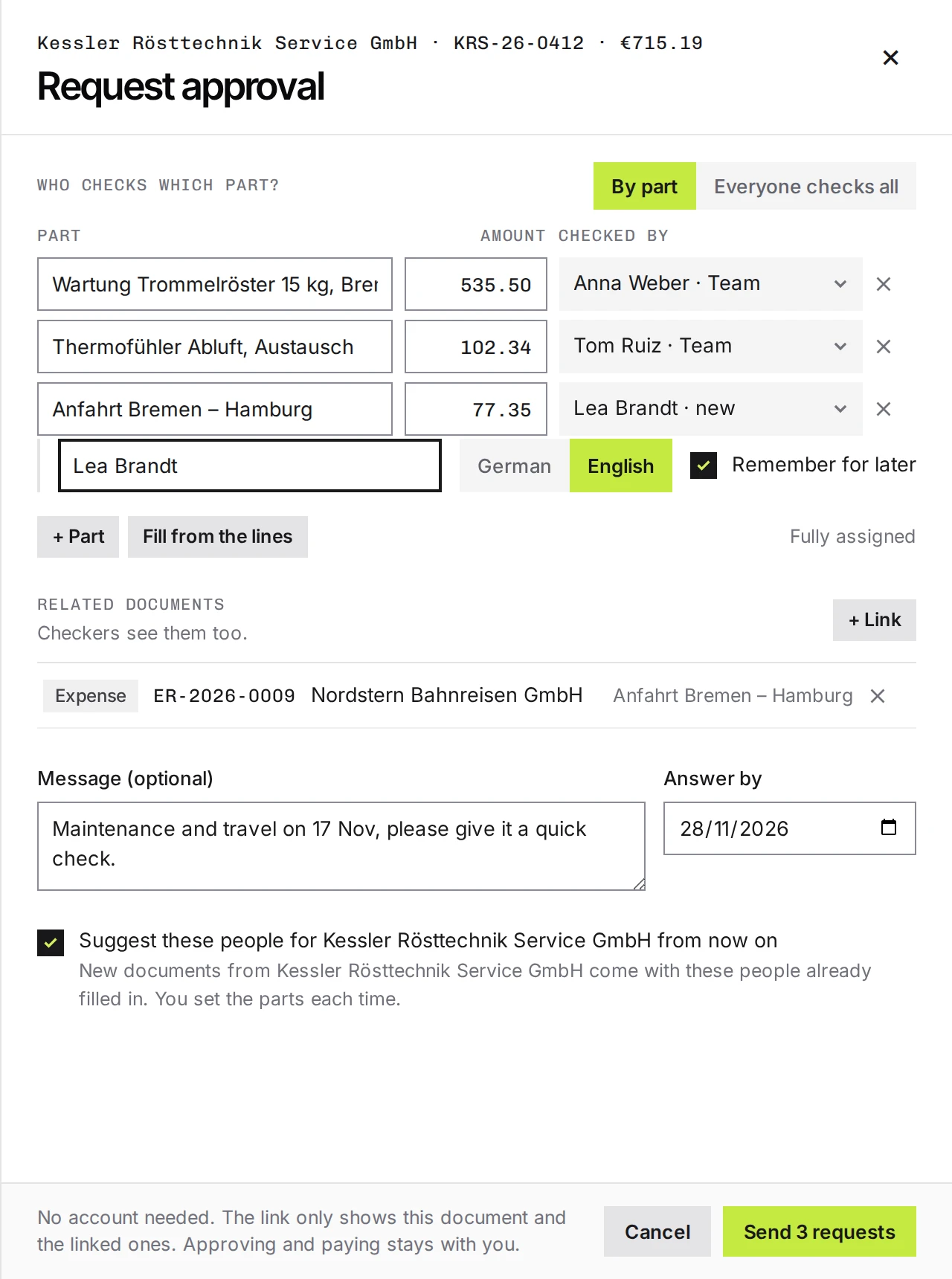
On the document, "Request approval" opens a window with one row per part. "Fill from the lines" creates the rows from the invoice, for e-invoices with the description and article number. Under "Checked by" you pick someone from your team or type an email address. For a new person you enter their name and the language of their emails, German or English, right below the row. Parts without a check stay on "No check needed" and still count towards the total.
What the checker sees
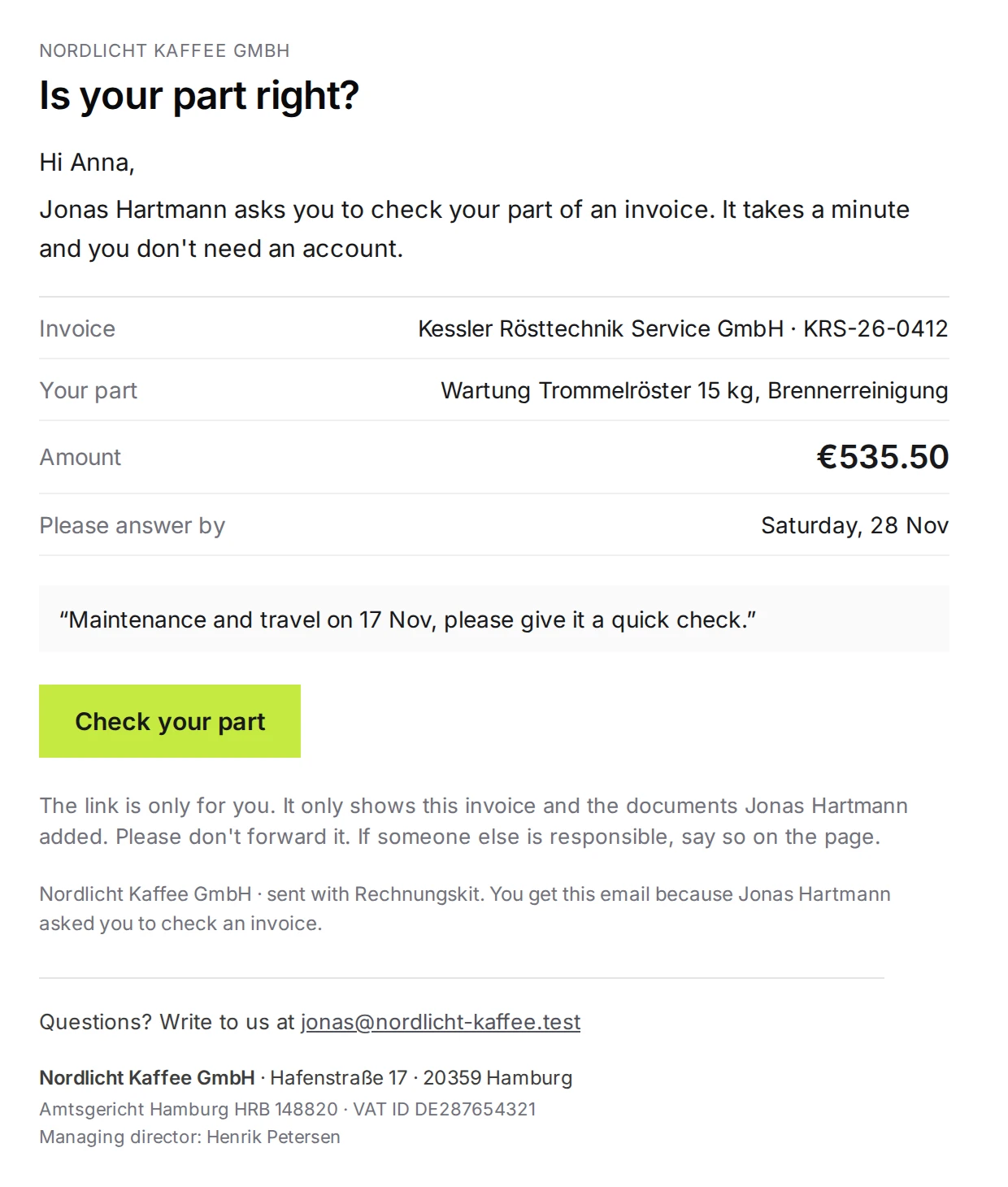
Each person gets an email in the name of the person asking, with the part, the amount and the deadline. If they reply to the email, the reply reaches you. The email ends with your company details.
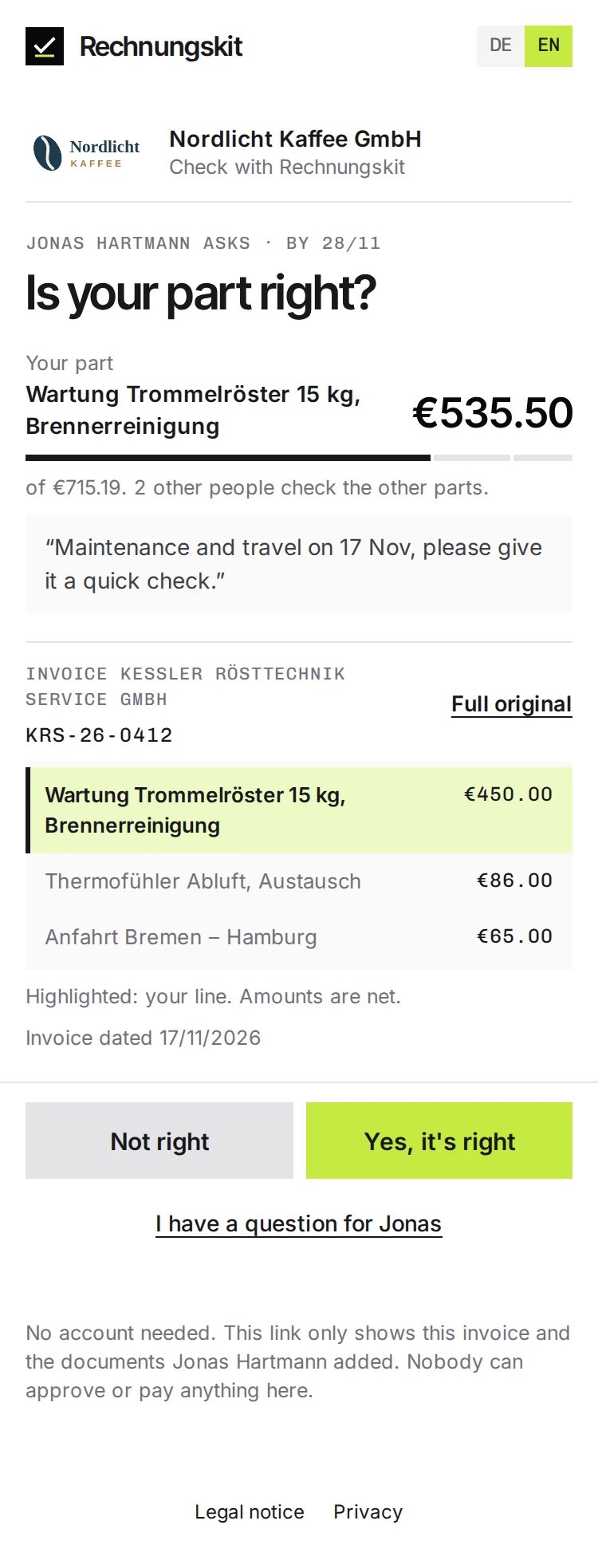
The link opens a checker page with the logo from your invoice template. It shows the part, how much of the invoice other people check, the invoice with the highlighted line and, if needed, the original. The answer can be changed until you approve the document. Anyone who thinks someone else is responsible can say so on the page.
Status on the document and in the list
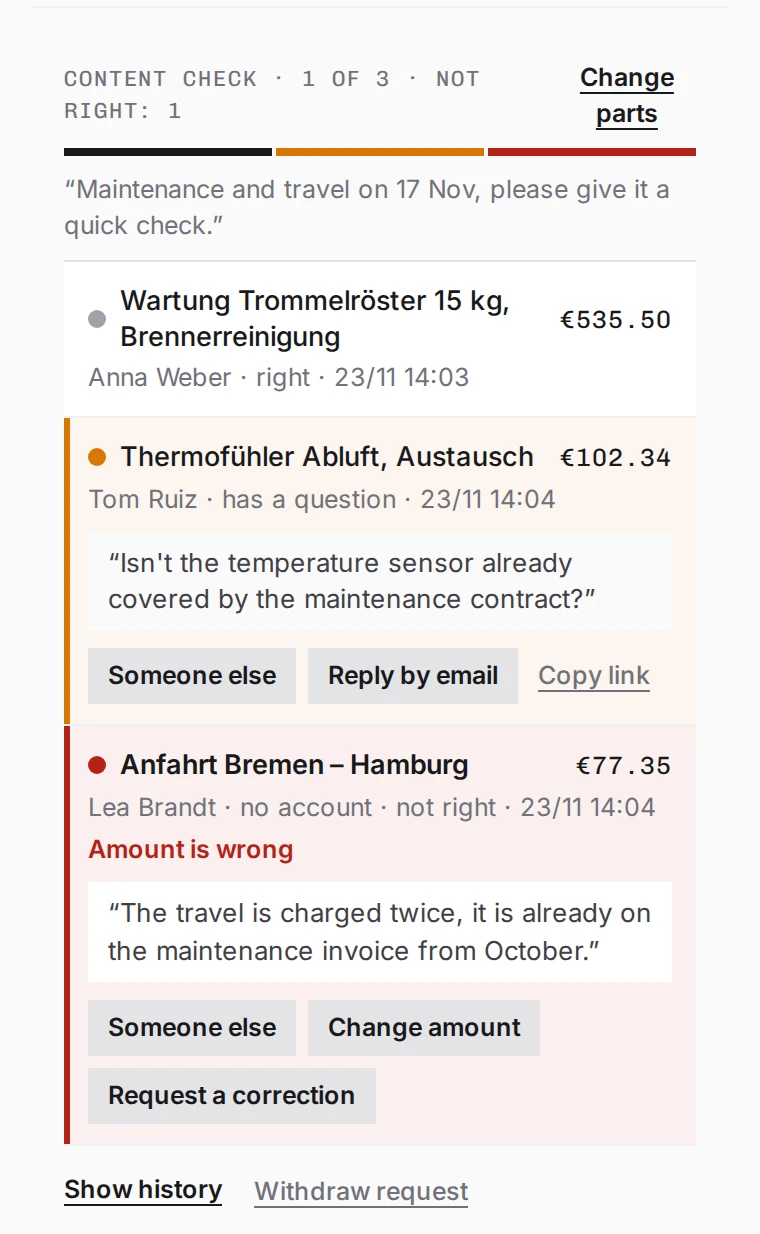
The document shows the "Content check" card: per part the person and their answer, "Not right" in red with the reason and text, an open question in yellow. From there you remind someone, ask someone else, change the amount or request a correction from the supplier. In the expenses list the document shows its status with the deadline, for example "In check (1/2) · due 28 Nov".
Once all parts are confirmed, you approve as usual. If you do not want to wait, use "Approve anyway"; the history records it with your name and the parts that were still open.
Adding related documents
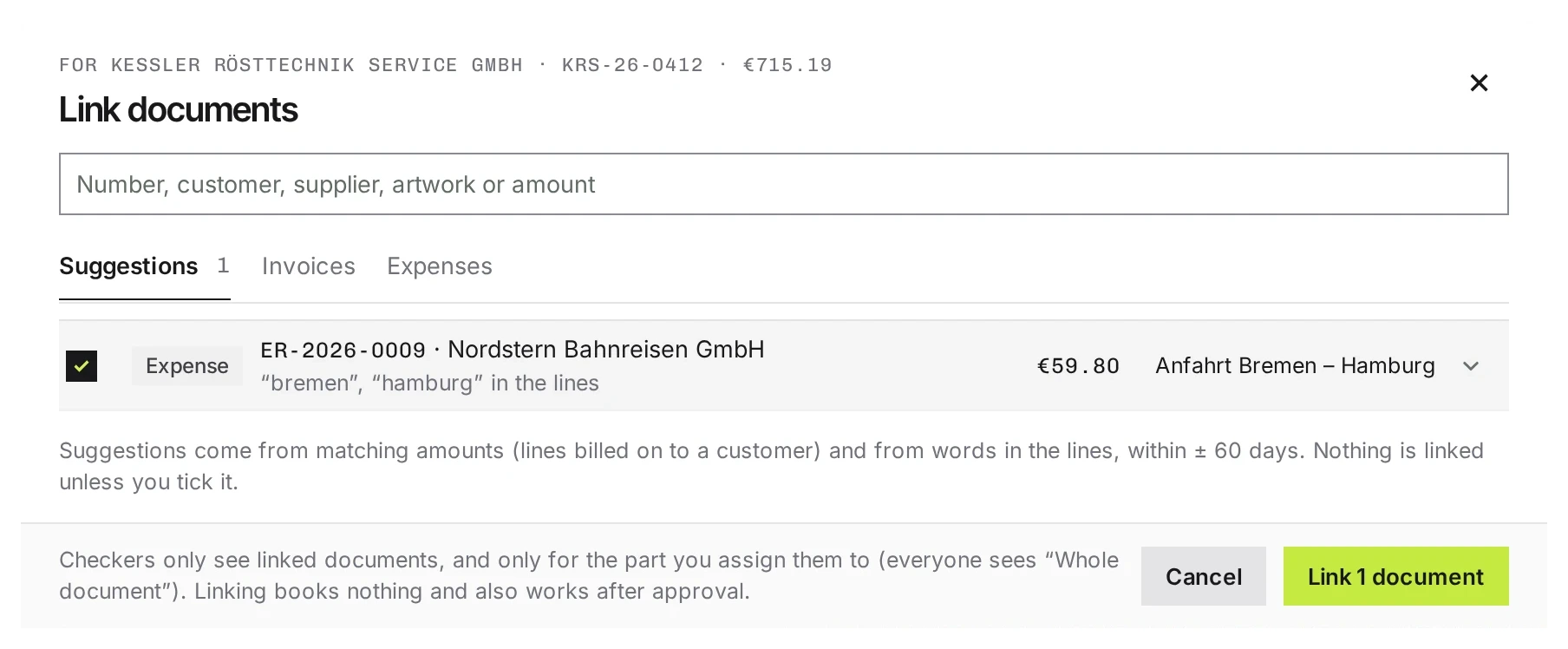
A second document often helps with the check: the invoice you used to pass the costs on to your customer, or another expense for the same job. "+ Link" suggests such documents and says why. You decide which part they belong to, and checkers only see what belongs to their part. A link books nothing.
Setup and all the details
This page shows what invoice approval can do. Every step, the deadlines, the summary email and managing checkers under Settings → Expenses are explained in the guide Request approval (in German). How approved documents get into the export for your tax advisor is shown under DATEV export.
Frequently asked questions
Do checkers need a Rechnungskit account?
No. They get an email with a link that shows only this document and the documents added to it. There is no login. You can ask colleagues who have their own access the same way.
Can a checker approve or pay through the link?
No. The link can only confirm whether the content is right or ask a question. Approving, booking and paying stay with the people in your account who are allowed to approve.
Does every part have to be checked?
No. Every part starts as "No check needed". It counts towards the total, but nobody gets an email about it. You pick a person only where someone should check. At least one part needs a person.
What if nobody answers?
With "Answer by" you set a deadline. The list shows it next to the document and, once it is over, "deadline passed". Open checks come in one summary email on weekdays, and on the document you remind someone with one click or ask someone else. If you do not want to wait, "Approve anyway" approves it and puts your name in the history.
What does invoice approval cost?
Nothing extra. Request approval is part of Expenses and included in every account. Checkers without an account cost nothing either.
What happens after approval?
The document carries on like any approved document: into the payment run if it needs paying, and into the DATEV export for your tax advisor.
- Integrations DATEV
- Help Ausgaben - Eingangsbelege prüfen und freigeben (in German)
- Recently changed Request approval now in every account Request approval: have incoming invoices checked in parts
- Pricing What Rechnungskit costs per month. Every feature is included in every account.
Rechnungskit is not a tax advisory or law firm. This article explains general principles and does not replace advice from a tax advisor (Steuerberater, § 5 StBerG) or a lawyer (§ 3 RDG). Rechnungskit is built for businesses based in Germany and prepares documents, tax rates and bookings automatically. How your specific case is treated remains your decision, ideally together with your tax advisor or a lawyer.
Connect your shop. Rechnungskit does the rest.
Set up for free Or view the live demo firstSet up for free, no credit card. You only pay once real invoices go out.