Checkout link for one-time purchases
With the checkout link you sell a product you created yourself without running an online store, through a link like checkout.rechnungskit.de/c/your-product. The buyer pays through your own payment provider and the money goes straight to your account. After payment Rechnungskit issues the e-invoice; for physical goods it waits until the order ships.
Why it matters
If you sell single products, courses or licenses, you rarely need a full store system. A plain payment link only handles the payment, though. The order flow still has to meet § 312j BGB (the German Civil Code rule for online orders by consumers), for example with an order button labeled "order with obligation to pay". Business customers from other EU countries need a verified VAT ID (USt-IdNr.) before you can apply reverse charge, and at the end you still need an invoice. People usually patch these gaps with several tools and manual work.
How does a purchase work?
You create a product once, with price and VAT rate, and switch on the checkout. Then you share the link, for example in your social media bio, in your newsletter or as a button on your website.
- OrdersAddress, the VAT ID for businesses, then "Order with obligation to pay"
- Pays with your providerMollie, Stripe, PayPal or Unzer. The money goes straight to your account, not through Rechnungskit
 Mollie
 Stripe
 PayPal
 Unzer
Unzer DATEV exportfor your tax advisor
The screenshots on this page come from a demo account of "Stadtnotizen Leipzig", a made-up local newspaper. Names and addresses are invented. The app and the checkout are shown in English; the invoice itself is in German, the language this demo account uses for buyers in Germany.
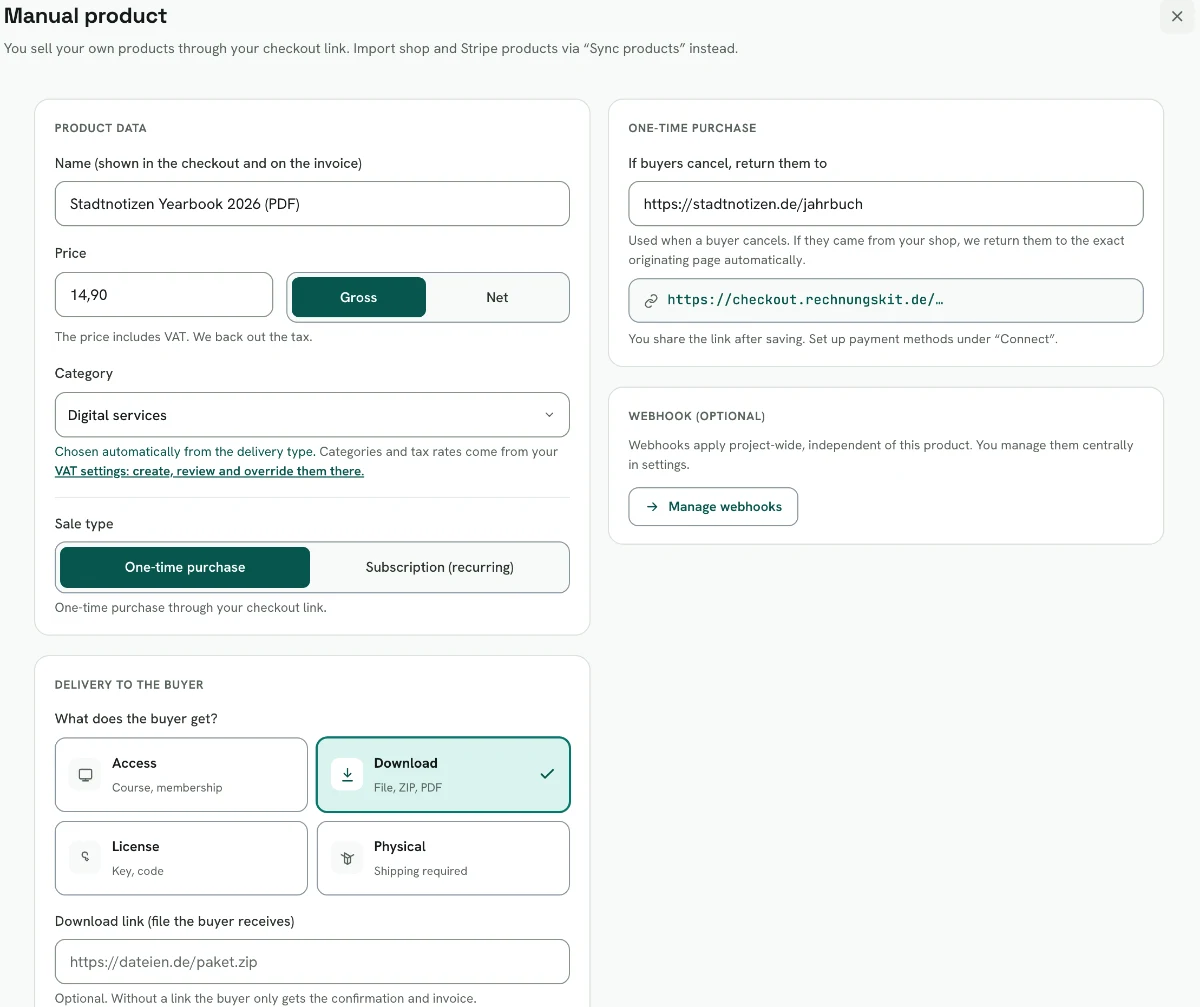
Under Products you create a manual product: name, price gross or net, sale type one-time purchase and the type of delivery. Rechnungskit derives the matching VAT category from the delivery type, and you can still change it.
- The buyer opens the link, picks the product and enters their address.
- They pay on your payment provider's payment page.
- After payment the e-invoice is created. Digital services are invoiced right away, physical goods only once you mark the order as shipped. That keeps the date of supply (Leistungsdatum) correct.
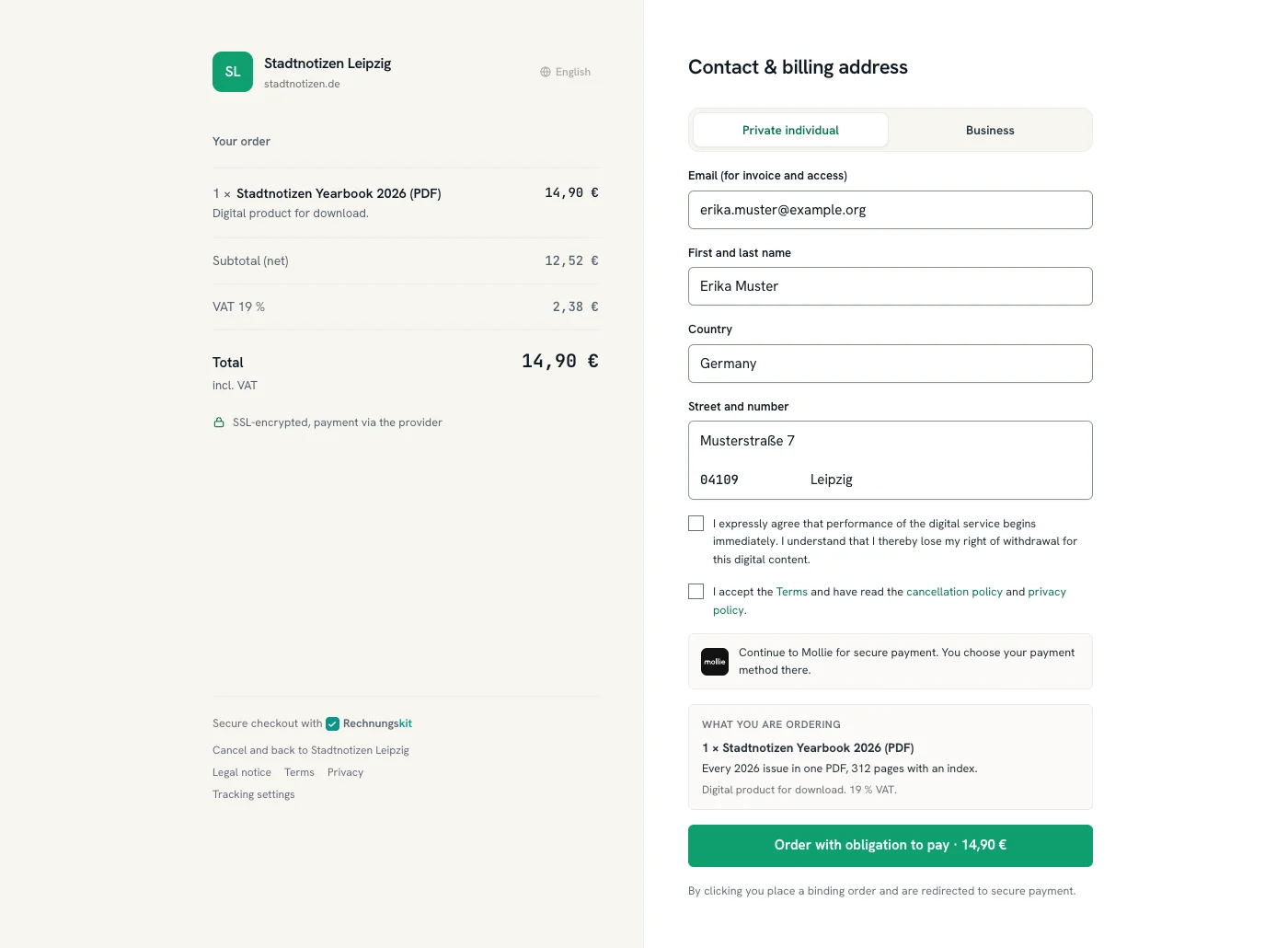
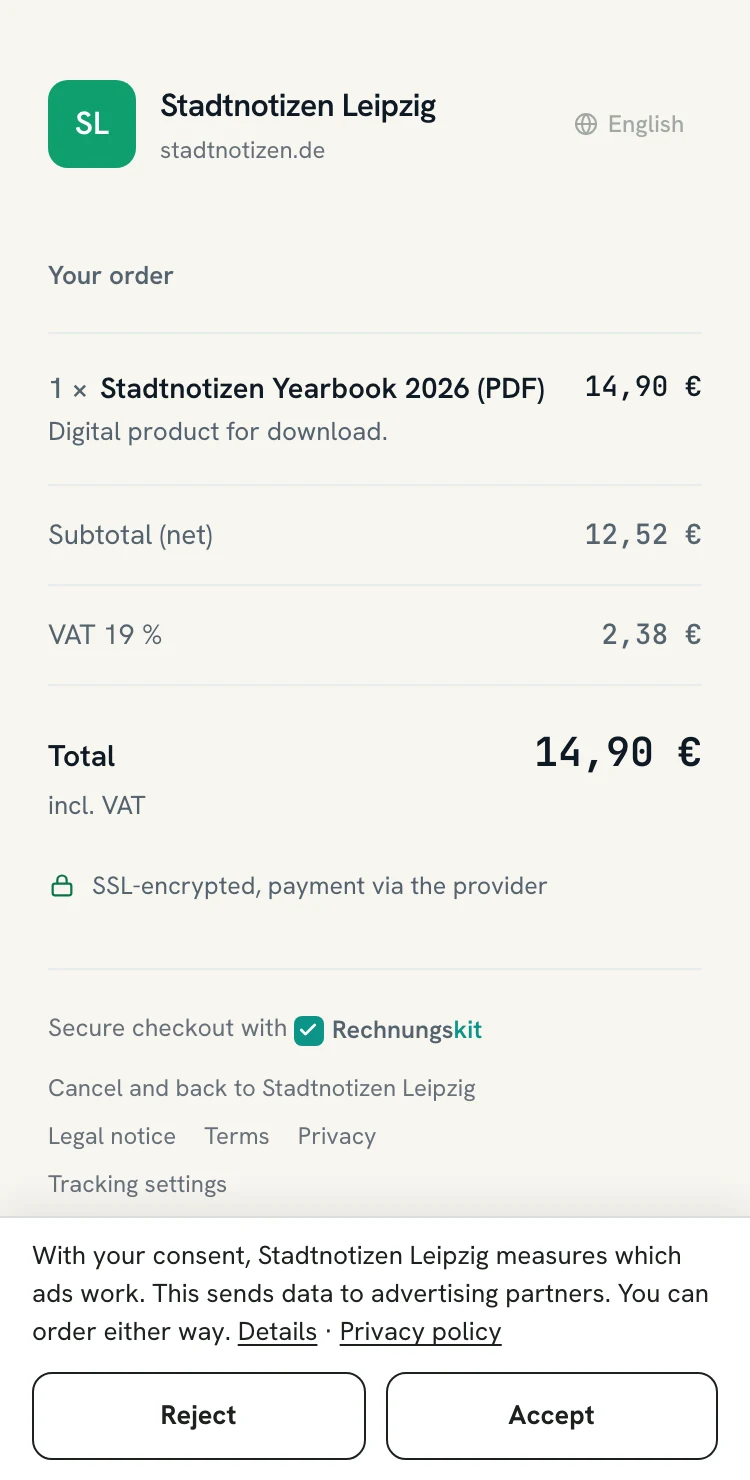
This is the checkout your buyer sees: the order with net amount, VAT and total on the left, the form on the right. For a digital product the withdrawal checkbox sits above the order button.
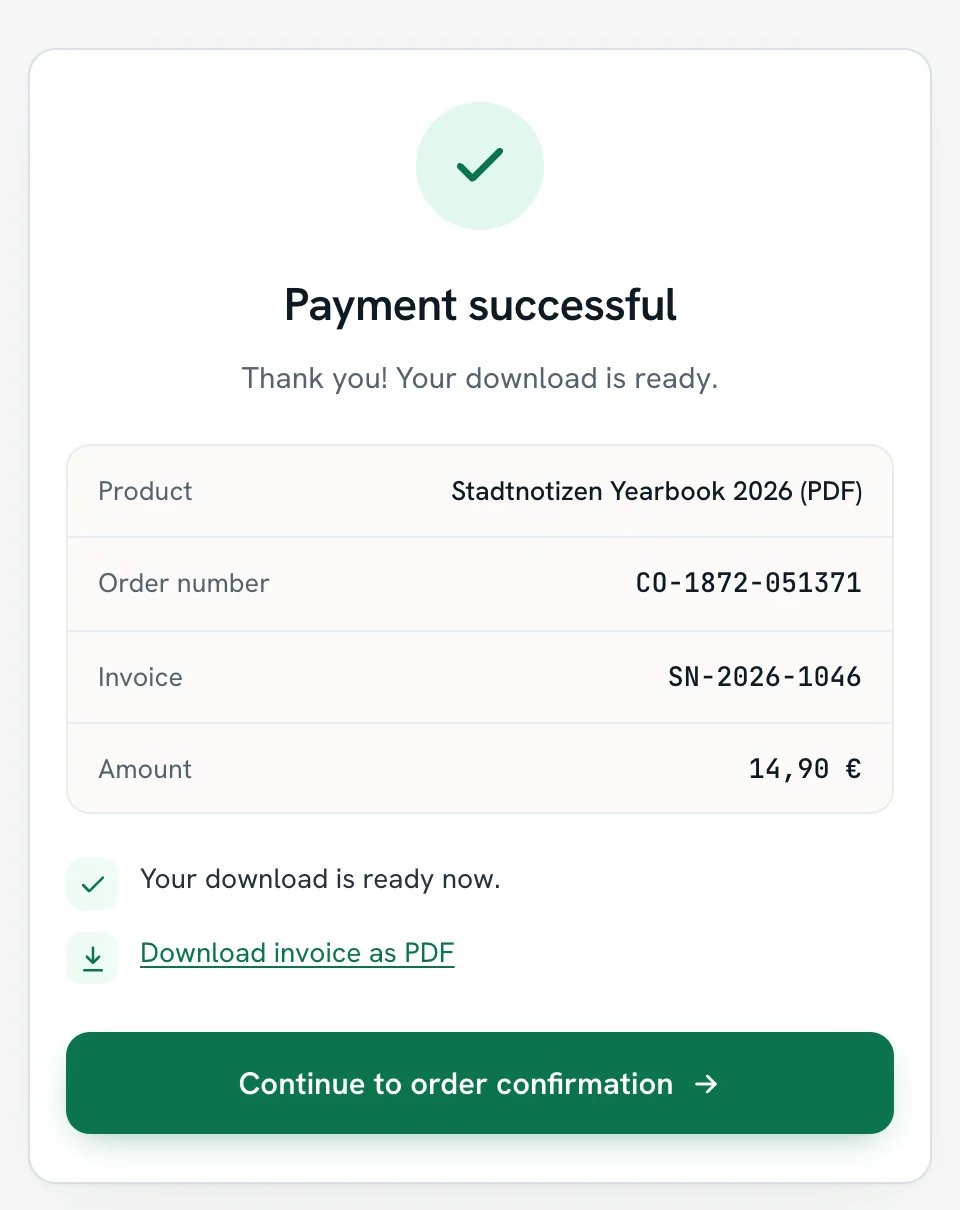
On the confirmation page the buyer can download the invoice as a PDF as soon as it exists. From there it goes into the archive and the DATEV export like every other invoice. Revenue account, tax rate and date of supply follow from the product type.
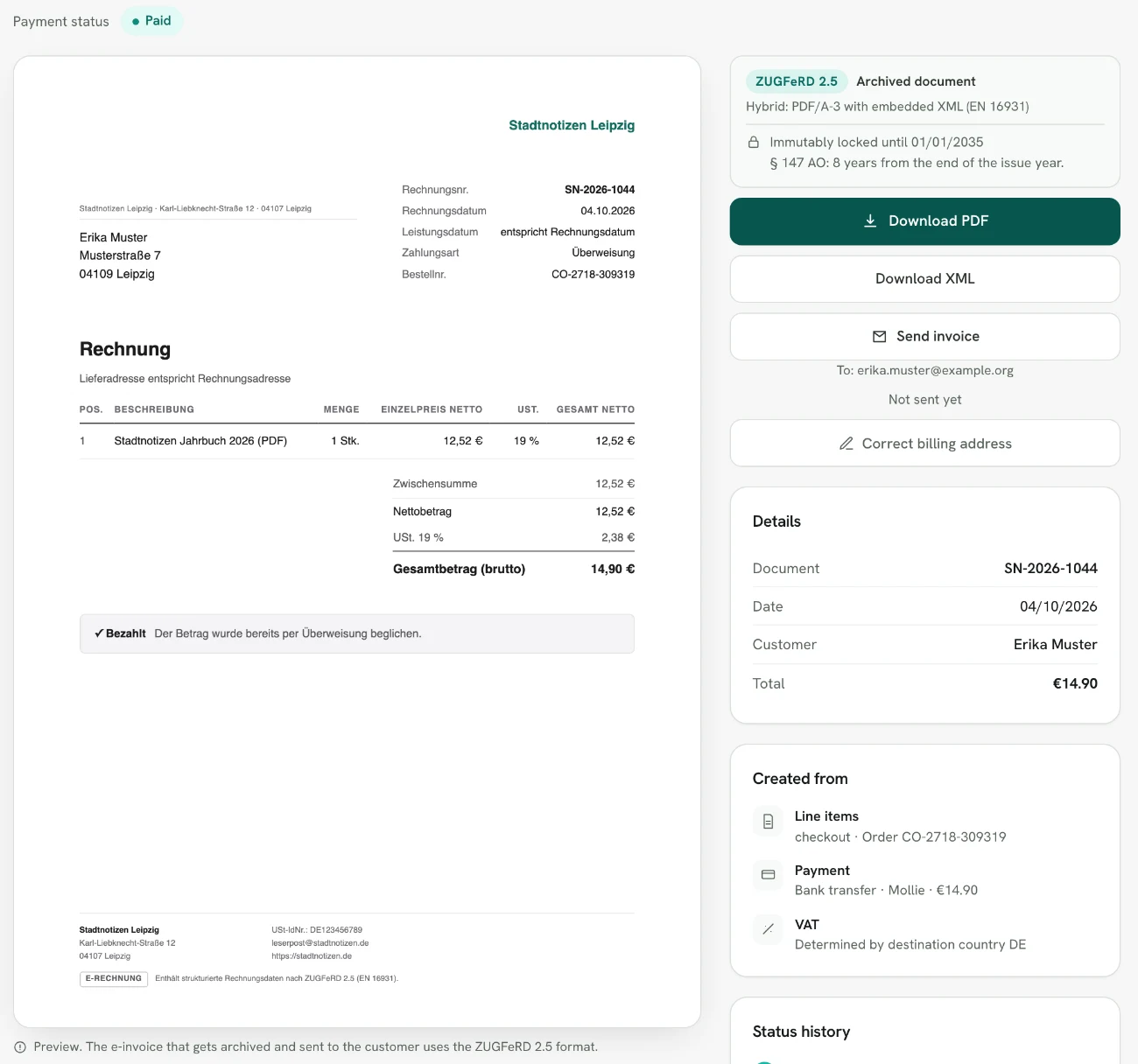
In the app the same invoice shows up under Invoices, with a preview, PDF and XML download and a status history that runs through to the DATEV export.
How does the checkout handle VAT?
When a business from another EU country enters its VAT ID, Rechnungskit checks it directly with the BZSt, including a match of company name and address. Only on confirmation does Rechnungskit issue the invoice with reverse charge and the note "Steuerschuldnerschaft des Leistungsempfängers" (§ 14a Abs. 1 UStG). The check result is archived. You need your own German VAT ID in the settings for this.
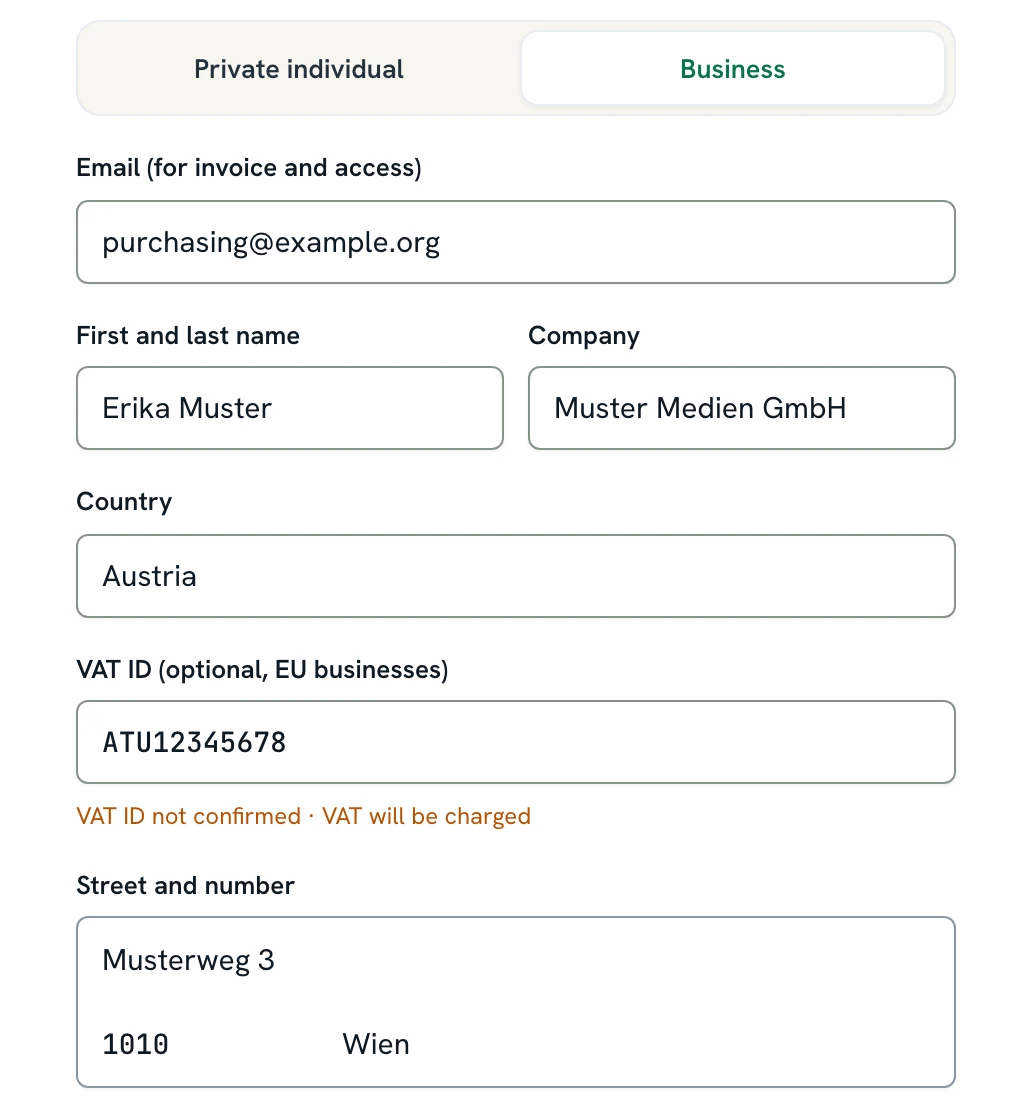
If the buyer picks "Business" and another EU country, the VAT ID field appears and the result of the check shows right below it. In the example the number is not confirmed, so 19% VAT stays on the order, and the buyer can still order.
If you pay VAT in the destination country, because your sales to consumers in other EU countries are above the 10,000 euro threshold or you opted out of the threshold (§ 3c Abs. 4 UStG), the checkout only offers the EU countries for which the VAT matrix knows a rate for the product. More on this under OSS export.
Right of withdrawal for digital products
When consumers buy a digital product, the checkout shows a checkbox. The buyer agrees that the service starts right away and confirms that this ends their right of withdrawal (§ 356 Abs. 6 BGB). The consent is stored with the order. You can switch the checkbox off per product, and your customers then keep their 14-day right of withdrawal (§ 355 Abs. 2 BGB).
Delivery and conversion tracking
Webhooks let you deliver automatically after payment, for example access or a download. Setting them up in Make, n8n and Zapier is described in Securing checkout webhooks (in German).
Conversion tracking for your ads: if you run ads on Meta (Facebook, Instagram), Google or TikTok, tracking shows you which campaign led to a purchase. You connect your ad account under Integrations: Meta directly from the server and, if you like, with the tracking pixel as well, Google (Ads and Analytics) and TikTok with their tracking pixels. You only enter your pixel or measurement ID; you don't need to write any code. The details for Meta are under Meta Ads.
Only after consent: as soon as tracking is active, the checkout asks the buyer in a slim bar at the bottom of the screen. Only after a yes does the checkout load the pixels and store the campaign data with the purchase: the click ID from the ad (fbclid or gclid) and the UTM parameters. You then also get this data in the webhook. Without a yes, neither happens. Reject and Accept are buttons of the same size, and the buyer can order either way. Why the checkout asks is explained in Server-side tracking with consent.
Recurring services are not sold through the checkout link but through subscriptions.
In detail
- Payment through your own provider: Mollie, Stripe, PayPal or Unzer. The money goes straight to your account, not through Rechnungskit
- Order flow that meets § 312j BGB, with price, mandatory information and an "order with obligation to pay" button
- Private individual or business: the VAT ID of an EU business is checked live with the BZSt (Federal Central Tax Office), reverse charge applies only when confirmed, and the check never blocks the purchase
- Public-sector customer? An optional Leitweg-ID field (the German routing ID for public buyers) automatically turns the invoice into an XRechnung
- Physical goods with quantity and shipping address are invoiced only once you mark the order as shipped; digital services are invoiced right away
- Webhooks per order for Make, n8n or Zapier, with an API key and an optional HMAC signature, for example to send license keys, download links or course access
- After payment: a GoBD-compliant e-invoice, DATEV export, archive, and an invoice download on the confirmation page
Legal basis
- § 312j BGB (Besondere Pflichten im elektronischen Geschäftsverkehr gegenüber Verbrauchern): Special duties in online commerce with consumers. Requires an order button that is clearly labeled "zahlungspflichtig bestellen" (order with obligation to pay) or with an equally unambiguous wording (para. 3).
- § 356 BGB (Widerrufsrecht, Abs. 6 digitale Inhalte): Right of withdrawal, digital content. Since June 19, 2026 the rule sits in para. 6 (previously para. 5, BGBl. 2026 I Nr. 28). For paid digital content the right of withdrawal only lapses once the buyer has expressly agreed, confirmed they know it lapses, and you have given them a confirmation under § 312f BGB.
- § 355 BGB (Widerrufsrecht bei Verbraucherverträgen): Right of withdrawal for consumer contracts. The withdrawal period is 14 days.
- § 14a UStG (Zusätzliche Angaben in Rechnungen in besonderen Fällen): Additional invoice details in special cases (German VAT Act). If a business in another EU country owes the tax in its own country, the invoice carries the note "Steuerschuldnerschaft des Leistungsempfängers" (reverse charge) and both VAT IDs (para. 1). In the checkout this only applies after the VAT ID has been confirmed.
- § 3c UStG (Ort der Lieferung beim Fernverkauf): Place of supply for distance sales. Above 10,000 euros a year in EU-wide distance sales and digital services to consumers, or after opting out of the threshold, the VAT of the destination country applies (para. 4).