The tax advisor workspace at a glance
Updated
This page is for you as a tax advisor. Your clients give you access in their Rechnungskit account, and you then work in the partner portal at partner.rechnungskit.de. You see all clients on one page, check and lock DATEV exports, and resolve payments a client could not match. You don't change your clients' invoices or payments. How the export itself works is covered in DATEV export and your tax advisor.
Clients
After you sign in, you land on "Clients". Each row is a client who has given you access.
| Column | What it shows |
|---|---|
| Client | Name and contact person; a click opens the client |
| DATEV | "Ready" once the advisor and client numbers are filled in and all account roles are confirmed, otherwise the number of open items |
| Documents | How documents get to DATEV: Belegtransfer, ZIP or batch only |
| Last month | The newest exported month, as a draft or locked, otherwise "No export yet" or "Still in test mode" |
| Questions | Payments the client handed over to you to resolve |
You add new clients under "Request access", either by sending a request to an email address or through your personal invitation link. You only get access once the client confirms. They can revoke it at any time, and the client disappears from your list right away.
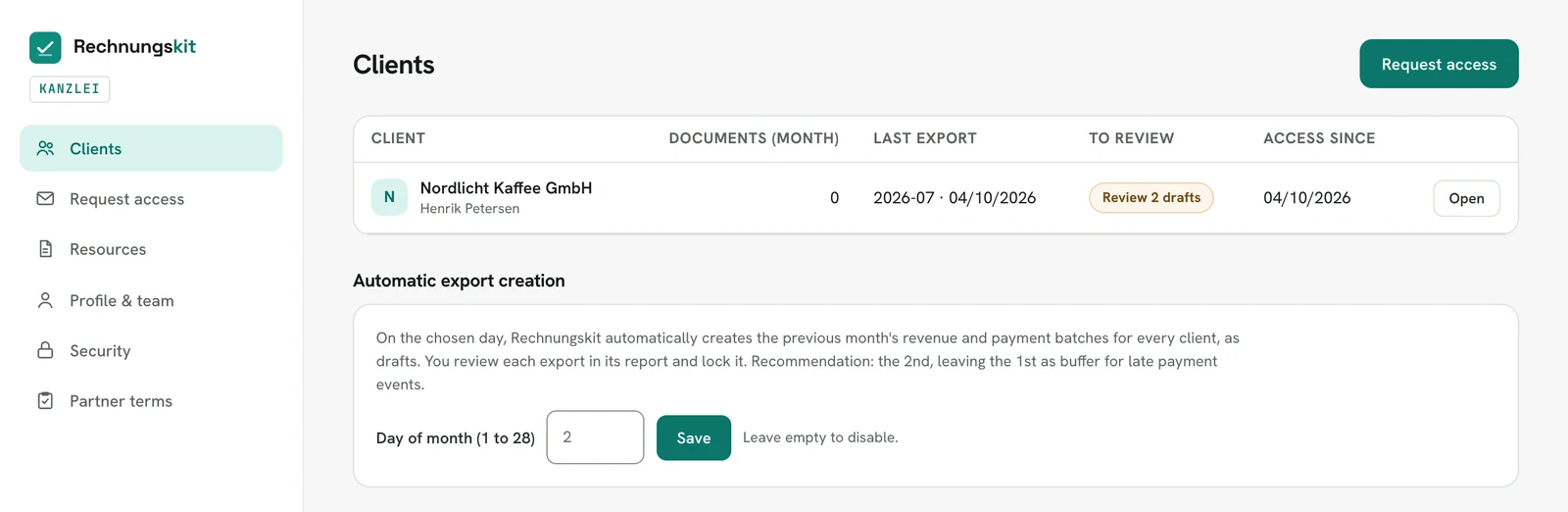
Automatic export creation
At the bottom of the "Clients" page you pick a day of the month, 1 to 28. On that day Rechnungskit creates the previous month's revenue and payment batches as drafts for every client. Nothing is ever locked automatically: you check each draft in the report and lock it yourself.
Questions
When a client can't match a payment to an order, they hand it over to you with a note. You find it under "Questions" for that client, with the amount, date, payment provider and any orders with the same amount. For each question you have three options:
- "Book revenue" at 19 % or 7 % if it was a sale.
- "Not a sale", for example a fee, a transfer or a deposit.
- "Back to client" with a short note if the client still needs to sort something out.
Every decision shows up in the client's activity log.
Reports and settings per client
When you open a client, the left side has:
- Overview with the state of the month.
- Reports: revenue and payments with the month check before the export, OSS, EC Sales List (ZM), payment methods, open items, vouchers and credits, deferrals, and the documents from the GoBD archive. If the client is still in test mode, every report shows their test data with the note "Test data"; none of it can be locked or filed (test mode and test exports).
- Tax & products: you maintain the OSS registration, document rules and product classification here; tax rates and tax status are view-only.
- Questions, as described above.
- DATEV settings with numbers, chart of accounts, account mappings, account roles and how documents get to DATEV.
- Activity log: every change in the account with before and after, including the client's own changes.
Activity log and "Last in your account"
What you change or trigger in a client's account is logged: exports you create, download, lock or delete, changes to the DATEV settings and your decisions on questions. The client sees these entries in their activity log and under Settings → External access next to your access.
Viewing something, for example an overview, a report, a document or the export lines, doesn't create an entry there. Instead, the client sees next to your access when you were last in their account ("Last in your account") and when Kit last read data from it ("Kit last read").
Demo
You can try the tax advisor workspace without signing up at rechnungskit.de/en/demo, card "For tax advisors". The demo firm has three sample clients. Nothing can be changed there.
Kit in the tax advisor workspace
Kit is Rechnungskit's AI assistant. In the tax advisor workspace you open it with the chat bubble at the bottom right.
- Kit answers questions about the workspace and the DATEV export, such as "What are clearing accounts?" or "How do I set up option 3?".
- Kit sees your clients the way you see them, read-only: which clients have open questions, where an account mapping is missing, which month is still a draft. Kit does not pass on data about your clients' end customers, such as names or email addresses.
- Kit doesn't change anything. It points you to the page where you do it yourself.
- When Kit reads a client's data, the client sees "Kit last read" with date and time next to your access under Settings → External access. Single answers do not appear in their activity log.
- Answers are written by an AI. They are labeled as such and are not tax advice; the tax assessment stays with you. With "Talk to a person" you can write to a person on the Rechnungskit team at any time.
How Kit works in general and which data it sends to the AI model is explained in Kit, the AI assistant.
Rechnungskit is not a tax advisory or law firm. This article explains general principles and does not replace advice from a tax advisor (Steuerberater, § 5 StBerG) or a lawyer (§ 3 RDG). Rechnungskit is built for businesses based in Germany and prepares documents, tax rates and bookings automatically. How your specific case is treated remains your decision, ideally together with your tax advisor or a lawyer.