Donation receipts via the API
Updated
This guide is for nonprofits that take donations on their own website through Stripe and want to show the donor their donation receipt (Zuwendungsbestätigung) afterwards. It covers both sides: how to mark the payment as a donation on Stripe, and how the website fetches the receipt from Rechnungskit. What the receipt contains and how the association sets it up is in the help page on donation receipts.
Requirements
- Stripe is connected in Rechnungskit (connecting Stripe). Rechnungskit learns about the payment from the Stripe webhook, not from your website.
- Donation receipts are enabled for the account and fully set up under Settings → Donation receipts. Otherwise the API answers
403 donations_not_enabled, or the donation stays onreceipt_pending. - An API key with the
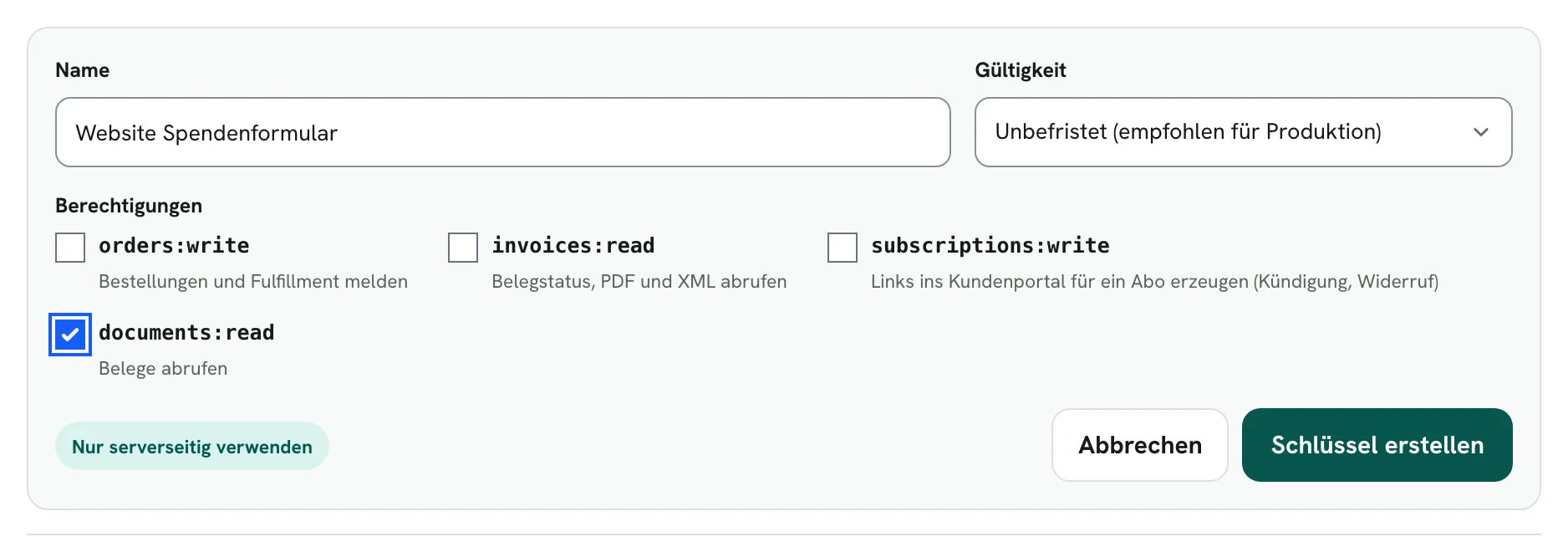
documents:readpermission. You create it under Connections → API. This integration needs no other permission.
| Item | Value |
|---|---|
| Base URL | https://api.rechnungskit.de/v1 |
| Authentication | Authorization: Bearer rk_key_… |
| Permission | documents:read |
| Format | JSON, amounts in integer cents |
| Rate limit | 300 requests per minute per key, short bursts up to 600. Every response carries RateLimit-Limit and RateLimit-Remaining; over the limit you get 429 rate_limited with Retry-After |
| Machine readable | https://api.rechnungskit.de/v1/openapi.json |
The full key is shown exactly once when you create it. It belongs in your server's environment variables, never in JavaScript that runs in the browser.
Marking a donation in Stripe Checkout
Rechnungskit only turns a payment into a donation when it is marked. For a one-off donation, the metadata sits on the PaymentIntent. In Checkout you set it through payment_intent_data.metadata:
| Key | Value | Meaning |
|---|---|---|
rk_kind |
donation or membership_fee |
Required. Donation or membership fee. The German values spende and mitgliedsbeitrag work too, and case doesn't matter. Rechnungskit turns no other value into a donation |
rk_purpose |
free text | Optional, for example a campaign. Shown as the purpose under Donations |
rk_recurring |
true |
Optional, for recurring donations and sponsorships you charge without a Stripe subscription. For Stripe subscriptions Rechnungskit sets it itself |
Add billing_address_collection: 'required'. Without an address there is no donation receipt.
Example with stripe-node on the website's server:
import Stripe from 'stripe';
const stripe = new Stripe(process.env.STRIPE_SECRET_KEY);

const session = await stripe.checkout.sessions.create({
  mode: 'payment',
  line_items: [
    {
      price_data: {
        currency: 'eur',
        unit_amount: 5000, // 50.00 EUR from your donation form, in cents
        product_data: { name: 'Spende Naturschutz' }
      },
      quantity: 1
    }
  ],
  billing_address_collection: 'required',
  customer_email: 'jonas.becker@example.org', // optional, from the form
  payment_intent_data: {
    metadata: { rk_kind: 'donation', rk_purpose: 'Streuobstwiese' }
  },
  success_url: 'https://verein.example/danke?session_id={CHECKOUT_SESSION_ID}',
  cancel_url: 'https://verein.example/spenden'
});
// Redirect the donor to session.url.
The same with curl:
curl https://api.stripe.com/v1/checkout/sessions \
  -u "$STRIPE_SECRET_KEY:" \
  -d mode=payment \
  -d "line_items[0][price_data][currency]=eur" \
  -d "line_items[0][price_data][unit_amount]=5000" \
  -d "line_items[0][price_data][product_data][name]=Spende Naturschutz" \
  -d "line_items[0][quantity]=1" \
  -d billing_address_collection=required \
  -d "payment_intent_data[metadata][rk_kind]=donation" \
  -d "payment_intent_data[metadata][rk_purpose]=Streuobstwiese" \
  --data-urlencode "success_url=https://verein.example/danke?session_id={CHECKOUT_SESSION_ID}" \
  -d cancel_url=https://verein.example/spenden
On the thank-you page, your server reads the session and uses the PaymentIntent ID as paymentRef:
const session = await stripe.checkout.sessions.retrieve(req.query.session_id);
const paymentRef = session.payment_intent; // "pi_…"
Other ways to take the payment
- Stripe subscription (recurring donation, sponsorship, membership fee):
mode: 'subscription'with the marker insubscription_data.metadata, for example{ rk_kind: 'membership_fee' }. It can also sit on the price. Rechnungskit reads it from every paid Stripe invoice of the subscription and books each charge as a recurring donation. - Payment Links: through the API with
payment_intent_data.metadataorsubscription_data.metadata. Rechnungskit does not read metadata that sits only on the Payment Link or the Checkout Session. - Your own PaymentIntents (for example sponsorships charged off session without a Stripe subscription): set
metadatadirectly on the PaymentIntent, and addrk_recurring: 'true'for recurring amounts. - A marker on the price only works for subscriptions. For one-off payments only the marker on the PaymentIntent counts.
Never mix a donation and a sale
A marked payment is a donation as a whole. So never put a donation and a sale (calendar, T-shirt, ticket) into the same Checkout Session. For subscriptions it depends on where the marker sits. On the subscription, every paid invoice of the subscription counts as a donation as a whole, including any sales line on it. On the price, an invoice only counts as a donation when every line carries the same marker; otherwise the payment goes through as a sale. Always split donations and sales into two subscriptions.
Test mode
While the Rechnungskit project is in test mode, you connect Stripe with test keys and pay with Stripe test cards. Rechnungskit creates test documents (TEST-ZB-…), and the same API key sees only those. After go-live it sees only real receipts, and you don't need to replace it (test mode).
Fetching the receipt
GET https://api.rechnungskit.de/v1/donation-receipts?paymentRef=pi_3QdemoA1LindentalSp01
Authorization: Bearer rk_key_…
| Parameter | In | Required | Meaning |
|---|---|---|---|
paymentRef |
query | yes | The payment's ID at the payment provider; on Stripe the PaymentIntent (pi_…). The charge ID (ch_…) works too. At most 200 characters |
Response 200 (real output with demo data):
{
  "paymentRef": "pi_3QdemoA1LindentalSp01",
  "donation": {
    "amountCents": 5000,
    "refundedCents": 0,
    "receivedOn": "2026-10-28"
  },
  "data": [
    {
      "number": "ZB-2026-0001",
      "kind": "single",
      "issueDate": "2026-11-09",
      "totalCents": 5000,
      "currency": "EUR",
      "donorName": "Jonas Becker",
      "withdrawsNumber": null,
      "withdrawn": false,
      "sha256": "a88c22710c51cacd381cadb93eda05960ceb051c66a86602a376c75b0c27643e",
      "test": false,
      "pdfPath": "/v1/donation-receipts/ZB-2026-0001/pdf"
    }
  ]
}
| Field | Meaning |
|---|---|
paymentRef |
the payment ID you asked for |
donation.amountCents |
donation amount in cents |
donation.refundedCents |
amount refunded so far, in cents |
donation.receivedOn |
date of the donation (YYYY-MM-DD) |
data[] |
every receipt for this payment, including withdrawals, sorted by issue date and number |
data[].number |
receipt number, ZB-YYYY-NNNN, in test mode TEST-ZB-YYYY-NNNN |
data[].kind |
single (single receipt), collective (annual receipt) or withdrawal |
data[].issueDate |
issue date (YYYY-MM-DD) |
data[].totalCents |
confirmed amount. For an annual receipt the sum of all donations on it, for a withdrawal the refunded amount |
data[].currency |
currency, EUR |
data[].donorName |
donor name as printed on the receipt |
data[].withdrawsNumber |
only for withdrawal: the number of the withdrawn receipt, otherwise null |
data[].withdrawn |
true if a later withdrawal made this receipt invalid |
data[].sha256 |
SHA-256 of the archived original |
data[].test |
true for test documents |
data[].pdfPath |
path to the PDF from the host: https://api.rechnungskit.de + pdfPath |
The valid receipt is the entry whose kind is not withdrawal and whose withdrawn is false. There is at most one such entry per payment.
Status and error codes
Errors always come in the same format, with the request ID in the X-Request-Id header:
{
  "error": {
    "code": "receipt_pending",
    "message": "The donation is booked, its receipt is not issued yet (missing address, yearly mode or pending issue). Retry later.",
    "details": {
      "donation": { "amountCents": 3000, "refundedCents": 0, "receivedOn": "2026-11-08" }
    }
  },
  "requestId": "110a0117-1dc5-4fdc-a082-b601f988ac88"
}
| Status | error.code |
Meaning | What your website does |
|---|---|---|---|
| 200 | donation and receipts | show the valid receipt | |
| 400 | invalid_request |
paymentRef is missing |
fix the call, don't retry |
| 401 | unauthorized |
key missing, invalid, expired or revoked | check the key |
| 403 | insufficient_scope |
the key lacks documents:read; details lists the required and granted permissions |
create a new key with documents:read |
| 403 | donations_not_enabled |
donation receipts are not enabled for the account | contact support@rechnungskit.de |
| 404 | not_found |
Rechnungskit knows no donation for this payment (yet) | retry briefly with backoff, see below |
| 404 | receipt_pending |
donation booked, receipt not issued yet; details.donation shows amount and date |
show a note, ask again later |
| 429 | rate_limited |
rate limit exceeded | wait for Retry-After |
| 5xx | temporary server error | retry with backoff |
not_found stays for good if the payment was not marked, ran in the other mode (test or live), or belongs to a different project.
When the receipt is there
There are no webhooks for donation receipts. Your website polls. When there is something to fetch depends on the case:
- One-off donation in "Immediately, per payment" mode with an address: Rechnungskit books the donation and issues the receipt while it processes the Stripe webhook
payment_intent.succeeded. The receipt is emailed to the donor at the same time. - Address missing: Rechnungskit asks Stripe for it. If that fails, the donation stays on
receipt_pendinguntil the association adds the address under Donations. A daily run at 06:15 (Berlin time) then issues whatever is due. - "Once a year as an annual receipt" mode: the donation stays on
receipt_pendinguntil after the year ends. Only when the association closes the year under Donations does the API return the annual receipt.
Recommended behavior on the thank-you page:
- Ask the first time after about 2 seconds, then with growing gaps (2, 4, 8, 16, 30 seconds), for about 2 minutes in total. During that time you get
not_foundwhile the Stripe webhook is still on its way. - On
200, show the valid receipt and offer the PDF. - On
receipt_pending, stop asking at short intervals. Show a note such as "You'll get your donation receipt by email", and if you need to, ask again at most once a day. - If you still get
not_foundafter 2 minutes, show the same note. The receipt is emailed in any case once it is issued.
const BASE = 'https://api.rechnungskit.de/v1';

async function fetchReceipt(paymentRef) {
  const delays = [2000, 2000, 4000, 8000, 16000, 30000, 30000, 30000];
  for (const ms of delays) {
    await new Promise((r) => setTimeout(r, ms));
    const res = await fetch(
      `${BASE}/donation-receipts?paymentRef=${encodeURIComponent(paymentRef)}`,
      { headers: { Authorization: `Bearer ${process.env.RECHNUNGSKIT_API_KEY}` } }
    );
    if (res.status === 200) {
      const body = await res.json();
      return body.data.find((r) => r.kind !== 'withdrawal' && !r.withdrawn) ?? null;
    }
    const err = await res.json().catch(() => null);
    if (res.status === 404 && err?.error?.code === 'receipt_pending') return 'pending';
    if (res.status === 429) {
      await new Promise((r) => setTimeout(r, Number(res.headers.get('retry-after') ?? 5) * 1000));
      continue;
    }
    if (res.status === 404 || res.status >= 500) continue; // webhook still on its way
    throw new Error(`Rechnungskit ${res.status} ${err?.error?.code}`);
  }
  return 'pending';
}
Refunds: withdrawal and replacement receipt
If the association refunds a confirmed donation on Stripe in full or in part, Rechnungskit withdraws the receipt with a separate, numbered letter and issues a new receipt for the remaining amount. The API then returns all three entries. Example: 150.00 EUR donated, 50.00 EUR refunded:
{
  "paymentRef": "pi_3QdemoA1LindentalSp02",
  "donation": { "amountCents": 15000, "refundedCents": 5000, "receivedOn": "2026-11-02" },
  "data": [
    { "number": "ZB-2026-0002", "kind": "single", "totalCents": 15000, "withdrawsNumber": null, "withdrawn": true, "pdfPath": "/v1/donation-receipts/ZB-2026-0002/pdf", "…": "…" },
    { "number": "ZB-2026-0006", "kind": "withdrawal", "totalCents": 5000, "withdrawsNumber": "ZB-2026-0002", "withdrawn": false, "pdfPath": "/v1/donation-receipts/ZB-2026-0006/pdf", "…": "…" },
    { "number": "ZB-2026-0007", "kind": "single", "totalCents": 10000, "withdrawsNumber": null, "withdrawn": false, "pdfPath": "/v1/donation-receipts/ZB-2026-0007/pdf", "…": "…" }
  ]
}
(Shortened: every entry has the same fields as above.) Only ZB-2026-0007 is valid. The withdrawal's totalCents is the refunded amount. If everything is refunded, there is only the receipt and the withdrawal, and no valid receipt is left. Rechnungskit does not email the withdrawal and the replacement receipt itself; the association sends them from Donations with "Send again". If donors have an account on your website, you can also show both there.
Annual receipt
In "Once a year as an annual receipt" mode, all donations a donor made in a calendar year go on one receipt with an annex. For each of those payments the API returns the same receipt with kind: "collective" and the yearly total in totalCents:
{
  "paymentRef": "pi_3QdemoA1LindentalPa01",
  "donation": { "amountCents": 1500, "refundedCents": 0, "receivedOn": "2025-10-15" },
  "data": [
    { "number": "ZB-2026-0005", "kind": "collective", "issueDate": "2026-11-09", "totalCents": 6000, "donorName": "Miriam Schulte", "withdrawn": false, "pdfPath": "/v1/donation-receipts/ZB-2026-0005/pdf", "…": "…" }
  ]
}
The number carries the year of issue, not the year of the donations. If you only confirm once a year, the thank-you page usually needs no polling; it can simply say "Your annual receipt arrives after the end of the year".
Downloading the PDF
curl -o ZB-2026-0001.pdf \
  -H "Authorization: Bearer $RECHNUNGSKIT_API_KEY" \
  https://api.rechnungskit.de/v1/donation-receipts/ZB-2026-0001/pdf
pdfPath from the response is the path from the host: https://api.rechnungskit.de + pdfPath. The number in the path is URL encoded.
| Header | Value |
|---|---|
Content-Type |
application/pdf |
Content-Disposition |
attachment; filename="ZB-2026-0001.pdf" |
Cache-Control |
private, no-store |
X-SHA256 |
SHA-256 of the archived original, same as the sha256 field |
X-Request-Id |
request ID |
The PDF is rendered fresh on every download from the archived original, after Rechnungskit has checked its checksum. So X-SHA256 belongs to the original, not to the PDF bytes: don't compare it with the downloaded PDF. Because of Cache-Control: no-store, your server downloads the PDF again when needed or stores it itself. An unknown number, a number from the other mode, or one from a different project returns 404 not_found. The endpoint also serves annual receipts and withdrawals.
Example of a route on the website that passes the PDF on to the donor:
app.get('/spende/bestaetigung/:number', async (req, res) => {
  // First check that this number belongs to the donor's payment
  // (for example through the stored paymentRef of their Checkout Session).
  const r = await fetch(
    `https://api.rechnungskit.de/v1/donation-receipts/${encodeURIComponent(req.params.number)}/pdf`,
    { headers: { Authorization: `Bearer ${process.env.RECHNUNGSKIT_API_KEY}` } }
  );
  if (!r.ok) return res.status(r.status === 404 ? 404 : 502).end();
  res.set('Content-Type', 'application/pdf');
  res.set('Content-Disposition', r.headers.get('content-disposition'));
  res.set('Cache-Control', 'private, no-store');
  res.send(Buffer.from(await r.arrayBuffer()));
});
Security
- The API key lives only on the server. It can read every receipt of the project.
- A receipt contains the donor's name and address. Only hand the PDF to the person who donated, for example by tying the
paymentRefto their Checkout Session. Don't use guessable public links. - The tenant and project always come from the key, never from the request.
Where to find it in the app
Rechnungskit is not a tax advisory or law firm. This article explains general principles and does not replace advice from a tax advisor (Steuerberater, § 5 StBerG) or a lawyer (§ 3 RDG). Rechnungskit is built for businesses based in Germany and prepares documents, tax rates and bookings automatically. How your specific case is treated remains your decision, ideally together with your tax advisor or a lawyer.