Cancelling and deleting your account
Updated
How you leave Rechnungskit depends on whether real documents have been created in your account. An account that only ran in test mode you delete yourself, right away. If real invoices have been created, you cancel at the end of the month. You then get your free full export for 90 days, and only after that does Rechnungskit delete the data.
Which path applies to you?
At the very bottom of Settings you'll find the card "Cancel or delete your account". It shows you the path that applies to your account.
Delete a test account yourself
As long as your account only ran in test mode, it holds nothing that has to be kept: test documents aren't invoices, and you haven't been charged anything. So you delete it yourself, with no notice period and no waiting.
This works when all of these apply:
- Every project is in test mode and was never live.
- There are no real documents and no real payments, only test data.
- Rechnungskit has never charged you fees.
How to delete your test account:
- Open Settings and scroll to the bottom, to the card "Cancel or delete your account".
- Click "Delete test account".
- Read in the dialog what gets deleted, then type the name of your company exactly as it's shown above the field.
- Click "Delete for good".
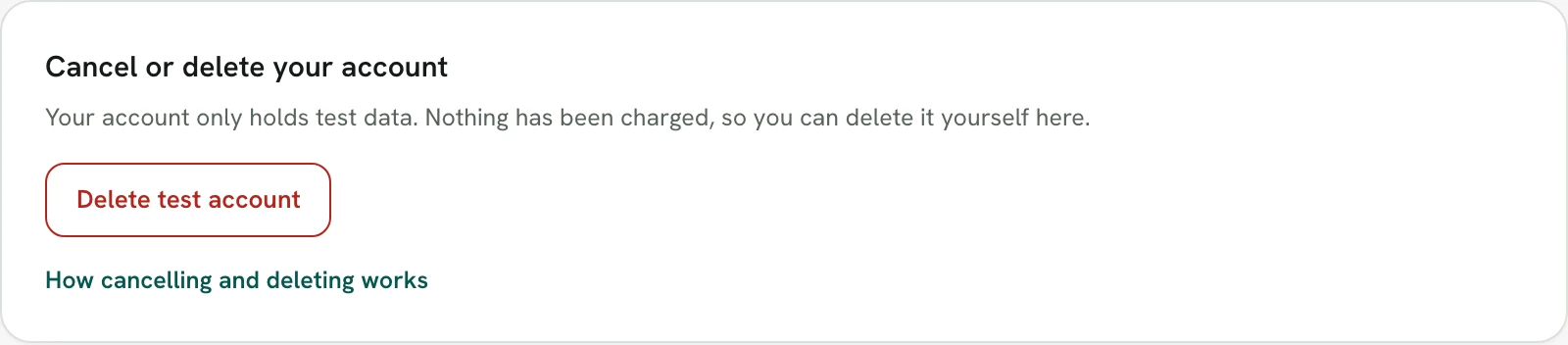
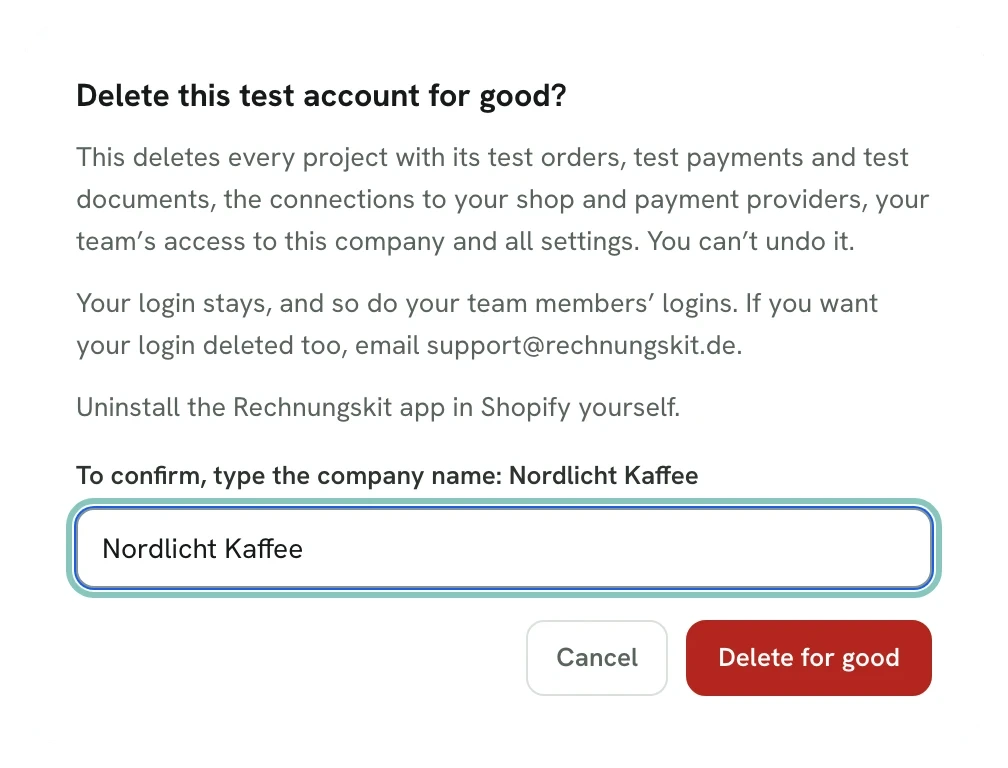
Only an admin of the account sees the button. In-house bookkeeping, tax advisor, agency and support access can't delete an account.
What gets deleted
- every project with its test orders, test payments and test documents, including the test PDFs
- the connections to your shop and payment providers, with the stored credentials
- products, document rules, invoice template, number ranges, API keys and all other settings
- your team's, tax advisor's and agency's access to this company
You can't undo it. Internally, Rechnungskit only records that the account was deleted, when and by whom.
What stays
- Your login: your email address and login stay. If you have no other company in Rechnungskit, you're signed out after the deletion. If you sign in again later, you can set up a new company. If you want your login deleted too, email support@rechnungskit.de.
- Your team: team members lose access to this company, and their own logins stay.
- Shopify: uninstall the Rechnungskit app yourself in your Shopify admin under Apps. In test mode Rechnungskit charges you nothing, not through Shopify either.
- Payment providers: if you created API keys for Rechnungskit, for example at Stripe or Mollie, delete them in the provider's dashboard.
If the button is missing
- If the card points you to Billing & plan, your account has real documents or has already been live. Then cancellation applies.
- If it points you to support, your account is a special case, for example linked to a partner. Email support@rechnungskit.de and we'll sort it out with you.
- If you're not an admin, ask an admin of your account to delete the test account.
Cancel an account with real documents
You can cancel Rechnungskit monthly, with no notice period. The cancellation takes effect at the end of the current month.
- Open Billing & plan.
- In the card "Account & status", click "Cancel account".
- Rechnungskit shows you what cancelling means, and an alternative: if you only want to pause, disconnect your shops and payment providers. No new documents are created, you only pay the base fee, and your archive stays.
- Click "Cancel anyway". You'll get a confirmation by email.
Until the end of the month everything keeps running as usual. The final invoice arrives on the 1st of the following month. Until then you can take the cancellation back under Billing & plan with "Revoke cancellation". Admins and the In-house bookkeeping role can cancel.
If you're billed through the Shopify App Store, the same applies. If you uninstall the app and don't reinstall it, Rechnungskit cancels your account automatically at the end of the month and emails you about it (see Shopify).
After cancelling: 90 days to export, then deletion
From the end of the month your account is cancelled. You can still view and download everything, but you can't change anything, and no new documents are created.
- Full export: Rechnungskit creates your free, complete GoBD export automatically and emails you once it's ready. You download it under Billing & plan. It contains the original ZUGFeRD XML files and all DATEV exports, plus PDF copies if you want them. Details are under Cancellation and data export.
- 90 days: that's how long you can download the export. During this time you can also reactivate your account under Billing & plan.
- After that: Rechnungskit deletes all invoices and records for good.
The duty to keep your invoices for eight years (§ 14b UStG, § 147 AO) is yours after the deletion. So download the export and pass it to your tax advisor if needed.
Team, tax advisor and connections
The deletion ends all access to this company: team, tax advisor, agency and support. The people's logins stay. Give your tax advisor the export before the 90-day window ends.
Rechnungskit removes the connections to your shop and payment providers on its side. Uninstall the Rechnungskit app in Shopify yourself, and delete your own API keys in the provider's dashboard.
Questions or help
Kit explains the steps in the chat. If you'd rather talk to a person, ask Kit to hand you over or email support@rechnungskit.de.
Where to find it in the app
Rechnungskit is not a tax advisory or law firm. This article explains general principles and does not replace advice from a tax advisor (Steuerberater, § 5 StBerG) or a lawyer (§ 3 RDG). Rechnungskit is built for businesses based in Germany and prepares documents, tax rates and bookings automatically. How your specific case is treated remains your decision, ideally together with your tax advisor or a lawyer.