Sell your online course in your own name
On Digistore24 or CopeCart, the platform sells your course in its own name, keeps a percentage plus a fee on every sale and sends you a credit note that you then book yourself. With Rechnungskit you sell through your own payment link: the buyer pays you directly, is unlocked in Memberspot right away and gets their e-invoice, while VAT for EU buyers and the DATEV export are handled along the way.
Share the link, sell the course, access follows: every purchase becomes a ZUGFeRD invoice in your name, the buyer lands in Memberspot, and your tax advisor gets the DATEV export. You pay per document, not a percentage of revenue.
No credit card. You only pay once real invoices go out.
- Checkout
- Payment
- E-invoice
- Course access
- DATEV
Writing invoices is easy. Writing compliant ones is not.
The difference between a PDF and a compliant e-invoice matters at the next tax audit. Rechnungskit closes exactly this gap.
Without Rechnungskit
- Digistore24 or CopeCart sell as a reseller, so you have exactly one customer and receive a credit note
- Every sale costs a percentage plus a fixed amount, and part of the payout arrives weeks later
- Course access set up through a Zapier chain or by hand after every purchase
- Your own invoices as PDFs without structured data, and every EU buyer charged 19%
With Rechnungskit
- You are the contracting party, and the invoice carries your name and your number sequence
- The money goes straight to you through your Stripe, Mollie, PayPal or Unzer account; Rechnungskit charges per document
- Access in Memberspot right after payment, revoked again on a full refund or when a subscription ends
- A ZUGFeRD invoice for every purchase, the VAT rate per EU country, the OSS return and the DATEV export ready
Four steps to a compliant e-invoice.
- 01
Create the course as a product
Set the course up as a digital product with a price and a VAT category. A one-time purchase and a subscription both work; for a membership with monthly payments, create a subscription plan. Rechnungskit creates the payment link. - 02
Share the link
Put the link on your website, in your social media bio or in your newsletter. The checkout shows your name, your logo and your legal texts, and it keeps click IDs from ads if the buyer consents. - 03
The buyer pays and gets the e-invoice
The buyer chooses private individual or business, agrees that digital content may start right away, confirms that this ends their right of withdrawal, and pays. The ZUGFeRD invoice is ready to download on the confirmation page straight away. - 04
Access and bookkeeping run on their own
Rechnungskit unlocks the buyer in Memberspot or Ghost, reports the purchase to Meta Ads if you want it to, and archives the invoice to GoBD standards. Your tax advisor (Steuerkanzlei) pulls the DATEV export.
Selling without a platform in between
Digistore24 and CopeCart sell your course as a reseller. They buy it from you, resell it to the buyer in their own name, issue the invoice and owe the VAT. You have exactly one customer, the platform, and it sends you a credit note. In return it keeps a percentage plus a fixed amount on every sale, and part of the payout arrives weeks later. For many course creators this was the simplest route for a long time, because running your own billing with EU VAT and bookkeeping took a lot of work.
Rechnungskit turns this around. You sell under your own name with your own payment provider, whether that is Stripe, Mollie, PayPal or Unzer. The buyer sees your checkout, your legal texts and your invoice. The money goes straight to you, Rechnungskit holds nothing back and charges per document (Beleg), not a percentage of your revenue.
A worked example from the comparison with Digistore24: for a course at 97 euros gross, Digistore24 keeps 8.66 euros per sale under its price list (as of 14 October 2026). With Stripe at 1.5% plus 0.25 euros it is 1.71 euros, plus Rechnungskit per document. At 100 sales a month, that leaves you about 6.50 euros more per sale. In exchange, you handle VAT and withdrawals yourself when you sell in your own name. How CopeCart charges is in the comparison with CopeCart. Whether the reseller model or your own name suits you better for tax purposes is a question for your tax advisor.
How a course sale works
 Stripe
 Mollie
 PayPal
 Unzer
- Set the VAT rateper country, reverse charge for a verified VAT ID
- Issue the e-invoiceZUGFeRD with your number sequence
- Unlock accessin Memberspot or Ghost
- Archive and bookGoBD archive, DATEV export
 Memberspotaccess to the offer, new buyers get the invitation
 Tax advisorDATEV export with revenue account and VAT rate
The payment link from the product checkout leads to a checkout page under your name: checkout.rechnungskit.de/c/your-course for one-time purchases, and a separate link under /s/ for each subscription plan. The buyer enters their billing address and chooses private individual or business. Businesses also enter their VAT ID (USt-IdNr.), which Rechnungskit checks live with the German Federal Central Tax Office (Bundeszentralamt für Steuern). For digital content, the buyer agrees before the purchase that delivery starts right away and confirms that this ends their right of withdrawal (§ 356(6) BGB). The legal notice (Impressum), terms, withdrawal policy and privacy policy are your own and are linked.
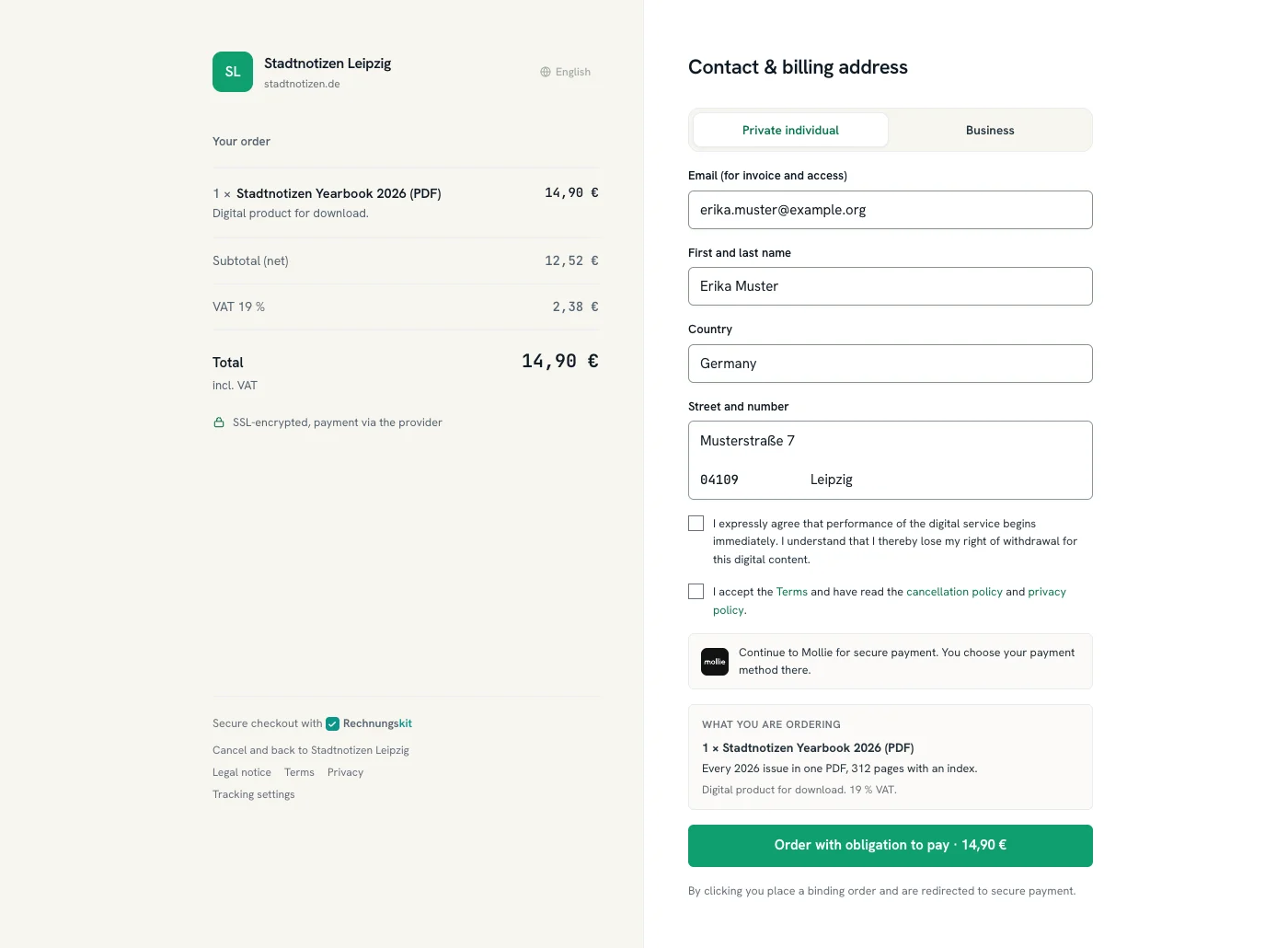
After paying, the buyer lands on the confirmation page and can download the invoice as a PDF right away. If you have turned on invoice delivery by email, it also goes out in your name. You can add your own thank-you page through the return URL on the product. The help page on the Rechnungskit Checkout covers the details.
Course access without Zapier
If your courses live in Memberspot, Rechnungskit connects the course platform directly: after payment, it unlocks the assigned offer, and Memberspot creates the account if needed and sends the invitation. If your community runs on Ghost, Rechnungskit sets the matching membership tier instead. When a subscription ends or a purchase is fully refunded, Rechnungskit takes the access away again. During payment reminders, access stays in place. Every unlock and revocation shows up in the log on the integration page.
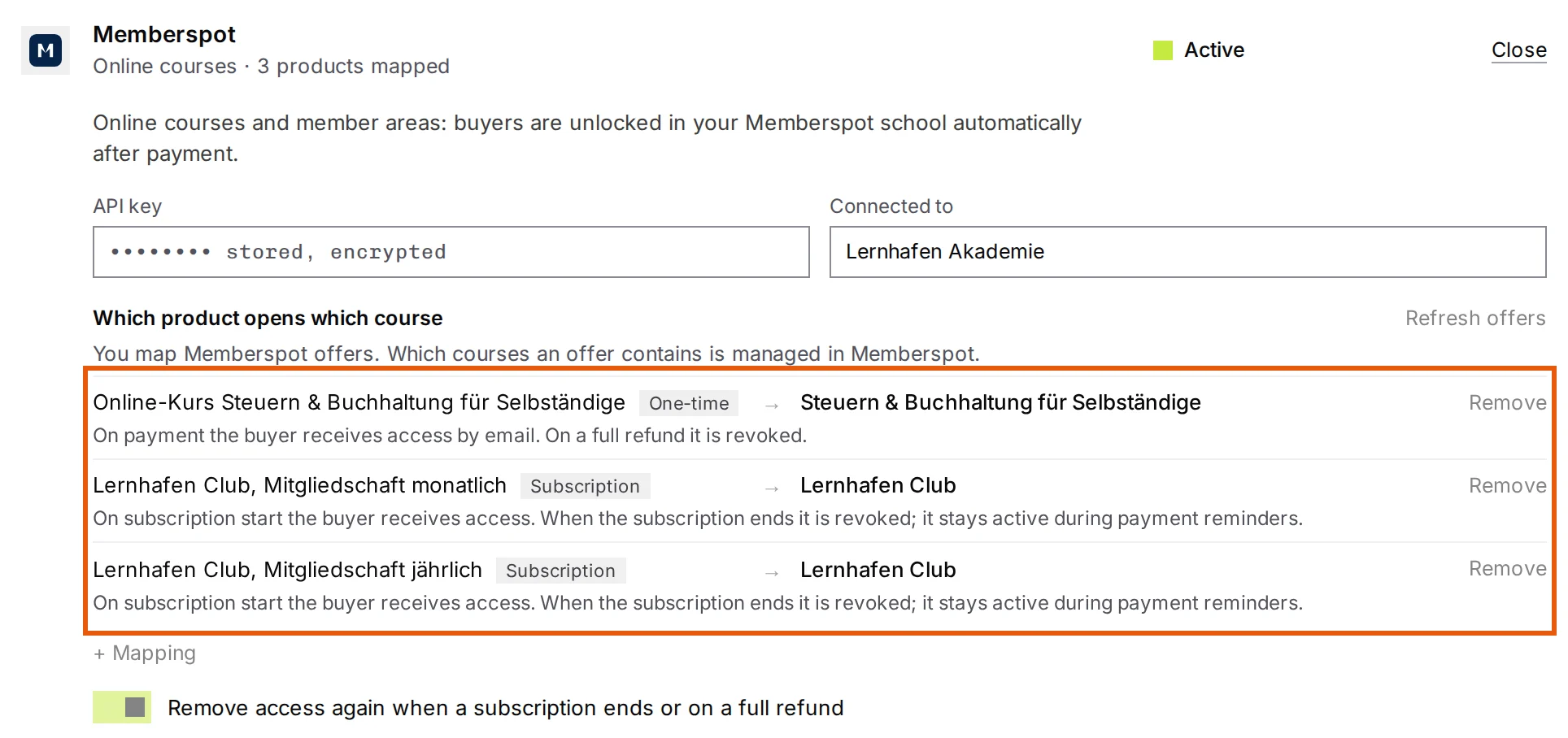
Setup takes three steps: create an API key in Memberspot, paste it into Rechnungskit under Memberspot, and map your products to your Memberspot offers. The help page Connecting Memberspot has the instructions.
For other platforms, there is the checkout webhook. It reports every purchase with product, buyer and invoice number to Make, Zapier, n8n or your own system. If you want to measure purchases from ads, report them server-side to Meta Ads; the checkout asks buyers for consent through a slim bar.
VAT on online courses
A video course that the buyer works through on their own after paying counts as an electronically supplied service for VAT: largely automated, with minimal human involvement (section 3a.12(1) UStAE, the German VAT application decree). Private customers in Germany pay the standard rate (§ 12(1) UStG). For private customers in other EU countries, the rate of their country of residence applies above the 10,000-euro threshold, or below it if you waive the threshold (§ 3a(5) UStG), and you report it through the OSS procedure (the EU One-Stop Shop). Rechnungskit knows the rates of all EU countries and prepares the OSS return.
If a business from another EU country buys with a valid VAT ID, the reverse charge applies: the invoice shows no German VAT and carries the note that the recipient owes the tax (§ 14a(1) UStG). Rechnungskit checks the number at purchase and issues the invoice accordingly. If you are a Kleinunternehmer under § 19 UStG (small-business VAT exemption), the checkout shows no VAT and the invoice carries the required note.
Two cases fall outside this. Live formats with interaction, such as a webinar with a Q&A, usually do not count as electronically supplied services because of the human involvement (section 3a.12(1) UStAE), and different place-of-supply rules apply to them. A VAT exemption for teaching under § 4 no. 21 UStG usually requires private providers to hold a certificate from the responsible state authority. Clarify both with your tax advisor.
What reaches your tax advisor
Every purchase becomes an e-invoice in ZUGFeRD format. It contains the structured XML part that German law requires for B2B sales once the 2027 and 2028 transition periods end (§ 27(38) UStG). The invoice is stored with a hash in the GoBD archive and is ready in the DATEV export with revenue account, VAT rate and date of supply (Leistungsdatum). OSS sales carry the destination country and the EU VAT rate in the fields DATEV reads for its OSS evaluation. You can invite your tax advisor for free, and they pull the booking batches themselves. If you sell access for a fixed term or annual memberships and keep double-entry books, deferred revenue comes into play; the article on pRAP for online courses explains when it applies. Set up memberships with monthly payments in the subscription checkout.
What Rechnungskit does not do
Rechnungskit is not a sales platform. Your courses stay on Memberspot or Ghost. There is also no affiliate marketplace, no instalment payments, no funnels, no order bumps or one-click upsells in the checkout, and no dunning with debt collection. If you need affiliates, you can run both side by side: affiliate products stay on Digistore24, and sales to your own list go through Rechnungskit. Work out what it costs you on the pricing page.
Course sales per month: 50, 200 or 500
One invoice per purchase and per subscription charge. A full refund creates a cancellation invoice, which does not count.
- 50 invoices €36.50 per month · €29.00 base fee + €7.50 usage
- 200 invoices €55.00 per month · €29.00 base fee + €26.00 usage
- 500 invoices €88.00 per month · €29.00 base fee + €59.00 usage
Every feature and integration included, one bank account too, cancel monthly. Free to test until you go live. An offer for businesses, all prices plus statutory VAT.
See full pricingFrequently asked questions
I currently sell through Digistore24 or CopeCart. What happens to my past sales?
They stay where they are. Old invoices and credit notes remain with the platform, and the retention obligation applies there too. Rechnungskit does not import invoices from other systems. Running subscriptions and instalment plans cannot be moved over; customers sign up with you again. New sales run through your payment link: the buy button on your site simply points to the new link. You can also run both side by side, keeping affiliate products on Digistore24 and selling to your own list through Rechnungskit. If you have issued your own invoices before, you set the starting number at go-live and your number sequence carries on.
Does my tax advisor have to get involved?
No, but it makes their work easier. You can download the DATEV export yourself and send it, or invite your tax advisor. Their access is free: they see the same figures in the tax advisor area and pull the booking batches themselves. Instead of one credit note a month, they get booking records with revenue account, VAT rate and date of supply, plus the invoices.
Am I required to issue e-invoices as a course creator?
Not to private customers. The e-invoicing obligation covers invoices to other businesses in Germany (§ 14(2) UStG, the German VAT Act). Every business has had to be able to receive e-invoices since 2025; you have to issue them for sales from 2027 if your prior-year revenue was above 800,000 euros, otherwise from 2028 (§ 27(38) UStG). Rechnungskit issues every invoice as ZUGFeRD. Private customers open it like a normal PDF, and business customers get the structured data set as well.
Can I test first, and how much setup is it?
You start in test mode, which costs nothing. Billing starts with the first real document after go-live. Kit, the assistant, walks you through setup: connect your payment provider, create the course as a product, create an API key in Memberspot and paste it into Rechnungskit, then map the product to the Memberspot offer. Test purchases with your payment provider's test credentials unlock access just like real ones. At go-live, Rechnungskit revokes those test accesses again.
Can I also sell a course as a subscription or membership?
Yes. A subscription product gets its own subscription link per plan. The buyer sets up a card or a SEPA Direct Debit mandate, Rechnungskit charges monthly or yearly and issues an e-invoice for every period. Subscriptions run through Stripe or Mollie. The customer cancels on their own in the customer portal. How seats, add-ons and changes are billed is explained under subscription billing.
Do I need my own payment provider?
Yes. Rechnungskit does not process payments itself. It uses your account with Stripe, Mollie, PayPal or Unzer, so the money goes straight to you without passing through a platform.
Does the buyer really have to confirm that their right of withdrawal ends?
Only for digital content that is provided right away. In that case, the right of withdrawal only ends once the buyer has expressly agreed and confirmed they know it ends (§ 356(6) BGB, the German Civil Code). Without that confirmation, the buyer could withdraw for 14 days (§ 355(2) BGB) even after watching the whole course. The checkout collects the confirmation before the purchase; without the checkbox, there is no buy button.
Do I need a withdrawal button for course sales?
Yes, since June 19, 2026, for online contracts with consumers (§ 356a BGB). For purchases through the checkout link, Rechnungskit includes it: "Withdraw from contract" on the thank-you page and in the invoice email, then "Confirm withdrawal" in the customer portal, an immediate receipt confirmation. If the buyer agreed to the course starting right away, the withdrawal page points out that their right of withdrawal may have lapsed. You decide on the refund.
What about buyers outside the EU?
For private customers in a non-EU country, the place of supply for electronically supplied services is the country where they live (§ 3a(5) UStG), so no German VAT is due. Whether and how you have to register there depends on the country. Rechnungskit issues the invoice without German VAT and marks the case.
Rechnungskit is not a tax advisory or law firm. This article explains general principles and does not replace advice from a tax advisor (Steuerberater, § 5 StBerG) or a lawyer (§ 3 RDG). Rechnungskit is built for businesses based in Germany and prepares documents, tax rates and bookings automatically. How your specific case is treated remains your decision, ideally together with your tax advisor or a lawyer.
Ready for the e-invoicing mandate?
Create an account, connect your payment provider, check everything in free test mode. Billing starts when you go live.
Try it free Or view the live demo first